RTF to PDF API
Send a Rich Text Format file to POST /v2/convert/rtf/to/pdf and get the PDF back in the response, laid out by our own document engine with the RTF's paper size, margins, table geometry and pictures.
- Endpoint
- POST /v2/
convert/ rtf/ to/ pdf - Accepts
- rtf
- Sample timing
- 22 ms median of 5 runsHow we measure
- Request size
- Up to 10 MB on the Free plan or 100 MB on paid plans, all files together
Request and response
Every sample below ran against the API before this page was published. Set PDFCONVERSIONAPI_KEY to your key and run it as is.
curl -sS -X POST \
  https://api.pdfconversionapi.com/v2/convert/rtf/to/pdf \
  -H "Authorization: Bearer $PDFCONVERSIONAPI_KEY" \
  -F File=@repair-estimate.rtf \
  -o response.json

# FileData is base64. Save the first file in converted/,
# or print the JSON error.
if jq -e '.Files' response.json > /dev/null; then
  mkdir -p converted
  name=$(jq -r '.Files[0].FileName' response.json)
  jq -r '.Files[0].FileData' response.json \
    | base64 --decode > "converted/$name"
else
  cat response.json
fi
import base64
import os
import requests
key = os.environ["PDFCONVERSIONAPI_KEY"]
response = requests.post(
"https://api.pdfconversionapi.com/v2/convert/rtf/to/pdf",
headers={"Authorization": f"Bearer {key}"},
files=[("File", open("repair-estimate.rtf", "rb"))],
timeout=180,
)
result = response.json()
if not response.ok:
raise SystemExit(f"{result['Code']}: {result['Message']}")
os.makedirs("converted", exist_ok=True)
for file in result["Files"]:
path = os.path.join("converted", file["FileName"])
with open(path, "wb") as out:
out.write(base64.b64decode(file["FileData"]))
print(path, file["FileSize"], "bytes")
import { mkdir, readFile, writeFile } from "node:fs/promises";
import { join } from "node:path";

const form = new FormData();
const file = "repair-estimate.rtf";
form.append("File", new Blob([await readFile(file)]), file);

const url = "https://api.pdfconversionapi.com/v2/convert/rtf/to/pdf";
const key = process.env.PDFCONVERSIONAPI_KEY;
const response = await fetch(url, {
  method: "POST",
  headers: { Authorization: `Bearer ${key}` },
  body: form,
});
const result = await response.json();
if (!response.ok) {
  throw new Error(`${result.Code}: ${result.Message}`);
}

await mkdir("converted", { recursive: true });
for (const file of result.Files) {
  const path = join("converted", file.FileName);
  await writeFile(path, Buffer.from(file.FileData, "base64"));
  console.log(path, file.FileSize, "bytes");
}
{
  "ConversionCost": 1,
  "ConversionTime": 0.022,
  "Files": [
    {
      "FileName": "repair-estimate.pdf",
      "FileExt": "pdf",
      "FileSize": 65095,
      "FileData": "JVBERi0xLjcKJYCAgIAKMSAw…"
    }
  ]
}
Response from our test run on 2026-11-03. ConversionTime shows the median of 5 runs. FileData is shortened here; the real response carries the whole file as base64.
The sample, converted
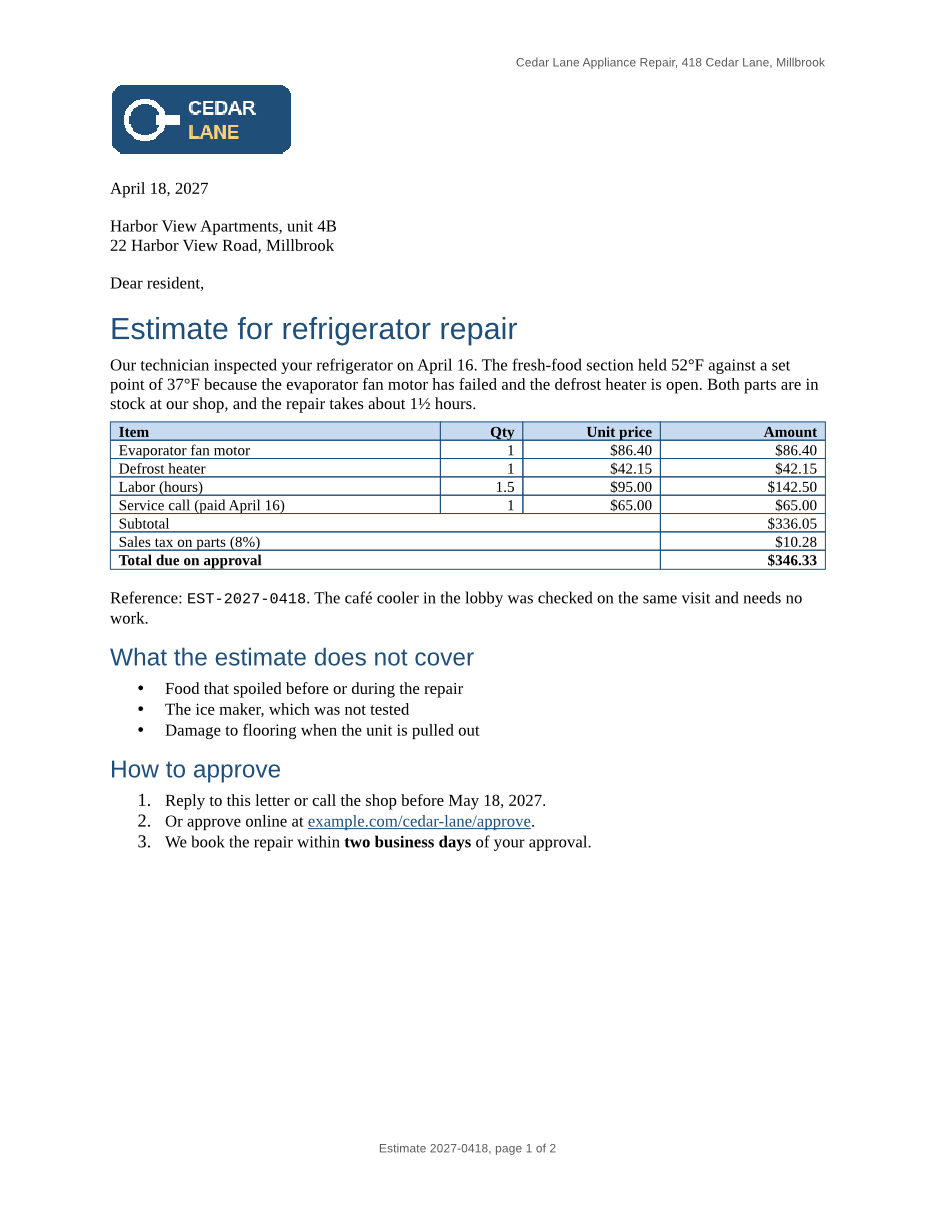
The same file the code sends. Download the input and the output and compare them yourself.
- Input
- repair-estimate.rtf (14 KB)
- Output
- repair-estimate.pdf (64 KB)
- Source
- A two-page repair estimate letter from a fictional appliance shop, with a logo, a priced table, lists, a link, a footnote and a page-numbered footer. We wrote it for these pages in Rich Text Format. (CC0-1.0). How it was made
- Made by
- 2026-11-04, API build
9eeeb0640aba
Parameters
Send these as form fields next to the file. Names are case-insensitive. If you set one of the documented options below that we don't support yet, the request fails with a 400 that names it instead of returning a file made without it.
| Parameter | What it does |
|---|---|
IncludeMarkupboolean, default false | Print revision marks: deleted text struck through and inserted text underlined in color, with a change bar. Without it the PDF shows the final text. RTF comments (annotations) are not printed either way. |
UpdateTableOfContentsboolean, default false | Accepted, but RTF fields are read as their stored result, so nothing is rebuilt. In our test a TOC field saved with a stale entry, and a PAGEREF saved as 99, printed exactly as saved. |
FileNamestring | Name for the PDF without extension. repair-estimate.rtf comes back as repair-estimate.pdf; FileName=estimate-0418 returns estimate-0418.pdf. |
StoreFileboolean, default false | Keep the PDF for 3 hours and answer with a link to it instead of the bytes. |
Not supported yet
Setting one of these to anything but its default returns 400.
| Option | What to do instead |
|---|---|
PageRange | Any value other than ConvertAPI's default 1-6000 returns 400 "PageRange is not supported yet for RTF → PDF". Keep pages afterwards with /v2/convert/pdf/to/extract. |
Pdfa | true returns 400. Send the finished PDF to /v2/convert/pdf/to/pdfa, which returned PDF/A-2b for the sample. |
IncludeMetadata | false returns 400; the RTF's title, subject, author and keywords are always written. |
IncludeStructureTags | true returns 400, although the PDF is already tagged. |
BookmarkMode | Only headings, the default, is accepted. Bookmarks come from the heading styles. |
SubsetFonts | true returns 400, yet fonts are always embedded as subsets. |
What carries over, and what doesn't
Kept
- Paper and margins from \paperw, \paperh and \marg: 2 US Letter pages, the second starting at "Terms" after the manual page break
- The priced table exactly as laid out: column positions, blue (#1F4E79) borders, light blue header shading, right-aligned amounts and the totals rows merged across three columns
- The 160 × 64 pixel PNG logo, placed 120 × 48 points as the RTF asks
- Bulleted and numbered lists, bold, italic, red text, the yellow highlight and the Courier New reference code
- The approval link, clickable, and °, ½ and é from the Windows-1252 escapes
- A bookmark per heading (4 in the sample), a tagged PDF with language en-US, and title, subject, author and keywords
- The creation time from the RTF's \creatim (April 18, 2027, 9:30) as the PDF's creation date
Lost or not yet supported
- The footnote and its mark: the note that parts prices are held for 30 days is not in the PDF.
- Page numbers in the footer. Fields print their stored result, so both pages read "Estimate 2027-0418, page 1 of 2".
- Heading formatting set on the paragraph: the sample's 15 pt bold heading 1 prints at 20 pt regular and its 12 pt bold heading 2 at 16 pt regular; their blue color and font are kept.
- The exact fonts: Times New Roman, Arial and Courier New are drawn with Liberation Serif, Sans and Mono, which have the same character widths.
- Comments (\annotation groups).
Limits
- Requests up to 10 MB on the Free plan or 100 MB on paid plans, all files and fields together.
- A conversion can run for up to 120 seconds; after that the API returns 504.
PdfaVersionis not read for RTF and is ignored: the PDF comes back without PDF/A.- RTF files can't be encrypted, so
Passwordis accepted and has no effect.
Where teams use it
Letters and forms from systems that write RTF
When billing, scheduling or transcription software exports letters as RTF, convert them to PDF before they are emailed or posted to a portal. The layout is then fixed, so the customer sees the table and logo where the system put them.
Report generators that emit RTF
Report tools such as JasperReports and Crystal Reports can export RTF without any office software. Send that output here for a PDF with bookmarks from the heading styles and document properties taken from the RTF's info group.
Questions
Why does the second page say page 1 of 2?
RTF stores a result next to every field, and the converter prints that result instead of recalculating it. The sample's PAGE field was saved as 1, so both pages show 1, and a NUMPAGES field saved as 9 would print 9 whatever the real count. Until this is fixed, leave page numbers out of RTF footers, or stamp them onto the finished PDF.
Are footnotes kept?
Not yet. The RTF reader skips \footnote groups and their reference marks, so the surrounding sentence closes up. Move short notes into the text, or add them to the PDF afterwards, if they must appear.
Which fonts end up in the PDF?
The RTF's font table asks for Times New Roman, Arial and Courier New; the PDF embeds subsets of Liberation Serif, Liberation Sans and Liberation Mono in their place. Those have the same character widths, so lines and pages break where they would with the original fonts.
Can I convert only some pages?
PageRange returns 400 for RTF to PDF unless it is 1-6000. Convert the whole file, then keep the pages you need with /v2/convert/pdf/to/extract, or render chosen pages as images with /v2/convert/rtf/to/png, which reads PageRange.
Convert your first RTF file in a minute.