RTF to PNG API
Send an .rtf file to POST /v2/convert/rtf/to/png and get a lossless PNG of each page, drawn from the same layout as our RTF to PDF route. The sample asks for page 1 at 110 DPI and gets a 935 × 1,210 image of 213,278 bytes.
- Endpoint
- POST /v2/
convert/ rtf/ to/ png - Accepts
- rtf
- Sample timing
- 39 ms median of 5 runsHow we measure
- Request size
- Up to 10 MB on the Free plan or 100 MB on paid plans, all files together
Request and response
Every sample below ran against the API before this page was published. Set PDFCONVERSIONAPI_KEY to your key and run it as is.
curl -sS -X POST \
  https://api.pdfconversionapi.com/v2/convert/rtf/to/png \
  -H "Authorization: Bearer $PDFCONVERSIONAPI_KEY" \
  -F File=@repair-estimate.rtf \
  --form-string PageRange=1 \
  --form-string ImageResolution=110 \
  -o response.json

# FileData is base64. Save the first file in converted/,
# or print the JSON error.
if jq -e '.Files' response.json > /dev/null; then
  mkdir -p converted
  name=$(jq -r '.Files[0].FileName' response.json)
  jq -r '.Files[0].FileData' response.json \
    | base64 --decode > "converted/$name"
else
  cat response.json
fi
import base64
import os
import requests
key = os.environ["PDFCONVERSIONAPI_KEY"]
response = requests.post(
"https://api.pdfconversionapi.com/v2/convert/rtf/to/png",
headers={"Authorization": f"Bearer {key}"},
files=[("File", open("repair-estimate.rtf", "rb"))],
data={
"PageRange": "1",
"ImageResolution": "110",
},
timeout=180,
)
result = response.json()
if not response.ok:
raise SystemExit(f"{result['Code']}: {result['Message']}")
os.makedirs("converted", exist_ok=True)
for file in result["Files"]:
path = os.path.join("converted", file["FileName"])
with open(path, "wb") as out:
out.write(base64.b64decode(file["FileData"]))
print(path, file["FileSize"], "bytes")
import { mkdir, readFile, writeFile } from "node:fs/promises";
import { join } from "node:path";

const form = new FormData();
const file = "repair-estimate.rtf";
form.append("File", new Blob([await readFile(file)]), file);
form.append("PageRange", "1");
form.append("ImageResolution", "110");

const url = "https://api.pdfconversionapi.com/v2/convert/rtf/to/png";
const key = process.env.PDFCONVERSIONAPI_KEY;
const response = await fetch(url, {
  method: "POST",
  headers: { Authorization: `Bearer ${key}` },
  body: form,
});
const result = await response.json();
if (!response.ok) {
  throw new Error(`${result.Code}: ${result.Message}`);
}

await mkdir("converted", { recursive: true });
for (const file of result.Files) {
  const path = join("converted", file.FileName);
  await writeFile(path, Buffer.from(file.FileData, "base64"));
  console.log(path, file.FileSize, "bytes");
}
{
  "ConversionCost": 1,
  "ConversionTime": 0.039,
  "Files": [
    {
      "FileName": "repair-estimate-1.png",
      "FileExt": "png",
      "FileSize": 213278,
      "FileData": "iVBORw0KGgoAAAANSUhEUgAA…"
    }
  ]
}
Response from our test run on 2026-11-03. ConversionTime shows the median of 5 runs. FileData is shortened here; the real response carries the whole file as base64.
The sample, converted
The same file the code sends. Download the input and the output and compare them yourself.
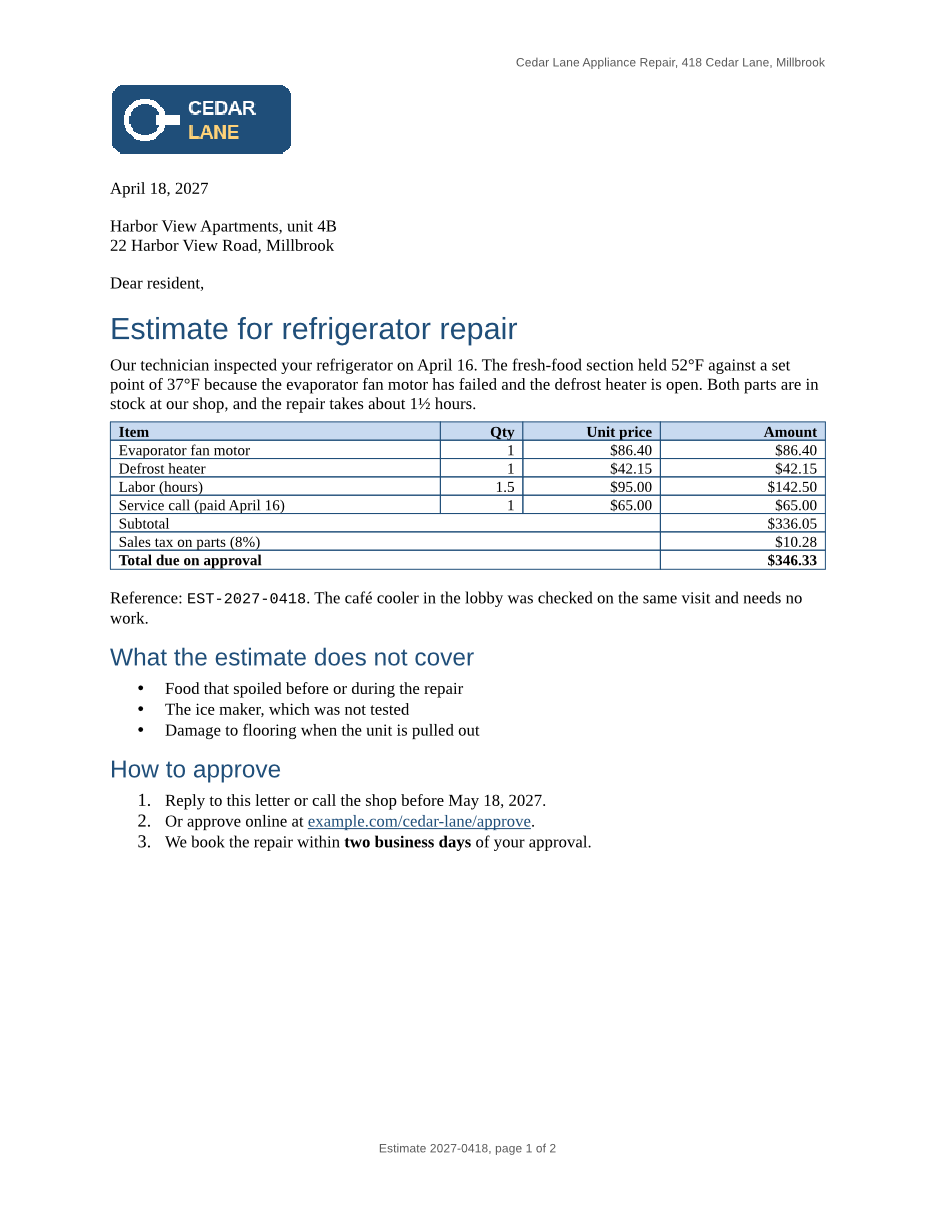
- Input
- repair-estimate.rtf (14 KB)
- Output
- repair-estimate-1.png (208 KB)
- Source
- A two-page repair estimate letter from a fictional appliance shop, with a logo, a priced table, lists, a link, a footnote and a page-numbered footer. We wrote it for these pages in Rich Text Format. (CC0-1.0). How it was made
- Made by
- 2026-11-04, API build
9eeeb0640aba
Parameters
Send these as form fields next to the file. Names are case-insensitive. If you set one of the documented options below that we don't support yet, the request fails with a 400 that names it instead of returning a file made without it.
| Parameter | What it does |
|---|---|
PageRangestring | Pages to draw, such as 1 (the sample), 2-last or 1,2. The file name carries the page number: repair-estimate-1.png. PageRange=0 or 2-1 returns 400 "PageRange '2-1' is not valid (example: 1-3,5)". |
ImageResolutioninteger, default 150 | Drawing resolution in DPI, written into the PNG's pHYs chunk when sent. At 110 the letter's first page is 935 × 1,210 pixels and its second 99,535 bytes; at the default 150 the pages are 1,275 × 1,650 (312,841 and 151,572 bytes). 600 gives 5,100 × 6,600.Values: 36–600 |
ImageWidthinteger | Width in pixels, height from the page's proportions; use it for thumbnails of a fixed width.Values: 1–20000 |
ImageHeightinteger | Height in pixels. Combined with ImageWidth, each page is fitted inside the box.Values: 1–20000 |
TransparentColorstring | Make one exact color transparent. With white, 92.5% of page 1 at 110 DPI turned transparent, including 1,076 pixels inside the logo where its ring and lettering are pure white.Values: white, black, red, green, blue, gray, #RRGGBB or R,G,B |
BackgroundColorstring | Color under the page, shown wherever the RTF paints nothing, such as margins and unshaded cells.Values: Same as TransparentColor |
ColorSpaceenum, default default | gray gives a one-channel PNG (77,636 bytes for the sample's page at 110 DPI instead of 213,278); monochrome only black and white pixels; rgb the same 3-channel file as the default; cmyk returns 400.Values: default, rgb, gray, monochrome |
IncludeMarkupboolean, default false | Draw revision marks in the image: deletions struck through, insertions underlined in color. RTF comments are not drawn. |
FileNamestring | Stem of the image names: FileName=estimate with the sample's request gives estimate-1.png. |
StoreFileboolean, default false | Get a link per image, kept for 3 hours, instead of base64 data. |
What carries over, and what doesn't
Kept
- The layout the PDF route gives: table columns, blue borders and header shading where the RTF put them, and the logo at 120 × 48 points
- Header and footer text on every page, and page 2 starting at "Terms"
- Colors: the blue headings, the red deposit warning and the yellow highlight on the trip fee
- Lossless RGB pixels, with an alpha channel added only when you set
TransparentColor
Lost or not yet supported
- Page numbers per page: the footer shows the stored "page 1 of 2" on both pages.
- The footnote and its mark.
- Heading weight and size: the 15 pt bold heading 1 is drawn at 20 pt and the 12 pt bold heading 2 at 16 pt, neither bold.
- Original fonts: Times New Roman, Arial and Courier New are drawn with Liberation Serif, Sans and Mono, which keep the same widths.
- Text you can select or search; the words are pixels.
Limits
- At most 2,000 pages per request; each page up to 16,000 pixels per side and 100 million pixels.
ImageWidth=17000returns 413. - Requests up to 10 MB on the Free plan or 100 MB on paid plans, all files and fields together; 120 seconds per conversion, then 504.
Where teams use it
Showing a letter's first page in a customer portal
When billing or service software produces RTF letters, render page 1 as a PNG and show it next to the download link, so customers see what they are opening.
Checking RTF output from a report generator
Render each page of a generated RTF in your test suite and compare it with an approved image. The table's geometry follows the RTF exactly, so a column that moves shows up as a pixel difference.
Questions
Why do both pages say page 1 of 2?
RTF fields carry a stored result, and the converter draws that result instead of counting pages. The sample's PAGE field was saved as 1, so page 2 shows 1 as well. UpdateFields doesn't change this for RTF input.
Why did parts of my logo become transparent?
TransparentColor removes every pixel of exactly that color, wherever it is. The sample's logo has white lettering and a white ring, so TransparentColor=white cut 1,076 pixels out of it along with the page background. Use a background color that doesn't appear in your pictures, or leave the option out.
How do I get a small preview of page 1?
Send PageRange=1 with ImageWidth, for example 300, and the page comes back 300 pixels wide with the height from the page shape. For the same thumbnail as a smaller JPEG, use /v2/convert/rtf/to/jpg, which gave 300 × 388 and 22,639 bytes.
Convert your first RTF file in a minute.