DOCX to PNG API
Send a Word file to POST /v2/convert/docx/to/png and get one PNG per page. The same engine as our DOCX to PDF route lays the document out, then a PDF renderer draws each page at the resolution you ask for.
- Endpoint
- POST /v2/
convert/ docx/ to/ png - Accepts
- docx, doc
- Sample timing
- 70 ms median of 5 runsHow we measure
- Request size
- Up to 10 MB on the Free plan or 100 MB on paid plans, all files together
Request and response
Every sample below ran against the API before this page was published. Set PDFCONVERSIONAPI_KEY to your key and run it as is.
curl -sS -X POST \
  https://api.pdfconversionapi.com/v2/convert/docx/to/png \
  -H "Authorization: Bearer $PDFCONVERSIONAPI_KEY" \
  -F File=@program-guide.docx \
  --form-string ImageResolution=100 \
  -o response.json

# FileData is base64. Save the first file in converted/,
# or print the JSON error.
if jq -e '.Files' response.json > /dev/null; then
  mkdir -p converted
  name=$(jq -r '.Files[0].FileName' response.json)
  jq -r '.Files[0].FileData' response.json \
    | base64 --decode > "converted/$name"
else
  cat response.json
fi
import base64
import os
import requests
key = os.environ["PDFCONVERSIONAPI_KEY"]
response = requests.post(
"https://api.pdfconversionapi.com/v2/convert/docx/to/png",
headers={"Authorization": f"Bearer {key}"},
files=[("File", open("program-guide.docx", "rb"))],
data={
"ImageResolution": "100",
},
timeout=180,
)
result = response.json()
if not response.ok:
raise SystemExit(f"{result['Code']}: {result['Message']}")
os.makedirs("converted", exist_ok=True)
for file in result["Files"]:
path = os.path.join("converted", file["FileName"])
with open(path, "wb") as out:
out.write(base64.b64decode(file["FileData"]))
print(path, file["FileSize"], "bytes")
import { mkdir, readFile, writeFile } from "node:fs/promises";
import { join } from "node:path";

const form = new FormData();
const file = "program-guide.docx";
form.append("File", new Blob([await readFile(file)]), file);
form.append("ImageResolution", "100");

const url = "https://api.pdfconversionapi.com/v2/convert/docx/to/png";
const key = process.env.PDFCONVERSIONAPI_KEY;
const response = await fetch(url, {
  method: "POST",
  headers: { Authorization: `Bearer ${key}` },
  body: form,
});
const result = await response.json();
if (!response.ok) {
  throw new Error(`${result.Code}: ${result.Message}`);
}

await mkdir("converted", { recursive: true });
for (const file of result.Files) {
  const path = join("converted", file.FileName);
  await writeFile(path, Buffer.from(file.FileData, "base64"));
  console.log(path, file.FileSize, "bytes");
}
{
  "ConversionCost": 1,
  "ConversionTime": 0.07,
  "Files": [
    {
      "FileName": "program-guide-1.png",
      "FileExt": "png",
      "FileSize": 234344,
      "FileData": "iVBORw0KGgoAAAANSUhEUgAA…"
    },
    {
      "FileName": "program-guide-2.png",
      "FileExt": "png",
      "FileSize": 111234,
      "FileData": "iVBORw0KGgoAAAANSUhEUgAA…"
    }
  ]
}
Response from our test run on 2026-11-03. ConversionTime shows the median of 5 runs. FileData is shortened here; the real response carries the whole file as base64.
The sample, converted
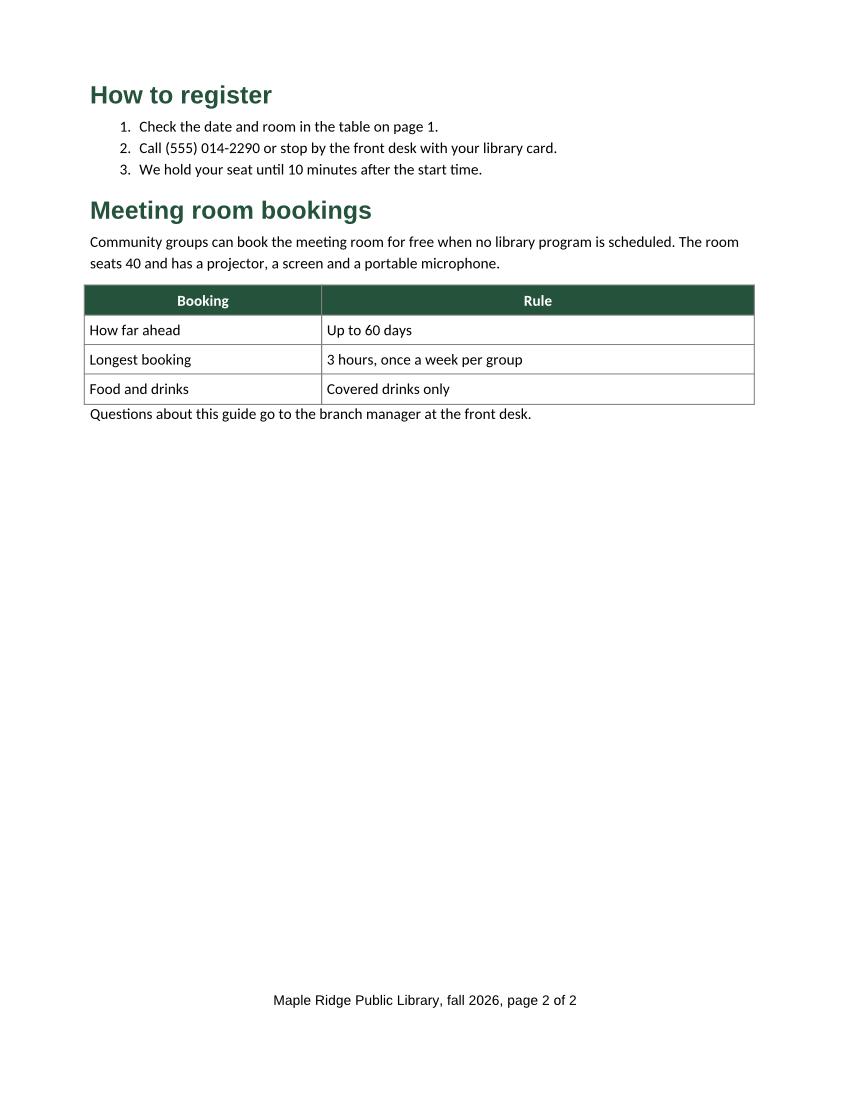
The same file the code sends. Download the input and the output and compare them yourself.
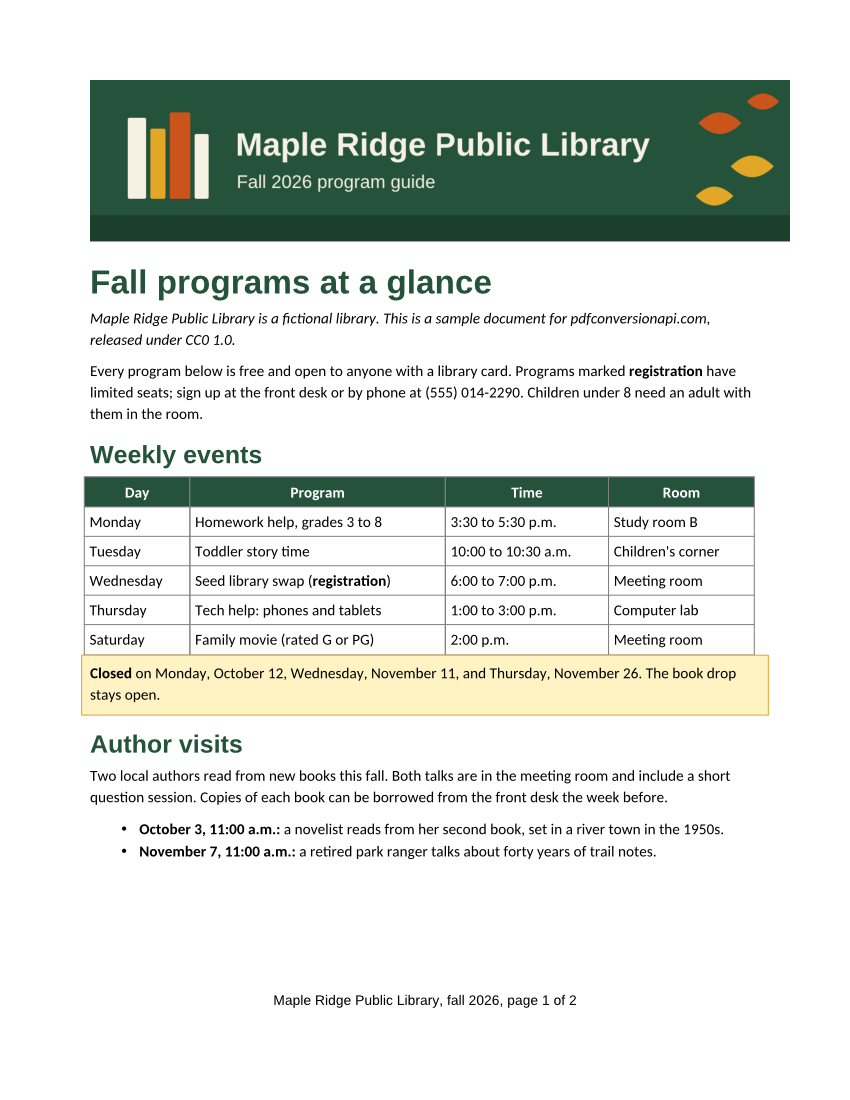
- Input
- program-guide.docx (29 KB)
- Output
- program-guide-1.png (229 KB)program-guide-2.png (109 KB)
- Source
- Written for this site (fictional library); DOCX saved by a word processor (CC0-1.0). How it was made
- Made by
- 2026-11-04, API build
9eeeb0640aba
Parameters
Send these as form fields next to the file. Names are case-insensitive. If you set one of the documented options below that we don't support yet, the request fails with a 400 that names it instead of returning a file made without it.
| Parameter | What it does |
|---|---|
ImageResolutioninteger, default 150 | Pixels per inch of page. A Letter page comes out 850 × 1,100 at 100 (the sample) and 1,275 × 1,650 at the default. ConvertAPI uses 200 when this is left out, so set it explicitly if you are moving code over. When you send it, the value is also written into the file: the sample's PNGs say 100 DPI.Values: 36–600 |
ImageWidthinteger | Width of each page image in pixels. The page is drawn at the scale this width needs, not drawn at ImageResolution and resampled. ImageWidth=800 gives an 800 × 1,035 image of the sample's Letter page; the height follows the page's proportions.Values: 1–20000 |
ImageHeightinteger | Height of each page image in pixels: ImageHeight=500 gives 386 × 500. With both sizes the page fits inside the box, so 800 × 800 gives 618 × 800.Values: 1–20000 |
ScaleProportionsboolean, default true | With false and both sizes, the page is stretched to exactly that box: 800 × 800 from a Letter page, with the text stretched wider. |
ScaleIfLargerboolean, default false | With true, sizes only shrink. A page already smaller than the size you ask for keeps the size ImageResolution gives: ImageWidth=2000 left the sample's first page at 1,275 × 1,650 (150 DPI). |
ScaleImageboolean, default true | With false, the page is drawn at ImageResolution and cut to ImageWidth × ImageHeight from its top-left corner instead of scaled. 500 × 300 at 150 DPI kept the top margin and the left part of the sample's banner. |
ColorSpaceenum, default default | Pages come back as RGB PNGs with no alpha channel, so default and rgb give the same file: page 1 at 72 DPI is 151,579 bytes either way. gray writes one 8-bit gray channel (55,501 bytes for that page), and adds an alpha channel only when TransparentColor is sent. monochrome makes every pixel pure black or white, split at mid-gray, which took the same page down to 15,785 bytes. cmyk returns 400 "ColorSpace cmyk is not supported yet; use rgb, gray or monochrome".Values: default, rgb, gray, monochrome |
ImageInterpolationboolean, default false | Accepted for compatibility. Pages drawn to an ImageWidth are smoothed the same way either way: true and false gave byte-identical files. |
PageRangestring | Draw only these pages; each file keeps its page number, so PageRange=2 returns program-guide-2.png. A range may end past the last page, but a page that doesn't exist returns 400 with the document's page count.Values: Pages and ranges such as 2, 1-3, 2- or 2-last (to the end) |
ImageQualityinteger, default 85 | JPEG quality, for docx/to/jpg and doc/to/jpg. The sample's two JPG pages at 150 DPI are 407,350 bytes at 85 and 280,641 at 50. ConvertAPI's default is 75. PNG ignores it.Values: 1–100 |
BackgroundColorstring | Color painted behind each page before it is drawn; left out, pages are white. A value that is not a color returns 400.Values: white, black, red, green, blue, gray, #RRGGBB or R,G,B |
TransparentColorstring | PNG only: every pixel of exactly this color becomes transparent. Smoothed pixels at the edges of letters are not exactly white, so they stay opaque and show as a light fringe on a dark backdrop.Values: white, black, red, green, blue, gray, #RRGGBB or R,G,B |
UpdateFieldsboolean, default false | Rebuild the table of contents and refresh cross-references before the pages are drawn. In our test, a table of contents saved with one stale entry was drawn with all three headings, dot leaders and page numbers. Without it, the stored entries are drawn. |
UpdateTableOfContentsboolean, default false | Same effect as UpdateFields; any of the three switches turns the refresh on. |
UpdateReferencesboolean, default false | Same effect as UpdateFields. |
IncludeMarkupboolean, default false | Draw comments in balloons in the right margin and show tracked changes, as the PDF route does with the same option. The page content is scaled down to make room for the balloons. Without it, the images show the final text and no comments. |
Passwordstring | Open password of a protected .docx. Our encrypted copy of the sample, sent with its password, gave the same two PNGs byte for byte. Without it, or with a wrong one: 422 "the input file is password-protected". |
FileNamestring | Stem for the page files: FileName=fall-guide gives fall-guide-1.png and fall-guide-2.png. Without it, the uploaded file's name is used. |
StoreFileboolean, default false | Store the images and return one download link per page instead of the data. Links expire after 3 hours. |
What carries over, and what doesn't
Kept
- The layout a desktop office suite gives the same file: the same words on every line and the same content on each of the 2 pages, with lines at most 3 pixels apart at 100 DPI (our reference render is drawn by the same renderer)
- Pictures, table borders and cell shading, and the bordered, shaded note under the first table
- Header and footer fields worked out at layout time: the sample's footer reads page 1 of 2 and page 2 of 2
- One image per page, named after the file and the page number, in page order
- Pixels as drawn: PNG is lossless, so small text has no compression noise. Use the JPG route when file size matters more
- The page's own fills under
BackgroundColor: the color shows wherever the page paints nothing itself, which in our test was the margins, the empty space and the unshaded table cells - The banner, the text and the shaded cells with
TransparentColor=white, which cleared 74% of the pixels on the sample's first page - Comments and tracked changes when you ask for them: with
IncludeMarkup=true, our test page showed the comment in a margin balloon, the deleted word struck through and the inserted word underlined
Lost or not yet supported
- Fonts the server doesn't have are replaced with metric-compatible ones: the sample asks for Calibri and is drawn with Carlito. Line breaks stay the same; the letter shapes differ.
- From a legacy .doc file (the sample saved in Word 97-2003 format), the tables lost their borders, padding and full width, and the note lost its yellow shading. The office suite we compared against drew all of them from the same file.
- A color profile: the images carry none. The DPI is recorded only when you send
ImageResolution; at the default, the file has no DPI and a layout program has to be told the resolution. - Selectable text. The words are pixels; if readers need to search or copy, convert to PDF with
/v2/convert/docx/to/pdfinstead.
Limits
- Up to 2,000 pages per request; above that the API returns 413. Work through longer documents with
PageRange. - Each page image is limited to 16,000 pixels per side and 100 million pixels. A Letter page at 600 DPI is 5,100 × 6,600, well inside both.
ImageWidth=20000on the same page returns 413 "page 1 is too large to draw at 20,000×25,882 pixels; lower ImageWidth or ImageHeight". - Protected .doc files can't be drawn yet. Without
Passwordthey return 422 "the input file is password-protected"; with it, 400 "password-protected DOC files can't be converted to PNG yet". - Requests up to 10 MB on the Free plan or 100 MB on paid plans, all files and fields together. A conversion can run for up to 120 seconds, layout and drawing together; after that the API returns 504.
Where teams use it
Thumbnails for a document library
Send PageRange=1 with a low ImageResolution and store the result next to the file. At 36 DPI a Letter page is 306 × 396 pixels, enough for a list view, and nobody has to open Word to see what a file is.
Visual checks for generated documents
If your app fills DOCX templates with data, render the pages in your test suite and compare them with images you approved. A long address that pushes a table onto page 2 shows up as a changed image in your test run.
Showing a page where a DOCX can't be opened
Chat messages, support tickets and email bodies show images inline but not Word files. Attach page 1 as a JPG and link to the full document.
Questions
Which ImageResolution should I use?
36 to 72 for thumbnails (a Letter page is 306 × 396 at 36 and 612 × 792 at 72), 100 to 150 for on-screen previews, and 200 to 300 when people will zoom in or you plan to run OCR on the image. The default is 150. Values outside 36 to 600 return 400 with "ImageResolution must be between 36 and 600". For an exact pixel size, send ImageWidth or ImageHeight instead.
How do I get just the first page?
Send PageRange=1. The response then holds one file, program-guide-1.png, instead of one per page. PageRange also takes lists and open ranges such as 1,3, 2- or 2-last, and pages always come back in page order. A range may end past the last page, so 1-10 on the 2-page sample returns both pages, but a page that doesn't exist is refused: PageRange=1,3 returns 400 with "PageRange asks for page 3, but the document has 2 pages".
Can the images show comments and tracked changes?
Yes, with IncludeMarkup=true. In our test the comment was drawn in a balloon in the right margin with its author's name, the deleted word was struck through, the inserted word was underlined, and a bar marked the changed line. The page content shrinks a little to leave room for the balloons. Without the option, the images show the text as if every change were accepted, and no comments.
Can I get every page in one file?
Use /v2/convert/docx/to/tiff, which returns one multi-page TIFF by default; our 2-page sample came back as a single file. MultiPage=false gives one TIFF per page. For a document people will read rather than look at, /v2/convert/docx/to/pdf is the better format.
Do I need Microsoft Word or an office suite installed?
No. Your code sends the file over HTTPS and gets the images back. Layout and drawing both happen on our side, so your server only needs an HTTP client.
Convert your first DOCX file in a minute.