RTF to TIFF API
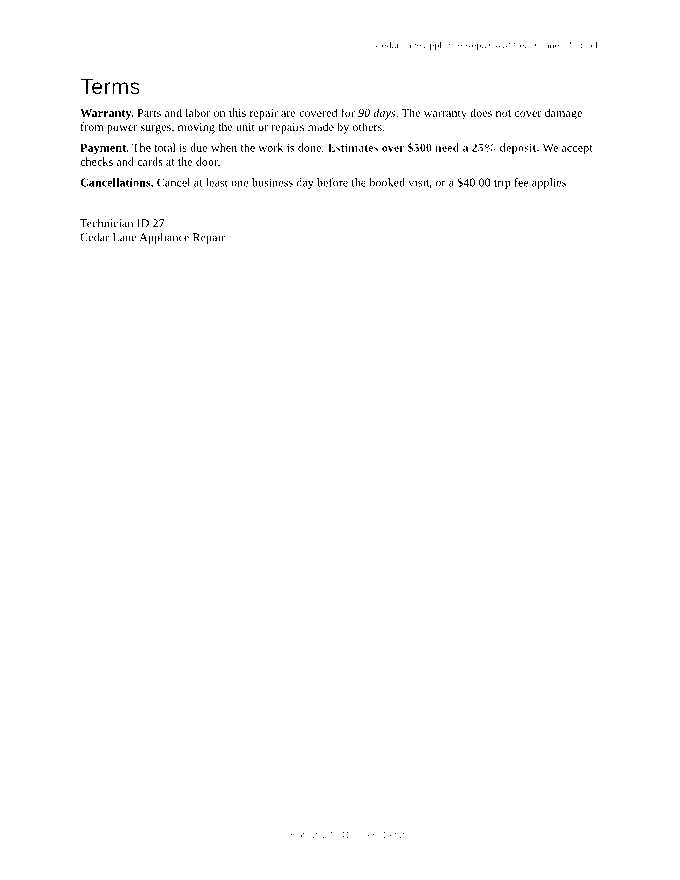
Send an .rtf file to POST /v2/convert/rtf/to/tiff and receive one uncompressed TIFF per page. The sample asks for page 2 at 80 DPI in black and white and gets a 680 × 880 image of 598,598 bytes tagged 80 DPI.
- Endpoint
- POST /v2/
convert/ rtf/ to/ tiff - Accepts
- rtf
- Sample timing
- 39 ms median of 5 runsHow we measure
- Request size
- Up to 10 MB on the Free plan or 100 MB on paid plans, all files together
Request and response
Every sample below ran against the API before this page was published. Set PDFCONVERSIONAPI_KEY to your key and run it as is.
curl -sS -X POST \
  https://api.pdfconversionapi.com/v2/convert/rtf/to/tiff \
  -H "Authorization: Bearer $PDFCONVERSIONAPI_KEY" \
  -F File=@repair-estimate.rtf \
  --form-string PageRange=2 \
  --form-string ImageResolution=80 \
  --form-string ColorSpace=monochrome \
  -o response.json

# FileData is base64. Save the first file in converted/,
# or print the JSON error.
if jq -e '.Files' response.json > /dev/null; then
  mkdir -p converted
  name=$(jq -r '.Files[0].FileName' response.json)
  jq -r '.Files[0].FileData' response.json \
    | base64 --decode > "converted/$name"
else
  cat response.json
fi
import base64
import os
import requests
key = os.environ["PDFCONVERSIONAPI_KEY"]
response = requests.post(
"https://api.pdfconversionapi.com/v2/convert/rtf/to/tiff",
headers={"Authorization": f"Bearer {key}"},
files=[("File", open("repair-estimate.rtf", "rb"))],
data={
"PageRange": "2",
"ImageResolution": "80",
"ColorSpace": "monochrome",
},
timeout=180,
)
result = response.json()
if not response.ok:
raise SystemExit(f"{result['Code']}: {result['Message']}")
os.makedirs("converted", exist_ok=True)
for file in result["Files"]:
path = os.path.join("converted", file["FileName"])
with open(path, "wb") as out:
out.write(base64.b64decode(file["FileData"]))
print(path, file["FileSize"], "bytes")
import { mkdir, readFile, writeFile } from "node:fs/promises";
import { join } from "node:path";

const form = new FormData();
const file = "repair-estimate.rtf";
form.append("File", new Blob([await readFile(file)]), file);
form.append("PageRange", "2");
form.append("ImageResolution", "80");
form.append("ColorSpace", "monochrome");

const url = "https://api.pdfconversionapi.com/v2/convert/rtf/to/tiff";
const key = process.env.PDFCONVERSIONAPI_KEY;
const response = await fetch(url, {
  method: "POST",
  headers: { Authorization: `Bearer ${key}` },
  body: form,
});
const result = await response.json();
if (!response.ok) {
  throw new Error(`${result.Code}: ${result.Message}`);
}

await mkdir("converted", { recursive: true });
for (const file of result.Files) {
  const path = join("converted", file.FileName);
  await writeFile(path, Buffer.from(file.FileData, "base64"));
  console.log(path, file.FileSize, "bytes");
}
{
  "ConversionCost": 1,
  "ConversionTime": 0.039,
  "Files": [
    {
      "FileName": "repair-estimate-2.tiff",
      "FileExt": "tiff",
      "FileSize": 598598,
      "FileData": "SUkqAJghCQBQAAAAAQAAAFAA…"
    }
  ]
}
Response from our test run on 2026-11-03. ConversionTime shows the median of 5 runs. FileData is shortened here; the real response carries the whole file as base64.
The sample, converted
The same file the code sends. Download the input and the output and compare them yourself.
- Input
- repair-estimate.rtf (14 KB)
- Output
- repair-estimate-2.tiff (585 KB)
- Source
- A two-page repair estimate letter from a fictional appliance shop, with a logo, a priced table, lists, a link, a footnote and a page-numbered footer. We wrote it for these pages in Rich Text Format. (CC0-1.0). How it was made
- Made by
- 2026-11-04, API build
9eeeb0640aba
Parameters
Send these as form fields next to the file. Names are case-insensitive. If you set one of the documented options below that we don't support yet, the request fails with a 400 that names it instead of returning a file made without it.
| Parameter | What it does |
|---|---|
ColorSpaceenum, default default | monochrome, as in the sample, sets each pixel to black or white at a 50% threshold; gray keeps 256 shades. Both store 1 byte per pixel, a third of the default RGB: page 2 at 80 DPI is 598,598 bytes either way, against 1,795,426 in color. rgb gives the same file as the default. cmyk returns 400.Values: default, rgb, gray, monochrome |
ImageResolutioninteger, default 150 | DPI used to draw the page and, when sent, written to the resolution tags in inches. 80 gives 680 × 880 for a Letter page.Values: 36–600 |
PageRangestring | Pick pages: 2 returns only repair-estimate-2.tiff. Lists and ranges such as 1-2 and 2-last work too; a page past the end returns 400. |
MultiPageboolean, default false | Send true for a single repair-estimate.tiff holding both pages instead of one file per page. That file is LZW-compressed, which loses nothing: at 80 DPI it is 121,043 bytes in color, 73,317 in gray and 14,016 in black and white. It needs at least two pages; with one selected, the page comes back uncompressed as usual. |
ImageWidthinteger | Output width in pixels, with the height following the page shape.Values: 1–20000 |
ImageHeightinteger | Output height in pixels, or a bounding box together with ImageWidth.Values: 1–20000 |
BackgroundColorstring | Fills the page before drawing; it shows in margins and empty space.Values: white, black, red, green, blue, gray, #RRGGBB or R,G,B |
FileNamestring | Stem of the page files: FileName=estimate with PageRange=2 returns estimate-2.tiff. |
StoreFileboolean, default false | Return links instead of data; useful because color TIFFs of many pages make very large responses. Links last 3 hours. |
What carries over, and what doesn't
Kept
- The page as laid out for the PDF route: the terms and the sign-off lines on page 2, with the header and footer
- Exact pixel values: single pages are not compressed, and
MultiPage=trueuses lossless LZW - The DPI you send, in the XResolution and YResolution tags with the unit set to inches
- Dark text in full: the sample's red warning becomes solid black text in monochrome
Lost or not yet supported
- Light colors in monochrome: the yellow highlight behind the trip fee vanishes, and the gray 8 pt header and footer text breaks into fragments at 80 DPI.
- Compression of single pages. A color Letter page is 6,311,516 bytes at the default 150 DPI.
- 1-bit storage: monochrome pages still use 8 bits per pixel, so they are not CCITT fax TIFFs.
- The footer's real page number (page 2 shows the stored "page 1 of 2"), the footnote, and the bold weight of the headings.
Limits
- At most 2,000 pages per request; 16,000 pixels per side and 100 million pixels per page, or the API returns 413.
- Requests up to 10 MB on the Free plan or 100 MB on paid plans, all files and fields together; 120 seconds per conversion before a 504.
Where teams use it
Feeding records systems that take TIFF pages
When a records or imaging system ingests one TIFF per page, convert RTF letters straight into that form. ImageResolution puts the DPI in each file, and ColorSpace=gray or monochrome keeps the files to a third of the color size.
Black-and-white copies for print or fax workflows
ColorSpace=monochrome gives a pure black-and-white page. Check light colors first: anything lighter than mid-gray disappears, and anything darker turns solid black.
Questions
Why did my header text break up in black and white?
Monochrome turns each pixel black or white at the halfway point. The sample's header and footer are 8 pt text in dark gray (#595959), and at 80 DPI their smoothed edges fall on both sides of the threshold, so letters lose strokes. Use ColorSpace=gray, which is the same file size here, or a higher ImageResolution.
Can I get one multi-page TIFF?
Yes, with MultiPage=true. The answer then has one file, repair-estimate.tiff, with both pages in it and LZW compression: 121,043 bytes in color at 80 DPI, against 1,795,426 for page 2 alone without it. Left out, the route returns one TIFF per page, repair-estimate-1.tiff, repair-estimate-2.tiff and so on.
How large are the files?
Width × height × bytes per pixel, plus a small header: 3 bytes per pixel in color (4 with TransparentColor), 1 in gray or monochrome. Page 2 of the sample at 80 DPI is 1,795,426 bytes in color and 598,598 in gray or black and white; at 150 DPI in color each page is 6,311,516 bytes. These sizes are for single pages; MultiPage=true compresses.
Convert your first RTF file in a minute.