TXT to TIFF API
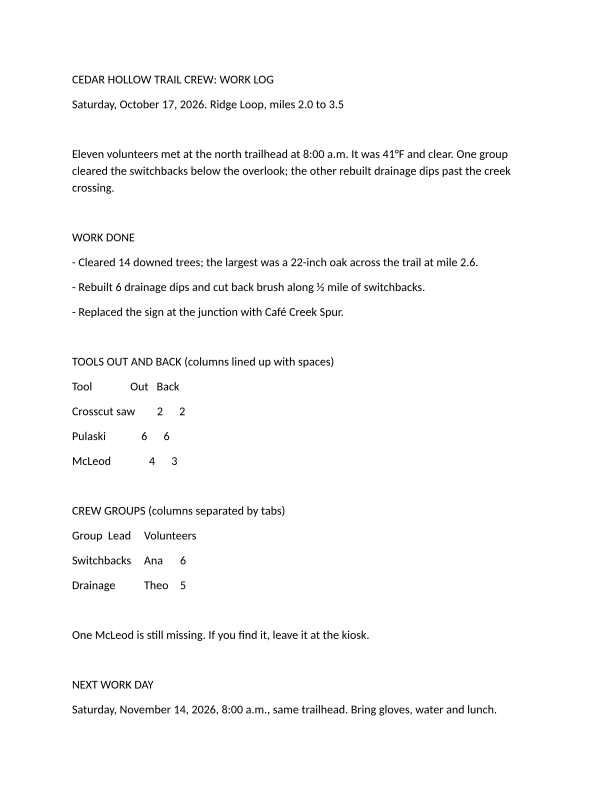
POST /v2/convert/txt/to/tiff returns one uncompressed TIFF per page of a text file. The sample asks for page 1 only, in grayscale at 72 DPI, and gets a 612 × 792 pixel TIFF of 484,902 bytes.
- Endpoint
- POST /v2/
convert/ txt/ to/ tiff - Accepts
- txt
- Sample timing
- 36 ms median of 5 runsHow we measure
- Request size
- Up to 10 MB on the Free plan or 100 MB on paid plans, all files together
Request and response
Every sample below ran against the API before this page was published. Set PDFCONVERSIONAPI_KEY to your key and run it as is.
curl -sS -X POST \
  https://api.pdfconversionapi.com/v2/convert/txt/to/tiff \
  -H "Authorization: Bearer $PDFCONVERSIONAPI_KEY" \
  -F File=@trail-crew-log.txt \
  --form-string PageRange=1 \
  --form-string ColorSpace=gray \
  --form-string ImageResolution=72 \
  -o response.json

# FileData is base64. Save the first file in converted/,
# or print the JSON error.
if jq -e '.Files' response.json > /dev/null; then
  mkdir -p converted
  name=$(jq -r '.Files[0].FileName' response.json)
  jq -r '.Files[0].FileData' response.json \
    | base64 --decode > "converted/$name"
else
  cat response.json
fi
import base64
import os
import requests
key = os.environ["PDFCONVERSIONAPI_KEY"]
response = requests.post(
"https://api.pdfconversionapi.com/v2/convert/txt/to/tiff",
headers={"Authorization": f"Bearer {key}"},
files=[("File", open("trail-crew-log.txt", "rb"))],
data={
"PageRange": "1",
"ColorSpace": "gray",
"ImageResolution": "72",
},
timeout=180,
)
result = response.json()
if not response.ok:
raise SystemExit(f"{result['Code']}: {result['Message']}")
os.makedirs("converted", exist_ok=True)
for file in result["Files"]:
path = os.path.join("converted", file["FileName"])
with open(path, "wb") as out:
out.write(base64.b64decode(file["FileData"]))
print(path, file["FileSize"], "bytes")
import { mkdir, readFile, writeFile } from "node:fs/promises";
import { join } from "node:path";

const form = new FormData();
const file = "trail-crew-log.txt";
form.append("File", new Blob([await readFile(file)]), file);
form.append("PageRange", "1");
form.append("ColorSpace", "gray");
form.append("ImageResolution", "72");

const url = "https://api.pdfconversionapi.com/v2/convert/txt/to/tiff";
const key = process.env.PDFCONVERSIONAPI_KEY;
const response = await fetch(url, {
  method: "POST",
  headers: { Authorization: `Bearer ${key}` },
  body: form,
});
const result = await response.json();
if (!response.ok) {
  throw new Error(`${result.Code}: ${result.Message}`);
}

await mkdir("converted", { recursive: true });
for (const file of result.Files) {
  const path = join("converted", file.FileName);
  await writeFile(path, Buffer.from(file.FileData, "base64"));
  console.log(path, file.FileSize, "bytes");
}
{
  "ConversionCost": 1,
  "ConversionTime": 0.036,
  "Files": [
    {
      "FileName": "trail-crew-log-1.tiff",
      "FileExt": "tiff",
      "FileSize": 484902,
      "FileData": "SUkqAHhlBwBIAAAAAQAAAEgA…"
    }
  ]
}
Response from our test run on 2026-11-03. ConversionTime shows the median of 5 runs. FileData is shortened here; the real response carries the whole file as base64.
The sample, converted
The same file the code sends. Download the input and the output and compare them yourself.
- Input
- trail-crew-log.txt (1.4 KB)
- Output
- trail-crew-log-1.tiff (474 KB)
- Source
- A two-page plain-text work log for a fictional volunteer trail crew, written by us, with a form feed before page 2 (CC0-1.0). How it was made
- Made by
- 2026-11-04, API build
9eeeb0640aba
Parameters
Send these as form fields next to the file. Names are case-insensitive. If you set one of the documented options below that we don't support yet, the request fails with a 400 that names it instead of returning a file made without it.
| Parameter | What it does |
|---|---|
ImageResolutioninteger, default 150 | DPI of the drawn page, also written into the TIFF. At the default, a Letter page is 1,275 × 1,650 pixels; the sample's 72 gives 612 × 792.Values: 36 to 600 |
ColorSpaceenum, default default | gray stores one 8-bit channel, a third of the default RGB size. monochrome sets every pixel to black or white but still stores 8 bits per pixel, so the file is the same size as gray.Values: default, rgb, gray, monochrome |
PageRangestring | Pages to return; the sample sends 1. A page past the end returns 400 with the page count.Values: Page numbers and ranges |
MultiPageboolean, default false | true returns all pages in one LZW-compressed TIFF named trail-crew-log.tiff: 228,079 bytes for the sample's two pages at 150 DPI, where each separate page is 6,311,516 bytes. Gray pages stay gray: with ColorSpace=gray at 72 DPI the 2-page file is 54,283 bytes. A single page, such as PageRange=1, still comes back uncompressed. |
ImageWidthinteger | Scale each page to this width in pixels; the height follows unless ImageHeight is sent as well.Values: 1 to 20,000 |
FileNamestring | Stem of the files, numbered by page: trail-crew-log-1.tiff. |
StoreFileboolean, default false | Store the TIFFs for 3 hours and return links instead of the data. |
What carries over, and what doesn't
Kept
- The Letter layout and page breaks of the PDF route, including the form feed before the safety notes
- The DPI you send, stored in the file: the sample TIFF says 72 DPI
- Every pixel: single-page TIFFs are not compressed at all and the multi-page file uses lossless LZW, so nothing is lost
Lost or not yet supported
- Small files, when pages come back one by one. With no compression, one Letter page at the default 150 DPI is 6,311,516 bytes in RGB; the sample's grayscale page at 72 DPI is 484,902.
- 1-bit black and white.
monochromepages are still 8-bit, so fax-style CCITT compression is not available. - Selectable text.
Limits
- Up to 2,000 pages per request, 16,000 pixels per side and 100 million pixels per page; larger requests return 413.
- Uncompressed pages add up: a 10-page text file at 150 DPI comes to about 63 MB of TIFF, so lower
ImageResolution, useColorSpace=grayor sendMultiPage=truefor long files. - Requests up to 10 MB on the Free plan or 100 MB on paid plans, all files and fields together. A conversion can run for up to 120 seconds; after that the API returns 504.
Where teams use it
Records systems that file pages as TIFF
Some document imaging and case management systems store each page as a TIFF image. Text notes and logs can be filed next to scanned paper in the same form.
Grayscale page images for OCR pipelines
Some OCR and redaction tools take TIFF input only. ColorSpace=gray gives them one channel, which is all text needs.
Questions
How do I get one multi-page TIFF?
Send MultiPage=true. For the sample that returns a single 2-page file of 228,079 bytes, LZW-compressed, compared with two 6,311,516-byte files without it. It is byte for byte the file you get in two steps, /v2/convert/txt/to/pdf and then /v2/convert/pdf/to/tiff, where one multi-page TIFF is the default.
Why are the TIFFs so large?
This route writes pages without compression: 3 bytes per pixel in color, 1 byte in gray. Lower ImageResolution, add ColorSpace=gray, or send MultiPage=true, which compresses.
How big is a page at 300 DPI?
A Letter page is 2,550 × 3,300 pixels at 300 DPI. Uncompressed, that is about 8.4 MB in grayscale and 25.2 MB in the default color mode, so request only the pages you need with PageRange.
Convert your first TXT file in a minute.