DOCX to TIFF API
POST /v2/convert/docx/to/tiff lays out a Word document and returns all of its pages as frames of one TIFF. The sample asks for ImageResolution=100, so each Letter page is 850 × 1,100 pixels and the file records 100 pixels per inch.
- Endpoint
- POST /v2/
convert/ docx/ to/ tiff - Accepts
- docx
- Sample timing
- 0.105 s median of 5 runsHow we measure
- Request size
- Up to 10 MB on the Free plan or 100 MB on paid plans, all files together
Request and response
Every sample below ran against the API before this page was published. Set PDFCONVERSIONAPI_KEY to your key and run it as is.
curl -sS -X POST \
  https://api.pdfconversionapi.com/v2/convert/docx/to/tiff \
  -H "Authorization: Bearer $PDFCONVERSIONAPI_KEY" \
  -F File=@volunteer-handbook.docx \
  --form-string ImageResolution=100 \
  -o response.json

# FileData is base64. Save the first file in converted/,
# or print the JSON error.
if jq -e '.Files' response.json > /dev/null; then
  mkdir -p converted
  name=$(jq -r '.Files[0].FileName' response.json)
  jq -r '.Files[0].FileData' response.json \
    | base64 --decode > "converted/$name"
else
  cat response.json
fi
import base64
import os
import requests
key = os.environ["PDFCONVERSIONAPI_KEY"]
response = requests.post(
"https://api.pdfconversionapi.com/v2/convert/docx/to/tiff",
headers={"Authorization": f"Bearer {key}"},
files=[("File", open("volunteer-handbook.docx", "rb"))],
data={
"ImageResolution": "100",
},
timeout=180,
)
result = response.json()
if not response.ok:
raise SystemExit(f"{result['Code']}: {result['Message']}")
os.makedirs("converted", exist_ok=True)
for file in result["Files"]:
path = os.path.join("converted", file["FileName"])
with open(path, "wb") as out:
out.write(base64.b64decode(file["FileData"]))
print(path, file["FileSize"], "bytes")
import { mkdir, readFile, writeFile } from "node:fs/promises";
import { join } from "node:path";

const form = new FormData();
const file = "volunteer-handbook.docx";
form.append("File", new Blob([await readFile(file)]), file);
form.append("ImageResolution", "100");

const url = "https://api.pdfconversionapi.com/v2/convert/docx/to/tiff";
const key = process.env.PDFCONVERSIONAPI_KEY;
const response = await fetch(url, {
  method: "POST",
  headers: { Authorization: `Bearer ${key}` },
  body: form,
});
const result = await response.json();
if (!response.ok) {
  throw new Error(`${result.Code}: ${result.Message}`);
}

await mkdir("converted", { recursive: true });
for (const file of result.Files) {
  const path = join("converted", file.FileName);
  await writeFile(path, Buffer.from(file.FileData, "base64"));
  console.log(path, file.FileSize, "bytes");
}
{
  "ConversionCost": 1,
  "ConversionTime": 0.105,
  "Files": [
    {
      "FileName": "volunteer-handbook.tiff",
      "FileExt": "tiff",
      "FileSize": 148462,
      "FileData": "SUkqAFaKAQBkAAAAAQAAAGQA…"
    }
  ]
}
Response from our test run on 2026-11-03. ConversionTime shows the median of 5 runs. FileData is shortened here; the real response carries the whole file as base64.
The sample, converted
The same file the code sends. Download the input and the output and compare them yourself.
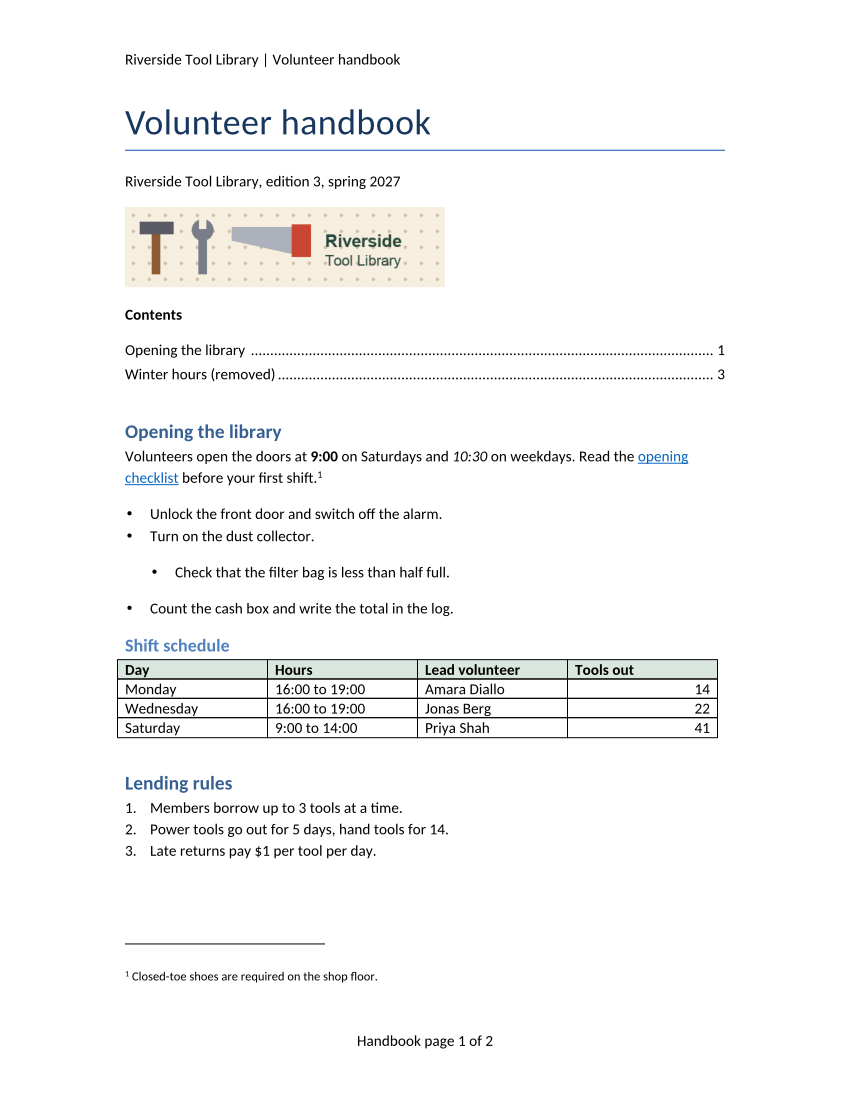
- Input
- volunteer-handbook.docx (43 KB)
- Output
- volunteer-handbook.tiff (145 KB)
- Source
- A two-page volunteer handbook for a fictional tool library, written for this site, with a stale table of contents, a footnote, a comment, a tracked change, a table and a picture. (CC0-1.0). How it was made
- Made by
- 2026-11-04, API build
9eeeb0640aba
Parameters
Send these as form fields next to the file. Names are case-insensitive. If you set one of the documented options below that we don't support yet, the request fails with a 400 that names it instead of returning a file made without it.
| Parameter | What it does |
|---|---|
ImageResolutioninteger, default 150 | Drawing resolution in DPI, also stored in the TIFF's XResolution and YResolution tags when you send it. A Letter page is 1,275 × 1,650 at the default 150 and 850 × 1,100 at 100. Left out, the tags read 1 × 1 with no unit; ConvertAPI's own default is 200.Values: 36–600 |
MultiPageboolean, default true | Leave it on for one file with a frame per page. With false each page comes back as volunteer-handbook-1.tiff, -2.tiff and so on, stored uncompressed (6,311,516 bytes per page at 150 DPI). |
PageRangestring | Which pages to draw: 1, 2-, 1,3. Asking for page 3 of the 2-page sample returns 400 "PageRange asks for page 3, but the document has 2 pages". One selected page comes back as a single uncompressed TIFF.Values: e.g. 1, 2-last |
ImageWidthinteger | Scale each page to this width; ImageWidth=800 gives 800 × 1,035 frames. ScaleProportions=false with both sizes stretches to exactly that box, and ScaleImage=false crops instead of scaling.Values: 1–20,000 |
ImageHeightinteger | Scale each page to this height: 600 gives 464 × 600.Values: 1–20,000 |
ColorSpaceenum, default default | gray removes color and monochrome leaves only black and white pixels; both store each frame as one 8-bit gray channel, so the sample at 150 DPI takes 148,360 bytes in gray and 36,809 in monochrome instead of 249,157. Color frames, by default or with rgb, have three channels and no alpha.Values: default, rgb, gray, monochrome |
IncludeMarkupboolean, default false | Print comments in balloons at the right edge and show the tracked deletion and insertion, shrinking the page content to make room. |
UpdateFieldsboolean, default false | Rebuild the table of contents before layout. The sample's longer TOC then pushes the text onto a third page, so the TIFF has 3 frames. UpdateTableOfContents and UpdateReferences are the same switch. |
BackgroundColorstring | Color laid under each page before drawing (white when left out). |
TransparentColorstring | Adds a fourth, alpha channel in which every pixel of exactly this color is transparent: white clears 91.7% of page 1 at 100 DPI. |
Passwordstring | Opens an encrypted .docx before it is drawn. |
FileNamestring | Base name of the TIFF: volunteer-handbook.tiff unless you set one. |
StoreFileboolean, default false | Return a link that expires after 3 hours instead of the image data. |
What carries over, and what doesn't
Kept
- Both pages in one 148,462-byte file with LZW compression, RGB frames 850 × 1,100 at 100 DPI
- The header line and the footer fields, drawn as "Handbook page 1 of 2" and "page 2 of 2"
- The footnote with its number, the banner picture and the bordered, shaded shift table
- The text as accepted: the lending rule reads "5 days", and the comment is not printed unless you ask for markup
- The table of contents exactly as saved, stale line included, unless you send
UpdateFields
Lost or not yet supported
- Selectable text; the pages are pixels.
- Calibri itself: the server draws Carlito, a font with the same character widths, so lines break in the same places but letter shapes differ.
- A labeled alpha channel when you send
TransparentColor: those frames have four samples per pixel but no ExtraSamples tag, so strict TIFF readers warn before guessing that the fourth is alpha.
Limits
- 2,000 pages per request at most (413 above that).
- 16,000 pixels per side and 100 million pixels per page.
- Requests up to 10 MB on the Free plan or 100 MB on paid plans, all files and fields together; 120 seconds per conversion, then 504.
Where teams use it
Archiving signed Word documents as images
Records systems in insurance, banking and government often store TIFF. One multi-page file per document keeps the pages together, and the DPI tag tells the archive how large to print them.
Preparing pages for OCR or redaction tools
Tools that work on scanned paper take TIFF input. Rendering at 300 DPI gives them clean, artifact-free pages instead of a photograph of a printout.
Questions
How do I get a TIFF per page?
Send MultiPage=false. You then get volunteer-handbook-1.tiff and volunteer-handbook-2.tiff. Those single-page files are written without compression, so lower ImageResolution or use ColorSpace=gray if their size matters.
Can the TIFF show comments and tracked changes?
Yes, with IncludeMarkup=true. The sample's page 1 then shows Priya Shah's comment in a balloon, the deleted 7 struck through and the inserted 5 underlined. Without it, the pages show the document with changes accepted and no comments.
Which resolution should I choose?
100 to 150 for viewing on screen, 200 to match ConvertAPI's default, and 300 for OCR or print. At 300 DPI a Letter page is 2,550 × 3,300 pixels, well inside the 100-million-pixel limit.
Convert your first DOCX file in a minute.