DOC to TIFF API
Send a Word 97-2003 file to POST /v2/convert/doc/to/tiff and get every page back in a single multi-page TIFF. Our converter lays the document out, draws each page at 150 DPI unless you choose otherwise, and stores the frames with LZW compression.
- Endpoint
- POST /v2/
convert/ doc/ to/ tiff - Accepts
- doc
- Sample timing
- 0.154 s median of 5 runsHow we measure
- Request size
- Up to 10 MB on the Free plan or 100 MB on paid plans, all files together
Request and response
Every sample below ran against the API before this page was published. Set PDFCONVERSIONAPI_KEY to your key and run it as is.
curl -sS -X POST \
  https://api.pdfconversionapi.com/v2/convert/doc/to/tiff \
  -H "Authorization: Bearer $PDFCONVERSIONAPI_KEY" \
  -F File=@loan-agreement.doc \
  -o response.json

# FileData is base64. Save the first file in converted/,
# or print the JSON error.
if jq -e '.Files' response.json > /dev/null; then
  mkdir -p converted
  name=$(jq -r '.Files[0].FileName' response.json)
  jq -r '.Files[0].FileData' response.json \
    | base64 --decode > "converted/$name"
else
  cat response.json
fi
import base64
import os
import requests
key = os.environ["PDFCONVERSIONAPI_KEY"]
response = requests.post(
"https://api.pdfconversionapi.com/v2/convert/doc/to/tiff",
headers={"Authorization": f"Bearer {key}"},
files=[("File", open("loan-agreement.doc", "rb"))],
timeout=180,
)
result = response.json()
if not response.ok:
raise SystemExit(f"{result['Code']}: {result['Message']}")
os.makedirs("converted", exist_ok=True)
for file in result["Files"]:
path = os.path.join("converted", file["FileName"])
with open(path, "wb") as out:
out.write(base64.b64decode(file["FileData"]))
print(path, file["FileSize"], "bytes")
import { mkdir, readFile, writeFile } from "node:fs/promises";
import { join } from "node:path";

const form = new FormData();
const file = "loan-agreement.doc";
form.append("File", new Blob([await readFile(file)]), file);

const url = "https://api.pdfconversionapi.com/v2/convert/doc/to/tiff";
const key = process.env.PDFCONVERSIONAPI_KEY;
const response = await fetch(url, {
  method: "POST",
  headers: { Authorization: `Bearer ${key}` },
  body: form,
});
const result = await response.json();
if (!response.ok) {
  throw new Error(`${result.Code}: ${result.Message}`);
}

await mkdir("converted", { recursive: true });
for (const file of result.Files) {
  const path = join("converted", file.FileName);
  await writeFile(path, Buffer.from(file.FileData, "base64"));
  console.log(path, file.FileSize, "bytes");
}
{
  "ConversionCost": 1,
  "ConversionTime": 0.154,
  "Files": [
    {
      "FileName": "loan-agreement.tiff",
      "FileExt": "tiff",
      "FileSize": 174870,
      "FileData": "SUkqAOUXAgABAAAAAQAAAAEA…"
    }
  ]
}
Response from our test run on 2026-11-03. ConversionTime shows the median of 5 runs. FileData is shortened here; the real response carries the whole file as base64.
The sample, converted
The same file the code sends. Download the input and the output and compare them yourself.
- Input
- loan-agreement.doc (26 KB)
- Output
- loan-agreement.tiff (171 KB)
- Source
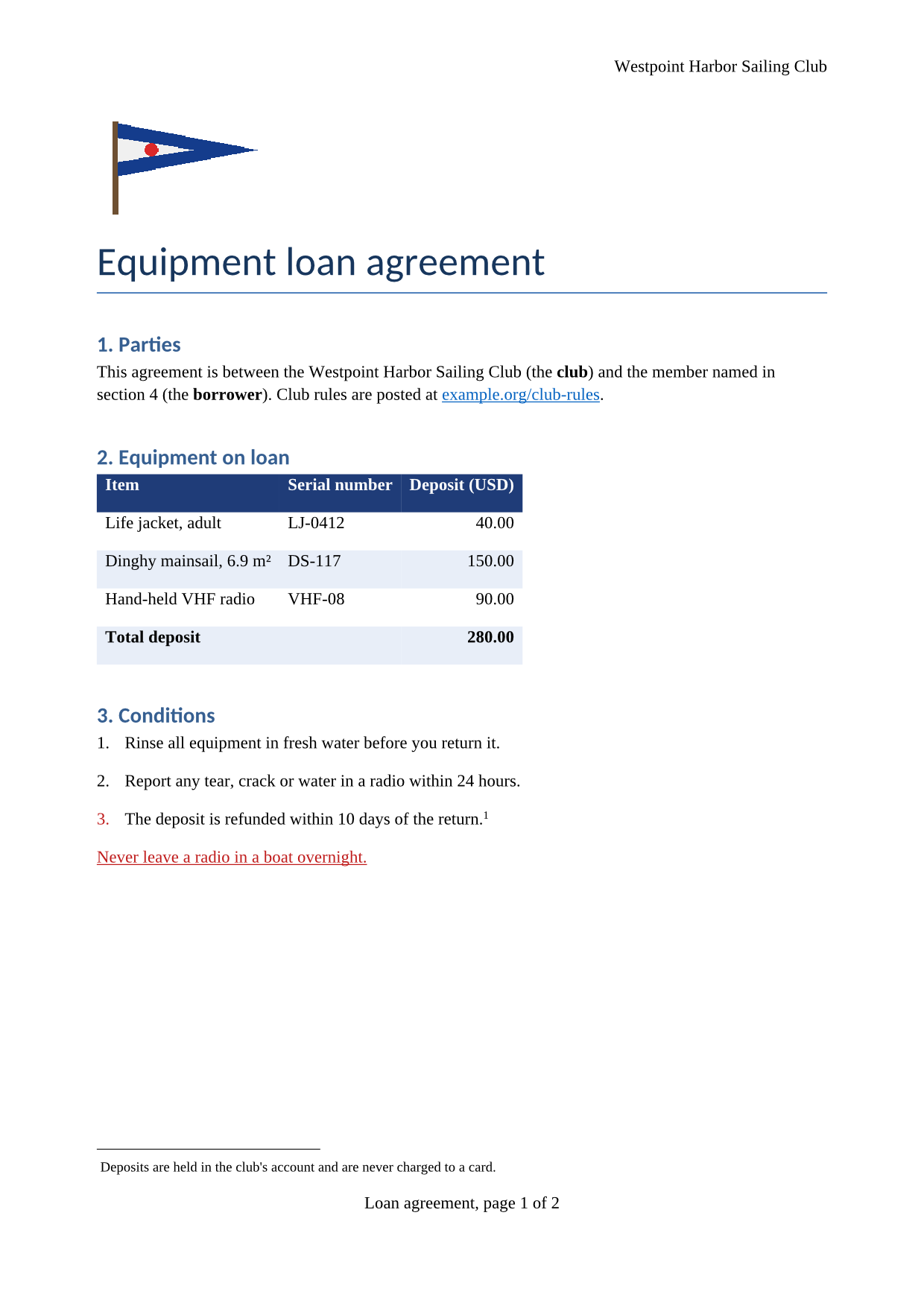
- A two-page equipment loan agreement for a fictional sailing club, written for this site and saved in the Word 97-2003 format, with a shaded table, a footnote, a picture and page-numbered footers. (CC0-1.0). How it was made
- Made by
- 2026-11-04, API build
9eeeb0640aba
Parameters
Send these as form fields next to the file. Names are case-insensitive. If you set one of the documented options below that we don't support yet, the request fails with a 400 that names it instead of returning a file made without it.
| Parameter | What it does |
|---|---|
MultiPageboolean, default true | One TIFF with a frame per page. false returns one file per page instead (loan-agreement-1.tiff, loan-agreement-2.tiff), and those single-page files are written without compression: 6,521,426 bytes each at 150 DPI. |
ImageResolutioninteger, default 150 | Dots per inch the pages are drawn at. An A4 page is 1,240 × 1,753 pixels at 150 and 826 × 1,169 at 100; setting it also writes the value into the TIFF's resolution tags. ConvertAPI's default is 200.Values: 36–600 |
PageRangestring | Pages to draw, such as 2, 1-3 or 2-last. A page past the end returns 400 with the page count. A range that selects a single page returns that page as its own uncompressed file, named with its number.Values: e.g. 2, 1-3, 2- |
ImageWidthinteger | Draw each page this many pixels wide, height in proportion: 600 gives 600 × 849 for the sample's A4 pages. Combine with ImageHeight and ScaleProportions=false to force both sides, or ScaleIfLarger=true to only ever shrink.Values: 1–20,000 |
ImageHeightinteger | Same as ImageWidth, for the height.Values: 1–20,000 |
ColorSpaceenum, default default | gray or monochrome turn the pixels gray or pure black and white, and the multi-page file then stores each frame as one 8-bit gray channel: the sample drops from 174,870 bytes to 99,872 in gray and 27,698 in monochrome. The default and rgb both store three channels without alpha; cmyk returns 400.Values: default, rgb, gray, monochrome |
BackgroundColorstring | Color painted behind each page before it is drawn; white when left out. Names, #RRGGBB or R,G,B. |
TransparentColorstring | Adds a fourth, alpha channel to the frames, with zero alpha for pixels of exactly this color: white clears 93.1% of page 1. |
UpdateFieldsboolean, default false | Refresh fields such as a table of contents before the pages are laid out, so the images show current entries. UpdateTableOfContents and UpdateReferences do the same. |
IncludeMarkupboolean, default false | Draw comments in balloons beside the page and show tracked changes. The sample .doc has neither. |
FileNamestring | Base name of the output: loan-agreement.tiff by default. |
StoreFileboolean, default false | Return a link instead of the TIFF; links last 3 hours. |
What carries over, and what doesn't
Kept
- Both A4 pages in one 174,870-byte file, each frame 1,240 × 1,753 RGB pixels
- The header, the burgee picture and the footer with its fields filled in: "Loan agreement, page 1 of 2" and "page 2 of 2"
- Cell shading: the navy header row with white text and the light blue banding
- The red underlined warning line and the blue link text
- Lossless pixels: LZW compression changes no pixel value
Lost or not yet supported
- Table borders. The navy lines around the equipment table are not drawn, and the table is about 3.8 inches wide where another office suite draws it across the full 6.5-inch text width.
- The footnote's number at the foot of page 1: the reference mark is in the text, but the note below the line starts without its "1".
- A resolution in the file unless you set one: without
ImageResolutionthe tags read 1 × 1 with no unit. - Selectable text. The pages are pictures; use
/v2/convert/doc/to/pdfwhen readers need to search.
Limits
- Up to 2,000 pages per request; more returns 413.
- Each page is limited to 16,000 pixels per side and 100 million pixels.
- Requests up to 10 MB on the Free plan or 100 MB on paid plans, all files and fields together; 120 seconds per conversion, then 504.
- A .doc with a password can't be drawn yet: 422 "the input file is password-protected" without
Password, 400 "password-protected DOC files can't be converted to TIFF yet" with it. Unprotected files ignorePassword.
Where teams use it
Document management systems that store TIFF
Many records and imaging systems file every page as TIFF. One request turns a .doc from a shared drive into the multi-page file those systems ingest, with the page count fixed at conversion time.
Faxing old forms
Fax gateways take TIFF pages. ColorSpace=monochrome with ImageResolution=200 gives pure black-and-white pages close to fine fax resolution; check with your provider whether it needs 1-bit Group 4 files, which this route does not write.
Freezing a legacy document's look
A TIFF can't be edited by accident. Rendering an old agreement to images records the version that was signed, page by page.
Questions
Why is my one-page TIFF so large?
Single pages skip the multi-page writer, which is the one that compresses. One page of the sample at 150 DPI is 6,521,426 bytes uncompressed, while both pages together in the default multi-page file take 174,870 bytes. If you need one page, lower ImageResolution or convert to PNG, which is always compressed.
Can I get a 1-bit black-and-white TIFF?
Not yet. ColorSpace=monochrome makes every pixel black or white, but each frame is stored as 8-bit gray, one byte per pixel, with LZW (27,698 bytes for the sample). Software that insists on 1-bit CCITT Group 4 data will need to convert it further.
Why does the table look different from Word?
Our converter reads the .doc itself, and for this sample it did not pick up the table borders or the table width. The DOC to XML route, which reads .doc files with a different converter, kept the navy borders in our test. Check a few pages of your own files before a large batch.
How do I pick the DPI to match ConvertAPI?
Send ImageResolution=200. Our default is 150, ConvertAPI's is 200, so set it explicitly when you move code over. Values outside 36 to 600 return 400.
Convert your first DOC file in a minute.