DOCX to WebP API
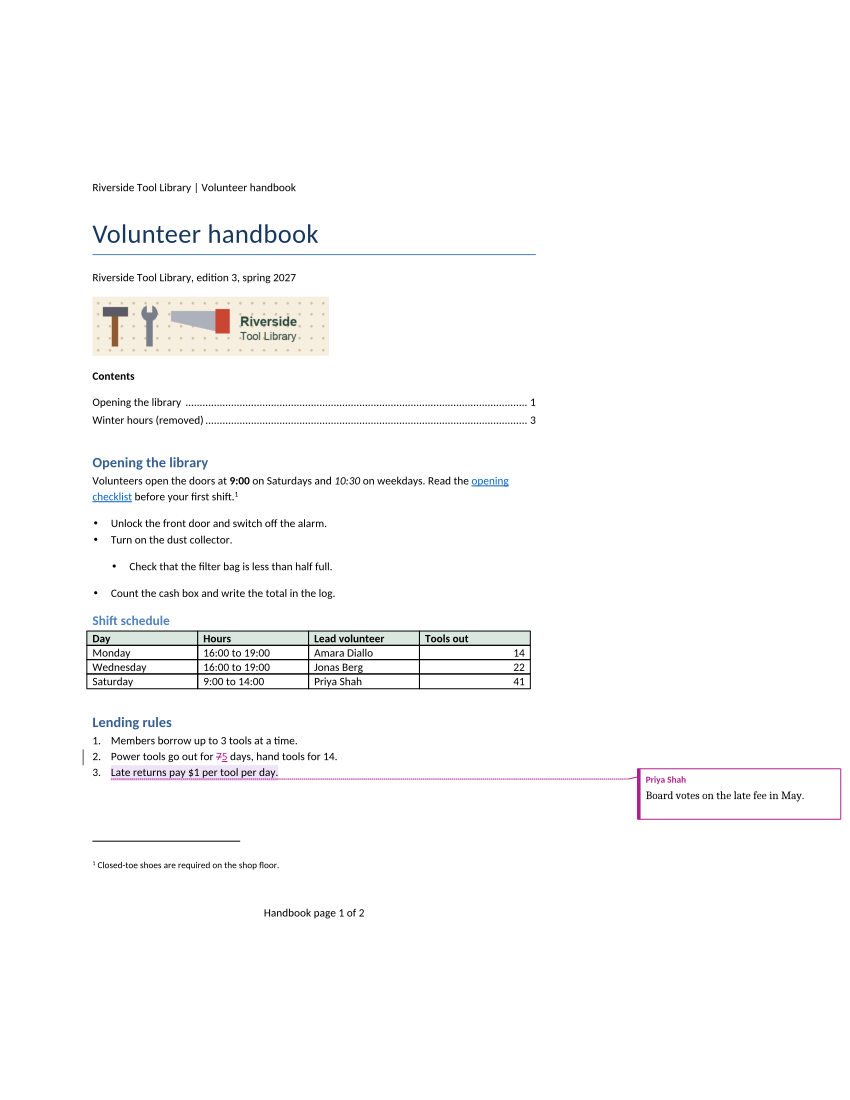
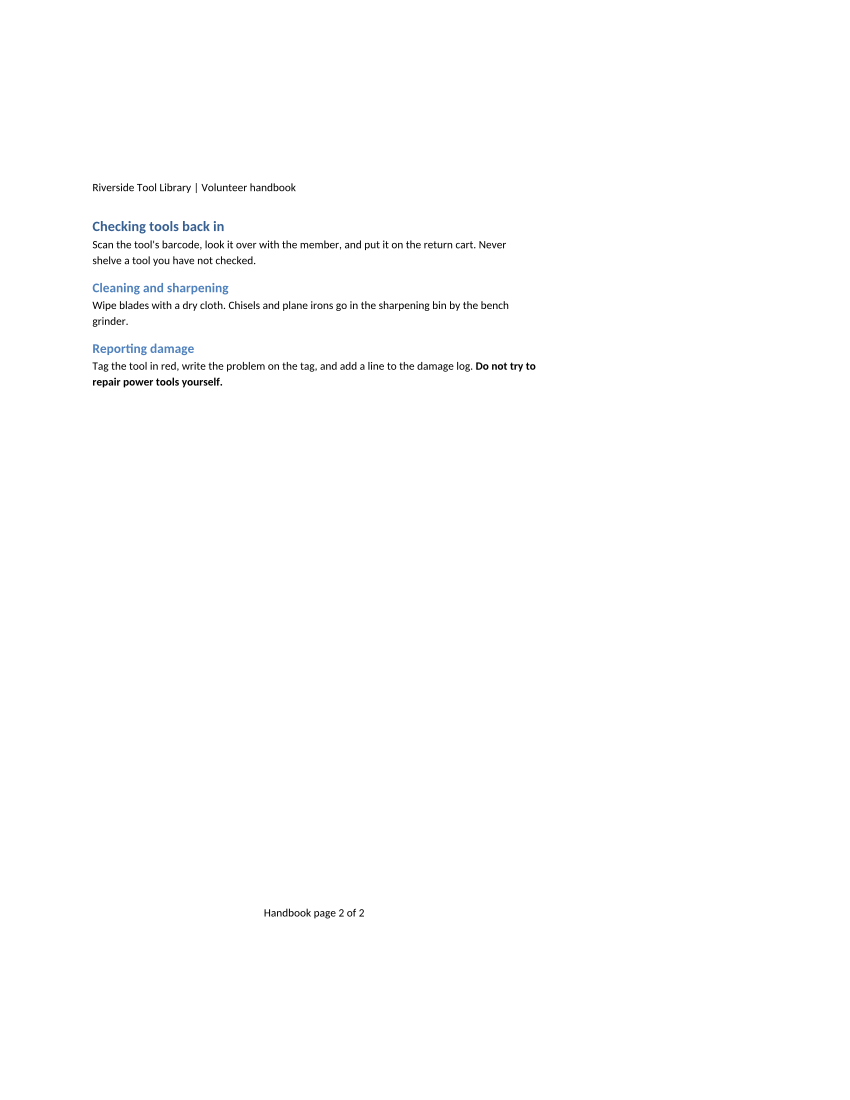
POST /v2/convert/docx/to/webp returns one lossless WebP per page of a Word document. The sample turns on IncludeMarkup at 100 DPI, so page 1 shows the reviewer's comment in a margin balloon next to the tracked edit.
- Endpoint
- POST /v2/
convert/ docx/ to/ webp - Accepts
- docx
- Sample timing
- 45 ms median of 5 runsHow we measure
- Request size
- Up to 10 MB on the Free plan or 100 MB on paid plans, all files together
Request and response
Every sample below ran against the API before this page was published. Set PDFCONVERSIONAPI_KEY to your key and run it as is.
curl -sS -X POST \
  https://api.pdfconversionapi.com/v2/convert/docx/to/webp \
  -H "Authorization: Bearer $PDFCONVERSIONAPI_KEY" \
  -F File=@volunteer-handbook.docx \
  --form-string IncludeMarkup=true \
  --form-string ImageResolution=100 \
  -o response.json

# FileData is base64. Save the first file in converted/,
# or print the JSON error.
if jq -e '.Files' response.json > /dev/null; then
  mkdir -p converted
  name=$(jq -r '.Files[0].FileName' response.json)
  jq -r '.Files[0].FileData' response.json \
    | base64 --decode > "converted/$name"
else
  cat response.json
fi
import base64
import os
import requests
key = os.environ["PDFCONVERSIONAPI_KEY"]
response = requests.post(
"https://api.pdfconversionapi.com/v2/convert/docx/to/webp",
headers={"Authorization": f"Bearer {key}"},
files=[("File", open("volunteer-handbook.docx", "rb"))],
data={
"IncludeMarkup": "true",
"ImageResolution": "100",
},
timeout=180,
)
result = response.json()
if not response.ok:
raise SystemExit(f"{result['Code']}: {result['Message']}")
os.makedirs("converted", exist_ok=True)
for file in result["Files"]:
path = os.path.join("converted", file["FileName"])
with open(path, "wb") as out:
out.write(base64.b64decode(file["FileData"]))
print(path, file["FileSize"], "bytes")
import { mkdir, readFile, writeFile } from "node:fs/promises";
import { join } from "node:path";

const form = new FormData();
const file = "volunteer-handbook.docx";
form.append("File", new Blob([await readFile(file)]), file);
form.append("IncludeMarkup", "true");
form.append("ImageResolution", "100");

const url = "https://api.pdfconversionapi.com/v2/convert/docx/to/webp";
const key = process.env.PDFCONVERSIONAPI_KEY;
const response = await fetch(url, {
  method: "POST",
  headers: { Authorization: `Bearer ${key}` },
  body: form,
});
const result = await response.json();
if (!response.ok) {
  throw new Error(`${result.Code}: ${result.Message}`);
}

await mkdir("converted", { recursive: true });
for (const file of result.Files) {
  const path = join("converted", file.FileName);
  await writeFile(path, Buffer.from(file.FileData, "base64"));
  console.log(path, file.FileSize, "bytes");
}
{
  "ConversionCost": 1,
  "ConversionTime": 0.045,
  "Files": [
    {
      "FileName": "volunteer-handbook-1.webp",
      "FileExt": "webp",
      "FileSize": 60068,
      "FileData": "UklGRpzqAABXRUJQVlA4TI/q…"
    },
    {
      "FileName": "volunteer-handbook-2.webp",
      "FileExt": "webp",
      "FileSize": 23378,
      "FileData": "UklGRkpbAABXRUJQVlA4TD1b…"
    }
  ]
}
Response from our test run on 2026-11-03. ConversionTime shows the median of 5 runs. FileData is shortened here; the real response carries the whole file as base64.
The sample, converted
The same file the code sends. Download the input and the output and compare them yourself.
- Input
- volunteer-handbook.docx (43 KB)
- Output
- volunteer-handbook-1.webp (59 KB)volunteer-handbook-2.webp (23 KB)
- Source
- A two-page volunteer handbook for a fictional tool library, written for this site, with a stale table of contents, a footnote, a comment, a tracked change, a table and a picture. (CC0-1.0). How it was made
- Made by
- 2026-11-04, API build
9eeeb0640aba
Parameters
Send these as form fields next to the file. Names are case-insensitive. If you set one of the documented options below that we don't support yet, the request fails with a 400 that names it instead of returning a file made without it.
| Parameter | What it does |
|---|---|
IncludeMarkupboolean, default false | Draw review markup: comment balloons with the author's name in the right margin, deletions struck through, insertions underlined and a change bar. The page content is scaled down to fit the balloons. Off, the pages show the text with every change accepted. |
ImageResolutioninteger, default 150 | How finely pages are drawn. Letter pages measure 850 × 1,100 pixels at 100 (the sample) and 1,275 × 1,650 at 150. No DPI is stored, since WebP has no field for it.Values: 36–600 |
ImageWidthinteger | Output width in pixels; the height follows. At ImageWidth=600 the handbook's two pages are 47,988 and 21,696 bytes without markup, and 38,896 and 14,410 with the sample's IncludeMarkup=true.Values: 1–20,000 |
ImageHeightinteger | Output height in pixels, width in proportion.Values: 1–20,000 |
PageRangestring | Draw only some pages; PageRange=1 returns volunteer-handbook-1.webp alone.Values: e.g. 1, 2-last |
UpdateFieldsboolean, default false | Rebuild the stale table of contents before drawing; also accepted as UpdateTableOfContents or UpdateReferences. |
TransparentColorstring | Make one exact color fully transparent, typically white for the paper. |
BackgroundColorstring | Paint a color under the page before drawing it; white by default. |
ColorSpaceenum, default default | gray or monochrome for colorless previews.Values: default, rgb, gray, monochrome |
Passwordstring | Password of an encrypted .docx. |
FileNamestring | Stem for the page files, followed by the page number. |
StoreFileboolean, default false | Store the images and return one link per page, valid for 3 hours. |
Not supported yet
Setting one of these to anything but its default returns 400.
| Option | What to do instead |
|---|---|
ImageQuality | Pages are encoded losslessly. 75, ConvertAPI's default, is accepted; ImageQuality=50 returns 400 "ImageQuality is not supported yet for DOCX → WebP". |
What carries over, and what doesn't
Kept
- With markup: Priya Shah's balloon reading "Board votes on the late fee in May.", the struck-through 7 and the underlined 5
- Header, footer ("Handbook page 1 of 2"), the numbered footnote, the banner and the shaded table
- Exact pixels: VP8L lossless encoding, so small text has no blocky artifacts
- One file per page: 60,068 bytes for page 1 and 23,378 for page 2 in the sample
Lost or not yet supported
- Full-size text when markup is on: the page is scaled down to make room for the balloon column.
- Calibri letter shapes, drawn with the metric-compatible Carlito.
- Lossy compression. For photo-heavy pages,
/v2/convert/docx/to/jpggives smaller files.
Limits
- At most 2,000 pages per request, then 413.
- Page images up to 16,000 pixels per side and 100 million pixels.
- Requests up to 10 MB on the Free plan or 100 MB on paid plans, all files and fields together; 120 seconds per conversion, then 504.
Where teams use it
Showing review state in a web app
A document review tool can show each page with its open comments drawn in, without a Word viewer in the browser. Regenerate the images whenever a reviewer saves.
Previews of generated Word files
Apps that fill DOCX templates can show users what they are about to download. WebP keeps text edges exact, and ImageWidth sets a size that fits the layout.
Questions
Why is the page smaller with `IncludeMarkup=true`?
The image keeps the page's size, 850 × 1,100 at 100 DPI, and the document is shrunk inside it so the comment balloons fit in a column on the right.
Can I get lossy WebP for smaller files?
No, only lossless WebP is written today, and ImageQuality is refused unless it equals 75. Reduce ImageResolution or set ImageWidth instead; at 600 pixels wide the first page is 47,988 bytes without markup and 38,896 with it, against 114,948 at the default 150 DPI.
Do tracked changes show without markup?
No. Without IncludeMarkup, deleted text disappears and inserted text looks like ordinary text, so page 1 of the sample reads "5 days" with no sign of the edit.
Convert your first DOCX file in a minute.