ODT to WebP API
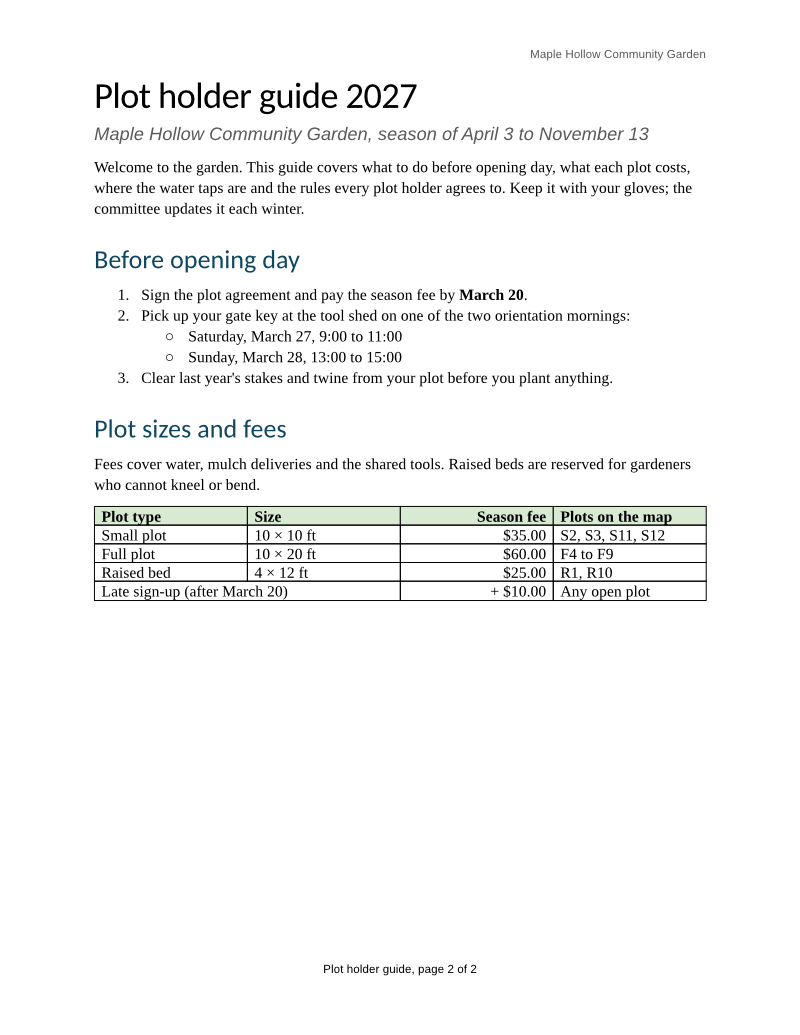
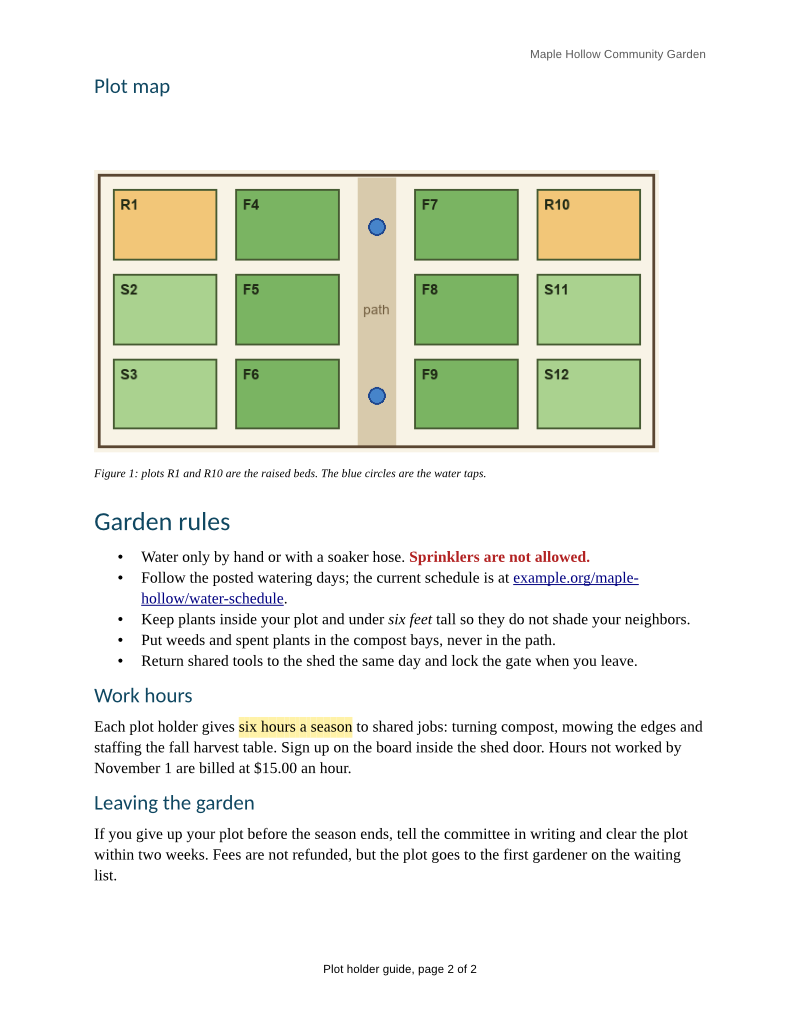
POST an .odt file to /v2/convert/odt/to/webp and get a lossless WebP image of each page. The sample asks for 800 pixels across and gets two 800 × 1,035 pages of 74,204 and 75,986 bytes, 44% of the same pages as PNG.
- Endpoint
- POST /v2/
convert/ odt/ to/ webp - Accepts
- odt
- Sample timing
- 41 ms median of 5 runsHow we measure
- Request size
- Up to 10 MB on the Free plan or 100 MB on paid plans, all files together
Request and response
Every sample below ran against the API before this page was published. Set PDFCONVERSIONAPI_KEY to your key and run it as is.
curl -sS -X POST \
  https://api.pdfconversionapi.com/v2/convert/odt/to/webp \
  -H "Authorization: Bearer $PDFCONVERSIONAPI_KEY" \
  -F File=@garden-plot-guide.odt \
  --form-string ImageWidth=800 \
  -o response.json

# FileData is base64. Save the first file in converted/,
# or print the JSON error.
if jq -e '.Files' response.json > /dev/null; then
  mkdir -p converted
  name=$(jq -r '.Files[0].FileName' response.json)
  jq -r '.Files[0].FileData' response.json \
    | base64 --decode > "converted/$name"
else
  cat response.json
fi
import base64
import os
import requests
key = os.environ["PDFCONVERSIONAPI_KEY"]
response = requests.post(
"https://api.pdfconversionapi.com/v2/convert/odt/to/webp",
headers={"Authorization": f"Bearer {key}"},
files=[("File", open("garden-plot-guide.odt", "rb"))],
data={
"ImageWidth": "800",
},
timeout=180,
)
result = response.json()
if not response.ok:
raise SystemExit(f"{result['Code']}: {result['Message']}")
os.makedirs("converted", exist_ok=True)
for file in result["Files"]:
path = os.path.join("converted", file["FileName"])
with open(path, "wb") as out:
out.write(base64.b64decode(file["FileData"]))
print(path, file["FileSize"], "bytes")
import { mkdir, readFile, writeFile } from "node:fs/promises";
import { join } from "node:path";

const form = new FormData();
const file = "garden-plot-guide.odt";
form.append("File", new Blob([await readFile(file)]), file);
form.append("ImageWidth", "800");

const url = "https://api.pdfconversionapi.com/v2/convert/odt/to/webp";
const key = process.env.PDFCONVERSIONAPI_KEY;
const response = await fetch(url, {
  method: "POST",
  headers: { Authorization: `Bearer ${key}` },
  body: form,
});
const result = await response.json();
if (!response.ok) {
  throw new Error(`${result.Code}: ${result.Message}`);
}

await mkdir("converted", { recursive: true });
for (const file of result.Files) {
  const path = join("converted", file.FileName);
  await writeFile(path, Buffer.from(file.FileData, "base64"));
  console.log(path, file.FileSize, "bytes");
}
{
  "ConversionCost": 1,
  "ConversionTime": 0.041,
  "Files": [
    {
      "FileName": "garden-plot-guide-1.webp",
      "FileExt": "webp",
      "FileSize": 74204,
      "FileData": "UklGRtQhAQBXRUJQVlA4TMch…"
    },
    {
      "FileName": "garden-plot-guide-2.webp",
      "FileExt": "webp",
      "FileSize": 75986,
      "FileData": "UklGRsooAQBXRUJQVlA4TL4o…"
    }
  ]
}
Response from our test run on 2026-11-03. ConversionTime shows the median of 5 runs. FileData is shortened here; the real response carries the whole file as base64.
The sample, converted
The same file the code sends. Download the input and the output and compare them yourself.
- Input
- garden-plot-guide.odt (35 KB)
- Output
- garden-plot-guide-1.webp (72 KB)garden-plot-guide-2.webp (74 KB)
- Source
- A two-page plot holder guide for a fictional community garden, with a fee table, a plot map, lists, a footnote and a page-numbered footer. We wrote it for these pages as an OpenDocument text file. (CC0-1.0). How it was made
- Made by
- 2026-11-04, API build
9eeeb0640aba
Parameters
Send these as form fields next to the file. Names are case-insensitive. If you set one of the documented options below that we don't support yet, the request fails with a 400 that names it instead of returning a file made without it.
| Parameter | What it does |
|---|---|
ImageWidthinteger | Page width in pixels, as the sample uses. The page is drawn at the scale that width needs rather than drawn larger and shrunk, and the height follows the Letter shape: 800 gives 1,035.Values: 1–20000 |
ImageHeightinteger | Page height in pixels. On its own it sets the width from the page shape; with ImageWidth, the page fits inside both.Values: 1–20000 |
ScaleProportionsboolean, default true | false with both sizes stretches each page to exactly that width and height. |
ImageResolutioninteger, default 150 | Drawing scale in DPI when no pixel size is given: 100 gives 850 × 1,100 pages (79,912 and 79,120 bytes for the sample). WebP has no field for a DPI value, so nothing is recorded in the file.Values: 36–600 |
PageRangestring | Draw only some pages, such as 1 or 2-last; files are named by page, as in garden-plot-guide-2.webp. |
TransparentColorstring | Turn every pixel of exactly this color transparent; the WebP then carries an alpha channel. With white, 92.1% of page 1 at 72 DPI became see-through, and 93.1% at the sample's 800-pixel width.Values: white, black, red, green, blue, gray, #RRGGBB or R,G,B |
BackgroundColorstring | Color put down under each page first; it shows in the margins and blank space.Values: Same as TransparentColor |
FileNamestring | Stem for the files: FileName=plots returns plots-1.webp and plots-2.webp. |
StoreFileboolean, default false | Give back links (valid 3 hours) in place of the image data. |
What carries over, and what doesn't
Kept
- Every pixel: the images are lossless WebP (VP8L), so text edges are exactly as drawn
- Transparency only where you ask for it:
TransparentColoradds an alpha channel, and other pages are written as RGB - The page layout of the ODT to PDF route, including the header and footer on each page
- Full color for the green table header, the red warning, the highlight and the map
Lost or not yet supported
- Size control through quality: the encoder is lossless only, so
ImageQualityis ignored. To make files smaller, lowerImageWidthorImageResolution. - A stored DPI, which the WebP format has no place for.
- The page number on page 1, drawn as "page 2 of 2" from the value stored in the ODT, and the footnote, which is left out.
- The ODT's own heading colors and fonts, and its table column widths.
Limits
- At most 2,000 pages per request; each page up to 16,000 pixels per side and 100 million pixels. Larger requests return 413.
- A password-protected ODT returns 422 without
Passwordand 400 "password-protected ODT files can't be converted to WebP yet" with it. - Requests up to 10 MB on the Free plan or 100 MB on paid plans, all files and fields together; 120 seconds per conversion.
Where teams use it
Document previews on web pages
Current browsers display WebP directly, and the sample's lossless WebP pages are about 44% of the size of the same pages as PNG, with none of the halos JPEG leaves around small letters.
Thumbnails at a fixed width
Send PageRange=1 with an ImageWidth that matches your layout, and every document in a list comes back the same width whatever its paper size.
Questions
Is the WebP lossy or lossless?
Lossless. Each file is a VP8L WebP, RGB unless TransparentColor adds an alpha channel, and ImageQuality has no effect: quality 10 and the default gave the same bytes. Lossless suits text pages, which keep sharp edges and still compress well.
How much smaller than PNG is it?
For the sample at 800 pixels wide, page 1 is 74,204 bytes as WebP and 177,740 bytes as PNG. At the default 150 DPI the two pages are 130,426 and 126,346 bytes as WebP against 317,926 and 293,381 as PNG.
Why does page 1 show page 2 of 2 in the footer?
The footer's page field is drawn with the value the ODT stored when it was last saved, 2 in the sample, rather than counted for each page. The PDF and DOCX results carry the same stored value. Leave page numbers out of the footer if the images will be shown.
Convert your first ODT file in a minute.