ODT to JPG API
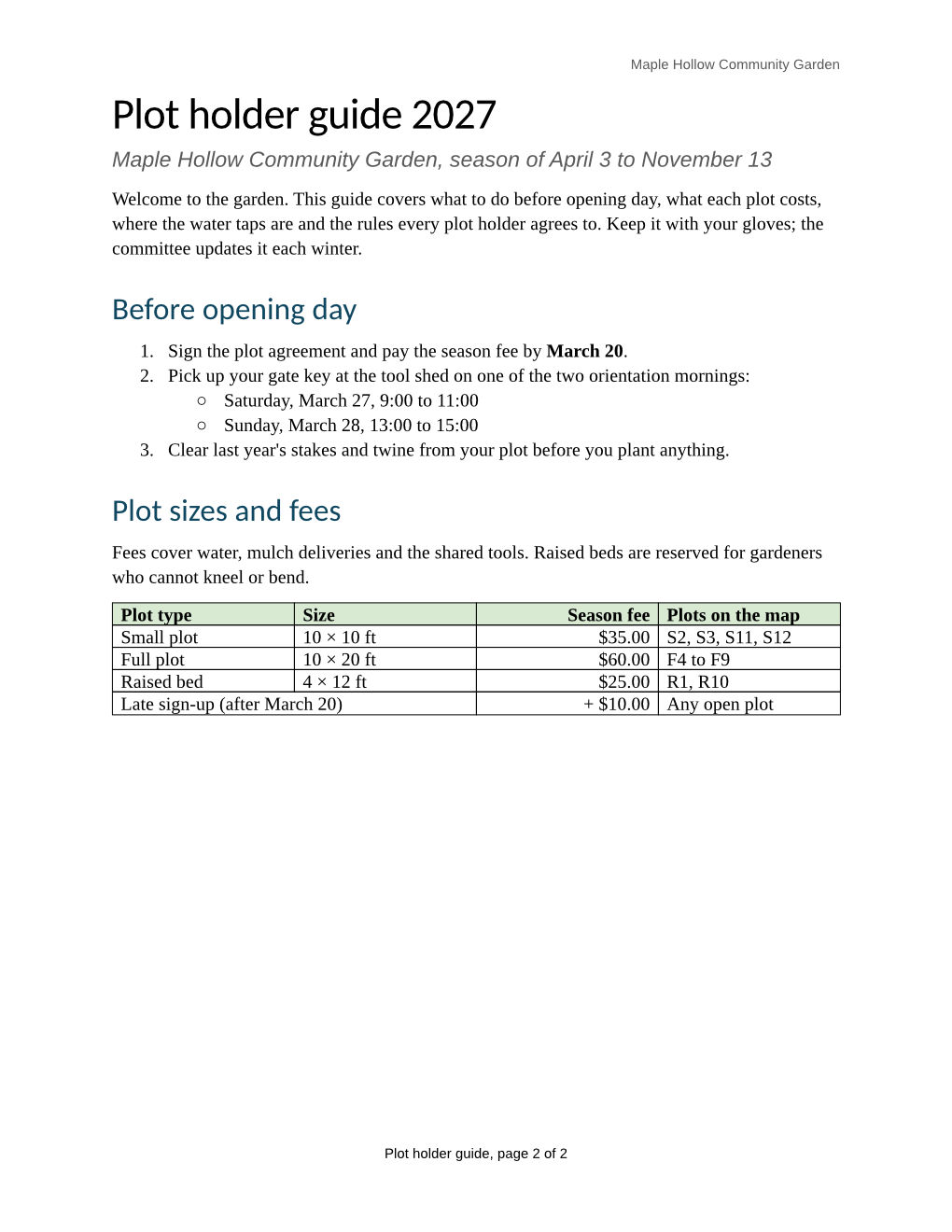
POST an OpenDocument text file to /v2/convert/odt/to/jpg and get a JPEG for each page, or only the pages you name. The sample asks for page 1 at 120 DPI and quality 80 and gets a 1,020 × 1,320 image of 137,265 bytes.
- Endpoint
- POST /v2/
convert/ odt/ to/ jpg - Accepts
- odt
- Sample timing
- 45 ms median of 5 runsHow we measure
- Request size
- Up to 10 MB on the Free plan or 100 MB on paid plans, all files together
Request and response
Every sample below ran against the API before this page was published. Set PDFCONVERSIONAPI_KEY to your key and run it as is.
curl -sS -X POST \
  https://api.pdfconversionapi.com/v2/convert/odt/to/jpg \
  -H "Authorization: Bearer $PDFCONVERSIONAPI_KEY" \
  -F File=@garden-plot-guide.odt \
  --form-string PageRange=1 \
  --form-string ImageResolution=120 \
  --form-string ImageQuality=80 \
  -o response.json

# FileData is base64. Save the first file in converted/,
# or print the JSON error.
if jq -e '.Files' response.json > /dev/null; then
  mkdir -p converted
  name=$(jq -r '.Files[0].FileName' response.json)
  jq -r '.Files[0].FileData' response.json \
    | base64 --decode > "converted/$name"
else
  cat response.json
fi
import base64
import os
import requests
key = os.environ["PDFCONVERSIONAPI_KEY"]
response = requests.post(
"https://api.pdfconversionapi.com/v2/convert/odt/to/jpg",
headers={"Authorization": f"Bearer {key}"},
files=[("File", open("garden-plot-guide.odt", "rb"))],
data={
"PageRange": "1",
"ImageResolution": "120",
"ImageQuality": "80",
},
timeout=180,
)
result = response.json()
if not response.ok:
raise SystemExit(f"{result['Code']}: {result['Message']}")
os.makedirs("converted", exist_ok=True)
for file in result["Files"]:
path = os.path.join("converted", file["FileName"])
with open(path, "wb") as out:
out.write(base64.b64decode(file["FileData"]))
print(path, file["FileSize"], "bytes")
import { mkdir, readFile, writeFile } from "node:fs/promises";
import { join } from "node:path";

const form = new FormData();
const file = "garden-plot-guide.odt";
form.append("File", new Blob([await readFile(file)]), file);
form.append("PageRange", "1");
form.append("ImageResolution", "120");
form.append("ImageQuality", "80");

const url = "https://api.pdfconversionapi.com/v2/convert/odt/to/jpg";
const key = process.env.PDFCONVERSIONAPI_KEY;
const response = await fetch(url, {
  method: "POST",
  headers: { Authorization: `Bearer ${key}` },
  body: form,
});
const result = await response.json();
if (!response.ok) {
  throw new Error(`${result.Code}: ${result.Message}`);
}

await mkdir("converted", { recursive: true });
for (const file of result.Files) {
  const path = join("converted", file.FileName);
  await writeFile(path, Buffer.from(file.FileData, "base64"));
  console.log(path, file.FileSize, "bytes");
}
{
  "ConversionCost": 1,
  "ConversionTime": 0.045,
  "Files": [
    {
      "FileName": "garden-plot-guide-1.jpg",
      "FileExt": "jpg",
      "FileSize": 137265,
      "FileData": "/9j/4AAQSkZJRgABAgEAeAB4…"
    }
  ]
}
Response from our test run on 2026-11-03. ConversionTime shows the median of 5 runs. FileData is shortened here; the real response carries the whole file as base64.
The sample, converted
The same file the code sends. Download the input and the output and compare them yourself.
- Input
- garden-plot-guide.odt (35 KB)
- Output
- garden-plot-guide-1.jpg (134 KB)
- Source
- A two-page plot holder guide for a fictional community garden, with a fee table, a plot map, lists, a footnote and a page-numbered footer. We wrote it for these pages as an OpenDocument text file. (CC0-1.0). How it was made
- Made by
- 2026-11-04, API build
9eeeb0640aba
Parameters
Send these as form fields next to the file. Names are case-insensitive. If you set one of the documented options below that we don't support yet, the request fails with a 400 that names it instead of returning a file made without it.
| Parameter | What it does |
|---|---|
ImageQualityinteger, default 85 | JPEG quality. Page 1 of the sample at 120 DPI weighs 101,904 bytes at 50, 137,265 at 80 (the sample), 150,502 at 85 and 212,031 at 95. ConvertAPI's documented default is 75; ours is 85. 0 or 101 returns 400.Values: 1–100 |
ImageResolutioninteger, default 150 | Dots per inch used to draw each page, also written into the JPEG's JFIF header when you send it. 120 makes a Letter page 1,020 × 1,320; leaving it out gives 1,275 × 1,650 with a density of 1:1 and no unit in the header.Values: 36–600 |
PageRangestring | Pages to return, such as 1, 2-last or 1,2. Page numbers stay in the file names, so the sample's single file is garden-plot-guide-1.jpg. A page past the end returns 400 with the document's page count. |
ImageWidthinteger | Exact width in pixels, with the height worked out from the page. For the sample, ImageWidth=800 gives 800 × 1,035 JPEGs of 104,325 and 117,840 bytes.Values: 1–20000 |
ImageHeightinteger | Exact height in pixels; with ImageWidth as well, the page fits inside both.Values: 1–20000 |
BackgroundColorstring | Paint this color under the page before it is drawn. Areas the page leaves empty, such as margins, take the color.Values: white, black, red, green, blue, gray, #RRGGBB or R,G,B |
ColorSpaceenum, default default | gray writes a one-channel grayscale JPEG (57,017 bytes for page 1 at 72 DPI, against 66,775 in color); monochrome thresholds to black and white. cmyk returns 400.Values: default, rgb, gray, monochrome |
IncludeMarkupboolean, default false | Show tracked changes in the images: struck-through deletions and colored, underlined insertions. |
FileNamestring | Stem for the page files; FileName=guide returns guide-1.jpg. |
StoreFileboolean, default false | Store each JPEG for 3 hours and return links instead of base64 data. |
What carries over, and what doesn't
Kept
- The layout the PDF route gives the same file, page for page; page 1 holds the title, the numbered steps with their sub-list and the fee table
- Colors: the green table header, the red warning, the highlight and the colored map
- Header and footer text on each page
- A JFIF density of 120 dots per inch in the sample, from the
ImageResolutionsent
Lost or not yet supported
- Clean edges around small type. Zoomed in, faint halos show around the gray 9 pt header text at quality 50, and more at 30.
- Transparency. JPEG has no alpha channel, and
TransparentColoris ignored for this route. - The right page number in the footer: page 1 reads "page 2 of 2", the value stored in the ODT.
- The footnote and the reference mark after "shared tools."
- The ODT's heading look (bold green) and its column widths: headings are drawn in dark blue Carlito and the table's four columns come out equal.
Limits
- Up to 2,000 pages per request (413 above that) and 16,000 pixels per side or 100 million pixels per page.
- A password-protected ODT returns 422 without
Passwordand 400 "password-protected ODT files can't be converted to JPG yet" with it. - Requests up to 10 MB on the Free plan or 100 MB on paid plans, all files and fields together; 120 seconds per conversion, then 504.
Where teams use it
Attaching a page where office files don't display
Email bodies, support tickets and chat messages show JPEGs inline. Send PageRange=1 and attach the first page of the .odt, with a link to the full document.
Small page images for listings and social cards
When file size matters more than lossless detail, JPEG wins: page 1 of the sample at 120 DPI is 242,592 bytes as PNG, 137,265 as JPEG at quality 80 and 101,904 at quality 50.
Questions
Which ImageQuality should I send?
Our default is 85, a little higher than ConvertAPI's 75, so set the value yourself if you are moving code over and want similar file sizes. Lower values shrink the file in steps: the sample's page 1 at 120 DPI goes from 212,031 bytes at 95 to 150,502 at 85, 101,904 at 50 and 86,721 at 30, with halos around small gray text becoming visible when zoomed at the low end.
JPG, PNG or WebP for document pages?
JPEG is smaller than PNG but not exact: page 1 at 72 DPI is 66,775 bytes as JPEG at quality 85 and 123,839 as PNG. If you want small and exact, try /v2/convert/odt/to/webp: at the default 150 DPI its lossless page 1 was 130,426 bytes, less than the 206,667-byte JPEG at quality 85.
Can I get grayscale JPEGs?
Yes, with ColorSpace=gray, which writes a one-channel JPEG instead of a color one with gray pixels. For the sample's page 1 at 72 DPI that is 57,017 bytes against 66,775 in color. ColorSpace=monochrome thresholds every pixel to black or white before compressing.
Does the JPEG carry a resolution?
Only when you send ImageResolution: the value goes into the JFIF header as dots per inch (120 in the sample). Without it the header says 1:1 with no unit, and the program that opens the file picks its own default.
Convert your first ODT file in a minute.