RTF to WebP API
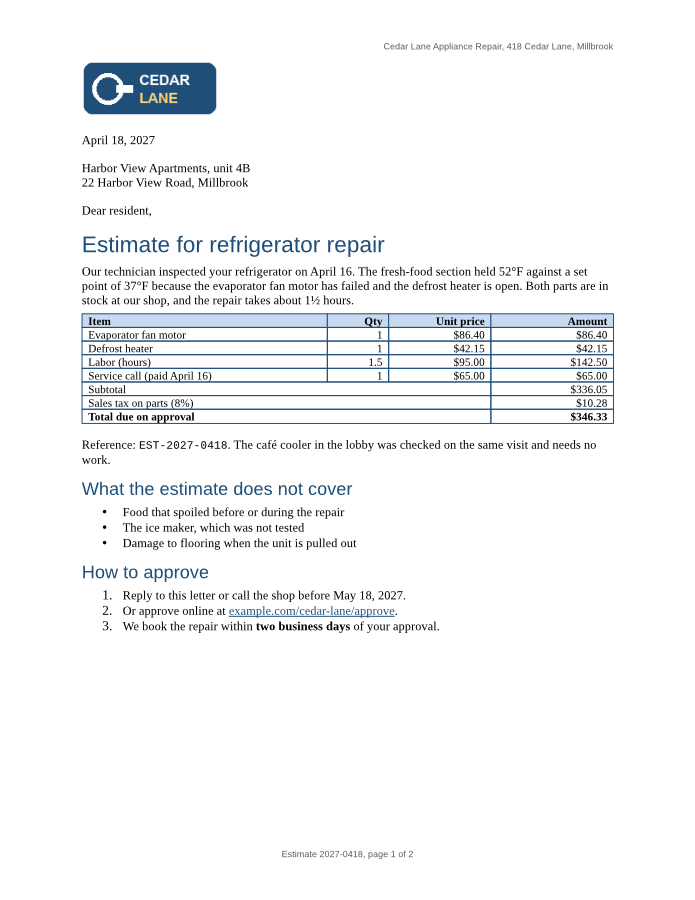
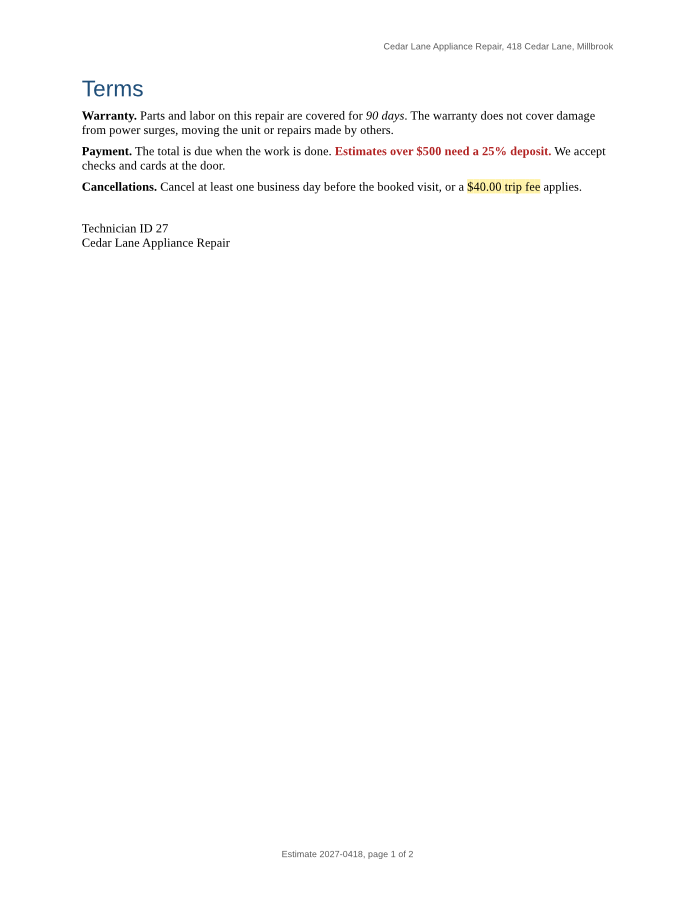
POST an .rtf file to /v2/convert/rtf/to/webp and get a lossless WebP for every page. The sample asks for images 900 pixels tall and gets two 695 × 900 pages of 67,096 and 25,758 bytes.
- Endpoint
- POST /v2/
convert/ rtf/ to/ webp - Accepts
- rtf
- Sample timing
- 37 ms median of 5 runsHow we measure
- Request size
- Up to 10 MB on the Free plan or 100 MB on paid plans, all files together
Request and response
Every sample below ran against the API before this page was published. Set PDFCONVERSIONAPI_KEY to your key and run it as is.
curl -sS -X POST \
  https://api.pdfconversionapi.com/v2/convert/rtf/to/webp \
  -H "Authorization: Bearer $PDFCONVERSIONAPI_KEY" \
  -F File=@repair-estimate.rtf \
  --form-string ImageHeight=900 \
  -o response.json

# FileData is base64. Save the first file in converted/,
# or print the JSON error.
if jq -e '.Files' response.json > /dev/null; then
  mkdir -p converted
  name=$(jq -r '.Files[0].FileName' response.json)
  jq -r '.Files[0].FileData' response.json \
    | base64 --decode > "converted/$name"
else
  cat response.json
fi
import base64
import os
import requests
key = os.environ["PDFCONVERSIONAPI_KEY"]
response = requests.post(
"https://api.pdfconversionapi.com/v2/convert/rtf/to/webp",
headers={"Authorization": f"Bearer {key}"},
files=[("File", open("repair-estimate.rtf", "rb"))],
data={
"ImageHeight": "900",
},
timeout=180,
)
result = response.json()
if not response.ok:
raise SystemExit(f"{result['Code']}: {result['Message']}")
os.makedirs("converted", exist_ok=True)
for file in result["Files"]:
path = os.path.join("converted", file["FileName"])
with open(path, "wb") as out:
out.write(base64.b64decode(file["FileData"]))
print(path, file["FileSize"], "bytes")
import { mkdir, readFile, writeFile } from "node:fs/promises";
import { join } from "node:path";

const form = new FormData();
const file = "repair-estimate.rtf";
form.append("File", new Blob([await readFile(file)]), file);
form.append("ImageHeight", "900");

const url = "https://api.pdfconversionapi.com/v2/convert/rtf/to/webp";
const key = process.env.PDFCONVERSIONAPI_KEY;
const response = await fetch(url, {
  method: "POST",
  headers: { Authorization: `Bearer ${key}` },
  body: form,
});
const result = await response.json();
if (!response.ok) {
  throw new Error(`${result.Code}: ${result.Message}`);
}

await mkdir("converted", { recursive: true });
for (const file of result.Files) {
  const path = join("converted", file.FileName);
  await writeFile(path, Buffer.from(file.FileData, "base64"));
  console.log(path, file.FileSize, "bytes");
}
{
  "ConversionCost": 1,
  "ConversionTime": 0.037,
  "Files": [
    {
      "FileName": "repair-estimate-1.webp",
      "FileExt": "webp",
      "FileSize": 67096,
      "FileData": "UklGRhAGAQBXRUJQVlA4TAQG…"
    },
    {
      "FileName": "repair-estimate-2.webp",
      "FileExt": "webp",
      "FileSize": 25758,
      "FileData": "UklGRpZkAABXRUJQVlA4TIlk…"
    }
  ]
}
Response from our test run on 2026-11-03. ConversionTime shows the median of 5 runs. FileData is shortened here; the real response carries the whole file as base64.
The sample, converted
The same file the code sends. Download the input and the output and compare them yourself.
- Input
- repair-estimate.rtf (14 KB)
- Output
- repair-estimate-1.webp (66 KB)repair-estimate-2.webp (25 KB)
- Source
- A two-page repair estimate letter from a fictional appliance shop, with a logo, a priced table, lists, a link, a footnote and a page-numbered footer. We wrote it for these pages in Rich Text Format. (CC0-1.0). How it was made
- Made by
- 2026-11-04, API build
9eeeb0640aba
Parameters
Send these as form fields next to the file. Names are case-insensitive. If you set one of the documented options below that we don't support yet, the request fails with a 400 that names it instead of returning a file made without it.
| Parameter | What it does |
|---|---|
ImageHeightinteger | Height of each page image in pixels, as the sample sends. The width follows the Letter shape (900 tall gives 695 wide), and the page is drawn directly at that scale.Values: 1–20000 |
ImageWidthinteger | Width in pixels. With ImageHeight too, the page fits inside the box: 600 by 600 gave 464 × 600.Values: 1–20000 |
ScaleProportionsboolean, default true | false stretches each page to exactly ImageWidth × ImageHeight; 600 by 900 then gives 600 × 900 images with distorted text. |
ImageResolutioninteger, default 150 | Drawing DPI when you don't give a pixel size; nothing is stored in the file, because WebP has no resolution field. 150 makes the letter's pages 1,275 × 1,650 (137,520 and 55,616 bytes).Values: 36–600 |
PageRangestring | Draw some pages only: last with ImageResolution=36 gave an 8,250-byte image of page 2. |
TransparentColorstring | One exact color to make transparent, which adds an alpha channel to the otherwise RGB image. White also removes the white parts of pictures, such as the lettering in the sample's logo.Values: white, black, red, green, blue, gray, #RRGGBB or R,G,B |
BackgroundColorstring | Paint behind the page; it fills margins and areas with no fill of their own.Values: Same as TransparentColor |
FileNamestring | Stem for the image files: FileName=estimate gives estimate-1.webp and estimate-2.webp. |
StoreFileboolean, default false | Return a link per page, valid for 3 hours, instead of base64. |
What carries over, and what doesn't
Kept
- Lossless pixels (VP8L), so the 8 pt header and the 10 pt table text keep clean edges
- Only the channels the page needs: RGB, with alpha added when you send
TransparentColor - The RTF's table geometry, colors and logo as laid out for the PDF route, header and footer included
Lost or not yet supported
- Quality settings: the encoder is lossless only, so
ImageQualityis ignored; size is set by the pixel dimensions. - A DPI value in the file.
- The right page number on page 2 (it shows the stored "page 1 of 2") and the footnote.
- The headings' bold weight and size: heading 1 (15 pt bold in the file) is drawn at 20 pt regular, heading 2 (12 pt bold) at 16 pt regular.
Limits
- At most 2,000 pages per request; each page within 16,000 pixels per side and 100 million pixels.
- Requests up to 10 MB on the Free plan or 100 MB on paid plans, all files and fields together; 120 seconds per conversion, then 504.
Where teams use it
Letter previews in a web app
Show customers the pages of an RTF estimate or letter in the browser. At 900 pixels tall, the sample's two pages are 92,854 bytes in all as WebP against 209,725 as PNG.
Fixed-height page strips
Send ImageHeight so every page of every document comes back the same height, which lines up in a horizontal strip or carousel.
Questions
How do WebP sizes compare with PNG and JPEG here?
At 900 pixels tall the sample's page 1 is 67,096 bytes as lossless WebP, 144,172 as PNG and 76,038 as JPEG at quality 75; page 2 is 25,758, 65,553 and 34,632. For these text pages the lossless WebP is the smallest of the three and the only one that is both small and exact.
Can I make the WebP lossy to save more space?
Not yet. Every WebP from this route is lossless and ImageQuality makes no difference. Reduce ImageHeight or ImageWidth, or use the JPG route with an ImageQuality you choose.
Why isn't the heading bold?
Bold and size set directly on an RTF heading paragraph are not applied, while its color and font are. The sample's 15 pt bold heading 1 is drawn at 20 pt regular in its blue Arial-compatible font.
Convert your first RTF file in a minute.