TXT to PDF API
Send a plain-text file to POST /v2/convert/txt/to/pdf and get back a PDF with selectable text. Every line of the file becomes its own paragraph on Letter pages, and a form feed character starts a new page, as it does in the 2-page sample.
- Endpoint
- POST /v2/
convert/ txt/ to/ pdf - Accepts
- txt
- Sample timing
- 23 ms median of 5 runsHow we measure
- Request size
- Up to 10 MB on the Free plan or 100 MB on paid plans, all files together
Request and response
Every sample below ran against the API before this page was published. Set PDFCONVERSIONAPI_KEY to your key and run it as is.
curl -sS -X POST \
  https://api.pdfconversionapi.com/v2/convert/txt/to/pdf \
  -H "Authorization: Bearer $PDFCONVERSIONAPI_KEY" \
  -F File=@trail-crew-log.txt \
  -o response.json

# FileData is base64. Save the first file in converted/,
# or print the JSON error.
if jq -e '.Files' response.json > /dev/null; then
  mkdir -p converted
  name=$(jq -r '.Files[0].FileName' response.json)
  jq -r '.Files[0].FileData' response.json \
    | base64 --decode > "converted/$name"
else
  cat response.json
fi
import base64
import os
import requests
key = os.environ["PDFCONVERSIONAPI_KEY"]
response = requests.post(
"https://api.pdfconversionapi.com/v2/convert/txt/to/pdf",
headers={"Authorization": f"Bearer {key}"},
files=[("File", open("trail-crew-log.txt", "rb"))],
timeout=180,
)
result = response.json()
if not response.ok:
raise SystemExit(f"{result['Code']}: {result['Message']}")
os.makedirs("converted", exist_ok=True)
for file in result["Files"]:
path = os.path.join("converted", file["FileName"])
with open(path, "wb") as out:
out.write(base64.b64decode(file["FileData"]))
print(path, file["FileSize"], "bytes")
import { mkdir, readFile, writeFile } from "node:fs/promises";
import { join } from "node:path";

const form = new FormData();
const file = "trail-crew-log.txt";
form.append("File", new Blob([await readFile(file)]), file);

const url = "https://api.pdfconversionapi.com/v2/convert/txt/to/pdf";
const key = process.env.PDFCONVERSIONAPI_KEY;
const response = await fetch(url, {
  method: "POST",
  headers: { Authorization: `Bearer ${key}` },
  body: form,
});
const result = await response.json();
if (!response.ok) {
  throw new Error(`${result.Code}: ${result.Message}`);
}

await mkdir("converted", { recursive: true });
for (const file of result.Files) {
  const path = join("converted", file.FileName);
  await writeFile(path, Buffer.from(file.FileData, "base64"));
  console.log(path, file.FileSize, "bytes");
}
{
  "ConversionCost": 1,
  "ConversionTime": 0.023,
  "Files": [
    {
      "FileName": "trail-crew-log.pdf",
      "FileExt": "pdf",
      "FileSize": 21512,
      "FileData": "JVBERi0xLjcKJYCAgIAKMSAw…"
    }
  ]
}
Response from our test run on 2026-11-03. ConversionTime shows the median of 5 runs. FileData is shortened here; the real response carries the whole file as base64.
The sample, converted
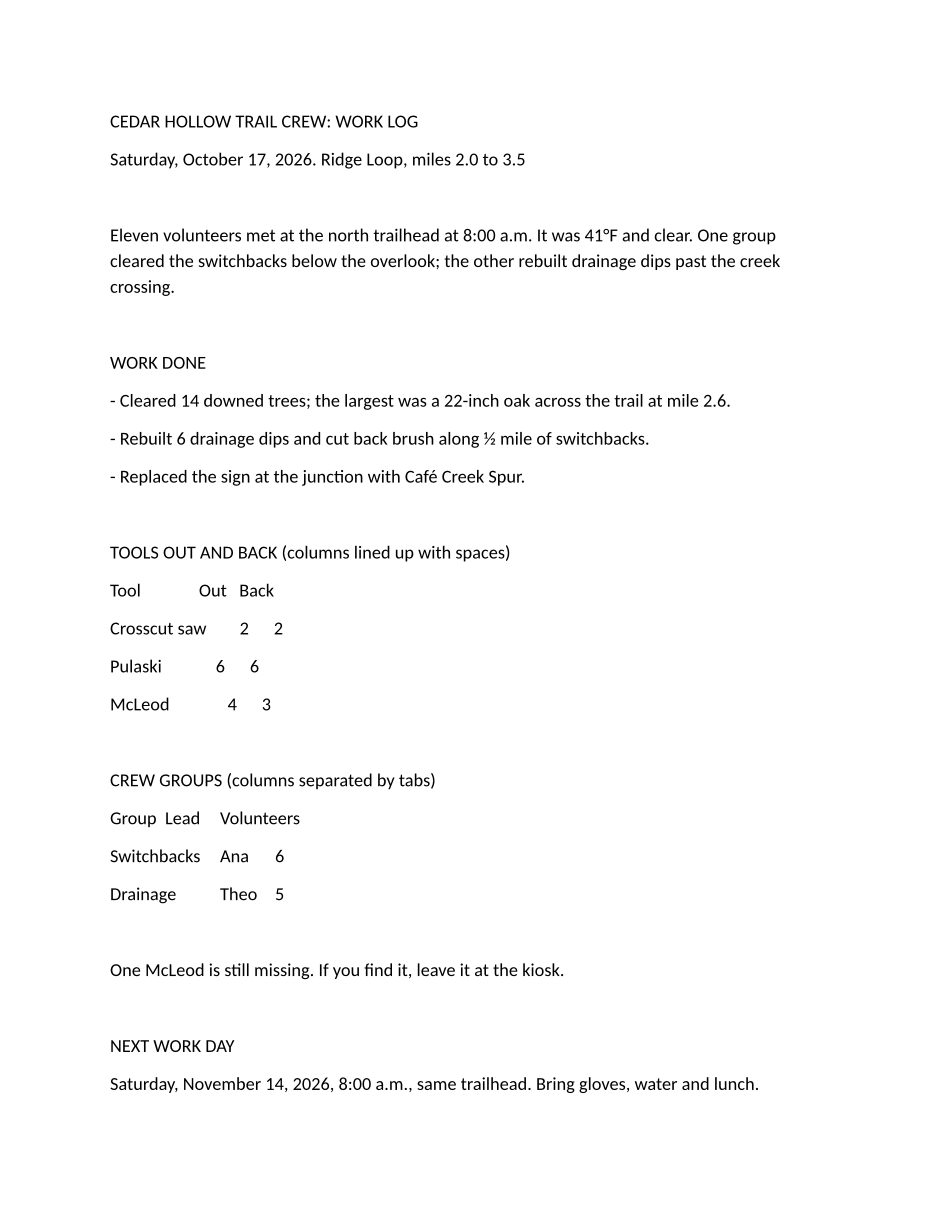
The same file the code sends. Download the input and the output and compare them yourself.
- Input
- trail-crew-log.txt (1.4 KB)
- Output
- trail-crew-log.pdf (21 KB)
- Source
- A two-page plain-text work log for a fictional volunteer trail crew, written by us, with a form feed before page 2 (CC0-1.0). How it was made
- Made by
- 2026-11-04, API build
9eeeb0640aba
Parameters
Send these as form fields next to the file. Names are case-insensitive. If you set one of the documented options below that we don't support yet, the request fails with a 400 that names it instead of returning a file made without it.
| Parameter | What it does |
|---|---|
FileNamestring | Name for the PDF without the extension. Left out, trail-crew-log.txt comes back as trail-crew-log.pdf; FileName=crew-log-oct17 gives crew-log-oct17.pdf. |
StoreFileboolean, default false | Keep the PDF on our side for 3 hours and answer with a download link in place of the file data. |
Not supported yet
Setting one of these to anything but its default returns 400.
| Option | What to do instead |
|---|---|
PageSize | Pages are always Letter, 8.5 × 11 in. PageSize=a4, ConvertAPI's documented default, returns 200 but the page is still Letter. |
PageOrientation | Portrait only. |
FontName | Text is set in Carlito 12 pt. FontName=CourierNew is accepted as the default and changes nothing. |
MarginTop | Every margin is 1 in (25.4 mm). |
PageRange | Cut pages from the finished PDF with /v2/convert/pdf/to/extract. |
Pdfa | Send the PDF to /v2/convert/pdf/to/pdfa for an archival copy. |
Also refused when set: FontSize, MarginRight, MarginBottom, MarginLeft.
What carries over, and what doesn't
Kept
- Every line in order, blank ones included: the sample's 33 lines (8 of them empty) print over 2 pages, one paragraph per line
- The form feed, which moves 'SAFETY NOTES FROM THE CREW LEAD' to the top of page 2
- Tab characters, which jump to stops every 0.5 in from the left margin
- 41°F, ½ and Café, read from the UTF-8 file and printed as typed
- Long lines, wrapped at the right margin: the 3-line opening paragraph is one line in the text file
- Text you can select and search, in an embedded Carlito subset; the PDF has a structure tree for screen readers
Lost or not yet supported
- Fixed-width alignment. Carlito is a proportional font, so the tool table that lines up with spaces in a text editor prints with ragged columns.
- Tab columns line up only when every cell is shorter than the same tab stop: 'Lead' starts at 1.5 in from the page edge but 'Ana' and 'Theo' at 2 in, because 'Switchbacks' runs past the first stop.
- Compact spacing. Each line gets 8 pt of space after it, so the 1,432-byte sample fills most of a page before its form feed.
- Control characters other than tab and form feed. In a test file, NUL and U+0001 between letters were dropped.
- There is no header, footer, page number or bookmark; the PDF's title field is empty.
Limits
- One text file per request. Join several PDFs afterwards with
/v2/convert/pdf/to/merge. - Page options return 400, for example "PageSize is not supported yet for TXT → PDF". The same goes for
PageOrientation,FontName,FontSize, the four margins,PageRangeandPdfa. - Requests up to 10 MB on the Free plan or 100 MB on paid plans, all files and fields together. A conversion can run for up to 120 seconds; after that the API returns 504.
Where teams use it
Old reports that use form feeds for page breaks
Line-printer reports exported from accounting and inventory systems mark each new page with a form feed. This route starts a fresh PDF page at every one, so a report keeps its page boundaries.
Text a system writes, printed for people
Receipts, support transcripts and email bodies saved as .txt can be attached to a case or sent to a customer as a PDF they can open on any device.
Notes from field crews and volunteers
People who type notes on a phone or a plain editor send .txt files. Converting them gives a document with page breaks and margins that prints the same everywhere, like the trail crew log in the sample.
Questions
Can I get A4 pages or a monospace font so columns line up?
Not on this route yet. A workaround that we tested: put a line with three backticks before and after the text, save it as .md and send it to /v2/convert/md/to/pdf. The text is then set in Liberation Mono 10 pt, the sample's space-aligned tool table lines up, and that route takes PageSize, PageOrientation and the margins (A4 by default). Remove form feeds first; we tested the sample without its form feed.
Which text encodings can the file use?
UTF-8, with or without a byte order mark, and UTF-16 with a byte order mark. Text in an older code page is recognized from its bytes: a test file holding 'caf' plus byte E9 printed café, and Windows-1251 (Russian), Windows-1250 (Polish) and Shift JIS (Japanese) test files printed as written, the Japanese in an embedded Japanese font. There is no parameter to name the encoding, so UTF-8 remains the safe choice for short or mixed-language text.
How do I force a page break?
Put a form feed character (U+000C, \f in most languages) at the start of the line that should begin the new page. The sample has one before its safety notes, which open page 2.
What happens with ConvertAPI's TXT to PDF options?
Values equal to ConvertAPI's documented defaults, such as PageSize=a4, FontName=CourierNew, FontSize=12 or MarginTop=10, return 200 and change nothing, so the PDF stays Letter with Carlito text. Any other value returns 400 naming the option. Remove those fields when you move code over.
Is the text in the PDF searchable?
Yes. The words are real text in an embedded font, so they can be selected, copied and found with search. Our PDF to TXT route read the sample's words back out in order.
Convert your first TXT file in a minute.