TXT to DOCX API
POST /v2/convert/txt/to/docx turns a plain-text file into a Word document you can edit: one paragraph per line in the Normal style, tabs as Word tabs and form feeds as page breaks, on Letter paper with 1 in margins.
- Endpoint
- POST /v2/
convert/ txt/ to/ docx - Accepts
- txt
- Sample timing
- 27 ms median of 5 runsHow we measure
- Request size
- Up to 10 MB on the Free plan or 100 MB on paid plans, all files together
Request and response
Every sample below ran against the API before this page was published. Set PDFCONVERSIONAPI_KEY to your key and run it as is.
curl -sS -X POST \
  https://api.pdfconversionapi.com/v2/convert/txt/to/docx \
  -H "Authorization: Bearer $PDFCONVERSIONAPI_KEY" \
  -F File=@trail-crew-log.txt \
  -o response.json

# FileData is base64. Save the first file in converted/,
# or print the JSON error.
if jq -e '.Files' response.json > /dev/null; then
  mkdir -p converted
  name=$(jq -r '.Files[0].FileName' response.json)
  jq -r '.Files[0].FileData' response.json \
    | base64 --decode > "converted/$name"
else
  cat response.json
fi
import base64
import os
import requests
key = os.environ["PDFCONVERSIONAPI_KEY"]
response = requests.post(
"https://api.pdfconversionapi.com/v2/convert/txt/to/docx",
headers={"Authorization": f"Bearer {key}"},
files=[("File", open("trail-crew-log.txt", "rb"))],
timeout=180,
)
result = response.json()
if not response.ok:
raise SystemExit(f"{result['Code']}: {result['Message']}")
os.makedirs("converted", exist_ok=True)
for file in result["Files"]:
path = os.path.join("converted", file["FileName"])
with open(path, "wb") as out:
out.write(base64.b64decode(file["FileData"]))
print(path, file["FileSize"], "bytes")
import { mkdir, readFile, writeFile } from "node:fs/promises";
import { join } from "node:path";

const form = new FormData();
const file = "trail-crew-log.txt";
form.append("File", new Blob([await readFile(file)]), file);

const url = "https://api.pdfconversionapi.com/v2/convert/txt/to/docx";
const key = process.env.PDFCONVERSIONAPI_KEY;
const response = await fetch(url, {
  method: "POST",
  headers: { Authorization: `Bearer ${key}` },
  body: form,
});
const result = await response.json();
if (!response.ok) {
  throw new Error(`${result.Code}: ${result.Message}`);
}

await mkdir("converted", { recursive: true });
for (const file of result.Files) {
  const path = join("converted", file.FileName);
  await writeFile(path, Buffer.from(file.FileData, "base64"));
  console.log(path, file.FileSize, "bytes");
}
{
  "ConversionCost": 1,
  "ConversionTime": 0.027,
  "Files": [
    {
      "FileName": "trail-crew-log.docx",
      "FileExt": "docx",
      "FileSize": 7430,
      "FileData": "UEsDBBQAAAAIAAAAIQB4NDMq…"
    }
  ]
}
Response from our test run on 2026-11-03. ConversionTime shows the median of 5 runs. FileData is shortened here; the real response carries the whole file as base64.
The sample, converted
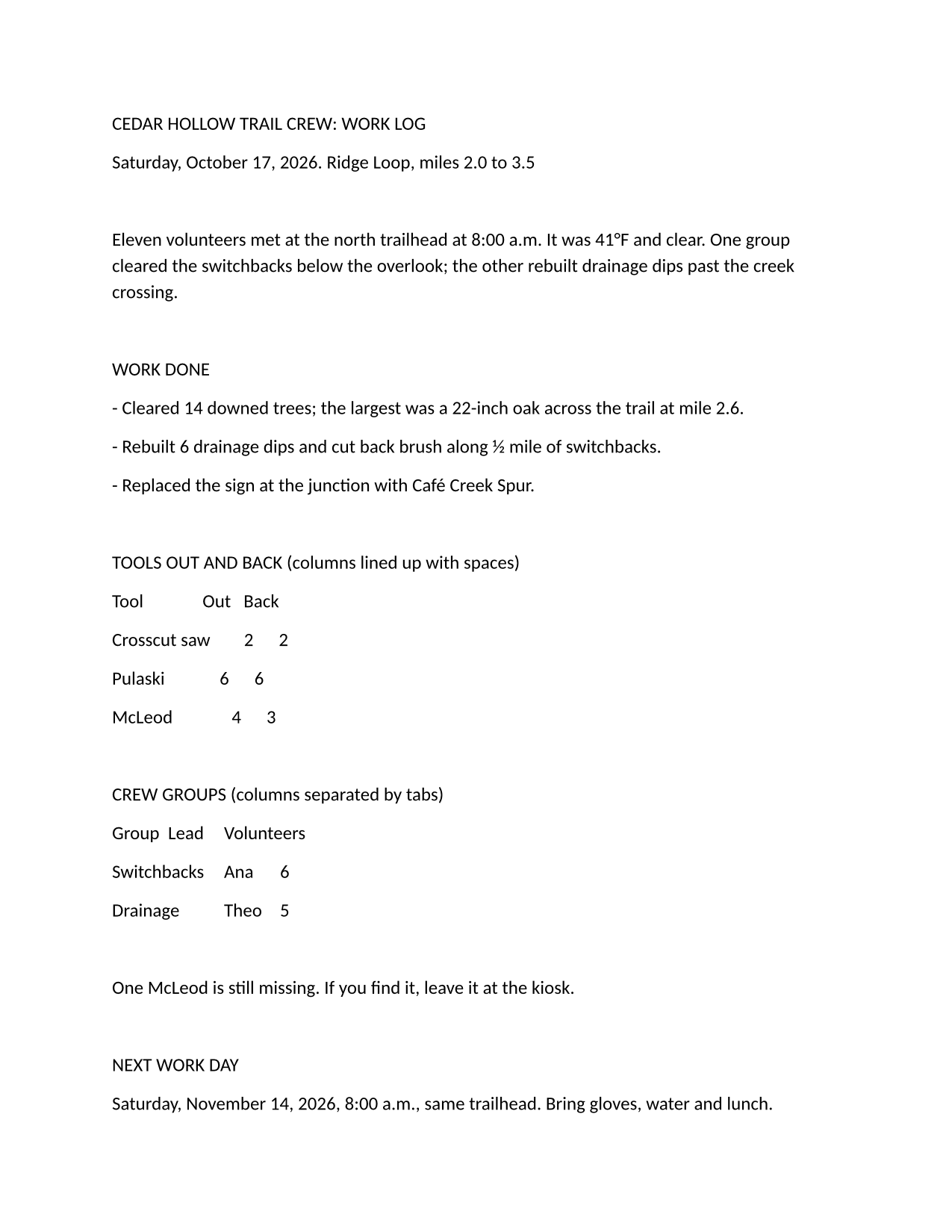
The same file the code sends. Download the input and the output and compare them yourself.
- Input
- trail-crew-log.txt (1.4 KB)
- Output
- trail-crew-log.docx (7.3 KB)
- Source
- A two-page plain-text work log for a fictional volunteer trail crew, written by us, with a form feed before page 2 (CC0-1.0). How it was made
- Made by
- 2026-11-04, API build
9eeeb0640aba
Parameters
Send these as form fields next to the file. Names are case-insensitive. If you set one of the documented options below that we don't support yet, the request fails with a 400 that names it instead of returning a file made without it.
| Parameter | What it does |
|---|---|
FileNamestring | Name for the .docx without the extension; left out, the text file's name is reused (trail-crew-log.docx). |
StoreFileboolean, default false | Answer with a link to the stored DOCX, valid for 3 hours, in place of the file itself. |
What carries over, and what doesn't
Kept
- One w:p paragraph per line: 34 in the sample, the 33 lines of the file plus an empty one after its final line break
- Blank lines, as empty paragraphs: the sample's 8 blank lines, plus the empty one after its final line break, make 9
- The 6 tab characters, written as Word tabs rather than spaces
- The form feed, written as a page break in front of 'SAFETY NOTES FROM THE CREW LEAD'
- Runs of spaces, kept as typed, and characters such as 41°F, ½ and Café as Unicode text
- Letter paper, 12,240 × 15,840 twips, with 1 in (1,440 twip) margins on every side
Lost or not yet supported
- The fixed-width look of a text editor. The document's default font is Aptos 12 pt, which is proportional, so the tool table that lines up with spaces in the .txt has ragged columns in the DOCX.
- Structure the text only suggests. Lines in capitals such as 'WORK DONE' stay Normal paragraphs, and lines starting with '- ' or '1. ' are not turned into Word lists.
- Tight line spacing. Word's defaults apply: 8 pt after each paragraph and 1.15 line spacing.
- Document properties: no title or author is set, and the application field reads 'PDF Conversion API'.
Limits
- Page size, font and margin options are not read on this route and are ignored:
PageSize=a4orFontName=arialstill returns the Letter, Aptos document. - One text file per request, up to 10 MB on the Free plan or 100 MB on paid plans with all fields. A conversion can run for up to 120 seconds; after that the API returns 504.
Where teams use it
A starting point people can format
Meeting notes, transcripts and drafts often arrive as .txt. A DOCX lets an editor add headings, a logo and tracked changes in Word without retyping or pasting the text in.
Text into a Word-based workflow
Document management systems, e-signature tools and review queues that accept only Word files can take text your application writes once it is a DOCX.
Files your code edits next
Open the DOCX with python-docx, docx4j or Open XML SDK and style it: every source line is its own paragraph, so line 1 is doc.paragraphs[0].
Questions
Which encodings can the .txt file use?
UTF-8 (a byte order mark is fine) and UTF-16 with a byte order mark are read as Unicode. Text in an older code page is recognized from its bytes rather than assumed to be Windows-1252: 'caf' followed by byte E9 became café, and test files in Windows-1251 (Russian), Windows-1250 (Polish) and Shift JIS (Japanese) came through as written. Control characters other than tab and form feed are dropped.
Can I choose the font or the paper size?
Not in the request. The DOCX always uses Aptos 12 pt on Letter paper with 1 in margins. Change the Normal style and the section's page size in Word, or with your DOCX library, after the conversion.
How is the DOCX different from the PDF route's output?
Both come from the same layout of the same paragraphs, so the pages break in the same places. The DOCX stays editable and names Aptos, while /v2/convert/txt/to/pdf prints the text in Carlito and can't be edited. Our DOCX to PNG route drew page 1 of the sample DOCX byte for byte the same as TXT to PNG did.
Do lines that look like bullets become a Word list?
No. '- Cleared 14 downed trees' stays a Normal paragraph that starts with a hyphen. If your text uses Markdown conventions, convert it with /v2/convert/md/to/docx, which builds real headings, lists and tables.
Convert your first TXT file in a minute.