TXT to ODT API
Post a .txt file to /v2/convert/txt/to/odt and get an OpenDocument Text file back: each line becomes a paragraph in the Standard style, runs of spaces and tabs are kept as ODF elements, and a form feed starts a new page.
- Endpoint
- POST /v2/
convert/ txt/ to/ odt - Accepts
- txt
- Sample timing
- 24 ms median of 5 runsHow we measure
- Request size
- Up to 10 MB on the Free plan or 100 MB on paid plans, all files together
Request and response
Every sample below ran against the API before this page was published. Set PDFCONVERSIONAPI_KEY to your key and run it as is.
curl -sS -X POST \
  https://api.pdfconversionapi.com/v2/convert/txt/to/odt \
  -H "Authorization: Bearer $PDFCONVERSIONAPI_KEY" \
  -F File=@trail-crew-log.txt \
  -o response.json

# FileData is base64. Save the first file in converted/,
# or print the JSON error.
if jq -e '.Files' response.json > /dev/null; then
  mkdir -p converted
  name=$(jq -r '.Files[0].FileName' response.json)
  jq -r '.Files[0].FileData' response.json \
    | base64 --decode > "converted/$name"
else
  cat response.json
fi
import base64
import os
import requests
key = os.environ["PDFCONVERSIONAPI_KEY"]
response = requests.post(
"https://api.pdfconversionapi.com/v2/convert/txt/to/odt",
headers={"Authorization": f"Bearer {key}"},
files=[("File", open("trail-crew-log.txt", "rb"))],
timeout=180,
)
result = response.json()
if not response.ok:
raise SystemExit(f"{result['Code']}: {result['Message']}")
os.makedirs("converted", exist_ok=True)
for file in result["Files"]:
path = os.path.join("converted", file["FileName"])
with open(path, "wb") as out:
out.write(base64.b64decode(file["FileData"]))
print(path, file["FileSize"], "bytes")
import { mkdir, readFile, writeFile } from "node:fs/promises";
import { join } from "node:path";

const form = new FormData();
const file = "trail-crew-log.txt";
form.append("File", new Blob([await readFile(file)]), file);

const url = "https://api.pdfconversionapi.com/v2/convert/txt/to/odt";
const key = process.env.PDFCONVERSIONAPI_KEY;
const response = await fetch(url, {
  method: "POST",
  headers: { Authorization: `Bearer ${key}` },
  body: form,
});
const result = await response.json();
if (!response.ok) {
  throw new Error(`${result.Code}: ${result.Message}`);
}

await mkdir("converted", { recursive: true });
for (const file of result.Files) {
  const path = join("converted", file.FileName);
  await writeFile(path, Buffer.from(file.FileData, "base64"));
  console.log(path, file.FileSize, "bytes");
}
{
  "ConversionCost": 1,
  "ConversionTime": 0.024,
  "Files": [
    {
      "FileName": "trail-crew-log.odt",
      "FileExt": "odt",
      "FileSize": 3118,
      "FileData": "UEsDBAoAAAAAAAAAIQBexjIM…"
    }
  ]
}
Response from our test run on 2026-11-03. ConversionTime shows the median of 5 runs. FileData is shortened here; the real response carries the whole file as base64.
The sample, converted
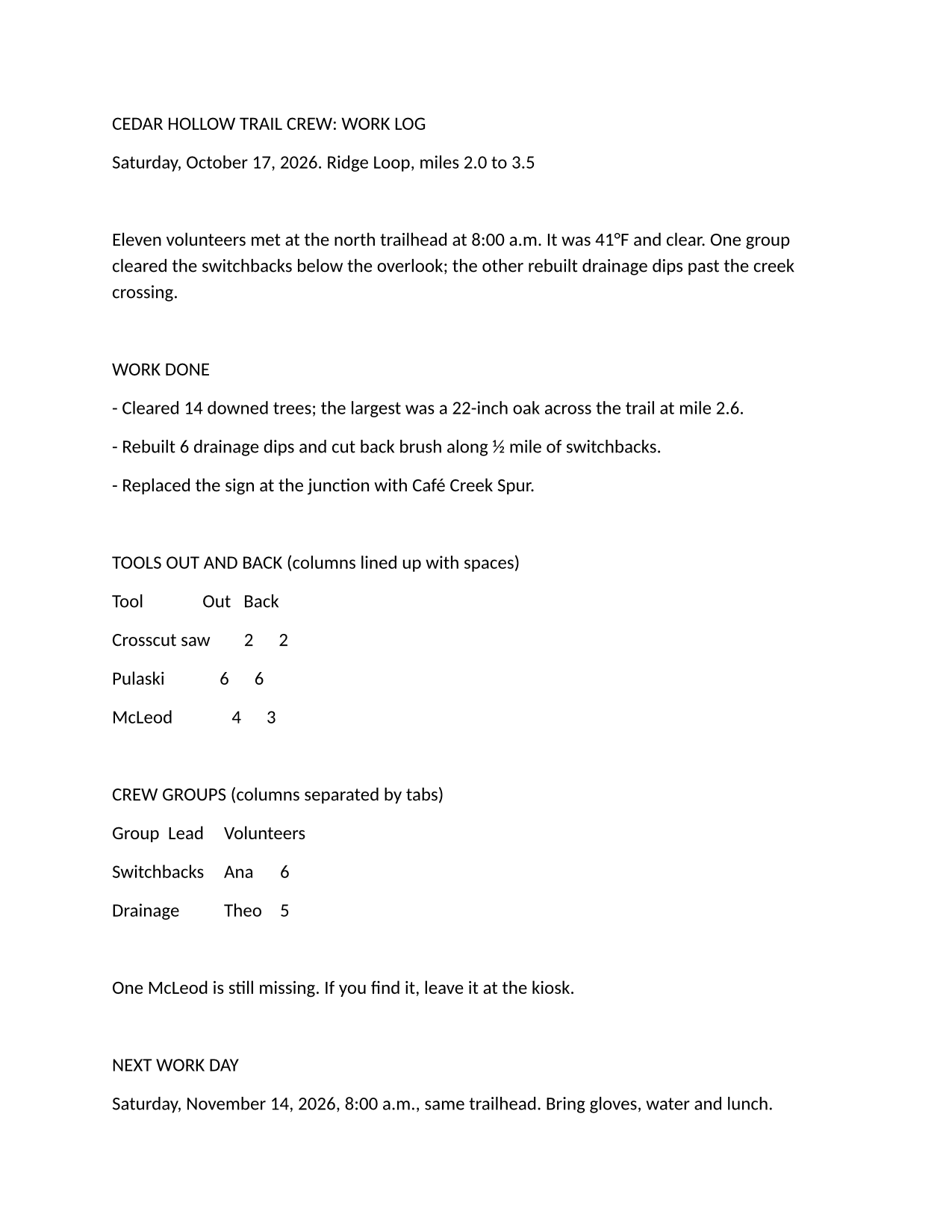
The same file the code sends. Download the input and the output and compare them yourself.
- Input
- trail-crew-log.txt (1.4 KB)
- Output
- trail-crew-log.odt (3.0 KB)
- Source
- A two-page plain-text work log for a fictional volunteer trail crew, written by us, with a form feed before page 2 (CC0-1.0). How it was made
- Made by
- 2026-11-04, API build
9eeeb0640aba
Parameters
Send these as form fields next to the file. Names are case-insensitive. If you set one of the documented options below that we don't support yet, the request fails with a 400 that names it instead of returning a file made without it.
| Parameter | What it does |
|---|---|
FileNamestring | Base name of the .odt. Without it the result is named after the upload, here trail-crew-log.odt. |
StoreFileboolean, default false | Return a link to the stored ODT, which expires after 3 hours, instead of the file data. |
What carries over, and what doesn't
Kept
- 34 text:p paragraphs for the sample's 33 lines (the extra one follows the last line break), with blank lines kept as empty paragraphs
- Tabs as text:tab elements, 6 in the sample
- Runs of spaces as text:s elements with a count, so the tool table's spacing is stored exactly (8 such runs in the sample)
- The form feed, as a paragraph style with a page break before it, so the safety notes open page 2
- A Letter page layout of 612 × 792 pt with 72 pt (1 in) margins
- ODF 1.3 markup (office:version="1.3") in a five-part package: mimetype, manifest, content, styles and meta
Lost or not yet supported
- Column alignment made with spaces. The default paragraph font is Aptos 12 pt, a proportional font, so the space-aligned table does not line up when the file is opened.
- Line-level spacing as in a text editor: every paragraph has 8 pt of space below it.
- Any meaning the text implies. Capitalized lines are not headings and '- ' lines are not list items; everything is in the Standard style.
- A preview picture: the package has no Thumbnails folder and no settings.xml.
Limits
- Options such as
PageSizeorFontNameare ignored on this route; the page is always Letter and the font Aptos. - Requests up to 10 MB on the Free plan or 100 MB on paid plans, all files and fields together, one text file each. A conversion can run for up to 120 seconds; after that the API returns 504.
Where teams use it
Public offices that standardize on OpenDocument
Agencies that require ODF for documents they keep can file notes and logs that arrive as plain text in that format without a manual copy and paste.
Text for open-source office suites
Teams that edit in an OpenDocument word processor get a file that opens straight into it, with paragraphs and tabs already in place.
Small files to post-process
The sample ODT is 3,118 bytes and holds only five parts, so a script can unzip it and rewrite content.xml with any XML library.
Questions
Does the ODT use A4 or Letter paper?
Letter: the page layout in styles.xml is 612 × 792 pt with 1 in margins on each side. There is no request option to change it; edit the page style after opening the file.
How are spaces and tabs stored?
As OpenDocument intends: a single space stays a space. In a longer run between words, the first space is kept as is and the rest become a text:s element with a count, so seven spaces are written as a space plus <text:s text:c="6"/>. Spaces at the start of a line all go into the element (<text:s text:c="4"/> for a 4-space indent), and each tab is a text:tab element. Nothing is collapsed, so the original spacing can be rebuilt exactly from the XML.
What encodings does the text file need?
UTF-8, or UTF-16 with a byte order mark. Text in an older code page is recognized from its bytes rather than assumed to be Windows-1252: test files in Windows-1251 (Russian), Windows-1250 (Polish) and Shift JIS (Japanese) came through as written. Control characters other than tab and form feed are left out.
Can I get Markdown-style headings and lists in the ODT?
Send the text as Markdown to /v2/convert/md/to/odt. That route turns # lines into Heading 1 and Heading 2 paragraphs with outline levels, and - or 1. lines into real ODF lists.
Convert your first TXT file in a minute.