MD to ODT API
Send a Markdown file to POST /v2/convert/md/to/odt and get an OpenDocument Text file with real Heading 1 and Heading 2 paragraphs, numbered and bulleted lists, a bordered table and code in Courier New, ready to edit in an OpenDocument word processor.
- Endpoint
- POST /v2/
convert/ md/ to/ odt - Accepts
- md
- Sample timing
- 27 ms median of 5 runsHow we measure
- Request size
- Up to 10 MB on the Free plan or 100 MB on paid plans, all files together
Request and response
Every sample below ran against the API before this page was published. Set PDFCONVERSIONAPI_KEY to your key and run it as is.
curl -sS -X POST \
  https://api.pdfconversionapi.com/v2/convert/md/to/odt \
  -H "Authorization: Bearer $PDFCONVERSIONAPI_KEY" \
  -F File=@postmortem.md \
  -o response.json

# FileData is base64. Save the first file in converted/,
# or print the JSON error.
if jq -e '.Files' response.json > /dev/null; then
  mkdir -p converted
  name=$(jq -r '.Files[0].FileName' response.json)
  jq -r '.Files[0].FileData' response.json \
    | base64 --decode > "converted/$name"
else
  cat response.json
fi
import base64
import os
import requests
key = os.environ["PDFCONVERSIONAPI_KEY"]
response = requests.post(
"https://api.pdfconversionapi.com/v2/convert/md/to/odt",
headers={"Authorization": f"Bearer {key}"},
files=[("File", open("postmortem.md", "rb"))],
timeout=180,
)
result = response.json()
if not response.ok:
raise SystemExit(f"{result['Code']}: {result['Message']}")
os.makedirs("converted", exist_ok=True)
for file in result["Files"]:
path = os.path.join("converted", file["FileName"])
with open(path, "wb") as out:
out.write(base64.b64decode(file["FileData"]))
print(path, file["FileSize"], "bytes")
import { mkdir, readFile, writeFile } from "node:fs/promises";
import { join } from "node:path";

const form = new FormData();
const file = "postmortem.md";
form.append("File", new Blob([await readFile(file)]), file);

const url = "https://api.pdfconversionapi.com/v2/convert/md/to/odt";
const key = process.env.PDFCONVERSIONAPI_KEY;
const response = await fetch(url, {
  method: "POST",
  headers: { Authorization: `Bearer ${key}` },
  body: form,
});
const result = await response.json();
if (!response.ok) {
  throw new Error(`${result.Code}: ${result.Message}`);
}

await mkdir("converted", { recursive: true });
for (const file of result.Files) {
  const path = join("converted", file.FileName);
  await writeFile(path, Buffer.from(file.FileData, "base64"));
  console.log(path, file.FileSize, "bytes");
}
{
  "ConversionCost": 1,
  "ConversionTime": 0.027,
  "Files": [
    {
      "FileName": "postmortem.odt",
      "FileExt": "odt",
      "FileSize": 4671,
      "FileData": "UEsDBAoAAAAAAAAAIQBexjIM…"
    }
  ]
}
Response from our test run on 2026-11-03. ConversionTime shows the median of 5 runs. FileData is shortened here; the real response carries the whole file as base64.
The sample, converted
The same file the code sends. Download the input and the output and compare them yourself.
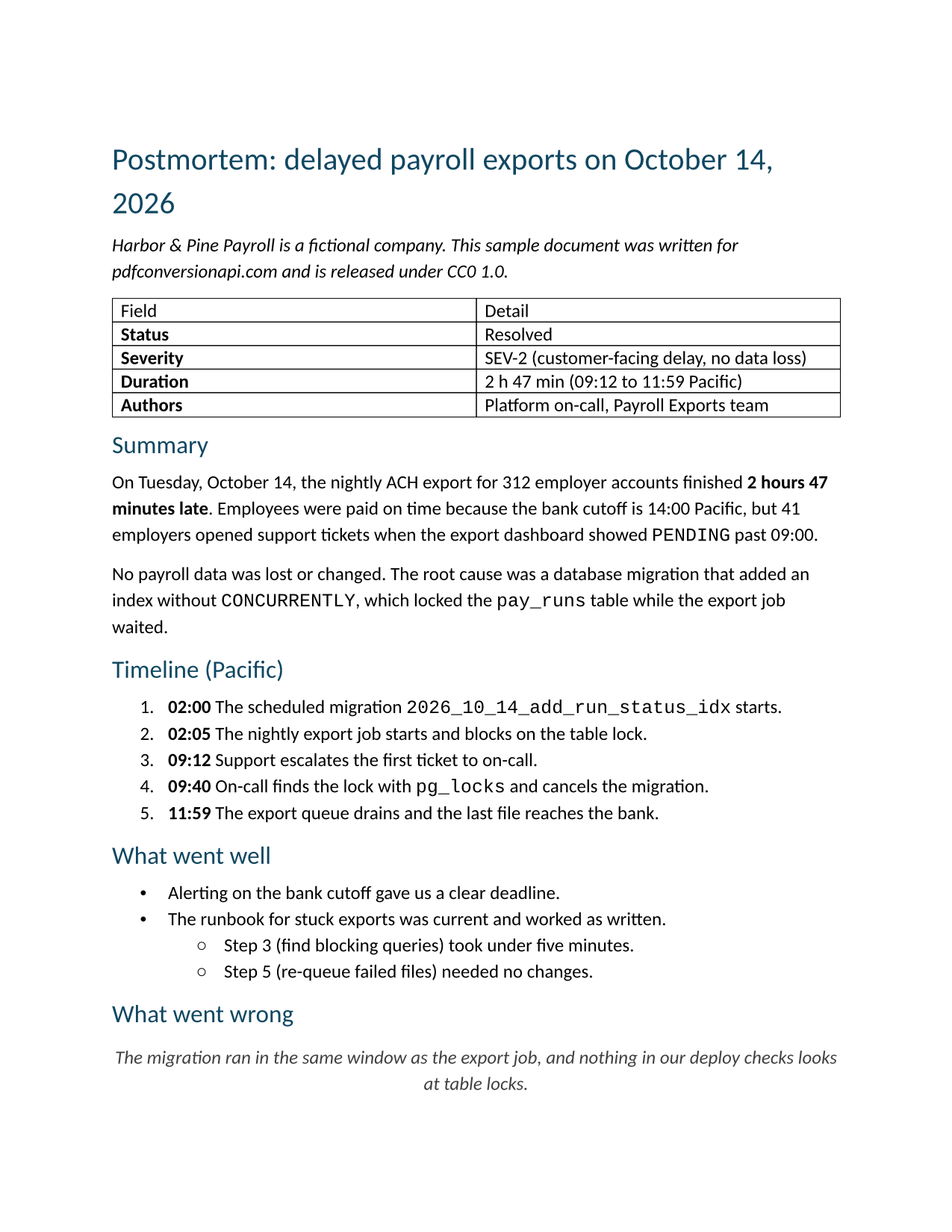
- Input
- postmortem.md (2.7 KB)
- Output
- postmortem.odt (4.6 KB)
- Source
- Written for this site (fictional company); GitHub-flavored Markdown (CC0-1.0). How it was made
- Made by
- 2026-11-04, API build
9eeeb0640aba
Parameters
Send these as form fields next to the file. Names are case-insensitive. If you set one of the documented options below that we don't support yet, the request fails with a 400 that names it instead of returning a file made without it.
| Parameter | What it does |
|---|---|
FileNamestring | Name of the .odt without the extension. FileName=pm-2026-10-14 returns pm-2026-10-14.odt. |
StoreFileboolean, default false | Return a download link that expires after 3 hours in place of the file. |
What carries over, and what doesn't
Kept
- Headings as Heading 1 and Heading 2 paragraphs with outline levels, so a table of contents can be built from them
- The table as an ODF table: 6.5 in (468 pt) wide, two 234 pt columns, 0.5 pt black borders, 4 pt padding, and the header row marked to repeat on new pages
- The numbered timeline as a list numbered 1., 2., 3. (deeper levels use a. and i.), and the bullets with their two nested items (• then ◦)
- Bold, italic and inline code, the code in Courier New
- The SQL block as Preformatted Text paragraphs in Courier New, its 4-space indent stored as a text:s run
- The block quote in a Quotations style: indented 36 pt on both sides, italic, gray (#404040)
- The link as a real hyperlink, and the --- rule as a paragraph with a 0.75 pt gray bottom border
- Images embedded as
data:URIs, which are stored in the package's Pictures folder
Lost or not yet supported
- Bold in the table's header row. 'Field' and 'Detail' are plain text, while the RTF route makes them bold.
- Task list boxes: [x] and [ ] stay as typed at the start of bullet items.
- Footnotes and YAML front matter. [^1] prints as typed; front matter becomes a rule and a Heading 2 that reads 'title: ...'.
- Raw HTML, kept as literal text with its tags, and bare URLs, which stay plain text; <url> and [text](url) do become links.
- Images given as a path or URL: only their alt text is kept.
- Page options.
PageSize,FontNameand the margins are ignored on this route; the file is Letter with 1 in margins and Aptos 12 pt text.
Limits
- One .md file per request; images must be inside it as
data:URIs, because nothing else is fetched. - Requests up to 10 MB on the Free plan or 100 MB on paid plans, all files and fields together. A conversion can run for up to 120 seconds; after that the API returns 504.
Where teams use it
Docs-as-code for organizations that file ODF
Teams write in Markdown next to the code, while some organizations require OpenDocument for the documents they keep. This route bridges the two without a manual copy.
Handing a draft to non-technical editors
An editor who doesn't read Markdown gets a document with headings, lists and a table they can restyle, comment on and track changes in.
Feeding a document template step
Generate the body in Markdown, convert it, then merge the ODT's content.xml into a styled template with your own code.
Questions
Can I choose the paper size or font of the ODT?
No. The options that /v2/convert/md/to/pdf takes, such as PageSize and FontName, are ignored here and the ODT is always Letter with Aptos 12 pt text. Change the page and paragraph styles after opening it, or convert to PDF directly if the page setup is what matters.
Which Markdown syntax is understood?
Headings, emphasis, strikethrough, inline code, fenced code blocks, ordered and bulleted lists (nested too), block quotes, tables with column alignment, links in brackets or angle brackets, horizontal rules and data: images. Task lists, footnotes, front matter and raw HTML are not interpreted.
How do I include images?
Embed them as data: URIs, for example . Our 40 × 20 pixel test PNG was stored as Pictures/image1.png and placed at 30 × 15 pt. A path such as chart.png or an https:// link leaves only the alt text.
Does the table keep its column alignment?
Yes. In a test table with :---, :---: and ---: columns, the cells were aligned start, center and end. Column widths are always equal, and the table always spans 6.5 in.
Convert your first MD file in a minute.