MD to RTF API
POST /v2/convert/md/to/rtf turns a Markdown file into Rich Text Format: heading styles, real numbered and bulleted lists, a bordered table with a bold, repeating header row, Courier New code and clickable links, all in a 7-bit file.
- Endpoint
- POST /v2/
convert/ md/ to/ rtf - Accepts
- md
- Sample timing
- 23 ms median of 5 runsHow we measure
- Request size
- Up to 10 MB on the Free plan or 100 MB on paid plans, all files together
Request and response
Every sample below ran against the API before this page was published. Set PDFCONVERSIONAPI_KEY to your key and run it as is.
curl -sS -X POST \
  https://api.pdfconversionapi.com/v2/convert/md/to/rtf \
  -H "Authorization: Bearer $PDFCONVERSIONAPI_KEY" \
  -F File=@postmortem.md \
  -o response.json

# FileData is base64. Save the first file in converted/,
# or print the JSON error.
if jq -e '.Files' response.json > /dev/null; then
  mkdir -p converted
  name=$(jq -r '.Files[0].FileName' response.json)
  jq -r '.Files[0].FileData' response.json \
    | base64 --decode > "converted/$name"
else
  cat response.json
fi
import base64
import os
import requests
key = os.environ["PDFCONVERSIONAPI_KEY"]
response = requests.post(
"https://api.pdfconversionapi.com/v2/convert/md/to/rtf",
headers={"Authorization": f"Bearer {key}"},
files=[("File", open("postmortem.md", "rb"))],
timeout=180,
)
result = response.json()
if not response.ok:
raise SystemExit(f"{result['Code']}: {result['Message']}")
os.makedirs("converted", exist_ok=True)
for file in result["Files"]:
path = os.path.join("converted", file["FileName"])
with open(path, "wb") as out:
out.write(base64.b64decode(file["FileData"]))
print(path, file["FileSize"], "bytes")
import { mkdir, readFile, writeFile } from "node:fs/promises";
import { join } from "node:path";

const form = new FormData();
const file = "postmortem.md";
form.append("File", new Blob([await readFile(file)]), file);

const url = "https://api.pdfconversionapi.com/v2/convert/md/to/rtf";
const key = process.env.PDFCONVERSIONAPI_KEY;
const response = await fetch(url, {
  method: "POST",
  headers: { Authorization: `Bearer ${key}` },
  body: form,
});
const result = await response.json();
if (!response.ok) {
  throw new Error(`${result.Code}: ${result.Message}`);
}

await mkdir("converted", { recursive: true });
for (const file of result.Files) {
  const path = join("converted", file.FileName);
  await writeFile(path, Buffer.from(file.FileData, "base64"));
  console.log(path, file.FileSize, "bytes");
}
{
  "ConversionCost": 1,
  "ConversionTime": 0.023,
  "Files": [
    {
      "FileName": "postmortem.rtf",
      "FileExt": "rtf",
      "FileSize": 11591,
      "FileData": "e1xydGYxXGFuc2lcYW5zaWNw…"
    }
  ]
}
Response from our test run on 2026-11-03. ConversionTime shows the median of 5 runs. FileData is shortened here; the real response carries the whole file as base64.
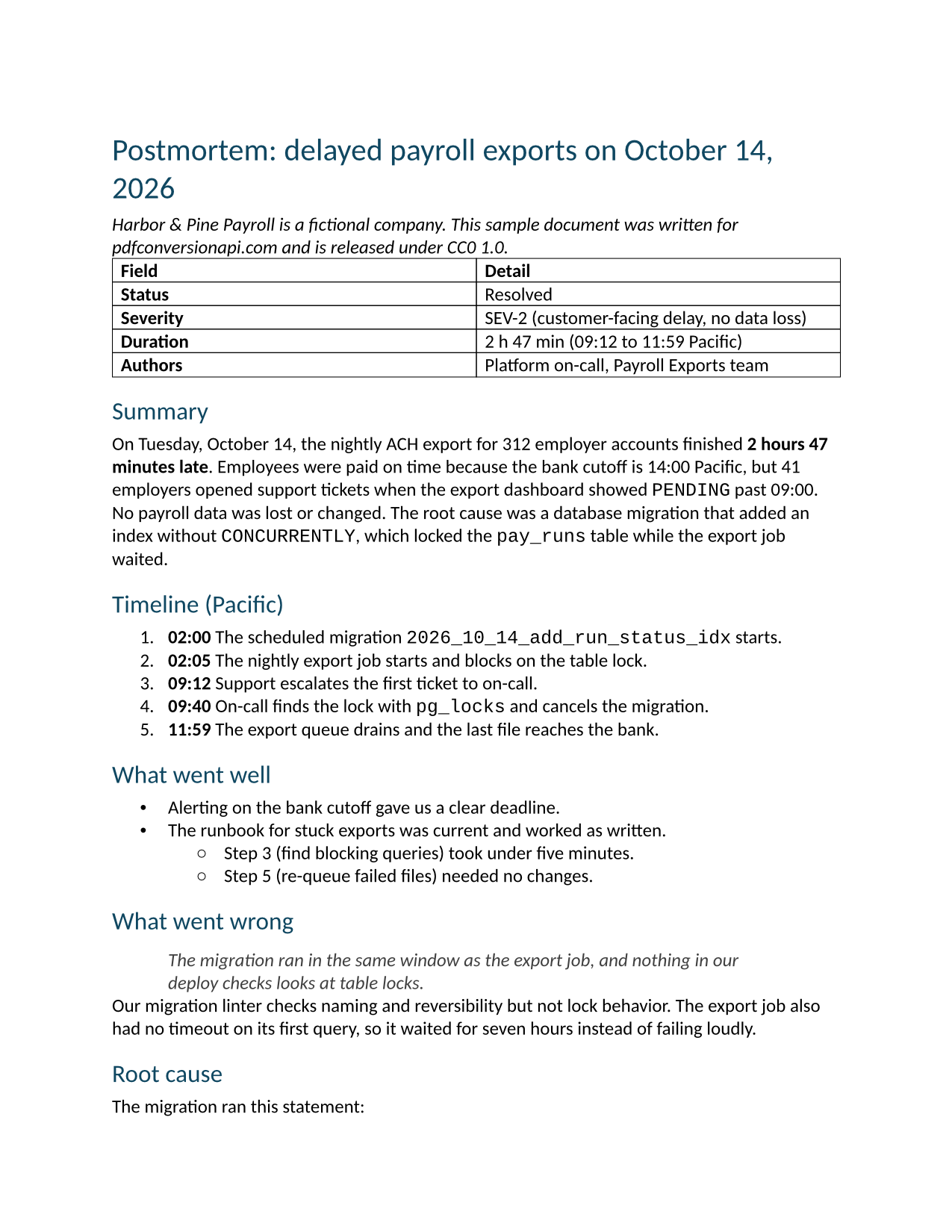
The sample, converted
The same file the code sends. Download the input and the output and compare them yourself.
- Input
- postmortem.md (2.7 KB)
- Output
- postmortem.rtf (11 KB)
- Source
- Written for this site (fictional company); GitHub-flavored Markdown (CC0-1.0). How it was made
- Made by
- 2026-11-04, API build
9eeeb0640aba
Parameters
Send these as form fields next to the file. Names are case-insensitive. If you set one of the documented options below that we don't support yet, the request fails with a 400 that names it instead of returning a file made without it.
| Parameter | What it does |
|---|---|
FileNamestring | Stem of the .rtf; without it the Markdown file's name is used (postmortem.rtf). |
StoreFileboolean, default false | Get a link to the stored RTF, valid for 3 hours, instead of the file. |
What carries over, and what doesn't
Kept
- Headings as RTF heading styles with outline levels: the title as heading 1 (bold, 20 pt) and the sections as heading 2 (bold, 16 pt)
- The table, with its header row bold and marked to repeat (\trhdr), cell borders of 0.5 pt and two 3.25 in columns
- Column alignment from the separator row: a test table came out \ql, \qc and \qr
- Ordered lists numbered 1., then a. and i. for deeper levels, and bullets • and ◦, as RTF list tables Word can renumber
- Inline code and the SQL block in Courier New, the block at 10 pt with its indented second line
- The link as a HYPERLINK field, underlined and blue
- Bold, italic and strikethrough;
data:URI images embedded as PNG pictures
Lost or not yet supported
- Space between paragraphs. Body paragraphs carry no spacing, so paragraphs and list items sit directly under each other; only headings have space around them.
- The gray color of block quotes: the quote is indented 0.5 in on both sides and italic, but black.
- Task list boxes, footnotes, YAML front matter and raw HTML, which come through as typed text.
- Images referenced by path or URL, which are replaced by their alt text.
Limits
- Page and font options are not read for this route and are ignored: the RTF is Letter with 1 in margins and Aptos as the body font.
- Requests up to 10 MB on the Free plan or 100 MB on paid plans, all files and fields together. A conversion can run for up to 120 seconds; after that the API returns 504.
Where teams use it
Markdown into software that imports RTF
Some help desks, CRM templates and document systems take RTF but not Markdown. Converting keeps the headings, lists and links when the text moves over.
Pasting formatted text from a Markdown source
Windows and macOS both have an RTF clipboard format for styled text. A script can convert release notes written in Markdown and put the RTF on the clipboard, ready to paste into mail.
Questions
Are headings and lists real styles or just formatting?
Real structure. Headings use RTF styles named heading 1 to heading 6 with outline levels, and lists are written as RTF list definitions (\listtable) rather than typed numbers and bullet characters.
How are non-English characters stored?
As \u escapes with a ? fallback, under the Windows-1252 code page declaration. Every byte of the sample RTF is plain ASCII, so the file survives systems that mangle 8-bit text.
How is this different from the ODT route?
Same Markdown reader, different details: the RTF's table header row is bold and the ODT's is not; the ODT colors block quotes gray and the RTF doesn't; and RTF body paragraphs have no space after them, while the ODT adds 8 pt.
Can I include images?
Yes, as data: URIs inside the Markdown. A 40 × 20 pixel test PNG was embedded as an RTF picture 0.42 × 0.21 in (600 × 300 twips) in size. Paths and URLs are not fetched.
Convert your first MD file in a minute.