ODT to DOCX API
POST an OpenDocument text file to /v2/convert/odt/to/docx and get a Word document back. Paragraphs, numbered and bulleted lists, tables, pictures, links and tracked changes are rebuilt as Word's own structures, and headings are given Word's Heading styles.
- Endpoint
- POST /v2/
convert/ odt/ to/ docx - Accepts
- odt
- Sample timing
- 27 ms median of 5 runsHow we measure
- Request size
- Up to 10 MB on the Free plan or 100 MB on paid plans, all files together
Request and response
Every sample below ran against the API before this page was published. Set PDFCONVERSIONAPI_KEY to your key and run it as is.
curl -sS -X POST \
  https://api.pdfconversionapi.com/v2/convert/odt/to/docx \
  -H "Authorization: Bearer $PDFCONVERSIONAPI_KEY" \
  -F File=@garden-plot-guide.odt \
  -o response.json

# FileData is base64. Save the first file in converted/,
# or print the JSON error.
if jq -e '.Files' response.json > /dev/null; then
  mkdir -p converted
  name=$(jq -r '.Files[0].FileName' response.json)
  jq -r '.Files[0].FileData' response.json \
    | base64 --decode > "converted/$name"
else
  cat response.json
fi
import base64
import os
import requests
key = os.environ["PDFCONVERSIONAPI_KEY"]
response = requests.post(
"https://api.pdfconversionapi.com/v2/convert/odt/to/docx",
headers={"Authorization": f"Bearer {key}"},
files=[("File", open("garden-plot-guide.odt", "rb"))],
timeout=180,
)
result = response.json()
if not response.ok:
raise SystemExit(f"{result['Code']}: {result['Message']}")
os.makedirs("converted", exist_ok=True)
for file in result["Files"]:
path = os.path.join("converted", file["FileName"])
with open(path, "wb") as out:
out.write(base64.b64decode(file["FileData"]))
print(path, file["FileSize"], "bytes")
import { mkdir, readFile, writeFile } from "node:fs/promises";
import { join } from "node:path";

const form = new FormData();
const file = "garden-plot-guide.odt";
form.append("File", new Blob([await readFile(file)]), file);

const url = "https://api.pdfconversionapi.com/v2/convert/odt/to/docx";
const key = process.env.PDFCONVERSIONAPI_KEY;
const response = await fetch(url, {
  method: "POST",
  headers: { Authorization: `Bearer ${key}` },
  body: form,
});
const result = await response.json();
if (!response.ok) {
  throw new Error(`${result.Code}: ${result.Message}`);
}

await mkdir("converted", { recursive: true });
for (const file of result.Files) {
  const path = join("converted", file.FileName);
  await writeFile(path, Buffer.from(file.FileData, "base64"));
  console.log(path, file.FileSize, "bytes");
}
{
  "ConversionCost": 1,
  "ConversionTime": 0.027,
  "Files": [
    {
      "FileName": "garden-plot-guide.docx",
      "FileExt": "docx",
      "FileSize": 17509,
      "FileData": "UEsDBBQAAAAIAAAAIQDOWIks…"
    }
  ]
}
Response from our test run on 2026-11-03. ConversionTime shows the median of 5 runs. FileData is shortened here; the real response carries the whole file as base64.
The sample, converted
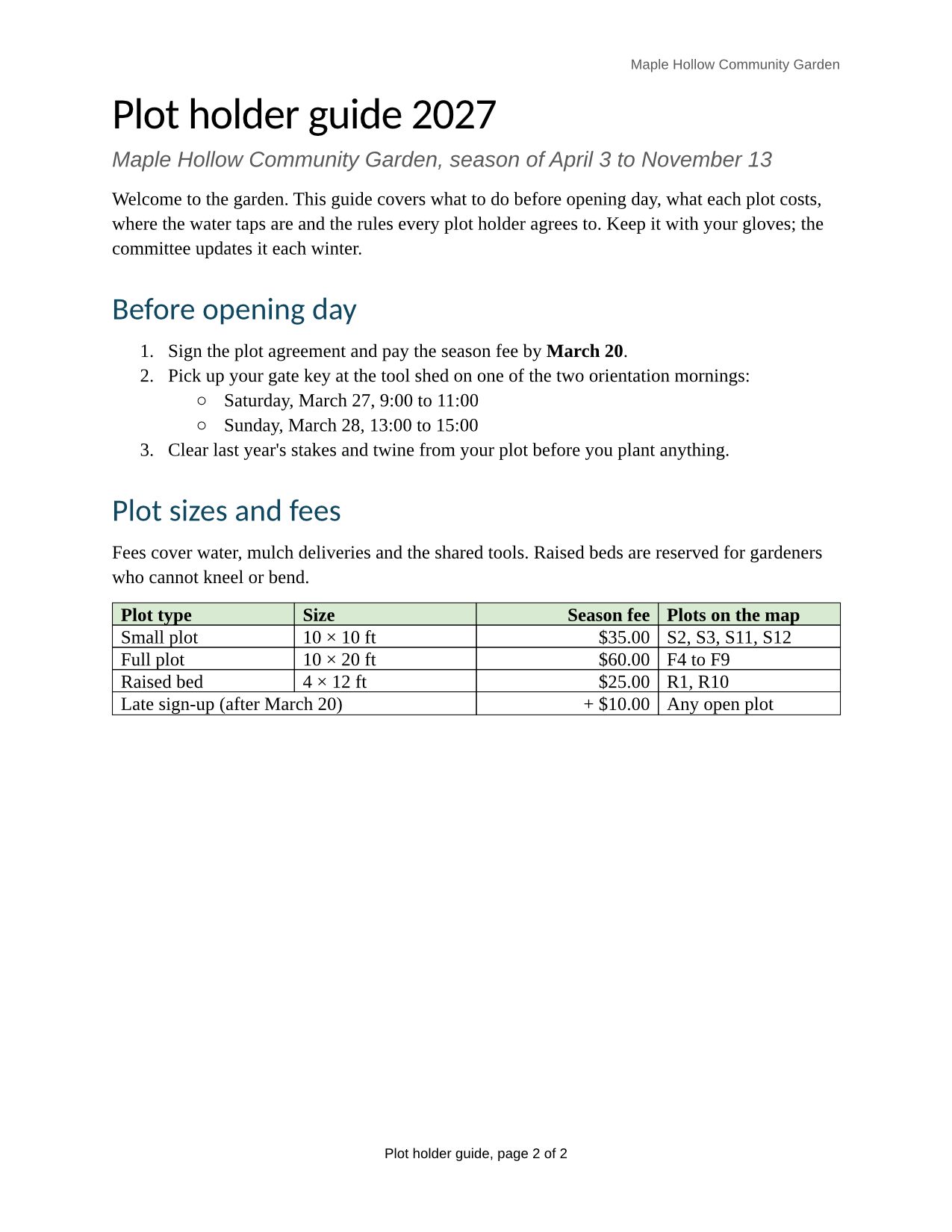
The same file the code sends. Download the input and the output and compare them yourself.
- Input
- garden-plot-guide.odt (35 KB)
- Output
- garden-plot-guide.docx (17 KB)
- Source
- A two-page plot holder guide for a fictional community garden, with a fee table, a plot map, lists, a footnote and a page-numbered footer. We wrote it for these pages as an OpenDocument text file. (CC0-1.0). How it was made
- Made by
- 2026-11-04, API build
9eeeb0640aba
Parameters
Send these as form fields next to the file. Names are case-insensitive. If you set one of the documented options below that we don't support yet, the request fails with a 400 that names it instead of returning a file made without it.
| Parameter | What it does |
|---|---|
UpdateTableOfContentsboolean, default false | Accepted, but an ODT's table of contents reaches the DOCX as ordinary paragraphs, so there is nothing to rebuild. A test file whose contents list held an entry for a heading that no longer existed kept that entry with true. |
UpdateReferencesboolean, default false | Also accepted without effect for ODT input: a cross-reference that showed page 99 in the file still shows 99, as plain text Word won't refresh. |
FileNamestring | Name for the Word file, extension added for you: FileName=plots-2027 gives plots-2027.docx instead of garden-plot-guide.docx. |
StoreFileboolean, default false | Keep the DOCX on our side for 3 hours and return a link to it in place of the base64 data. |
What carries over, and what doesn't
Kept
- Title, Heading 1 and Heading 2 paragraphs as Word's Title, Heading 1 and Heading 2 styles, which the Navigation pane and Word's table of contents use
- Numbered and bulleted lists as Word numbering, including the sub-list nested under step 2
- The fee table's shaded header row (marked to repeat at the top of each page), right-aligned amounts and the cell merged across two columns
- The plot map at 6 × 3 inches, with the picture's title and description as its alt text
- Tracked changes as Word revisions with author and date: in our test file, a deleted and an inserted word came through as a deletion and an insertion by the same reviewer
- Letter paper, margins and the header line "Maple Hollow Community Garden"
- The link, bold, italic and red text, and the yellow highlight (as character shading)
- Title, subject, author and keywords in the document properties
Lost or not yet supported
- Footer page numbers become fixed text. The sample's footer is written as "Plot holder guide, page 2 of 2" with no PAGE or NUMPAGES field, so every page in Word reads page 2 of 2.
- Footnotes: the DOCX has no footnotes part, and the note about reduced fees is gone together with its mark.
- Comments are dropped.
- The ODT's own style settings. Title and headings take Word's defaults (Aptos Display at 28, 20 and 16 pt, not bold; headings in dark blue #0F4761, the title in the default text color) instead of the file's bold green Liberation Sans, and the default text size becomes 12 pt instead of 11 pt. Aptos Display is replaced on computers that lack it.
- Table layout details: the columns are made equal (2,340 twips, about 1.63 inches each) instead of 2.2, 1.3, 1.3 and 1.7 inches, and the thin green borders become the black lines of Word's Table Grid style.
- The map's paragraph loses its centering.
Limits
- Requests up to 10 MB on the Free plan or 100 MB on paid plans, all files and fields together.
- Up to 120 seconds per conversion; a longer one ends with 504.
- A password-protected ODT returns 422 "the input file is password-protected" without
Passwordand 400 "password-protected ODT files can't be converted to DOCX yet" with it.Passwordsent with a file that has none changes nothing. - Fields such as a table of contents, page references and page numbers arrive as plain text, not as fields Word can update.
Where teams use it
Accepting OpenDocument files in a Word-based workflow
A law office, publisher or agency that edits everything in Word can take .odt submissions from authors who use other editors and convert them on arrival. Revisions the author tracked stay tracked, with the author's name and time.
Feeding .docx-only tools
Libraries such as python-docx, docx4j and the Open XML SDK read DOCX but not ODT. Convert first, then run the DOCX code you already have on the result.
Normalizing a mixed document archive
When a shared drive holds both formats, converting the ODT files gives one format to index, diff and search, with the title, subject, author and keywords carried into the Word properties.
Questions
Why does the footer say page 2 of 2 on every page?
An ODT keeps the last laid-out value of each page-number field, and the converter writes that value into the DOCX footer as text. The sample was saved with 2 stored, so all its pages read page 2 of 2. To get live numbers, insert a page-number field in the footer in Word, or add a PAGE field to word/footer1.xml in code before you pass the file on.
Are tracked changes and comments kept?
Tracked changes are: they become Word revisions with the reviewer's name and the date, so Word can accept or reject them. This route does not read comments from ODT files, so they are not in the DOCX; only /v2/convert/odt/to/xml keeps them. IncludeMarkup makes no difference to a DOCX result.
Can I go back from DOCX to ODT?
Yes, with /v2/convert/docx/to/odt. Converting there and back will not restore what the first step dropped, such as footnotes and the footer field.
Which fonts does the Word file ask for?
The fonts named in the ODT: the sample asks for Liberation Serif in the body and Liberation Sans in the subtitle, header and footer. Headings ask for Aptos Display, Word's default heading font, because they take Word's built-in heading styles. Word substitutes any font the reader's computer doesn't have.
Convert your first ODT file in a minute.