DOC to DOCX API
Send a Word 97-2003 file to POST /v2/convert/doc/to/docx and get an Office Open XML .docx back. Our converter reads the binary .doc itself and writes a new package: the 26,112-byte sample loan agreement came back as a 14,757-byte DOCX.
- Endpoint
- POST /v2/
convert/ doc/ to/ docx - Accepts
- doc
- Sample timing
- 25 ms median of 5 runsHow we measure
- Request size
- Up to 10 MB on the Free plan or 100 MB on paid plans, all files together
Request and response
Every sample below ran against the API before this page was published. Set PDFCONVERSIONAPI_KEY to your key and run it as is.
curl -sS -X POST \
  https://api.pdfconversionapi.com/v2/convert/doc/to/docx \
  -H "Authorization: Bearer $PDFCONVERSIONAPI_KEY" \
  -F File=@loan-agreement.doc \
  -o response.json

# FileData is base64. Save the first file in converted/,
# or print the JSON error.
if jq -e '.Files' response.json > /dev/null; then
  mkdir -p converted
  name=$(jq -r '.Files[0].FileName' response.json)
  jq -r '.Files[0].FileData' response.json \
    | base64 --decode > "converted/$name"
else
  cat response.json
fi
import base64
import os
import requests
key = os.environ["PDFCONVERSIONAPI_KEY"]
response = requests.post(
"https://api.pdfconversionapi.com/v2/convert/doc/to/docx",
headers={"Authorization": f"Bearer {key}"},
files=[("File", open("loan-agreement.doc", "rb"))],
timeout=180,
)
result = response.json()
if not response.ok:
raise SystemExit(f"{result['Code']}: {result['Message']}")
os.makedirs("converted", exist_ok=True)
for file in result["Files"]:
path = os.path.join("converted", file["FileName"])
with open(path, "wb") as out:
out.write(base64.b64decode(file["FileData"]))
print(path, file["FileSize"], "bytes")
import { mkdir, readFile, writeFile } from "node:fs/promises";
import { join } from "node:path";

const form = new FormData();
const file = "loan-agreement.doc";
form.append("File", new Blob([await readFile(file)]), file);

const url = "https://api.pdfconversionapi.com/v2/convert/doc/to/docx";
const key = process.env.PDFCONVERSIONAPI_KEY;
const response = await fetch(url, {
  method: "POST",
  headers: { Authorization: `Bearer ${key}` },
  body: form,
});
const result = await response.json();
if (!response.ok) {
  throw new Error(`${result.Code}: ${result.Message}`);
}

await mkdir("converted", { recursive: true });
for (const file of result.Files) {
  const path = join("converted", file.FileName);
  await writeFile(path, Buffer.from(file.FileData, "base64"));
  console.log(path, file.FileSize, "bytes");
}
{
  "ConversionCost": 1,
  "ConversionTime": 0.025,
  "Files": [
    {
      "FileName": "loan-agreement.docx",
      "FileExt": "docx",
      "FileSize": 14757,
      "FileData": "UEsDBBQAAAAIAAAAIQCsmR11…"
    }
  ]
}
Response from our test run on 2026-11-03. ConversionTime shows the median of 5 runs. FileData is shortened here; the real response carries the whole file as base64.
The sample, converted
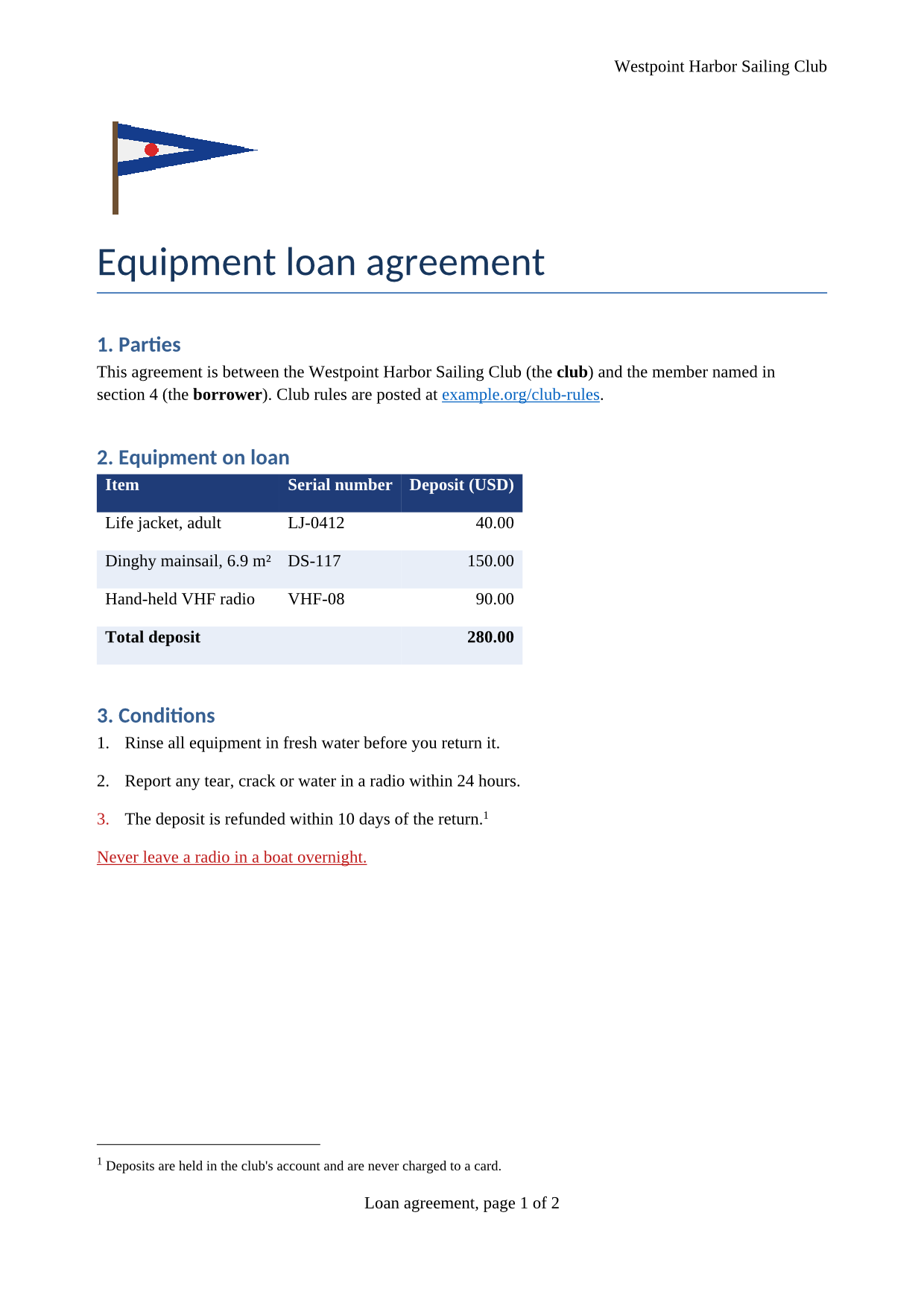
The same file the code sends. Download the input and the output and compare them yourself.
- Input
- loan-agreement.doc (26 KB)
- Output
- loan-agreement.docx (14 KB)
- Source
- A two-page equipment loan agreement for a fictional sailing club, written for this site and saved in the Word 97-2003 format, with a shaded table, a footnote, a picture and page-numbered footers. (CC0-1.0). How it was made
- Made by
- 2026-11-04, API build
9eeeb0640aba
Parameters
Send these as form fields next to the file. Names are case-insensitive. If you set one of the documented options below that we don't support yet, the request fails with a 400 that names it instead of returning a file made without it.
| Parameter | What it does |
|---|---|
UpdateFieldsboolean, default false | Refresh every field before the DOCX is written: tables of contents, cross-references, page numbers. The sample's only fields are the footer's page and page-count fields, so its output is the same either way. |
UpdateTableOfContentsboolean, default false | Same switch as UpdateFields; ConvertAPI documents this name for DOC to DOCX, and any of the three turns the refresh on. |
UpdateReferencesboolean, default false | Same effect as UpdateFields. A value other than true or false returns 400. |
FileNamestring | Base name of the DOCX. Without it, loan-agreement.doc becomes loan-agreement.docx. |
StoreFileboolean, default false | Answer with a download link instead of the file itself. The link stops working 3 hours after the conversion. |
What carries over, and what doesn't
Kept
- Header and footer, as three header and three footer parts, with the footer's page and page-count fields still live ("Loan agreement, page 1 of 2")
- The footnote, in
word/footnotes.xml, with its reference mark in the text - The burgee picture, as the same 895-byte PNG in
word/media/ - The numbered conditions as real Word numbering, the hyperlink, and bold, underlined and red text
- Cell shading: the navy header row and the light blue rows of the equipment table
- A4 paper (11,906 by 16,838 twips) and the document's title and author
Lost or not yet supported
- Table borders. The sample's equipment table has navy lines around every cell; the DOCX has shading but no borders, so the rows blend together.
- The file's history: revision goes from 1 to 2, the modified date becomes the time of the conversion, and the application name in the document properties reads PDF Conversion API.
- We opened the result in another office suite, not in Microsoft Word. It drew the same two pages with the same breaks.
Limits
- Requests up to 10 MB on the Free plan or 100 MB on paid plans, all files and fields together.
- 120 seconds per conversion, then 504.
- Password-protected .doc files can't be converted on this route yet: without
Passwordthe API returns 422 "the input file is password-protected", and with the right one 400 "password-protected DOC files can't be converted to DOCX yet".Passwordsent with an unprotected file changes nothing. - One file per request; the response holds one DOCX.
Where teams use it
Clearing out a share drive of .doc files
Old contracts and forms saved before 2007 are binary files, and libraries written for DOCX can't open them because they expect a ZIP package. Converting them once lets the rest of your pipeline, from search indexing to template filling, work on one format.
Uploads to systems that only take .docx
E-signature services, applicant portals and document assembly tools often reject .doc. Convert on upload and pass the .docx along, keeping the original as the record.
Editing old documents in code
A .docx is a ZIP of XML parts, so after conversion you can read the footnote in word/footnotes.xml or swap the logo in word/media/ with any ZIP and XML tooling.
Questions
How do I keep the table borders?
Take the two-step route: /v2/convert/doc/to/xml and then /v2/convert/xml/to/docx. A different converter handles those routes, and in our test the navy borders came through both steps (in the final DOCX all 15 cells of the equipment table have navy lines on four sides, 60 border lines in all). That path dropped the sample's footnote, so pick the route by which of the two matters more.
Can I convert a password-protected .doc?
Not on this route. With Password the API answers 400 "password-protected DOC files can't be converted to DOCX yet". The DOC to XML route does open protected files with Password, and its Word 2003 XML can go on to /v2/convert/xml/to/docx; we tested that with a protected .doc and got a 25,524-byte DOCX.
What if my file is really a .docx with a .doc name?
It still converts. The converter looks at the bytes, not the name: our .docx handbook sent to this route came back as a re-saved DOCX. A text file named .doc returns 422 saying it is not a Word document.
Will the converted file open in Word?
The output is a standard DOCX package with the usual parts (word/document.xml, styles.xml, numbering.xml, headers, footers, footnotes). We checked it in another office suite, which drew both pages with the header, footer and footnote. We have not opened it in Microsoft Word itself.
Convert your first DOC file in a minute.