DOCX to DOCX API
POST /v2/convert/docx/to/docx opens a Word file and saves it again as a new package. On its own that rewrites the parts in a clean form; with UpdateFields=true it also rebuilds the table of contents, and with Password it returns the document without its password.
- Endpoint
- POST /v2/
convert/ docx/ to/ docx - Accepts
- docx
- Sample timing
- 79 ms median of 5 runsHow we measure
- Request size
- Up to 10 MB on the Free plan or 100 MB on paid plans, all files together
Request and response
Every sample below ran against the API before this page was published. Set PDFCONVERSIONAPI_KEY to your key and run it as is.
curl -sS -X POST \
  https://api.pdfconversionapi.com/v2/convert/docx/to/docx \
  -H "Authorization: Bearer $PDFCONVERSIONAPI_KEY" \
  -F File=@volunteer-handbook.docx \
  --form-string UpdateFields=true \
  -o response.json

# FileData is base64. Save the first file in converted/,
# or print the JSON error.
if jq -e '.Files' response.json > /dev/null; then
  mkdir -p converted
  name=$(jq -r '.Files[0].FileName' response.json)
  jq -r '.Files[0].FileData' response.json \
    | base64 --decode > "converted/$name"
else
  cat response.json
fi
import base64
import os
import requests
key = os.environ["PDFCONVERSIONAPI_KEY"]
response = requests.post(
"https://api.pdfconversionapi.com/v2/convert/docx/to/docx",
headers={"Authorization": f"Bearer {key}"},
files=[("File", open("volunteer-handbook.docx", "rb"))],
data={
"UpdateFields": "true",
},
timeout=180,
)
result = response.json()
if not response.ok:
raise SystemExit(f"{result['Code']}: {result['Message']}")
os.makedirs("converted", exist_ok=True)
for file in result["Files"]:
path = os.path.join("converted", file["FileName"])
with open(path, "wb") as out:
out.write(base64.b64decode(file["FileData"]))
print(path, file["FileSize"], "bytes")
import { mkdir, readFile, writeFile } from "node:fs/promises";
import { join } from "node:path";

const form = new FormData();
const file = "volunteer-handbook.docx";
form.append("File", new Blob([await readFile(file)]), file);
form.append("UpdateFields", "true");

const url = "https://api.pdfconversionapi.com/v2/convert/docx/to/docx";
const key = process.env.PDFCONVERSIONAPI_KEY;
const response = await fetch(url, {
  method: "POST",
  headers: { Authorization: `Bearer ${key}` },
  body: form,
});
const result = await response.json();
if (!response.ok) {
  throw new Error(`${result.Code}: ${result.Message}`);
}

await mkdir("converted", { recursive: true });
for (const file of result.Files) {
  const path = join("converted", file.FileName);
  await writeFile(path, Buffer.from(file.FileData, "base64"));
  console.log(path, file.FileSize, "bytes");
}
{
  "ConversionCost": 1,
  "ConversionTime": 0.079,
  "Files": [
    {
      "FileName": "volunteer-handbook.docx",
      "FileExt": "docx",
      "FileSize": 43735,
      "FileData": "UEsDBBQAAAAIAAAAIQBOolVK…"
    }
  ]
}
Response from our test run on 2026-11-03. ConversionTime shows the median of 5 runs. FileData is shortened here; the real response carries the whole file as base64.
The sample, converted
The same file the code sends. Download the input and the output and compare them yourself.
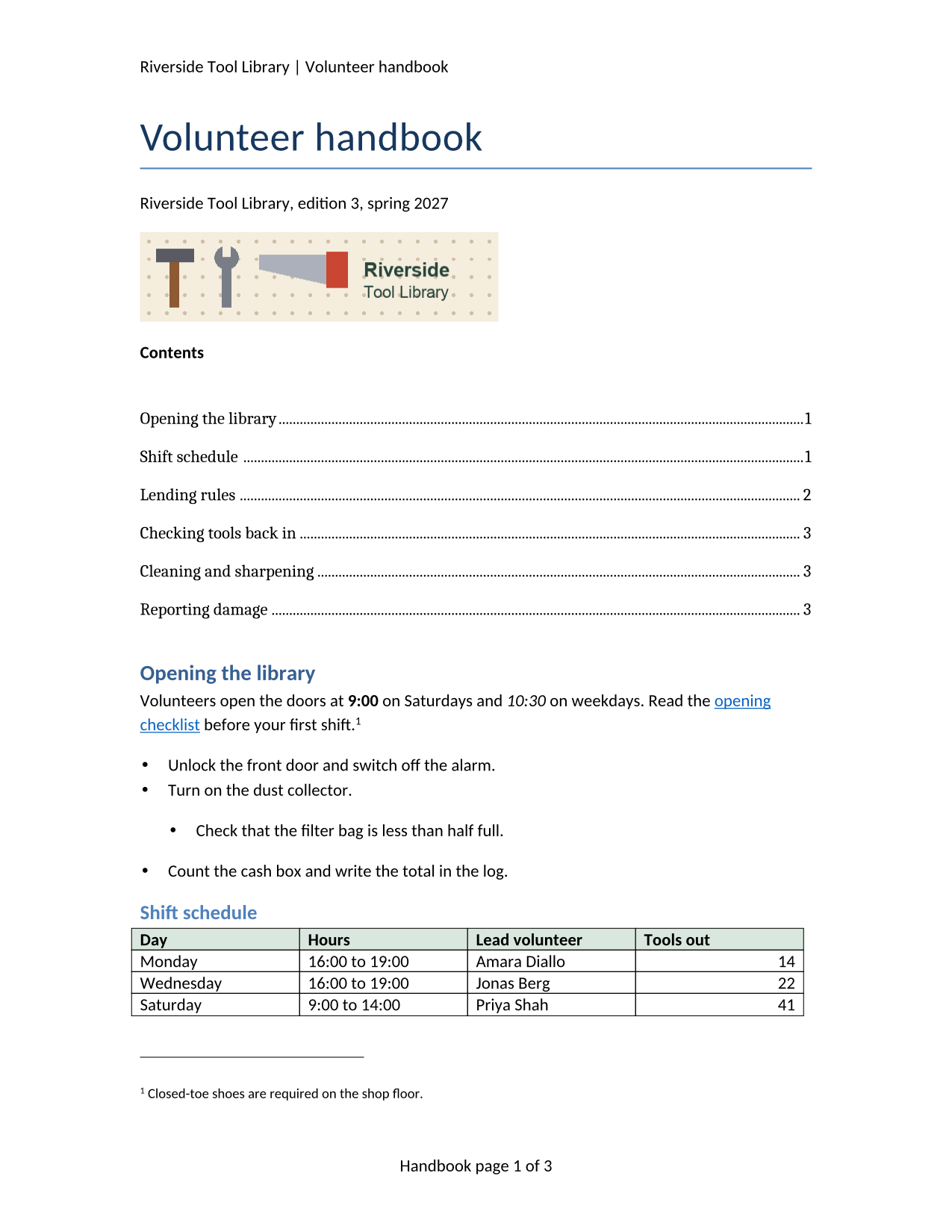
- Input
- volunteer-handbook.docx (43 KB)
- Output
- volunteer-handbook.docx (43 KB)
- Source
- A two-page volunteer handbook for a fictional tool library, written for this site, with a stale table of contents, a footnote, a comment, a tracked change, a table and a picture. (CC0-1.0). How it was made
- Made by
- 2026-11-04, API build
9eeeb0640aba
Parameters
Send these as form fields next to the file. Names are case-insensitive. If you set one of the documented options below that we don't support yet, the request fails with a 400 that names it instead of returning a file made without it.
| Parameter | What it does |
|---|---|
UpdateFieldsboolean, default false | Rebuild the table of contents from the headings and refresh other fields before saving. The sample's TOC was saved with two entries, one of them for a section that no longer exists; the re-saved file lists all six headings with page numbers 1, 1, 2, 3, 3, 3. |
UpdateTableOfContentsboolean, default false | ConvertAPI's name for the same refresh; the output is byte-for-byte the same size as with UpdateFields. |
UpdateReferencesboolean, default false | Same refresh again. Any one of the three switches is enough. |
Passwordstring | The password of an encrypted .docx. The file comes back decrypted: our handbook, protected and then sent with its password, returned a plain DOCX whose document.xml matched the unprotected re-save. A wrong or missing password returns 422. |
FileNamestring | Name of the new file, without extension: FileName=handbook-v4 returned handbook-v4.docx. |
StoreFileboolean, default false | Keep the file for 3 hours and answer with a link to it. |
What carries over, and what doesn't
Kept
- Comments and tracked changes as they were: Priya Shah's comment, and Dana Okafor's deleted "7" and inserted "5", still waiting to be accepted
- The footnote, header, footer, hyperlink and the banner PNG
- Title, subject, author, keywords and description in the document properties
- Custom XML, web settings and the second styles part from the original package
- The look of the pages: another office suite drew the original and the re-saved file with the same lines on both pages
Lost or not yet supported
- The stale TOC entry "Winter hours (removed)", which is the point of
UpdateFields; without the option the TOC is saved as it was. - Byte identity. The package is rewritten: the theme part shrinks from 10,939 to 2,167 bytes, three comment helper parts are added, and ZIP entry dates read 1980-01-01.
- The original revision count and dates: revision becomes 2 and the modified time is the conversion time. The application name reads PDF Conversion API.
Limits
- Requests up to 10 MB on the Free plan or 100 MB on paid plans, all files and fields together.
- 120 seconds per conversion, then 504.
- Only Office 2010-style (agile) encryption can be opened with
Password; files protected with the older Office 2007 scheme are refused.
Where teams use it
Fixing tables of contents in generated reports
Documents built by code usually carry a TOC field with no entries, or entries from the template. One request with UpdateFields=true fills it in from the real headings, with page numbers from our layout, before the file goes to a reader.
Removing a password you know
Send the protected .docx with Password and store the result without encryption, for example before indexing or archiving. Pair it with /v2/convert/docx/to/protect to change a password in two calls.
Normalizing files from many sources
Files saved by different editors differ in how parts are written. A re-save gives every file the same package layout and recomputed word and paragraph counts.
Questions
Why do the TOC page numbers say page 3 when my file had two pages?
Because the rebuilt TOC is longer. Our sample's two-entry TOC became six entries, which pushed "Lending rules" onto page 2 and the last section onto page 3, and the numbers follow that new layout. They come from our converter's layout of the file, which we have not compared with Word's.
Are tracked changes accepted?
No. Deletions, insertions and comments are written back as they were, so the reviewer still sees them. To get a clean copy, convert to PDF or images, which show the document with changes accepted.
What does `IncludeMarkup` do on this route?
Nothing. It is read, so it is not refused, but the saved DOCX is the same with it: comments and tracked changes are always kept in a DOCX.
Can it repair a damaged DOCX?
Only if our converter can read it. A file that is not a ZIP package returns 422 "the input file could not be read: not a valid zip package". Files that open but have untidy parts come back rewritten in a standard layout.
Convert your first DOCX file in a minute.