DOC to RTF API
POST /v2/convert/doc/to/rtf reads a Word 97-2003 file and writes Rich Text Format: plain ASCII with control words, Windows-1252 code page, and pictures as hex-encoded PNG. The sample agreement came back as a 7,338-byte RTF.
- Endpoint
- POST /v2/
convert/ doc/ to/ rtf - Accepts
- doc
- Sample timing
- 24 ms median of 5 runsHow we measure
- Request size
- Up to 10 MB on the Free plan or 100 MB on paid plans, all files together
Request and response
Every sample below ran against the API before this page was published. Set PDFCONVERSIONAPI_KEY to your key and run it as is.
curl -sS -X POST \
  https://api.pdfconversionapi.com/v2/convert/doc/to/rtf \
  -H "Authorization: Bearer $PDFCONVERSIONAPI_KEY" \
  -F File=@loan-agreement.doc \
  -o response.json

# FileData is base64. Save the first file in converted/,
# or print the JSON error.
if jq -e '.Files' response.json > /dev/null; then
  mkdir -p converted
  name=$(jq -r '.Files[0].FileName' response.json)
  jq -r '.Files[0].FileData' response.json \
    | base64 --decode > "converted/$name"
else
  cat response.json
fi
import base64
import os
import requests
key = os.environ["PDFCONVERSIONAPI_KEY"]
response = requests.post(
"https://api.pdfconversionapi.com/v2/convert/doc/to/rtf",
headers={"Authorization": f"Bearer {key}"},
files=[("File", open("loan-agreement.doc", "rb"))],
timeout=180,
)
result = response.json()
if not response.ok:
raise SystemExit(f"{result['Code']}: {result['Message']}")
os.makedirs("converted", exist_ok=True)
for file in result["Files"]:
path = os.path.join("converted", file["FileName"])
with open(path, "wb") as out:
out.write(base64.b64decode(file["FileData"]))
print(path, file["FileSize"], "bytes")
import { mkdir, readFile, writeFile } from "node:fs/promises";
import { join } from "node:path";

const form = new FormData();
const file = "loan-agreement.doc";
form.append("File", new Blob([await readFile(file)]), file);

const url = "https://api.pdfconversionapi.com/v2/convert/doc/to/rtf";
const key = process.env.PDFCONVERSIONAPI_KEY;
const response = await fetch(url, {
  method: "POST",
  headers: { Authorization: `Bearer ${key}` },
  body: form,
});
const result = await response.json();
if (!response.ok) {
  throw new Error(`${result.Code}: ${result.Message}`);
}

await mkdir("converted", { recursive: true });
for (const file of result.Files) {
  const path = join("converted", file.FileName);
  await writeFile(path, Buffer.from(file.FileData, "base64"));
  console.log(path, file.FileSize, "bytes");
}
{
  "ConversionCost": 1,
  "ConversionTime": 0.024,
  "Files": [
    {
      "FileName": "loan-agreement.rtf",
      "FileExt": "rtf",
      "FileSize": 7338,
      "FileData": "e1xydGYxXGFuc2lcYW5zaWNw…"
    }
  ]
}
Response from our test run on 2026-11-03. ConversionTime shows the median of 5 runs. FileData is shortened here; the real response carries the whole file as base64.
The sample, converted
The same file the code sends. Download the input and the output and compare them yourself.
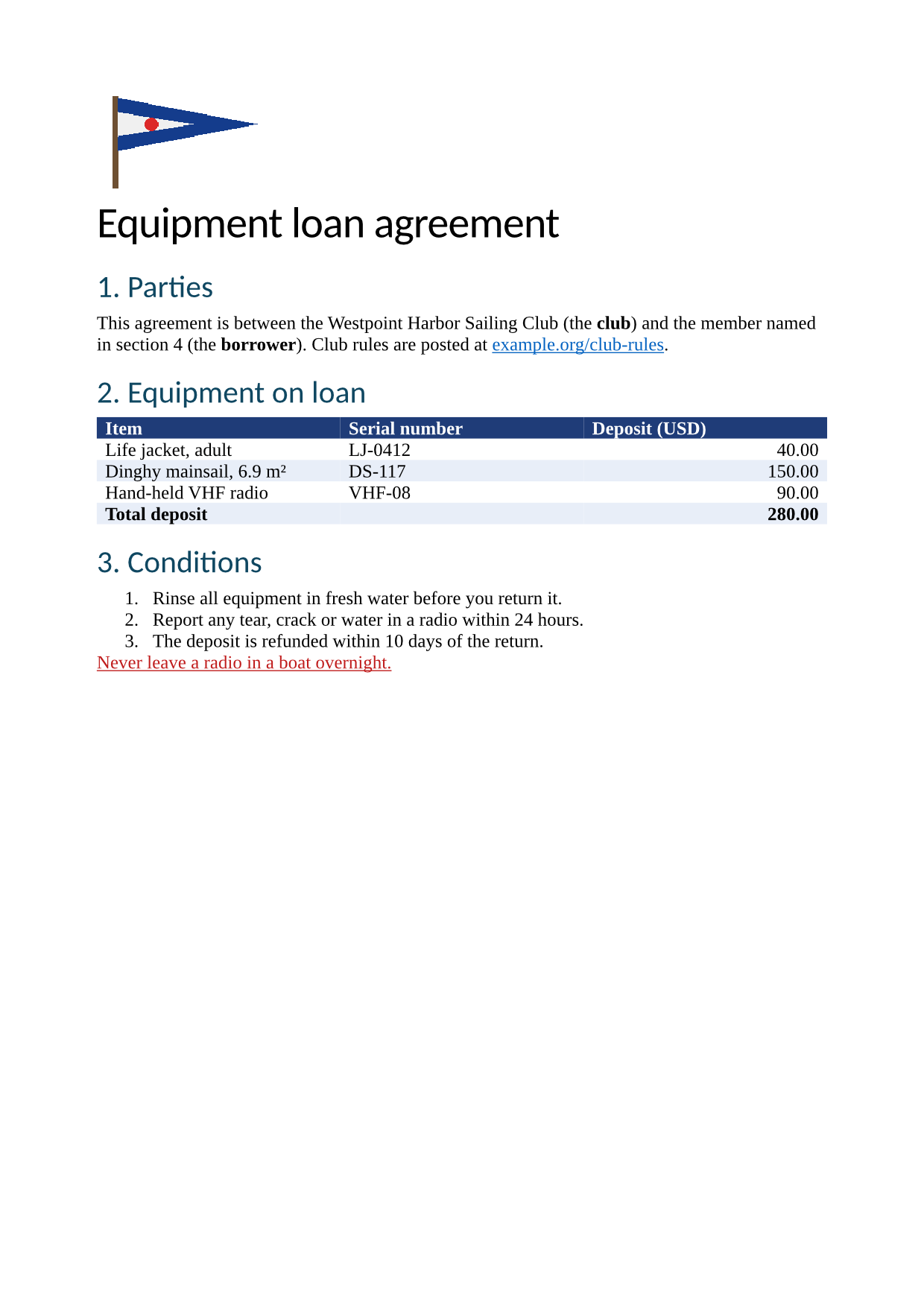
- Input
- loan-agreement.doc (26 KB)
- Output
- loan-agreement.rtf (7.2 KB)
- Source
- A two-page equipment loan agreement for a fictional sailing club, written for this site and saved in the Word 97-2003 format, with a shaded table, a footnote, a picture and page-numbered footers. (CC0-1.0). How it was made
- Made by
- 2026-11-04, API build
9eeeb0640aba
Parameters
Send these as form fields next to the file. Names are case-insensitive. If you set one of the documented options below that we don't support yet, the request fails with a 400 that names it instead of returning a file made without it.
| Parameter | What it does |
|---|---|
UpdateFieldsboolean, default false | Refresh tables of contents and other fields before writing the RTF. Our converter reads this on every Word route; the sample's body has no fields, so its RTF does not change. |
UpdateReferencesboolean, default false | Same switch as UpdateFields, as is UpdateTableOfContents. |
FileNamestring | Base name of the RTF: FileName=loan-2027 returned loan-2027.rtf. |
StoreFileboolean, default false | Store the RTF and return a link that works for 3 hours. |
What carries over, and what doesn't
Kept
- Body text, headings and the numbered conditions (as an RTF list table)
- Cell shading: the color table lists navy 31,60,120 and light blue 232,238,248, used by 9 cell-shading commands
- The red underlined warning (192,28,28) and the link color
- The picture as a PNG blip, 220 by 130 pixels
- The hyperlink, as a HYPERLINK field
- A4 paper (11,906 by 16,838 twips) and the margins
- Title, author and comment in the info group
Lost or not yet supported
- The header, the footer and their page numbers. Only the header and footer distances are written.
- The footnote.
- Table borders: no cell border command is written, so the table has fills but no lines.
- Fonts other than the body font. The font table holds only Times New Roman, so the Calibri headings come out in it too.
Limits
- Requests up to 10 MB on the Free plan or 100 MB on paid plans, all files and fields together.
- 120 seconds per conversion, then 504.
- A protected .doc returns 422 "the input file is password-protected", or 400 "password-protected DOC files can't be converted to RTF yet" once you add the right
Password. For unprotected files the option is ignored.
Where teams use it
Text for editors and systems that read RTF but not .doc
Older case management, medical record and mail merge systems often import RTF. Converting a .doc to RTF gives them the text, tables and bold or colored runs they can show.
Inspecting or patching a document as text
RTF is plain ASCII, so a script can search and replace in it, or diff two versions. In the sample, the deposit total is the literal text 280.00 inside a table row.
Questions
How are characters outside ASCII written?
As Unicode escapes with a question mark as the fallback (\uc1), even characters that Windows-1252 has. The superscript two in "6.9 m²" is written \u178?, so readers that know Unicode show m² and older ones show a question mark.
Is RTF a good way to keep a .doc's layout?
Only partly. RTF can hold headers, footers and footnotes, but our converter does not write them yet, and table borders were dropped from the sample. For the full layout use /v2/convert/doc/to/pdf; for an editable file with headers and footnotes use /v2/convert/doc/to/docx.
Does ConvertAPI have options for DOC to RTF?
It documents none, so nothing is refused by name. Our route reads the field-refresh switches, FileName and StoreFile; IncludeMarkup and other names change nothing in the RTF, and Password only matters for a protected file (see the limits).
Convert your first DOC file in a minute.