XML to DOCX API
POST /v2/convert/xml/to/docx reads a Word 2003 XML document, the single-file format with a w:wordDocument root, and saves it as .docx. The 9,100-byte sample became a 12,309-byte .docx on A4 with its table, footnote, header, footer and properties, but its numbered list and picture did not come through cleanly.
- Endpoint
- POST /v2/
convert/ xml/ to/ docx - Accepts
- xml
- Sample timing
- 0.547 s median of 5 runsHow we measure
- Request size
- Up to 10 MB on the Free plan or 100 MB on paid plans, all files together
Request and response
Every sample below ran against the API before this page was published. Set PDFCONVERSIONAPI_KEY to your key and run it as is.
curl -sS -X POST \
  https://api.pdfconversionapi.com/v2/convert/xml/to/docx \
  -H "Authorization: Bearer $PDFCONVERSIONAPI_KEY" \
  -F File=@repair-stand-rules.xml \
  -o response.json

# FileData is base64. Save the first file in converted/,
# or print the JSON error.
if jq -e '.Files' response.json > /dev/null; then
  mkdir -p converted
  name=$(jq -r '.Files[0].FileName' response.json)
  jq -r '.Files[0].FileData' response.json \
    | base64 --decode > "converted/$name"
else
  cat response.json
fi
import base64
import os
import requests
key = os.environ["PDFCONVERSIONAPI_KEY"]
response = requests.post(
"https://api.pdfconversionapi.com/v2/convert/xml/to/docx",
headers={"Authorization": f"Bearer {key}"},
files=[("File", open("repair-stand-rules.xml", "rb"))],
timeout=180,
)
result = response.json()
if not response.ok:
raise SystemExit(f"{result['Code']}: {result['Message']}")
os.makedirs("converted", exist_ok=True)
for file in result["Files"]:
path = os.path.join("converted", file["FileName"])
with open(path, "wb") as out:
out.write(base64.b64decode(file["FileData"]))
print(path, file["FileSize"], "bytes")
import { mkdir, readFile, writeFile } from "node:fs/promises";
import { join } from "node:path";

const form = new FormData();
const file = "repair-stand-rules.xml";
form.append("File", new Blob([await readFile(file)]), file);

const url = "https://api.pdfconversionapi.com/v2/convert/xml/to/docx";
const key = process.env.PDFCONVERSIONAPI_KEY;
const response = await fetch(url, {
  method: "POST",
  headers: { Authorization: `Bearer ${key}` },
  body: form,
});
const result = await response.json();
if (!response.ok) {
  throw new Error(`${result.Code}: ${result.Message}`);
}

await mkdir("converted", { recursive: true });
for (const file of result.Files) {
  const path = join("converted", file.FileName);
  await writeFile(path, Buffer.from(file.FileData, "base64"));
  console.log(path, file.FileSize, "bytes");
}
{
  "ConversionCost": 1,
  "ConversionTime": 0.547,
  "Files": [
    {
      "FileName": "repair-stand-rules.docx",
      "FileExt": "docx",
      "FileSize": 12309,
      "FileData": "UEsDBBQAAAgIAA14ZF3lcvZE…"
    }
  ]
}
Response from our test run on 2026-11-03. ConversionTime shows the median of 5 runs. FileData is shortened here; the real response carries the whole file as base64.
The sample, converted
The same file the code sends. Download the input and the output and compare them yourself.
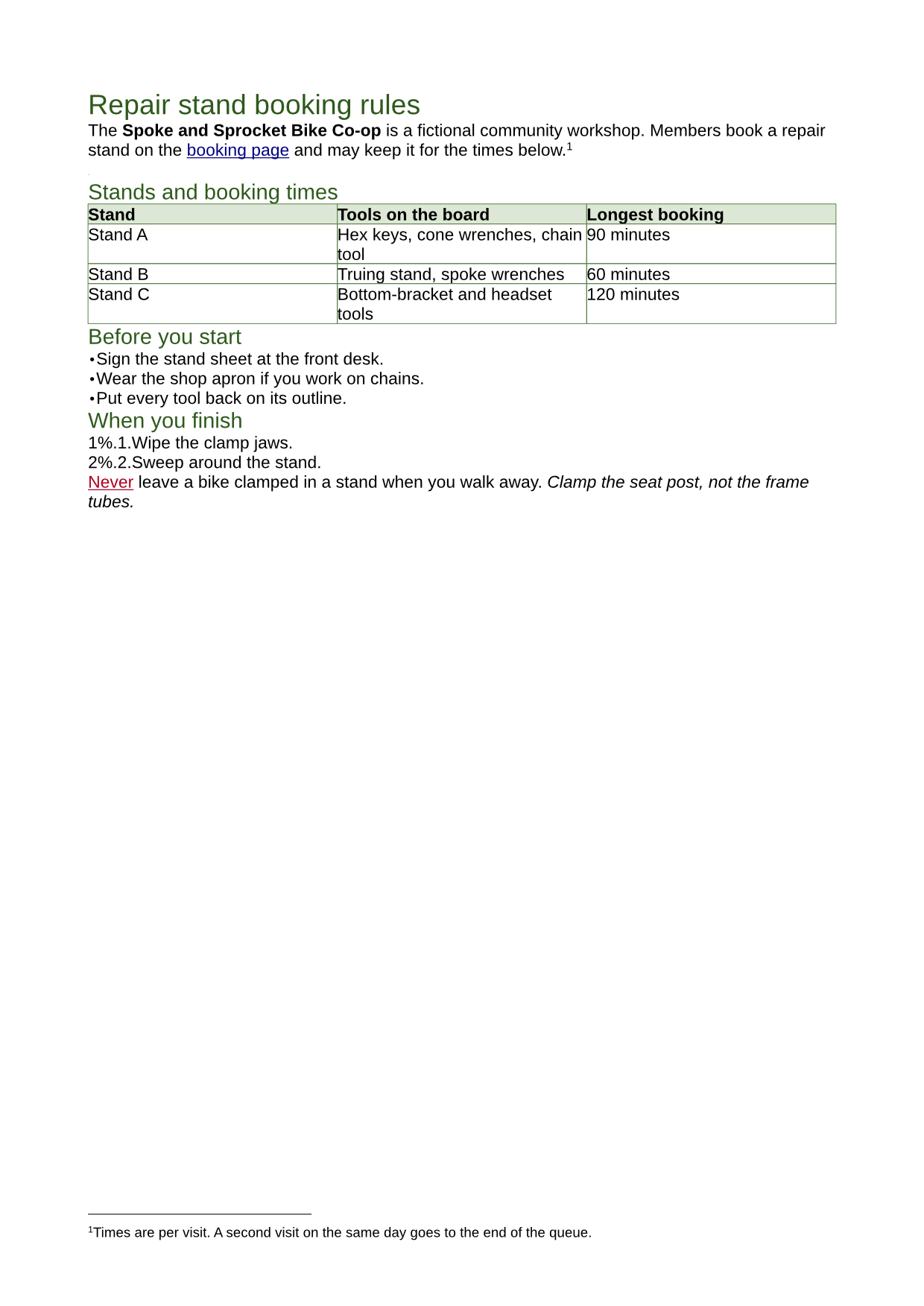
- Input
- repair-stand-rules.xml (8.9 KB)
- Output
- repair-stand-rules.docx (12 KB)
- Source
- A one-page Word 2003 XML document for a fictional bike co-op, written for this site: styles, two lists, a bordered table, a link, a footnote, a header and footer and a small picture, on A4 paper. (CC0-1.0). How it was made
- Made by
- 2026-11-04, API build
9eeeb0640aba
Parameters
Send these as form fields next to the file. Names are case-insensitive. If you set one of the documented options below that we don't support yet, the request fails with a 400 that names it instead of returning a file made without it.
| Parameter | What it does |
|---|---|
FileNamestring | Base name of the result; the sample comes back as repair-stand-rules.docx, and FileName=stand-rules gave stand-rules.docx. |
StoreFileboolean, default false | true returns Files[].Url, a link kept for 3 hours, in place of the base64 file. |
Not supported yet
Setting one of these to anything but its default returns 400.
| Option | What to do instead |
|---|---|
UpdateTableOfContents | false passes; true returns 400 "UpdateTableOfContents is not supported yet for XML files". |
UpdateReferences | false passes; true returns 400 "UpdateReferences is not supported yet for XML → DOCX". |
What carries over, and what doesn't
Kept
- The A4 page (11904 × 16836 twips) with its 2 cm top and side margins; the bottom margin became 1.5 cm
- Title, subject, author and keywords from
o:DocumentProperties - The body font, Arial 11 pt, and run formatting: bold, italic, a colored underlined word
- The table's header shading (#DCE8D5) and its green #5B7F4A borders, now set on each cell
- The footnote, as a real footnote with its reference mark
- The header text and the footer's PAGE field
- The hyperlink to the booking page, with the Hyperlink character style
- The bulleted list, as a Word bullet list
Lost or not yet supported
- Numbered lists. The level text is written as
%0%.%1., so the sample's steps show as "1%.1." and "2%.2." in our render. - Pictures. The 120 × 80 px PNG from
w:binDatais in the package, but its frame is 635 × 635 EMU (about 0.0007 in), so it can't be seen. - The header and footer on page 1. The section is marked "different first page" without a first-page header, so a one-page document shows neither.
- Heading weight and spacing: Heading 1 and 2 keep their green color and 18 and 14 pt sizes but lose bold and the space before and after.
- Style names: Normal and Heading 1 come back as
wNormalandwHeading1, so tools that look for Word's built-in heading names won't find them. - The table's column widths (2600, 3600 and 2400 twips became three of 3212) and its repeating header row; borders thin from 1/2 pt to 1/4 pt.
- List indents: the bullets sit at the left margin.
Limits
- One XML file per request.
- Requests up to 10 MB on the Free plan or 100 MB on paid plans, all files and fields together.
- 120 seconds per conversion, then 504.
- Only Word 2003 XML is read. Other well-formed XML, such as an RSS feed or a Flat OPC package, returns 200 with an empty 4,707-byte document; text that isn't XML returns 422 "it could not be opened as XML".
Where teams use it
Documents generated as Word 2003 XML
Some reporting and mail-merge systems produce WordprocessingML with XSLT or string templates, because it is one plain XML file. Convert their output to .docx for the people and tools that expect the current format.
Archives of .xml Word files
Folders of documents saved from Word 2003 as XML can be moved to .docx in bulk. Check numbered lists and pictures afterwards, since those are the parts that change.
Questions
Which XML files does this route accept?
Word 2003 XML, also called WordprocessingML: a single file with a <w:wordDocument> root in the http://schemas.microsoft.com/office/word/2003/wordml namespace, often starting with <?mso-application progid="Word.Document"?>. It is the format /v2/convert/docx/to/xml writes.
Does it accept the XML that newer versions of Word save?
No. Word 2007 and later save a "Word XML Document" as Flat OPC, a <pkg:package> holding the .docx parts. Our test Flat OPC file converted with a 200 status but produced a document with no text, so check for that if you can't control which kind you get.
My numbered list shows odd characters. Why?
The list's number format comes out of the conversion as %0%.%1. instead of %1., which renders as "1%.1.". Bulleted lists are not affected. Until this is fixed, reapply the numbering in the .docx after converting.
Are document properties kept?
Yes. The sample's title, subject, author and keywords from o:DocumentProperties are in docProps/core.xml of the .docx.
Convert your first XML file in a minute.