ODG to PDF API
Send an OpenDocument drawing to POST /v2/convert/odg/to/pdf and you get one PDF page per drawing page, with shapes as vector paths and text you can select. Our 4,479-byte maker fair floor plan returns a 2-page, 41,759-byte PDF on US Letter landscape paper.
- Endpoint
- POST /v2/
convert/ odg/ to/ pdf - Accepts
- odg
- Sample timing
- 0.511 s median of 5 runsHow we measure
- Request size
- Up to 10 MB on the Free plan or 100 MB on paid plans, all files together
Request and response
Every sample below ran against the API before this page was published. Set PDFCONVERSIONAPI_KEY to your key and run it as is.
curl -sS -X POST \
  https://api.pdfconversionapi.com/v2/convert/odg/to/pdf \
  -H "Authorization: Bearer $PDFCONVERSIONAPI_KEY" \
  -F File=@maker-fair-floor-plan.odg \
  -o response.json

# FileData is base64. Save the first file in converted/,
# or print the JSON error.
if jq -e '.Files' response.json > /dev/null; then
  mkdir -p converted
  name=$(jq -r '.Files[0].FileName' response.json)
  jq -r '.Files[0].FileData' response.json \
    | base64 --decode > "converted/$name"
else
  cat response.json
fi
import base64
import os
import requests
key = os.environ["PDFCONVERSIONAPI_KEY"]
response = requests.post(
"https://api.pdfconversionapi.com/v2/convert/odg/to/pdf",
headers={"Authorization": f"Bearer {key}"},
files=[("File", open("maker-fair-floor-plan.odg", "rb"))],
timeout=180,
)
result = response.json()
if not response.ok:
raise SystemExit(f"{result['Code']}: {result['Message']}")
os.makedirs("converted", exist_ok=True)
for file in result["Files"]:
path = os.path.join("converted", file["FileName"])
with open(path, "wb") as out:
out.write(base64.b64decode(file["FileData"]))
print(path, file["FileSize"], "bytes")
import { mkdir, readFile, writeFile } from "node:fs/promises";
import { join } from "node:path";

const form = new FormData();
const file = "maker-fair-floor-plan.odg";
form.append("File", new Blob([await readFile(file)]), file);

const url = "https://api.pdfconversionapi.com/v2/convert/odg/to/pdf";
const key = process.env.PDFCONVERSIONAPI_KEY;
const response = await fetch(url, {
  method: "POST",
  headers: { Authorization: `Bearer ${key}` },
  body: form,
});
const result = await response.json();
if (!response.ok) {
  throw new Error(`${result.Code}: ${result.Message}`);
}

await mkdir("converted", { recursive: true });
for (const file of result.Files) {
  const path = join("converted", file.FileName);
  await writeFile(path, Buffer.from(file.FileData, "base64"));
  console.log(path, file.FileSize, "bytes");
}
{
  "ConversionCost": 1,
  "ConversionTime": 0.511,
  "Files": [
    {
      "FileName": "maker-fair-floor-plan.pdf",
      "FileExt": "pdf",
      "FileSize": 41759,
      "FileData": "JVBERi0xLjcKJcOkw7zDtsOf…"
    }
  ]
}
Response from our test run on 2026-11-03. ConversionTime shows the median of 5 runs. FileData is shortened here; the real response carries the whole file as base64.
The sample, converted
The same file the code sends. Download the input and the output and compare them yourself.
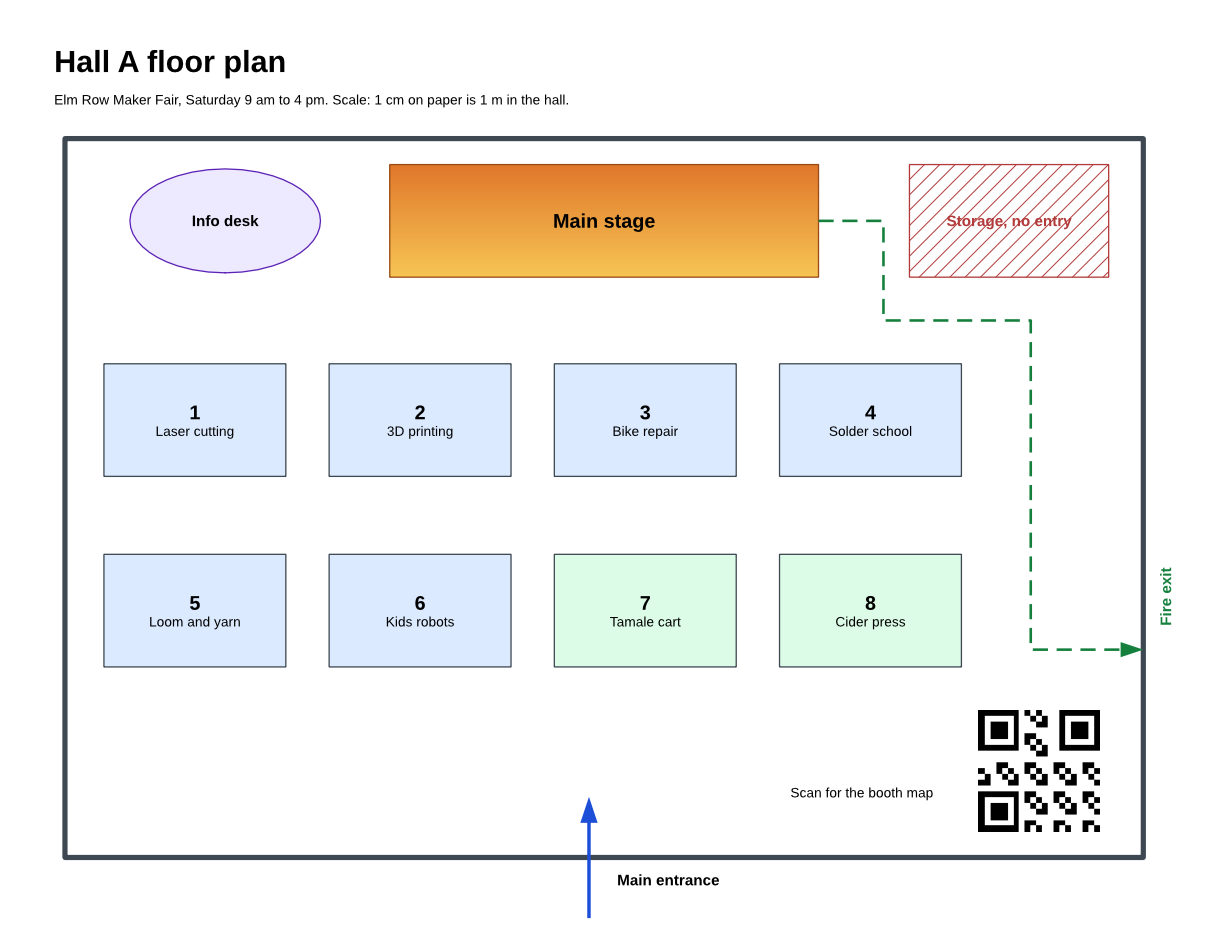
- Input
- maker-fair-floor-plan.odg (4.4 KB)
- Output
- maker-fair-floor-plan.pdf (41 KB)
- Source
- A two-page floor plan and booth directory for a fictional maker fair, which we wrote as an OpenDocument drawing by hand (CC0-1.0). How it was made
- Made by
- 2026-11-04, API build
9eeeb0640aba
Parameters
Send these as form fields next to the file. Names are case-insensitive. If you set one of the documented options below that we don't support yet, the request fails with a 400 that names it instead of returning a file made without it.
| Parameter | What it does |
|---|---|
PageRangestring | Pages to keep, by number in the drawing. PageRange=2 returns only the booth directory, 25,839 bytes, and the drawing's title comes with it. 3 returns 400 "PageRange asks for page 3, but the document has 2 pages".Values: e.g. 2, 1-2 |
PdfaVersionenum, default none | Write PDF/A. pdfA2b made the floor plan a PDF/A-2b file of 50,702 bytes. When Pdfa=true comes too, the version named here wins: pdfA3b with Pdfa=true gave PDF/A-3b.Values: none, pdfA1b, pdfA2b, pdfA3b |
Pdfaboolean, default false | true is the short form for PDF/A-1b (50,688 bytes for the sample). |
Passwordstring | Opens a drawing saved with a password. Our password-protected copy of the plan returned the same 41,759-byte PDF; a wrong or missing password returns 422 "the input file is password-protected". |
FileNamestring | Name for the PDF: FileName=hall-a returns hall-a.pdf instead of maker-fair-floor-plan.pdf. |
StoreFileboolean, default false | Keep the PDF on our side and answer with a download link, valid for 3 hours. |
Not supported yet
Setting one of these to anything but its default returns 400.
| Option | What to do instead |
|---|---|
PageSize | The paper size saved in the drawing is used; for the sample that is Letter landscape. The request returns 400 "PageSize is not supported yet for ODG files". |
PageOrientation | Also taken from the drawing's page setup. |
PdfTitle | The PDF title comes from the drawing's own title property. |
EmbedFonts | Fonts are always embedded as subsets. |
PdfVersion | The PDF is version 1.7. |
ColorSpace | Default and TrueColors are accepted and change nothing; other values such as gray return 400 "ColorSpace is not supported yet for ODG files". |
What carries over, and what doesn't
Kept
- Page size and orientation from the drawing: both pages are 792 × 612 pt, US Letter landscape
- Walls, booths, arrows and the dashed exit route as vector paths (76 drawing operations on page 1), so the plan stays sharp at any zoom
- The gradient on the stage and the hatching on the storage area, drawn as vectors as well
- All labels as selectable text, including the "Fire exit" label turned 90 degrees, which a PDF reader extracts as vertical text
- The embedded picture at its own 168 × 168 pixels
- Page names as PDF bookmarks ("Hall A", "Booth directory"), and the PDF asks viewers to show the bookmark panel when it opens
- The drawing's title, "Maker fair floor plan", as the PDF title, also in a
PageRangesubset
Lost or not yet supported
- Shapes on a layer that is not shown everywhere. The planner's note on our "Planner notes" layer, set to show on screen only, is missing from the PDF; set to print only, or hidden, it was left out too.
- Fonts the server doesn't have. Text styled in Calibri came out in Carlito, Cambria in Caladea and Segoe UI in Noto Sans.
Limits
- One drawing per request, up to 10 MB on the Free plan or 100 MB on paid plans; 120 seconds per conversion, then 504.
PageRangeplus PDF/A returns 400 "PageRange cannot be combined with PDF/A yet" if the range leaves pages out. A range covering every page, such as1-5here, is fine.- The file must really be a drawing: a plain text file sent here returns 422 "the input file could not be read: it could not be opened as ODG".
Where teams use it
Floor plans and seating charts for venues
Event teams who lay out halls in an OpenDocument drawing editor can send the venue or the printer a PDF that keeps the scale of every shape. The sample's 4.2 cm booths stay 4.2 cm on paper.
Diagrams for readers without a drawing editor
A PDF opens in any browser. The drawing's page names become bookmarks, so a reader can jump from "Hall A" to "Booth directory" without scrolling.
Long-term copies of drawings
Ask for PdfaVersion=pdfA2b when the plan goes into a records system. Send the whole drawing: a PageRange that drops pages can't be combined with PDF/A yet.
Questions
Can I change the paper size or orientation of the PDF?
Not with request options yet: PageSize and PageOrientation return 400 "... is not supported yet for ODG files". Each page prints at the size set in the drawing's page setup, so change it there.
Why is a shape I can see in my editor missing from the PDF?
Check its layer. Only layers that are both visible and printable reach the PDF. In our tests a layer set to screen only, print only or hidden was left out, while the same note on a normal layer printed.
Can I convert a password-protected ODG file?
Yes. Send the password as Password. Our protected copy of the floor plan converted to the same 41,759 bytes as the original; without the password, or with a wrong one, the API answers 422 "the input file is password-protected".
Can I post .odg files to file/to/pdf or office/to/pdf?
/v2/convert/file/to/pdf takes them and returns the same 41,759-byte PDF. office/to/pdf doesn't: it returns 400 and points you to /v2/convert/odg/to/pdf.
Convert your first ODG file in a minute.