ODG to TIFF API
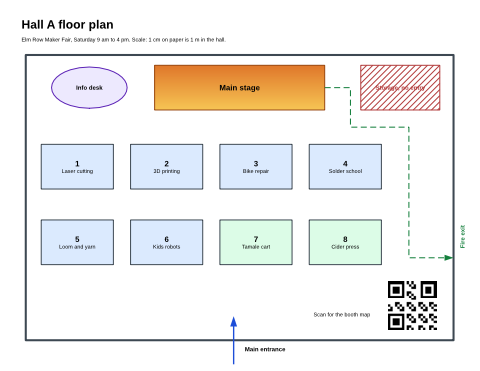
POST /v2/convert/odg/to/tiff returns one uncompressed TIFF for each page of an OpenDocument drawing. The sample asks for page 1 at ImageWidth=480 and gets a 480 × 371 RGB TIFF of 534,450 bytes; at the default 150 DPI the same page is 6,311,516 bytes.
- Endpoint
- POST /v2/
convert/ odg/ to/ tiff - Accepts
- odg
- Sample timing
- 0.525 s median of 5 runsHow we measure
- Request size
- Up to 10 MB on the Free plan or 100 MB on paid plans, all files together
Request and response
Every sample below ran against the API before this page was published. Set PDFCONVERSIONAPI_KEY to your key and run it as is.
curl -sS -X POST \
  https://api.pdfconversionapi.com/v2/convert/odg/to/tiff \
  -H "Authorization: Bearer $PDFCONVERSIONAPI_KEY" \
  -F File=@maker-fair-floor-plan.odg \
  --form-string PageRange=1 \
  --form-string ImageWidth=480 \
  -o response.json

# FileData is base64. Save the first file in converted/,
# or print the JSON error.
if jq -e '.Files' response.json > /dev/null; then
  mkdir -p converted
  name=$(jq -r '.Files[0].FileName' response.json)
  jq -r '.Files[0].FileData' response.json \
    | base64 --decode > "converted/$name"
else
  cat response.json
fi
import base64
import os
import requests
key = os.environ["PDFCONVERSIONAPI_KEY"]
response = requests.post(
"https://api.pdfconversionapi.com/v2/convert/odg/to/tiff",
headers={"Authorization": f"Bearer {key}"},
files=[("File", open("maker-fair-floor-plan.odg", "rb"))],
data={
"PageRange": "1",
"ImageWidth": "480",
},
timeout=180,
)
result = response.json()
if not response.ok:
raise SystemExit(f"{result['Code']}: {result['Message']}")
os.makedirs("converted", exist_ok=True)
for file in result["Files"]:
path = os.path.join("converted", file["FileName"])
with open(path, "wb") as out:
out.write(base64.b64decode(file["FileData"]))
print(path, file["FileSize"], "bytes")
import { mkdir, readFile, writeFile } from "node:fs/promises";
import { join } from "node:path";

const form = new FormData();
const file = "maker-fair-floor-plan.odg";
form.append("File", new Blob([await readFile(file)]), file);
form.append("PageRange", "1");
form.append("ImageWidth", "480");

const url = "https://api.pdfconversionapi.com/v2/convert/odg/to/tiff";
const key = process.env.PDFCONVERSIONAPI_KEY;
const response = await fetch(url, {
  method: "POST",
  headers: { Authorization: `Bearer ${key}` },
  body: form,
});
const result = await response.json();
if (!response.ok) {
  throw new Error(`${result.Code}: ${result.Message}`);
}

await mkdir("converted", { recursive: true });
for (const file of result.Files) {
  const path = join("converted", file.FileName);
  await writeFile(path, Buffer.from(file.FileData, "base64"));
  console.log(path, file.FileSize, "bytes");
}
{
  "ConversionCost": 1,
  "ConversionTime": 0.525,
  "Files": [
    {
      "FileName": "maker-fair-floor-plan-1.tiff",
      "FileExt": "tiff",
      "FileSize": 534450,
      "FileData": "SUkqAAQnCAABAAAAAQAAAAEA…"
    }
  ]
}
Response from our test run on 2026-11-03. ConversionTime shows the median of 5 runs. FileData is shortened here; the real response carries the whole file as base64.
The sample, converted
The same file the code sends. Download the input and the output and compare them yourself.
- Input
- maker-fair-floor-plan.odg (4.4 KB)
- Output
- maker-fair-floor-plan-1.tiff (522 KB)
- Source
- A two-page floor plan and booth directory for a fictional maker fair, which we wrote as an OpenDocument drawing by hand (CC0-1.0). How it was made
- Made by
- 2026-11-04, API build
9eeeb0640aba
Parameters
Send these as form fields next to the file. Names are case-insensitive. If you set one of the documented options below that we don't support yet, the request fails with a 400 that names it instead of returning a file made without it.
| Parameter | What it does |
|---|---|
ImageResolutioninteger, default 150 | Dots per inch, written into the TIFF's resolution tags when sent. At 40 DPI each page is 440 × 340 and 449,010 bytes.Values: 36–600 |
ImageWidthinteger | Width in pixels. The sample's 480 gives 480 × 371.Values: 1–20000 |
ImageHeightinteger | Height in pixels, alone or with ImageWidth as a box.Values: 1–20000 |
ScaleProportionsboolean, default true | false stretches a page to the exact ImageWidth × ImageHeight. |
ScaleImageboolean, default true | false crops the top-left area of that size from the 150 DPI page. |
ScaleIfLargerboolean, default false | true leaves pages that already fit unscaled. |
ColorSpaceenum, default default | gray writes one 8-bit channel, a third of the bytes: 149,798 for the directory page at 40 DPI. monochrome keeps the same layout with only the values 0 and 255, and rgb gives the same three-channel file as the default.Values: default, rgb, gray, monochrome |
TransparentColorstring | Clears one exact color and adds an alpha channel: white made 128,571 of the 178,080 pixels of the 480-wide hall page transparent, in a 712,534-byte file.Values: color name, #RRGGBB or R,G,B |
MultiPageboolean, default false | true puts all pages in one LZW-compressed TIFF: 244,125 bytes for both pages at 150 DPI, against 6,311,516 for each page on its own. With ColorSpace=gray the pages in it stay one channel (23,940 bytes at 40 DPI). |
PageRangestring | Pages to convert. Without MultiPage=true each page is its own file, so 1 returns one TIFF. |
Passwordstring | For drawings saved with a password. |
FileNamestring | Stem for -1.tiff, -2.tiff. |
StoreFileboolean, default false | Store the files and return links that last 3 hours. |
Not supported yet
Setting one of these to anything but its default returns 400.
| Option | What to do instead |
|---|---|
PageSize | 400 "PageSize is not supported yet for ODG files". |
Also refused when set: PageOrientation.
What carries over, and what doesn't
Kept
- Exact pixel values: page TIFFs are written without compression and the
MultiPage=truefile with lossless LZW, so nothing is approximated - Three channels (red, green and blue) by default;
TransparentColoradds an alpha channel - The page's proportions, and the DPI in the resolution tags when
ImageResolutionis sent (the sample sends a width instead, so its tags carry no unit)
Lost or not yet supported
- Compression on separate pages: a full Letter landscape page at 150 DPI is 6,311,516 bytes, the sample's 480-wide page 534,450.
- One file for the whole drawing, unless you ask: each page is a separate TIFF by default, and only
MultiPage=truejoins them. - Text as text, and shapes on layers that are hidden or don't print.
Limits
TiffType, an option from other TIFF routes, is ignored on this route rather than refused, with or withoutMultiPage=true.- 100,000,000 pixels and 16,000 pixels per side per page; larger requests return 413.
- Up to 10 MB on the Free plan or 100 MB on paid plans per request and 120 seconds per conversion; keep responses small with
PageRangeand a lower resolution.
Where teams use it
Document systems that file images as TIFF
Records and plan-room systems that index TIFF can take each page of a drawing as its own image, named by page number.
Page images for print or prepress checks
A print vendor's intake that wants raster pages can get exact pixel sizes with ImageWidth or ImageResolution; the resolution tags record the DPI you asked for.
Gray scans of plans
ColorSpace=gray gives one-channel TIFFs a third the size of the color ones, for archives that store plans in gray.
Questions
Can I get all pages in one multi-page TIFF?
Yes, send MultiPage=true: the 2-page plan then comes back as one maker-fair-floor-plan.tiff holding both pages, LZW-compressed, 244,125 bytes at 150 DPI. Without it you get maker-fair-floor-plan-1.tiff and -2.tiff.
Why are the TIFF files so large?
Separate pages are uncompressed, three bytes per pixel. A 1,650 × 1,275 page is about 6.3 MB. ImageResolution=40 brings it to 449,010 bytes, ColorSpace=gray divides any size by about three, and MultiPage=true compresses both pages into one 244,125-byte file.
Is `ColorSpace=monochrome` a 1-bit TIFF?
No. Every pixel becomes black or white, but the file keeps one byte per pixel: at 40 DPI the directory page was 149,798 bytes, the same as the gray version.
Convert your first ODG file in a minute.