PUB to PDF API
POST /v2/convert/pub/to/pdf opens a Microsoft Publisher file and returns a PDF with one page per publication page. Our 10,240-byte book sale flyer comes back as a 43,183-byte PDF on two US Letter pages, its boxes and rule drawn as vectors and every word selectable.
- Endpoint
- POST /v2/
convert/ pub/ to/ pdf - Accepts
- pub
- Sample timing
- 0.481 s median of 5 runsHow we measure
- Request size
- Up to 10 MB on the Free plan or 100 MB on paid plans, all files together
Request and response
Every sample below ran against the API before this page was published. Set PDFCONVERSIONAPI_KEY to your key and run it as is.
curl -sS -X POST \
  https://api.pdfconversionapi.com/v2/convert/pub/to/pdf \
  -H "Authorization: Bearer $PDFCONVERSIONAPI_KEY" \
  -F File=@book-sale-flyer.pub \
  -o response.json

# FileData is base64. Save the first file in converted/,
# or print the JSON error.
if jq -e '.Files' response.json > /dev/null; then
  mkdir -p converted
  name=$(jq -r '.Files[0].FileName' response.json)
  jq -r '.Files[0].FileData' response.json \
    | base64 --decode > "converted/$name"
else
  cat response.json
fi
import base64
import os
import requests
key = os.environ["PDFCONVERSIONAPI_KEY"]
response = requests.post(
"https://api.pdfconversionapi.com/v2/convert/pub/to/pdf",
headers={"Authorization": f"Bearer {key}"},
files=[("File", open("book-sale-flyer.pub", "rb"))],
timeout=180,
)
result = response.json()
if not response.ok:
raise SystemExit(f"{result['Code']}: {result['Message']}")
os.makedirs("converted", exist_ok=True)
for file in result["Files"]:
path = os.path.join("converted", file["FileName"])
with open(path, "wb") as out:
out.write(base64.b64decode(file["FileData"]))
print(path, file["FileSize"], "bytes")
import { mkdir, readFile, writeFile } from "node:fs/promises";
import { join } from "node:path";

const form = new FormData();
const file = "book-sale-flyer.pub";
form.append("File", new Blob([await readFile(file)]), file);

const url = "https://api.pdfconversionapi.com/v2/convert/pub/to/pdf";
const key = process.env.PDFCONVERSIONAPI_KEY;
const response = await fetch(url, {
  method: "POST",
  headers: { Authorization: `Bearer ${key}` },
  body: form,
});
const result = await response.json();
if (!response.ok) {
  throw new Error(`${result.Code}: ${result.Message}`);
}

await mkdir("converted", { recursive: true });
for (const file of result.Files) {
  const path = join("converted", file.FileName);
  await writeFile(path, Buffer.from(file.FileData, "base64"));
  console.log(path, file.FileSize, "bytes");
}
{
  "ConversionCost": 1,
  "ConversionTime": 0.481,
  "Files": [
    {
      "FileName": "book-sale-flyer.pdf",
      "FileExt": "pdf",
      "FileSize": 43183,
      "FileData": "JVBERi0xLjcKJcOkw7zDtsOf…"
    }
  ]
}
Response from our test run on 2026-11-03. ConversionTime shows the median of 5 runs. FileData is shortened here; the real response carries the whole file as base64.
The sample, converted
The same file the code sends. Download the input and the output and compare them yourself.
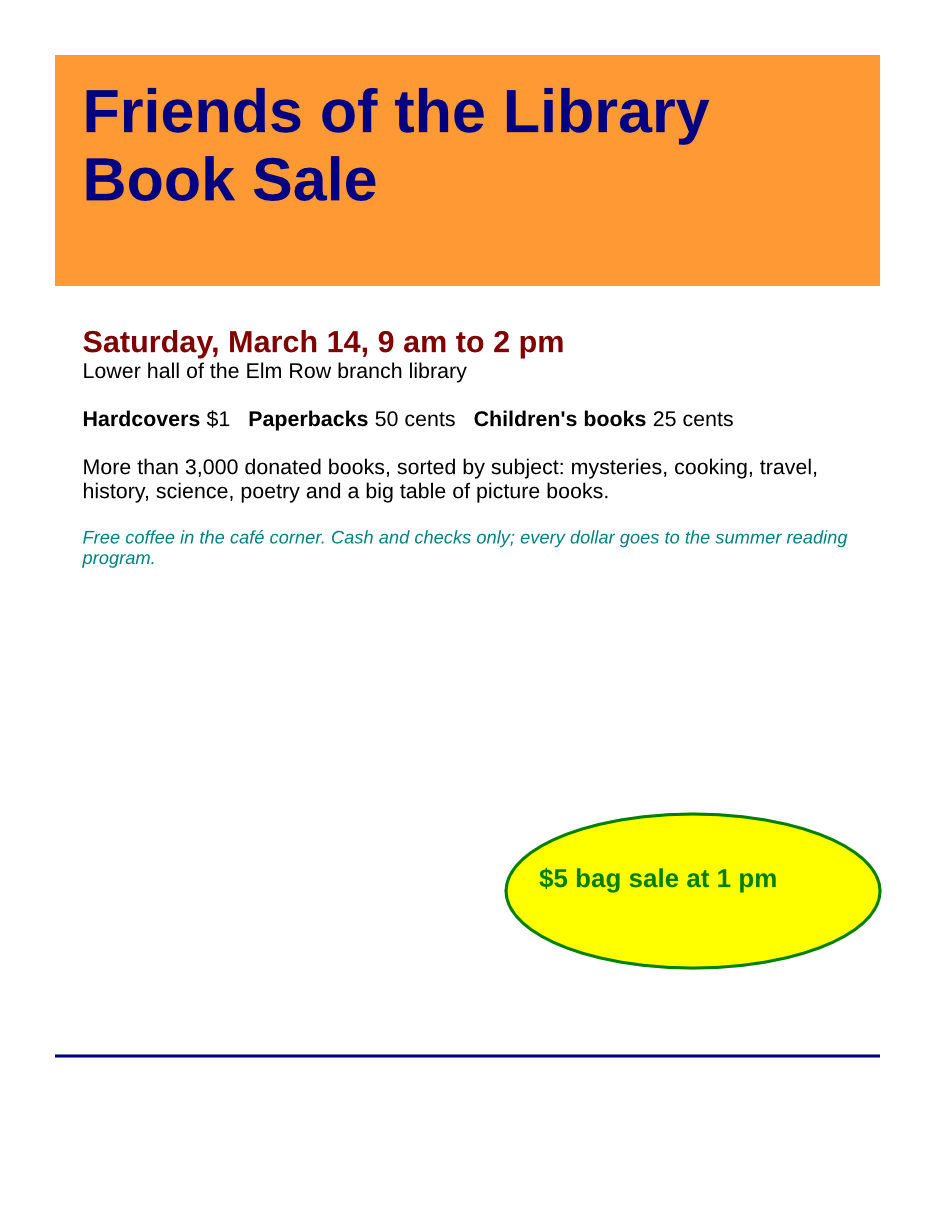
- Input
- book-sale-flyer.pub (10 KB)
- Output
- book-sale-flyer.pdf (42 KB)
- Source
- A two-page flyer for a fictional library book sale; we wrote our text and shapes into a small Publisher test file from an open-source office suite's test data (MPL-2.0). How it was made
- Made by
- 2026-11-04, API build
9eeeb0640aba
Parameters
Send these as form fields next to the file. Names are case-insensitive. If you set one of the documented options below that we don't support yet, the request fails with a 400 that names it instead of returning a file made without it.
| Parameter | What it does |
|---|---|
PageRangestring | Pages to keep: 2 returns the volunteer page alone (32,307 bytes); 4 returns 400 "PageRange asks for page 4, but the document has 2 pages".Values: e.g. 1, 2, 1-2 |
PdfaVersionenum, default none | PDF/A output. ConvertAPI doesn't list it for Publisher files, but it works here: pdfA2b gave a 52,126-byte PDF/A-2b flyer.Values: none, pdfA1b, pdfA2b, pdfA3b |
Pdfaboolean, default false | true writes PDF/A-1b (52,112 bytes). With a PageRange that leaves pages out it returns 400 "PageRange cannot be combined with PDF/A yet". |
FileNamestring | Base name of the PDF: FileName=book-sale returns book-sale.pdf. |
StoreFileboolean, default false | Keep the PDF on our side for 3 hours and return a link to it. |
Not supported yet
Setting one of these to anything but its default returns 400.
| Option | What to do instead |
|---|---|
SubsetFonts | Fonts are always embedded as subsets; false returns 400 "SubsetFonts is not supported yet for PUB → PDF". |
PdfResolution | Shapes stay vectors, so there is nothing to downsample; 400 "PdfResolution is not supported yet for PUB → PDF". |
PdfTitle | Returns 400 "PdfTitle is not supported yet for PUB files"; the PDF has no title. |
PdfVersion | The PDF is version 1.7. |
ColorSpace | Default, ConvertAPI's documented default, and TrueColors are accepted; other values such as gray return 400 "ColorSpace is not supported yet for PUB files". |
Also refused when set: SubsetFontsThreshold, PdfAuthor, PdfSubject, PdfKeywords, IncludeMetadata, EmbedFonts, OpenPage, OpenZoom, RotatePage.
What carries over, and what doesn't
Kept
- The publication's page size: both pages are 612 × 792 pt, US Letter
- Boxes, the ellipse and the rule as vector shapes with their fills and outlines: the #FF9933 orange banner, a yellow ellipse with a 2 pt green outline, a 2 pt navy rule and a silver panel with a 1 pt border
- Text in its boxes with each run's size (40, 22, 20, 17, 14, 12 and 10 pt in the sample), bold, italic and color
- Western accented letters such as the é in "café"
- Selectable, searchable text, and a bookmark for each page ("Page 1", "Page 2")
Lost or not yet supported
- Font faces: every run printed in one sans-serif family (bold and italic kept), whatever font the file names. The Publisher test file our sample was built from asks for Times New Roman Cyr and printed sans-serif as well.
- Text written in a non-Western 8-bit code page: that test file's Russian line came out as "Ðóññêèé òåêñò...", decoded as Western characters.
- A PDF title or author, which the file's properties don't supply and the request can't set.
Limits
- We tested an older-format Publisher file (one Contents stream, 8-bit text). We have no file saved by a current Publisher version to test with.
- Files that aren't Publisher files, such as a Visio drawing or plain text, return 422 "the input file could not be read: it could not be opened as PUB".
- Up to 10 MB on the Free plan or 100 MB on paid plans per request and 120 seconds per conversion.
Where teams use it
Opening old flyers and newsletters without Publisher
A club or small office with years of newsletters saved as .pub files can turn each one into a PDF that opens in any browser, on machines with no Publisher installed.
Sending a publication to a print shop
When a print shop asks for PDF, converting the .pub keeps the page size and the position of each box, so nobody has to rebuild the flyer in another program.
Making old publications searchable
The PDF's text is real text, so a document index or search tool can read the words in a flyer, including accented ones such as "café".
Questions
Do I need Microsoft Publisher to convert .pub files?
No. You upload the .pub file and the PDF comes back in the response; the file is opened on our side.
Which Publisher versions can I send?
Our sample uses the older Publisher layout, with all text in one stream. We haven't been able to test files saved by current Publisher versions, so convert one of yours and check the result before relying on it.
Why did my Russian or Greek text come out as accented Latin letters?
Older Publisher files store text in an 8-bit code page. The converter reads it as Western (Windows-1252), so the Russian test line "Русский текст" printed as "Ðóññêèé òåêñò". Western European text, such as "café", is fine.
Can I set the PDF title, author or version?
Not yet. PdfTitle, PdfAuthor, PdfVersion and the other PDF settings return 400 with "... is not supported yet". ConvertAPI's documented defaults, such as EmbedFonts=true or OpenZoom=default, are accepted, but PdfVersion is refused with any value, its documented 1.5 included.
Can I use file/to/pdf or office/to/pdf instead?
/v2/convert/file/to/pdf takes a .pub file and returned the same 43,183-byte PDF. office/to/pdf returns 400 and points to /v2/convert/pub/to/pdf.
Convert your first PUB file in a minute.