TGA to JPG API
POST a .tga file to /v2/convert/tga/to/jpg and get a baseline JPEG back in the JSON. Its alpha channel is blended onto AlphaColor (white unless you set one), and ImageQuality sets the size against detail.
- Endpoint
- POST /v2/
convert/ tga/ to/ jpg - Accepts
- tga
- Sample timing
- 1 ms median of 5 runsHow we measure
- Request size
- Up to 10 MB on the Free plan or 100 MB on paid plans, all files together
Request and response
Every sample below ran against the API before this page was published. Set PDFCONVERSIONAPI_KEY to your key and run it as is.
curl -sS -X POST \
  https://api.pdfconversionapi.com/v2/convert/tga/to/jpg \
  -H "Authorization: Bearer $PDFCONVERSIONAPI_KEY" \
  -F File=@shield-icon.tga \
  --form-string 'AlphaColor=#1E3A5F' \
  --form-string ImageQuality=90 \
  -o response.json

# FileData is base64. Save the first file in converted/,
# or print the JSON error.
if jq -e '.Files' response.json > /dev/null; then
  mkdir -p converted
  name=$(jq -r '.Files[0].FileName' response.json)
  jq -r '.Files[0].FileData' response.json \
    | base64 --decode > "converted/$name"
else
  cat response.json
fi
import base64
import os
import requests
key = os.environ["PDFCONVERSIONAPI_KEY"]
response = requests.post(
"https://api.pdfconversionapi.com/v2/convert/tga/to/jpg",
headers={"Authorization": f"Bearer {key}"},
files=[("File", open("shield-icon.tga", "rb"))],
data={
"AlphaColor": "#1E3A5F",
"ImageQuality": "90",
},
timeout=180,
)
result = response.json()
if not response.ok:
raise SystemExit(f"{result['Code']}: {result['Message']}")
os.makedirs("converted", exist_ok=True)
for file in result["Files"]:
path = os.path.join("converted", file["FileName"])
with open(path, "wb") as out:
out.write(base64.b64decode(file["FileData"]))
print(path, file["FileSize"], "bytes")
import { mkdir, readFile, writeFile } from "node:fs/promises";
import { join } from "node:path";

const form = new FormData();
const file = "shield-icon.tga";
form.append("File", new Blob([await readFile(file)]), file);
form.append("AlphaColor", "#1E3A5F");
form.append("ImageQuality", "90");

const url = "https://api.pdfconversionapi.com/v2/convert/tga/to/jpg";
const key = process.env.PDFCONVERSIONAPI_KEY;
const response = await fetch(url, {
  method: "POST",
  headers: { Authorization: `Bearer ${key}` },
  body: form,
});
const result = await response.json();
if (!response.ok) {
  throw new Error(`${result.Code}: ${result.Message}`);
}

await mkdir("converted", { recursive: true });
for (const file of result.Files) {
  const path = join("converted", file.FileName);
  await writeFile(path, Buffer.from(file.FileData, "base64"));
  console.log(path, file.FileSize, "bytes");
}
{
  "ConversionCost": 1,
  "ConversionTime": 0.001,
  "Files": [
    {
      "FileName": "shield-icon.jpg",
      "FileExt": "jpg",
      "FileSize": 10889,
      "FileData": "/9j/4AAQSkZJRgABAgAAAQAB…"
    }
  ]
}
Response from our test run on 2026-11-03. ConversionTime shows the median of 5 runs. FileData is shortened here; the real response carries the whole file as base64.
The sample, converted
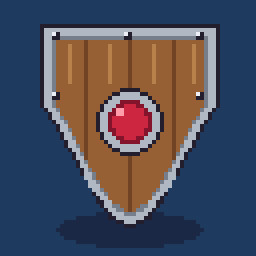
The same file the code sends. Download the input and the output and compare them yourself.
- Input
- shield-icon.tga (16 KB)
- Output
- shield-icon.jpg (11 KB)
- Source
- A 256 x 256 pixel-art shield icon with a transparent background and a half-transparent shadow, drawn by us and saved as a 32-bit run-length-encoded TGA. (CC0-1.0). How it was made
- Made by
- 2026-11-04, API build
9eeeb0640aba
Parameters
Send these as form fields next to the file. Names are case-insensitive. If you set one of the documented options below that we don't support yet, the request fails with a 400 that names it instead of returning a file made without it.
| Parameter | What it does |
|---|---|
AlphaColorstring, default white | The matte under the texture. The sample uses #1E3A5F, so the empty area around the shield is navy and its 112-alpha shadow blends to about (27, 40, 69) before compression.Values: #RRGGBB, R,G,B or white, black, red, green, blue, gray |
BackgroundColorstring, default white | Used as the matte when AlphaColor is not sent. black made the shield's backdrop black (8,981 bytes at default quality).Values: Same as AlphaColor |
ImageQualityinteger, default 85 | JPEG quality. On a white matte the shield measured 3,725 bytes at 10, 6,297 at 50, 9,467 at 85 and 20,027 at 100. The sample's 90 on navy gives 10,889 bytes.Values: 1–100 |
ImageWidthinteger | Width of the JPEG; height follows. ImageWidth=128 halves the sprite to 128 × 128 (5,144 bytes).Values: 1–20000 |
ImageHeightinteger | Height of the JPEG. With a width as well, the TGA is fitted inside that box.Values: 1–20000 |
ScaleProportionsboolean, default true | false lets width and height distort the picture when both are given. |
ScaleIfLargerboolean, default false | true stops the JPEG from being made bigger than the TGA. |
ScaleImageboolean, default true | false turns a width and height into a crop from the top-left corner. |
ColorSpaceenum, default default | gray and monochrome write a one-channel JPEG; for the shield, gray came to 6,171 bytes.Values: default, rgb, gray, monochrome; cmyk returns 400 |
ImageResolutioninteger | Sets the DPI in the JFIF header. Left out, the header says 1 × 1 with no unit, an aspect ratio only.Values: 10–800 |
FileNamestring | Name for the JPEG without extension; otherwise the TGA's own name with .jpg. |
StoreFileboolean, default false | Store the JPEG for 3 hours and return its URL in Files[].Url. |
What carries over, and what doesn't
Kept
- Width, height and the picture: the 256 × 256 shield comes back 256 × 256
- Full color resolution: the JPEG uses 4:4:4 sampling, so thin colored lines are not smeared by chroma subsampling
- Soft transparency as a blend, not a hard edge: each pixel is mixed with the matte in proportion to its alpha
- Close color: at quality 90 on navy, the average error against the flattened texture was under 0.6 levels per channel
Lost or not yet supported
- The alpha channel. JPEG has none, so transparent areas take the matte color for good.
- Hard pixel-art edges get ringing. The largest single error in the sample was 19 levels, next to the black outline.
- The TGA image ID, the footer and any developer or extension area.
TransparentColorhas nothing to act on: a JPEG can't hold transparency, and the request returns the default file.
Limits
- One TGA in, one JPEG out.
- Requests up to 10 MB on the Free plan or 100 MB on paid plans, all files and fields together.
- At most 100,000,000 pixels per image, checked from the header before decoding (413 above that).
ImageWidthandImageHeightfrom 1 to 20,000, as long as the scaled picture keeps under the same pixel cap: 20,000 on the square shield asks for 400 million pixels and gets a 413.- A conversion that runs past 120 seconds returns 504.
Where teams use it
Thumbnails for a mod or asset store
Listing pages want small JPEGs, not TGA. Convert each texture with a matte that matches the page background, so the transparent parts blend in instead of turning white.
Contact sheets of render passes
When render passes are saved as TGA, a JPEG copy is what fits in a review sheet or an email. The shield sample at ImageQuality=50 is 6,297 bytes, against 16,376 for its TGA.
Feeding tools that only take JPEG
Some upload forms and photo tools accept JPEG only. Convert the TGA on the way in and pick ImageQuality to fit their size cap.
Questions
Why did the transparent parts of my texture turn white?
JPEG can't store transparency, so we blend every pixel onto a solid color, and that color is white unless you send AlphaColor or BackgroundColor. Send the hex value of the background the image will sit on.
What happens to partly transparent pixels such as shadows?
They are mixed with the matte by their alpha. The shield's shadow is (24, 18, 36) at alpha 112 of 255; over navy #1E3A5F the blend is about (27, 40, 69), and after compression 2,973 of the 3,664 shadow pixels came out at (26, 40, 69).
Which ImageQuality should I use for game art?
Flat colors and hard outlines show JPEG artifacts sooner than photos do. At the default 85 the shield's worst pixel was off by 32 levels; at 90 on navy, 19. If edges must stay exact, convert to PNG or WebP instead, which are lossless here.
Can I get a grayscale JPEG?
Yes, send ColorSpace=gray. The result is a single-channel JPEG, smaller than the color one: 6,171 bytes for the shield against 9,467.
Convert your first TGA file in a minute.