QOI to JPG API
POST a .qoi to /v2/convert/qoi/to/jpg and receive a baseline JPEG. Alpha in 4-channel QOIs is blended onto AlphaColor (white by default), and ImageQuality trades bytes for detail.
- Endpoint
- POST /v2/
convert/ qoi/ to/ jpg - Accepts
- qoi
- Sample timing
- 2 ms median of 5 runsHow we measure
- Request size
- Up to 10 MB on the Free plan or 100 MB on paid plans, all files together
Request and response
Every sample below ran against the API before this page was published. Set PDFCONVERSIONAPI_KEY to your key and run it as is.
curl -sS -X POST \
  https://api.pdfconversionapi.com/v2/convert/qoi/to/jpg \
  -H "Authorization: Bearer $PDFCONVERSIONAPI_KEY" \
  -F File=@trail-map-card.qoi \
  --form-string ImageQuality=80 \
  -o response.json

# FileData is base64. Save the first file in converted/,
# or print the JSON error.
if jq -e '.Files' response.json > /dev/null; then
  mkdir -p converted
  name=$(jq -r '.Files[0].FileName' response.json)
  jq -r '.Files[0].FileData' response.json \
    | base64 --decode > "converted/$name"
else
  cat response.json
fi
import base64
import os
import requests
key = os.environ["PDFCONVERSIONAPI_KEY"]
response = requests.post(
"https://api.pdfconversionapi.com/v2/convert/qoi/to/jpg",
headers={"Authorization": f"Bearer {key}"},
files=[("File", open("trail-map-card.qoi", "rb"))],
data={
"ImageQuality": "80",
},
timeout=180,
)
result = response.json()
if not response.ok:
raise SystemExit(f"{result['Code']}: {result['Message']}")
os.makedirs("converted", exist_ok=True)
for file in result["Files"]:
path = os.path.join("converted", file["FileName"])
with open(path, "wb") as out:
out.write(base64.b64decode(file["FileData"]))
print(path, file["FileSize"], "bytes")
import { mkdir, readFile, writeFile } from "node:fs/promises";
import { join } from "node:path";

const form = new FormData();
const file = "trail-map-card.qoi";
form.append("File", new Blob([await readFile(file)]), file);
form.append("ImageQuality", "80");

const url = "https://api.pdfconversionapi.com/v2/convert/qoi/to/jpg";
const key = process.env.PDFCONVERSIONAPI_KEY;
const response = await fetch(url, {
  method: "POST",
  headers: { Authorization: `Bearer ${key}` },
  body: form,
});
const result = await response.json();
if (!response.ok) {
  throw new Error(`${result.Code}: ${result.Message}`);
}

await mkdir("converted", { recursive: true });
for (const file of result.Files) {
  const path = join("converted", file.FileName);
  await writeFile(path, Buffer.from(file.FileData, "base64"));
  console.log(path, file.FileSize, "bytes");
}
{
  "ConversionCost": 1,
  "ConversionTime": 0.002,
  "Files": [
    {
      "FileName": "trail-map-card.jpg",
      "FileExt": "jpg",
      "FileSize": 17359,
      "FileData": "/9j/4AAQSkZJRgABAgAAAQAB…"
    }
  ]
}
Response from our test run on 2026-11-03. ConversionTime shows the median of 5 runs. FileData is shortened here; the real response carries the whole file as base64.
The sample, converted
The same file the code sends. Download the input and the output and compare them yourself.
- Input
- trail-map-card.qoi (66 KB)
- Output
- trail-map-card.jpg (17 KB)
- Source
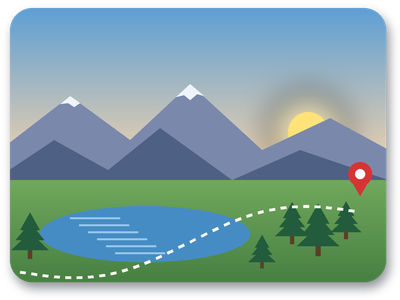
- A 400 x 300 trail map card with a sunrise sky, rounded transparent corners and a soft drop shadow, drawn by us and saved as a 4-channel QOI. (CC0-1.0). How it was made
- Made by
- 2026-11-04, API build
9eeeb0640aba
Parameters
Send these as form fields next to the file. Names are case-insensitive. If you set one of the documented options below that we don't support yet, the request fails with a 400 that names it instead of returning a file made without it.
| Parameter | What it does |
|---|---|
ImageQualityinteger, default 85 | The JPEG quality. The card measured 5,749 bytes at 10, 11,032 at 50, 19,852 at the default 85 and 62,947 at 100; the sample's 80 gives 17,359.Values: 1–100 |
AlphaColorstring, default white | Background for the transparent corners and the soft shadow. #1E3A5F gave a navy surround (19,536 bytes at quality 85).Values: #RRGGBB, R,G,B or white, black, red, green, blue, gray |
BackgroundColorstring, default white | Read as the matte if AlphaColor is absent.Values: Same as AlphaColor |
ImageWidthinteger | Shrink or enlarge before encoding; ImageWidth=128 gave a 128 × 96 JPEG of 4,893 bytes.Values: 1–20000 |
ImageHeightinteger | Output height, keeping the 4:3 shape unless ScaleProportions=false.Values: 1–20000 |
ScaleProportionsboolean, default true | false with both sizes set fills the box exactly, distorting the picture. |
ScaleIfLargerboolean, default false | true keeps the JPEG from being larger than the QOI's own size. |
ScaleImageboolean, default true | false turns the size into a crop at the top-left. |
ColorSpaceenum, default default | gray writes a one-channel JPEG (11,501 bytes for the card at quality 85).Values: default, rgb, gray, monochrome; cmyk returns 400 |
ImageResolutioninteger | DPI for the JFIF header; otherwise the header carries an aspect ratio of 1:1 and no unit.Values: 10–800 |
FileNamestring | Output name without .jpg. |
StoreFileboolean, default false | Store the result for 3 hours and return its URL. |
What carries over, and what doesn't
Kept
- The full 400 × 300 picture and its colors, within JPEG's limits: at quality 80 the average error was under 2 levels per channel
- Full chroma resolution (4:4:4 sampling), so the red pin and thin white trail dashes keep clean color
- Soft edges as soft blends: each partly transparent pixel is mixed with the matte by its alpha
Lost or not yet supported
- Transparency. The 2,030 fully clear pixels outside the rounded corners become the matte color.
- Some sharpness at hard edges: the worst pixel in the sample was off by 48 levels, where a white trail dash crosses the blue lake.
- Losslessness. The QOI is exact, the JPEG is not; keep the QOI if you will edit again.
Limits
- One QOI per request.
- 100,000,000 pixels per image, read from the header before any decoding.
- Requests up to 10 MB on the Free plan or 100 MB on paid plans, all files and fields together.
- 120 seconds per conversion.
Where teams use it
Sharing QOI screenshots
Screenshots saved as QOI are lossless and heavy for email or chat. For the sample card, a JPEG at quality 80 is about a quarter of the QOI's size.
Thumbnails from a QOI asset store
Generate JPEG thumbnails with ImageWidth for a gallery or CMS, picking an AlphaColor that matches the page so cut-out corners blend in.
Questions
How much smaller is the JPEG?
For the sample card, 67,304 bytes as QOI became 17,359 bytes as a JPEG at quality 80 and 5,749 at quality 10. At quality 100 it is 62,947 bytes, close to the QOI itself, so the savings come from the lower settings.
What color do the rounded corners get?
White by default, because JPEG has no alpha. Send AlphaColor with the color of the page or app behind the image, as a hex value or R,G,B.
Does the soft drop shadow survive?
As a blend, yes. Each shadow pixel is mixed with the matte by its alpha, so on white it reads as a gray halo, the way it looked over white in the QOI.
Convert your first QOI file in a minute.