QOI to PNG API
POST a .qoi file to /v2/convert/qoi/to/png and get a PNG back as base64 in the JSON. RGB and RGBA QOIs decode losslessly, partial transparency included, and the channel count carries over.
- Endpoint
- POST /v2/
convert/ qoi/ to/ png - Accepts
- qoi
- Sample timing
- 2 ms median of 5 runsHow we measure
- Request size
- Up to 10 MB on the Free plan or 100 MB on paid plans, all files together
Request and response
Every sample below ran against the API before this page was published. Set PDFCONVERSIONAPI_KEY to your key and run it as is.
curl -sS -X POST \
  https://api.pdfconversionapi.com/v2/convert/qoi/to/png \
  -H "Authorization: Bearer $PDFCONVERSIONAPI_KEY" \
  -F File=@trail-map-card.qoi \
  -o response.json

# FileData is base64. Save the first file in converted/,
# or print the JSON error.
if jq -e '.Files' response.json > /dev/null; then
  mkdir -p converted
  name=$(jq -r '.Files[0].FileName' response.json)
  jq -r '.Files[0].FileData' response.json \
    | base64 --decode > "converted/$name"
else
  cat response.json
fi
import base64
import os
import requests
key = os.environ["PDFCONVERSIONAPI_KEY"]
response = requests.post(
"https://api.pdfconversionapi.com/v2/convert/qoi/to/png",
headers={"Authorization": f"Bearer {key}"},
files=[("File", open("trail-map-card.qoi", "rb"))],
timeout=180,
)
result = response.json()
if not response.ok:
raise SystemExit(f"{result['Code']}: {result['Message']}")
os.makedirs("converted", exist_ok=True)
for file in result["Files"]:
path = os.path.join("converted", file["FileName"])
with open(path, "wb") as out:
out.write(base64.b64decode(file["FileData"]))
print(path, file["FileSize"], "bytes")
import { mkdir, readFile, writeFile } from "node:fs/promises";
import { join } from "node:path";

const form = new FormData();
const file = "trail-map-card.qoi";
form.append("File", new Blob([await readFile(file)]), file);

const url = "https://api.pdfconversionapi.com/v2/convert/qoi/to/png";
const key = process.env.PDFCONVERSIONAPI_KEY;
const response = await fetch(url, {
  method: "POST",
  headers: { Authorization: `Bearer ${key}` },
  body: form,
});
const result = await response.json();
if (!response.ok) {
  throw new Error(`${result.Code}: ${result.Message}`);
}

await mkdir("converted", { recursive: true });
for (const file of result.Files) {
  const path = join("converted", file.FileName);
  await writeFile(path, Buffer.from(file.FileData, "base64"));
  console.log(path, file.FileSize, "bytes");
}
{
  "ConversionCost": 1,
  "ConversionTime": 0.002,
  "Files": [
    {
      "FileName": "trail-map-card.png",
      "FileExt": "png",
      "FileSize": 49290,
      "FileData": "iVBORw0KGgoAAAANSUhEUgAA…"
    }
  ]
}
Response from our test run on 2026-11-03. ConversionTime shows the median of 5 runs. FileData is shortened here; the real response carries the whole file as base64.
The sample, converted
The same file the code sends. Download the input and the output and compare them yourself.
- Input
- trail-map-card.qoi (66 KB)
- Output
- trail-map-card.png (48 KB)
- Source
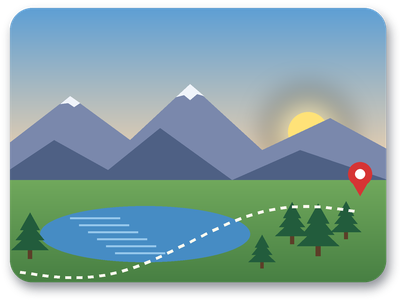
- A 400 x 300 trail map card with a sunrise sky, rounded transparent corners and a soft drop shadow, drawn by us and saved as a 4-channel QOI. (CC0-1.0). How it was made
- Made by
- 2026-11-04, API build
9eeeb0640aba
Parameters
Send these as form fields next to the file. Names are case-insensitive. If you set one of the documented options below that we don't support yet, the request fails with a 400 that names it instead of returning a file made without it.
| Parameter | What it does |
|---|---|
ImageWidthinteger | Scale to this width; the height keeps the 4:3 shape of the card, so 128 gives 128 × 96 (12,045 bytes).Values: 1–20000 |
ImageHeightinteger | Scale to this height: ImageHeight=100 gave 133 × 100. With both sizes, the image fits inside them (200 × 200 gave 200 × 150).Values: 1–20000 |
ScaleProportionsboolean, default true | Set false and a 200 × 200 request returns exactly 200 × 200, squashing the 4:3 picture. |
ScaleIfLargerboolean, default false | With true, asking for 1,000 px leaves the 400 px card at its own size. |
ScaleImageboolean, default true | false cuts the requested size out of the top-left corner rather than scaling (3,362 bytes for 200 × 100). |
ColorSpaceenum, default default | gray gives a gray-plus-alpha PNG (21,526 bytes for the card); monochrome reduces it to black and white (6,113 bytes).Values: default, rgb, gray, monochrome; cmyk returns 400 |
ImageResolutioninteger | Records a DPI in a pHYs chunk. QOI has no resolution field, so there is nothing to carry over otherwise.Values: 10–800 |
TransparentColorstring | Pixels that exactly match become transparent. #FFFFFF cleared the card's 87 pure-white pixels: 40 in the map pin's dot and 47 along the trail dashes.Values: #RRGGBB, R,G,B or a basic color name |
FileNamestring | Result name without extension; the default for the sample is trail-map-card.png. |
StoreFileboolean, default false | true stores the PNG for 3 hours and returns a URL rather than inline data. |
What carries over, and what doesn't
Kept
- All 120,000 pixels of the sample, color and alpha, including the 17,245 partly transparent ones in the soft shadow and the rounded corners
- The channel count: 4-channel QOIs give RGBA PNGs, 3-channel QOIs give RGB PNGs with no alpha added
- Dimensions, 400 × 300
Lost or not yet supported
- The colorspace byte of the header. Whether it says sRGB (0) or linear (1), the PNG is the same, and it gets no sRGB or gAMA chunk.
- Nothing else is carried because QOI has nothing else: no metadata, no profile, no DPI.
- Detail if you resize: scaling uses a Lanczos3 filter, and there is no option to turn it off.
Limits
- One QOI per request; QOI is an input only, and no route writes it.
- 100,000,000 pixels per image. QOI stores width and height as 32-bit numbers, so a 22-byte file can claim 20000 × 20000; it gets a 413 before decoding.
- Requests up to 10 MB on the Free plan or 100 MB on paid plans, all files and fields together.
- Resize targets from 1 to 20,000 px per side, and the resized image must also stay within 100,000,000 pixels:
ImageWidth=20000on the card (20,000 × 15,000) returned 413. 120 seconds per conversion.
Where teams use it
Showing QOI output on the web
Browsers don't decode QOI. If a game, emulator or capture tool writes QOI screenshots, convert them to PNG before they go on a page or into a bug report.
Handing frames to tools that lack a QOI reader
Not every editor or image library can open QOI. PNG is lossless too, so converting gives the same pixels in a format that common image tools read.
Checking a QOI encoder
If you are writing your own QOI encoder, round-trip test files through this route and compare the PNG's pixels with your source.
Questions
Is a PNG bigger or smaller than the QOI?
Smaller, for the sample: QOI uses a deliberately simple encoding, while PNG adds row filters and deflate compression. The 400 × 300 trail map card is 67,304 bytes as QOI and 49,290 as PNG, with every pixel the same.
What does the colorspace byte in the QOI header change?
Nothing in the output. The format treats the byte as informative only, and our decoder ignores it: the card saved with 0 (sRGB) and with 1 (linear) produced byte-identical PNGs, neither with a color chunk.
Can I convert PNG to QOI with this API?
No. QOI is supported as an input only. /v2/convert/png/to/qoi returns 404 'conversion from png to qoi is not supported'.
Does ConvertAPI support QOI?
Its catalogue of 328 services, which we compared ours with on 2026-11-02, has no QOI input. Requests here use the same multipart File field and return the same Files[] JSON as its image conversions.
Convert your first QOI file in a minute.