QOI to WebP API
POST a QOI to /v2/convert/qoi/to/webp and get a lossless WebP that browsers can show. Every pixel and alpha value is kept, and the sample card came out at 63% of the QOI's size.
- Endpoint
- POST /v2/
convert/ qoi/ to/ webp - Accepts
- qoi
- Sample timing
- 1 ms median of 5 runsHow we measure
- Request size
- Up to 10 MB on the Free plan or 100 MB on paid plans, all files together
Request and response
Every sample below ran against the API before this page was published. Set PDFCONVERSIONAPI_KEY to your key and run it as is.
curl -sS -X POST \
  https://api.pdfconversionapi.com/v2/convert/qoi/to/webp \
  -H "Authorization: Bearer $PDFCONVERSIONAPI_KEY" \
  -F File=@trail-map-card.qoi \
  -o response.json

# FileData is base64. Save the first file in converted/,
# or print the JSON error.
if jq -e '.Files' response.json > /dev/null; then
  mkdir -p converted
  name=$(jq -r '.Files[0].FileName' response.json)
  jq -r '.Files[0].FileData' response.json \
    | base64 --decode > "converted/$name"
else
  cat response.json
fi
import base64
import os
import requests
key = os.environ["PDFCONVERSIONAPI_KEY"]
response = requests.post(
"https://api.pdfconversionapi.com/v2/convert/qoi/to/webp",
headers={"Authorization": f"Bearer {key}"},
files=[("File", open("trail-map-card.qoi", "rb"))],
timeout=180,
)
result = response.json()
if not response.ok:
raise SystemExit(f"{result['Code']}: {result['Message']}")
os.makedirs("converted", exist_ok=True)
for file in result["Files"]:
path = os.path.join("converted", file["FileName"])
with open(path, "wb") as out:
out.write(base64.b64decode(file["FileData"]))
print(path, file["FileSize"], "bytes")
import { mkdir, readFile, writeFile } from "node:fs/promises";
import { join } from "node:path";

const form = new FormData();
const file = "trail-map-card.qoi";
form.append("File", new Blob([await readFile(file)]), file);

const url = "https://api.pdfconversionapi.com/v2/convert/qoi/to/webp";
const key = process.env.PDFCONVERSIONAPI_KEY;
const response = await fetch(url, {
  method: "POST",
  headers: { Authorization: `Bearer ${key}` },
  body: form,
});
const result = await response.json();
if (!response.ok) {
  throw new Error(`${result.Code}: ${result.Message}`);
}

await mkdir("converted", { recursive: true });
for (const file of result.Files) {
  const path = join("converted", file.FileName);
  await writeFile(path, Buffer.from(file.FileData, "base64"));
  console.log(path, file.FileSize, "bytes");
}
{
  "ConversionCost": 1,
  "ConversionTime": 0.001,
  "Files": [
    {
      "FileName": "trail-map-card.webp",
      "FileExt": "webp",
      "FileSize": 42524,
      "FileData": "UklGRhSmAABXRUJQVlA4TAim…"
    }
  ]
}
Response from our test run on 2026-11-03. ConversionTime shows the median of 5 runs. FileData is shortened here; the real response carries the whole file as base64.
The sample, converted
The same file the code sends. Download the input and the output and compare them yourself.
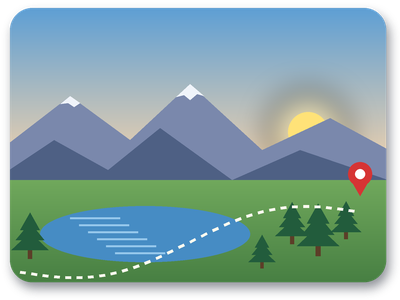
- Input
- trail-map-card.qoi (66 KB)
- Output
- trail-map-card.webp (42 KB)
- Source
- A 400 x 300 trail map card with a sunrise sky, rounded transparent corners and a soft drop shadow, drawn by us and saved as a 4-channel QOI. (CC0-1.0). How it was made
- Made by
- 2026-11-04, API build
9eeeb0640aba
Parameters
Send these as form fields next to the file. Names are case-insensitive. If you set one of the documented options below that we don't support yet, the request fails with a 400 that names it instead of returning a file made without it.
| Parameter | What it does |
|---|---|
ImageWidthinteger | Output width, height to match: 128 gives a 128 × 96 WebP of 11,552 bytes.Values: 1–16384 for WebP |
ImageHeightinteger | Output height; with a width too, the picture fits both.Values: 1–16384 |
ScaleProportionsboolean, default true | false stretches to the exact width × height pair. |
ScaleIfLargerboolean, default false | true never enlarges a QOI that is already small enough. |
ScaleImageboolean, default true | false crops a top-left window (2,170 bytes for 200 × 100). |
ColorSpaceenum, default default | gray cut the card to 18,576 bytes and monochrome to 3,768, with alpha still in place.Values: default, rgb, gray, monochrome; cmyk returns 400 |
TransparentColorstring | One exact color to make transparent before encoding.Values: #RRGGBB, R,G,B or a basic color name |
FileNamestring | File name for the WebP, without extension. |
StoreFileboolean, default false | true returns a URL that works for 3 hours. |
What carries over, and what doesn't
Kept
- Every pixel, including the 17,245 semi-transparent ones in the card's shadow and anti-aliased corners
- 400 × 300, with no resampling unless you ask
- Opaque pictures without an added alpha channel: a 3-channel QOI, or a 4-channel one with no transparent pixel, becomes an RGB WebP (38,144 bytes for a 3-channel copy of the card)
Lost or not yet supported
- Nothing in the picture. The QOI colorspace byte has no WebP equivalent and is dropped.
- Any chance of a lossy WebP:
ImageQualityis ignored on this route. - Very large dimensions. WebP's ceiling is 16,384 px per side, far below what a QOI header can state.
Limits
- One QOI per request.
- 16,384 px per side for WebP: a 16,385 × 2 QOI returned 413
WebP images can be at most 16,384 pixels on a side, and this one is 16,385×2. If you sentImageWidthorImageHeight, it adds; lower ImageWidth or ImageHeight. - 100,000,000 pixels per image (413 above, checked from the header).
- Requests up to 10 MB on the Free plan or 100 MB on paid plans; 120 seconds per conversion.
Where teams use it
Putting QOI art on a web page
Engines and tools that save QOI produce files browsers can't render. Lossless WebP keeps the pixels exact, alpha included, and current versions of the major browsers display it.
Smaller lossless archives
QOI keeps its encoding simple rather than small. If you keep frames or screenshots long term, lossless WebP stores the same pixels in fewer bytes: 63% of the QOI for the sample.
Questions
Is the WebP really lossless?
Yes. It is always written in WebP's lossless mode, and decoding the sample gives back all 120,000 RGBA values of the QOI unchanged.
How do the sizes compare?
For the trail map card: 67,304 bytes as QOI, 49,290 as PNG and 42,524 as lossless WebP. Results vary with the image, so measure on your own files.
Why did my 20,000 px wide QOI fail?
WebP cannot store more than 16,384 px per side, so the API answers 413 with that limit and the image's size. Send ImageWidth=16384 or less to scale it down in the same request, or choose PNG, which has no such limit.
Convert your first QOI file in a minute.