TIFF to GIF API
Send a TIFF to /v2/convert/tiff/to/gif and receive a GIF89a of its first page: one frame, colors reduced to a 256-entry palette. ImageWidth resizes it and TransparentColor makes one exact color see-through.
- Endpoint
- POST /v2/
convert/ tiff/ to/ gif - Accepts
- tiff
- Sample timing
- 48 ms median of 5 runsHow we measure
- Request size
- Up to 10 MB on the Free plan or 100 MB on paid plans, all files together
Request and response
Every sample below ran against the API before this page was published. Set PDFCONVERSIONAPI_KEY to your key and run it as is.
curl -sS -X POST \
  https://api.pdfconversionapi.com/v2/convert/tiff/to/gif \
  -H "Authorization: Bearer $PDFCONVERSIONAPI_KEY" \
  -F File=@bin-label-c14.tiff \
  --form-string ImageWidth=320 \
  -o response.json

# FileData is base64. Save the first file in converted/,
# or print the JSON error.
if jq -e '.Files' response.json > /dev/null; then
  mkdir -p converted
  name=$(jq -r '.Files[0].FileName' response.json)
  jq -r '.Files[0].FileData' response.json \
    | base64 --decode > "converted/$name"
else
  cat response.json
fi
import base64
import os
import requests
key = os.environ["PDFCONVERSIONAPI_KEY"]
response = requests.post(
"https://api.pdfconversionapi.com/v2/convert/tiff/to/gif",
headers={"Authorization": f"Bearer {key}"},
files=[("File", open("bin-label-c14.tiff", "rb"))],
data={
"ImageWidth": "320",
},
timeout=180,
)
result = response.json()
if not response.ok:
raise SystemExit(f"{result['Code']}: {result['Message']}")
os.makedirs("converted", exist_ok=True)
for file in result["Files"]:
path = os.path.join("converted", file["FileName"])
with open(path, "wb") as out:
out.write(base64.b64decode(file["FileData"]))
print(path, file["FileSize"], "bytes")
import { mkdir, readFile, writeFile } from "node:fs/promises";
import { join } from "node:path";

const form = new FormData();
const file = "bin-label-c14.tiff";
form.append("File", new Blob([await readFile(file)]), file);
form.append("ImageWidth", "320");

const url = "https://api.pdfconversionapi.com/v2/convert/tiff/to/gif";
const key = process.env.PDFCONVERSIONAPI_KEY;
const response = await fetch(url, {
  method: "POST",
  headers: { Authorization: `Bearer ${key}` },
  body: form,
});
const result = await response.json();
if (!response.ok) {
  throw new Error(`${result.Code}: ${result.Message}`);
}

await mkdir("converted", { recursive: true });
for (const file of result.Files) {
  const path = join("converted", file.FileName);
  await writeFile(path, Buffer.from(file.FileData, "base64"));
  console.log(path, file.FileSize, "bytes");
}
{
  "ConversionCost": 1,
  "ConversionTime": 0.048,
  "Files": [
    {
      "FileName": "bin-label-c14.gif",
      "FileExt": "gif",
      "FileSize": 21486,
      "FileData": "R0lGODlhQAHwAIAAAAAAAAAA…"
    }
  ]
}
Response from our test run on 2026-11-03. ConversionTime shows the median of 5 runs. FileData is shortened here; the real response carries the whole file as base64.
The sample, converted
The same file the code sends. Download the input and the output and compare them yourself.
- Input
- bin-label-c14.tiff (42 KB)
- Output
- bin-label-c14.gif (21 KB)
- Source
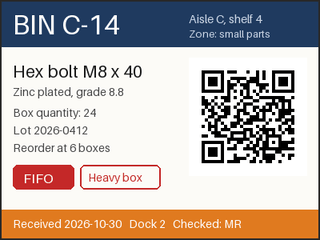
- A two-page warehouse bin label and cycle-count sheet we drew for this page, saved as an LZW-compressed TIFF at 200 dpi. (CC0-1.0). How it was made
- Made by
- 2026-11-04, API build
9eeeb0640aba
Parameters
Send these as form fields next to the file. Names are case-insensitive. If you set one of the documented options below that we don't support yet, the request fails with a 400 that names it instead of returning a file made without it.
| Parameter | What it does |
|---|---|
ImageWidthinteger | GIF width in pixels. The sample asks for 320, so the 400 × 300 label arrives as 320 × 240.Values: 1–20000 |
ImageHeightinteger | GIF height in pixels; the width follows unless ImageWidth is also set, in which case the page fits inside both.Values: 1–20000 |
ScaleProportionsboolean, default true | false lets ImageWidth and ImageHeight distort the page to fill both exactly. |
ScaleIfLargerboolean, default false | true skips enlargement: ImageWidth=800 with it returned the original 400 × 300 GIF of 12,945 bytes. |
ScaleImageboolean, default true | false cuts a top-left region of the requested size out of the page instead of resizing it. |
TransparentColorstring | Pixels of exactly this color become the GIF's transparent index. #FCFBF7, the label's paper, made 51,575 of 120,000 pixels transparent at full size, and 25,126 at the sample's 320 × 240.Values: Color name, #RRGGBB or R,G,B |
ColorSpaceenum, default default | gray before the palette step; monochrome leaves 2 colors and shrank the full-size GIF to 4,381 bytes. cmyk returns 400.Values: default, rgb, gray, monochrome |
ImageResolutioninteger | Range-checked, then ignored: GIF has no DPI field, and 300 returned the same bytes.Values: 10–800 |
FileNamestring | Name of the GIF; by default the TIFF's own name with a .gif extension. |
StoreFileboolean, default false | true returns Files[].Url, a link valid for 3 hours, instead of the base64 data. |
What carries over, and what doesn't
Kept
- Most colors exactly: at full size, 115,245 of the label's 120,000 pixels were unchanged and no channel moved by more than 26.
- The QR code: the 320 × 240 sample GIF still decodes to the bin's lot text.
- Every visible element of page 1 after resizing to 320 × 240: header, text lines, red tags and the orange footer.
- The Orientation tag, applied to the pixels before the palette step: a 300 × 200 TIFF tagged 6 came back as an upright 200 × 300 GIF.
Lost or not yet supported
- Colors beyond 256. Page 1 has 1,178 distinct colors; the full-size GIF uses 175 and the resized sample 190.
- Pages after the first. The count sheet on page 2 is dropped, and there is no option to turn TIFF pages into animation frames.
- Size after scaling down. Resizing adds blended colors (our 320 × 240 resize of the page has 2,632 distinct colors, against 1,178 at full size), so the sample is 21,486 bytes against 12,945 for the unscaled GIF.
- The 200 dpi resolution and ICC profile of the TIFF.
Limits
- One TIFF per request, first page only.
- Requests up to 10 MB on the Free plan or 100 MB on paid plans, all files and fields together.
- 100,000,000 pixels per page; the check runs on the header, so oversized TIFFs fail with 413 before decoding.
- GIF sides of at most 65,535 px: a 65,536 × 2 TIFF fits the pixel limit but returned 413, with a message naming the GIF limit and the image's size.
- Palette-based TIFFs are refused with 422 even though GIF is palette-based itself.
- Conversions are stopped after 120 seconds (504).
Where teams use it
Previews for places that still expect GIF
Some help-desk tools and older e-mail templates accept GIF but not TIFF. A scanned form or label becomes a small inline picture with one request.
Flat graphics from scanned line art
Diagrams, stamps and labels with few colors fit a 256-color palette well. On the sample, 115,245 of 120,000 pixels kept their exact color at full size.
Cut-out shapes on a known background
If the scan has a uniform background, TransparentColor removes it. Only pixels that match exactly are keyed, so anti-aliased edges keep a light fringe.
Questions
Why is my smaller GIF bigger than the full-size one?
Scaling blends neighboring pixels, which creates in-between colors the palette has to approximate, and those compress worse. The sample label at 320 × 240 is 21,486 bytes; the same page at 400 × 300 without resizing is 12,945 bytes.
Can a multi-page TIFF become an animated GIF?
Not with this endpoint. It reads the first page only and writes one frame. The animation options ConvertAPI lists for other GIF conversions, such as AnimationDelay, are not read for TIFF to GIF and have no effect: the sample came back identical with them.
How do I make the background transparent?
Send the background color as TransparentColor. For the label at full size, #FCFBF7 keyed out 51,575 pixels; at the sample's 320 × 240 it keyed out 25,126. A scan with noise has many near-white shades, so only the exact match turns transparent.
How many colors does the GIF keep?
Up to 256, chosen from the page itself and stored as the frame's own palette. Flat artwork like the sample keeps most pixels exact; photographs lose smooth gradients.
Convert your first TIFF file in a minute.