TIFF to ICO API
POST a TIFF to /v2/convert/tiff/to/ico and get an .ico file holding one image of its first page. Anything larger than 256 × 256 is fitted inside that size first; use ImageWidth for 16, 32, 48 or 64 pixel icons.
- Endpoint
- POST /v2/
convert/ tiff/ to/ ico - Accepts
- tiff
- Sample timing
- 5 ms median of 5 runsHow we measure
- Request size
- Up to 10 MB on the Free plan or 100 MB on paid plans, all files together
Request and response
Every sample below ran against the API before this page was published. Set PDFCONVERSIONAPI_KEY to your key and run it as is.
curl -sS -X POST \
  https://api.pdfconversionapi.com/v2/convert/tiff/to/ico \
  -H "Authorization: Bearer $PDFCONVERSIONAPI_KEY" \
  -F File=@bin-label-c14.tiff \
  -o response.json

# FileData is base64. Save the first file in converted/,
# or print the JSON error.
if jq -e '.Files' response.json > /dev/null; then
  mkdir -p converted
  name=$(jq -r '.Files[0].FileName' response.json)
  jq -r '.Files[0].FileData' response.json \
    | base64 --decode > "converted/$name"
else
  cat response.json
fi
import base64
import os
import requests
key = os.environ["PDFCONVERSIONAPI_KEY"]
response = requests.post(
"https://api.pdfconversionapi.com/v2/convert/tiff/to/ico",
headers={"Authorization": f"Bearer {key}"},
files=[("File", open("bin-label-c14.tiff", "rb"))],
timeout=180,
)
result = response.json()
if not response.ok:
raise SystemExit(f"{result['Code']}: {result['Message']}")
os.makedirs("converted", exist_ok=True)
for file in result["Files"]:
path = os.path.join("converted", file["FileName"])
with open(path, "wb") as out:
out.write(base64.b64decode(file["FileData"]))
print(path, file["FileSize"], "bytes")
import { mkdir, readFile, writeFile } from "node:fs/promises";
import { join } from "node:path";

const form = new FormData();
const file = "bin-label-c14.tiff";
form.append("File", new Blob([await readFile(file)]), file);

const url = "https://api.pdfconversionapi.com/v2/convert/tiff/to/ico";
const key = process.env.PDFCONVERSIONAPI_KEY;
const response = await fetch(url, {
  method: "POST",
  headers: { Authorization: `Bearer ${key}` },
  body: form,
});
const result = await response.json();
if (!response.ok) {
  throw new Error(`${result.Code}: ${result.Message}`);
}

await mkdir("converted", { recursive: true });
for (const file of result.Files) {
  const path = join("converted", file.FileName);
  await writeFile(path, Buffer.from(file.FileData, "base64"));
  console.log(path, file.FileSize, "bytes");
}
{
  "ConversionCost": 1,
  "ConversionTime": 0.005,
  "Files": [
    {
      "FileName": "bin-label-c14.ico",
      "FileExt": "ico",
      "FileSize": 43401,
      "FileData": "AAABAAEAAMAAAAAAIABzqQAA…"
    }
  ]
}
Response from our test run on 2026-11-03. ConversionTime shows the median of 5 runs. FileData is shortened here; the real response carries the whole file as base64.
The sample, converted
The same file the code sends. Download the input and the output and compare them yourself.
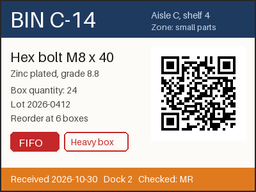
- Input
- bin-label-c14.tiff (42 KB)
- Output
- bin-label-c14.ico (42 KB)
- Source
- A two-page warehouse bin label and cycle-count sheet we drew for this page, saved as an LZW-compressed TIFF at 200 dpi. (CC0-1.0). How it was made
- Made by
- 2026-11-04, API build
9eeeb0640aba
Parameters
Send these as form fields next to the file. Names are case-insensitive. If you set one of the documented options below that we don't support yet, the request fails with a 400 that names it instead of returning a file made without it.
| Parameter | What it does |
|---|---|
ImageWidthinteger | Icon width. 64 gave a 64 × 48 icon of 5,817 bytes; 1000 is accepted but the icon is still capped at 256 × 192.Values: 1–20000 |
ImageHeightinteger | Icon height; with ImageWidth it defines the box the page is fitted into.Values: 1–20000 |
ScaleProportionsboolean, default true | false with ImageWidth=48 and ImageHeight=48 squeezed the 4:3 label into a square 48 × 48 icon. |
ScaleIfLargerboolean, default false | true keeps small TIFFs at their own size instead of enlarging them to ImageWidth. |
ScaleImageboolean, default true | false crops the top-left corner at the requested size rather than shrinking the whole page. |
ColorSpaceenum, default default | gray or monochrome icon pixels. monochrome stays strictly black and white after the fit to 256 × 192: the label's icon held only those two values (5,624 bytes). cmyk gives 400. The entry stays 32-bit.Values: default, rgb, gray, monochrome |
FileNamestring | Name for the .ico; bin-label-c14.ico for the sample when left out. |
StoreFileboolean, default false | true answers with a 3-hour download URL instead of FileData. |
What carries over, and what doesn't
Kept
- The page's proportions: the 400 × 300 label became a 256 × 192 icon with no option set.
- Full color at 32 bits per pixel, stored as a PNG inside the ICO (43,379 of the file's 43,401 bytes).
- Readable large text: BIN C-14 and the item name are still legible at 256 × 192.
- The Orientation tag: a 300 × 200 TIFF tagged 6 was turned upright first and fitted as a 171 × 256 icon.
Lost or not yet supported
- Detail beyond 256 pixels. The QR code no longer decoded from the 256 × 192 icon.
- Transparency you might expect: the TIFF had none, so all 49,152 icon pixels are opaque, and
TransparentColoris not read for ICO. - Every page but the first, and any second icon size in the same file.
- Resolution and ICC profile from the TIFF.
Limits
- One TIFF per request; one icon image per response, at most 256 × 256.
- Requests up to 10 MB on the Free plan or 100 MB on paid plans, all files and fields together.
- The page itself may have up to 100,000,000 pixels before it is scaled down; larger ones return 413.
- Each conversion has 120 seconds before a 504.
Where teams use it
Icons from artwork delivered as TIFF
Logos and artwork are sometimes delivered as print TIFFs. Convert the logo page into an .ico for a desktop shortcut or an installer, setting ImageWidth to the size you need.
One request per icon size
Each response holds a single image. Call the endpoint with ImageWidth=16, 32, 48 and 256 to get the usual set, and bundle them yourself if one file must carry several sizes.
Questions
Why is my icon 256 × 192 and not 400 × 300?
ICO entries are limited to 256 pixels per side, so the converter fits larger pages inside 256 × 256 and keeps their proportions. The label's 4:3 shape gives 256 × 192.
Does the ICO contain several sizes?
No, one image per file. Request each size separately with ImageWidth: 64 gave 64 × 48 at 5,817 bytes, 48 × 48 with ScaleProportions=false gave a square icon of 4,508 bytes.
Is the icon stored as BMP or PNG inside the .ico?
As a 32-bit PNG. The sample's directory lists one 256 × 192 entry of 43,379 bytes whose data starts with the PNG signature.
Which page of my TIFF becomes the icon?
The first. Our sample has two pages and the icon shows page 1, the bin label; the count sheet on page 2 is ignored without an error.
Convert your first TIFF file in a minute.