TIFF to BMP API
POST a .tif or .tiff file to /v2/convert/tiff/to/bmp and the JSON response carries an uncompressed 24-bit BMP of the first page, base64-encoded. ColorSpace turns it gray or pure black and white, and ImageResolution writes a DPI into the header.
- Endpoint
- POST /v2/
convert/ tiff/ to/ bmp - Accepts
- tiff
- Sample timing
- 4 ms median of 5 runsHow we measure
- Request size
- Up to 10 MB on the Free plan or 100 MB on paid plans, all files together
Request and response
Every sample below ran against the API before this page was published. Set PDFCONVERSIONAPI_KEY to your key and run it as is.
curl -sS -X POST \
  https://api.pdfconversionapi.com/v2/convert/tiff/to/bmp \
  -H "Authorization: Bearer $PDFCONVERSIONAPI_KEY" \
  -F File=@bin-label-c14.tiff \
  --form-string ColorSpace=monochrome \
  -o response.json

# FileData is base64. Save the first file in converted/,
# or print the JSON error.
if jq -e '.Files' response.json > /dev/null; then
  mkdir -p converted
  name=$(jq -r '.Files[0].FileName' response.json)
  jq -r '.Files[0].FileData' response.json \
    | base64 --decode > "converted/$name"
else
  cat response.json
fi
import base64
import os
import requests
key = os.environ["PDFCONVERSIONAPI_KEY"]
response = requests.post(
"https://api.pdfconversionapi.com/v2/convert/tiff/to/bmp",
headers={"Authorization": f"Bearer {key}"},
files=[("File", open("bin-label-c14.tiff", "rb"))],
data={
"ColorSpace": "monochrome",
},
timeout=180,
)
result = response.json()
if not response.ok:
raise SystemExit(f"{result['Code']}: {result['Message']}")
os.makedirs("converted", exist_ok=True)
for file in result["Files"]:
path = os.path.join("converted", file["FileName"])
with open(path, "wb") as out:
out.write(base64.b64decode(file["FileData"]))
print(path, file["FileSize"], "bytes")
import { mkdir, readFile, writeFile } from "node:fs/promises";
import { join } from "node:path";

const form = new FormData();
const file = "bin-label-c14.tiff";
form.append("File", new Blob([await readFile(file)]), file);
form.append("ColorSpace", "monochrome");

const url = "https://api.pdfconversionapi.com/v2/convert/tiff/to/bmp";
const key = process.env.PDFCONVERSIONAPI_KEY;
const response = await fetch(url, {
  method: "POST",
  headers: { Authorization: `Bearer ${key}` },
  body: form,
});
const result = await response.json();
if (!response.ok) {
  throw new Error(`${result.Code}: ${result.Message}`);
}

await mkdir("converted", { recursive: true });
for (const file of result.Files) {
  const path = join("converted", file.FileName);
  await writeFile(path, Buffer.from(file.FileData, "base64"));
  console.log(path, file.FileSize, "bytes");
}
{
  "ConversionCost": 1,
  "ConversionTime": 0.004,
  "Files": [
    {
      "FileName": "bin-label-c14.bmp",
      "FileExt": "bmp",
      "FileSize": 360054,
      "FileData": "Qk12fgUAAAAAADYAAAAoAAAA…"
    }
  ]
}
Response from our test run on 2026-11-03. ConversionTime shows the median of 5 runs. FileData is shortened here; the real response carries the whole file as base64.
The sample, converted
The same file the code sends. Download the input and the output and compare them yourself.
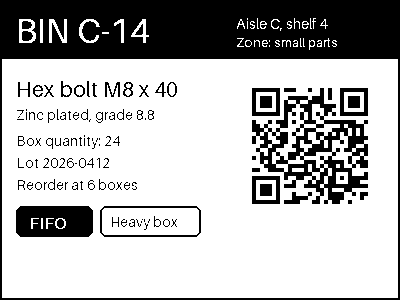
- Input
- bin-label-c14.tiff (42 KB)
- Output
- bin-label-c14.bmp (352 KB)
- Source
- A two-page warehouse bin label and cycle-count sheet we drew for this page, saved as an LZW-compressed TIFF at 200 dpi. (CC0-1.0). How it was made
- Made by
- 2026-11-04, API build
9eeeb0640aba
Parameters
Send these as form fields next to the file. Names are case-insensitive. If you set one of the documented options below that we don't support yet, the request fails with a 400 that names it instead of returning a file made without it.
| Parameter | What it does |
|---|---|
ColorSpaceenum, default default | monochrome, as in the sample, sets each pixel to black or white at a mid-gray threshold; gray keeps 256 levels. The bitmap stays 24 bits per pixel either way. cmyk is refused with 400.Values: default, rgb, gray, monochrome |
ImageResolutioninteger | Stored in the BMP header as pixels per metre. Left out, both fields are 0; 200 wrote 7,874, the same 200 dpi the label TIFF declares.Values: 10–800 |
ImageWidthinteger | Width of the bitmap in pixels. 200 shrank the 400 × 300 label to 200 × 150 and the file to 90,054 bytes.Values: 1–20000 |
ImageHeightinteger | Height in pixels. Alone, it derives the width; with ImageWidth the page is fitted inside that box, so 300 × 300 gave 300 × 225.Values: 1–20000 |
ScaleProportionsboolean, default true | false stretches the page to the exact ImageWidth × ImageHeight: the label came back 300 × 300. |
ScaleIfLargerboolean, default false | true never enlarges. With ImageWidth=800, the 400-pixel label kept its size instead of becoming 800 × 600 (1,440,054 bytes). |
ScaleImageboolean, default true | false crops rather than scales. A 300 × 200 request kept the label's top-left 300 × 200 pixels untouched. |
FileNamestring | Name for the result. Without it, bin-label-c14.tiff comes back as bin-label-c14.bmp. |
StoreFileboolean, default false | true keeps the BMP for 3 hours and answers with a download link in Files[].Url, so a 360 KB bitmap stays out of the JSON body. |
What carries over, and what doesn't
Kept
- Every pixel of page 1 in color mode: a default conversion of the sample matched the TIFF exactly.
- The QR code in black and white: the monochrome BMP still decodes to BIN C-14 / LOT 2026-0412 / 24 x hex bolt M8.
- Dark colors under the threshold: the navy header, the red FIFO tag and the gray body text turned black, and the white lettering on them stayed white.
- The Orientation tag, applied to the pixels: a 300 × 200 TIFF tagged 6 came back as an upright 200 × 300 BMP.
- Transparency from an RGBA TIFF. That file becomes a 32-bit BMP with a 108-byte header instead, and every alpha value matched the TIFF.
- Page dimensions, 400 × 300, with rows stored bottom-up as BMP normally does.
Lost or not yet supported
- Page 2. The sample's 300 × 400 count sheet is missing from the response, which still returns 200 with one file.
- Compression: 42,928 bytes of LZW TIFF became a 360,054-byte BMP, over 8 times larger.
- The 200 dpi in the TIFF. The BMP's resolution fields are 0 unless you send
ImageResolution. - A compact bit depth. Even the black-and-white sample is 24 bits per pixel; no 1-bit or 8-bit BMP can be requested.
- Light colors in monochrome mode: the orange footer (224, 122, 31) fell above the threshold and became white, taking its white text with it.
- ICC profiles: a Display P3 TIFF gave a plain 24-bit BMP with no profile in it.
Limits
- One TIFF per request; a second
Filereturns 400 'this conversion takes exactly one file'. - Requests up to 10 MB on the Free plan or 100 MB on paid plans, all files and fields together.
- 100,000,000 pixels per page, read from the TIFF header: a 12,000 × 9,000 fax TIFF of 6,836 bytes got 413 without being decoded.
- Indexed-color (palette) TIFFs return 422 'Photometric interpretation RGBPalette … is unsupported'.
ImageWidthandImageHeightfrom 1 to 20,000;ImageResolutionfrom 10 to 800.- 120 seconds per conversion, then 504.
Where teams use it
Software that reads bitmaps, not TIFF
Some embedded screens, label designers and older Windows tools open BMP but have no TIFF decoder. Convert the scan on upload and pass the device a plain bitmap it can draw row by row.
Black-and-white artwork from a color scan
ColorSpace=monochrome thresholds the page, which suits line art, stamps and barcodes. Check light colors first: on the sample, the orange footer turned white and the white text printed on it vanished.
Pixels with no decoder at all
For an opaque page our BMP is a 54-byte header followed by raw BGR rows, so a few lines of code can read it. The sample page is exactly 400 × 300 × 3 = 360,000 bytes of pixel data.
Questions
Why is the BMP eight times the size of my TIFF?
TIFF files are usually compressed; the sample uses LZW. Our BMP stores 3 bytes for every pixel of an opaque page with no compression, so a 400 × 300 page is always 360,054 bytes, colorful or not. Scale it with ImageWidth, or pick PNG if the target accepts it.
Can I get a 1-bit BMP for a label printer?
No. ColorSpace=monochrome changes the pixel values to black and white, but the file is still 24 bits per pixel: the sample is 360,054 bytes, the same as a color conversion. For a small black-and-white file, /v2/convert/tiff/to/png with ColorSpace=monochrome gave 4,337 bytes for the same label.
What happens to the other pages of a multi-page TIFF?
Only the first image in the file is converted. The sample has a label on page 1 and a count sheet on page 2, and the response holds one 400 × 300 BMP of the label, with status 200. Split the TIFF before upload if you need every page.
Does the BMP keep the scan's DPI?
Not by itself. Send ImageResolution=200 and the header records 7,874 pixels per metre in both directions, which is 200 dpi. Without it the fields are 0.
Are options like ImageQuality or TransparentColor used?
No. ConvertAPI documents no options for TIFF to BMP, and our converter doesn't apply these two, so they are ignored: the sample with ImageQuality=40 or TransparentColor=#FCFBF7 came back byte for byte the same.
Convert your first TIFF file in a minute.