BMP to TIFF API
POST a bitmap to /v2/convert/bmp/to/tiff and get an uncompressed TIFF with the same pixels. Add ColorSpace=gray for a one-channel file, as the sample does, and ImageResolution to record a DPI.
- Endpoint
- POST /v2/
convert/ bmp/ to/ tiff - Accepts
- bmp
- Sample timing
- 2 ms median of 5 runsHow we measure
- Request size
- Up to 10 MB on the Free plan or 100 MB on paid plans, all files together
Request and response
Every sample below ran against the API before this page was published. Set PDFCONVERSIONAPI_KEY to your key and run it as is.
curl -sS -X POST \
  https://api.pdfconversionapi.com/v2/convert/bmp/to/tiff \
  -H "Authorization: Bearer $PDFCONVERSIONAPI_KEY" \
  -F File=@shelf-label.bmp \
  --form-string ColorSpace=gray \
  -o response.json

# FileData is base64. Save the first file in converted/,
# or print the JSON error.
if jq -e '.Files' response.json > /dev/null; then
  mkdir -p converted
  name=$(jq -r '.Files[0].FileName' response.json)
  jq -r '.Files[0].FileData' response.json \
    | base64 --decode > "converted/$name"
else
  cat response.json
fi
import base64
import os
import requests
key = os.environ["PDFCONVERSIONAPI_KEY"]
response = requests.post(
"https://api.pdfconversionapi.com/v2/convert/bmp/to/tiff",
headers={"Authorization": f"Bearer {key}"},
files=[("File", open("shelf-label.bmp", "rb"))],
data={
"ColorSpace": "gray",
},
timeout=180,
)
result = response.json()
if not response.ok:
raise SystemExit(f"{result['Code']}: {result['Message']}")
os.makedirs("converted", exist_ok=True)
for file in result["Files"]:
path = os.path.join("converted", file["FileName"])
with open(path, "wb") as out:
out.write(base64.b64decode(file["FileData"]))
print(path, file["FileSize"], "bytes")
import { mkdir, readFile, writeFile } from "node:fs/promises";
import { join } from "node:path";

const form = new FormData();
const file = "shelf-label.bmp";
form.append("File", new Blob([await readFile(file)]), file);
form.append("ColorSpace", "gray");

const url = "https://api.pdfconversionapi.com/v2/convert/bmp/to/tiff";
const key = process.env.PDFCONVERSIONAPI_KEY;
const response = await fetch(url, {
  method: "POST",
  headers: { Authorization: `Bearer ${key}` },
  body: form,
});
const result = await response.json();
if (!response.ok) {
  throw new Error(`${result.Code}: ${result.Message}`);
}

await mkdir("converted", { recursive: true });
for (const file of result.Files) {
  const path = join("converted", file.FileName);
  await writeFile(path, Buffer.from(file.FileData, "base64"));
  console.log(path, file.FileSize, "bytes");
}
{
  "ConversionCost": 1,
  "ConversionTime": 0.002,
  "Files": [
    {
      "FileName": "shelf-label.tiff",
      "FileExt": "tiff",
      "FileSize": 100198,
      "FileData": "SUkqALiGAQABAAAAAQAAAAEA…"
    }
  ]
}
Response from our test run on 2026-11-03. ConversionTime shows the median of 5 runs. FileData is shortened here; the real response carries the whole file as base64.
The sample, converted
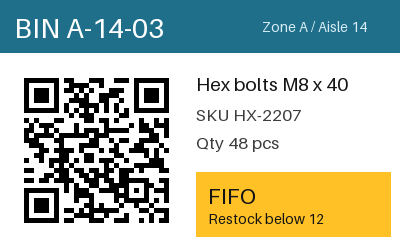
The same file the code sends. Download the input and the output and compare them yourself.
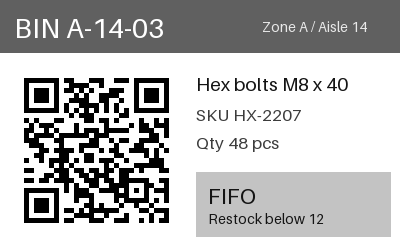
- Input
- shelf-label.bmp (293 KB)
- Output
- shelf-label.tiff (98 KB)
- Source
- A 24-bit warehouse bin label with a QR code and a colored header, drawn by us for this page. (CC0-1.0). How it was made
- Made by
- 2026-11-04, API build
9eeeb0640aba
Parameters
Send these as form fields next to the file. Names are case-insensitive. If you set one of the documented options below that we don't support yet, the request fails with a 400 that names it instead of returning a file made without it.
| Parameter | What it does |
|---|---|
ColorSpaceenum, default default | gray writes one 8-bit sample per pixel, cutting the label from 300,210 to 100,198 bytes; the teal header becomes level 96 and the amber box 195. monochrome keeps that layout with only 0 and 255. cmyk returns 400.Values: default, rgb, gray, monochrome |
ImageResolutioninteger | XResolution and YResolution in dots per inch. Without it the tags read 1/1 with no unit, even when the BMP declared a DPI.Values: 10–800 |
TransparentColorstring | Adds an alpha channel with this color cleared; #FFFFFF gave an RGBA TIFF of 400,214 bytes. With ColorSpace=gray as well, the file stays RGBA at that size, with the same value in red, green and blue.Values: Color name, #RRGGBB or R,G,B |
ImageWidthinteger | Scales to this width (200 gave 200 × 125, 75,210 bytes in color).Values: 1–20000 |
ImageHeightinteger | Scales to this height; both values set a box.Values: 1–20000 |
ScaleProportionsboolean, default true | false stretches to the box. |
ScaleIfLargerboolean, default false | true prevents enlargement. |
ScaleImageboolean, default true | false crops from the top-left corner. |
MultiPageboolean, default true | Accepted; a single BMP always gives a one-page TIFF. |
ImageQualityinteger, default 75 | Accepted only as 75, since the TIFF is not compressed. |
FileNamestring | Output name without extension. |
StoreFileboolean, default false | Return a 3-hour link. |
Not supported yet
Setting one of these to anything but its default returns 400.
| Option | What to do instead |
|---|---|
ImageQuality | Other values than 75 return 400 "ImageQuality is not supported yet for BMP → TIFF". |
What carries over, and what doesn't
Kept
- Every pixel in color mode: the default TIFF matched the BMP exactly
- Readability of the label in gray: its QR code still decoded from the one-channel sample
- 400 × 250 size
Lost or not yet supported
- Color, when you ask for gray: values follow the Rec. 709 brightness weights, so the label's teal and amber become 96 and 195.
- File size: no compression is used, so even the gray sample is 100,198 bytes.
- The BMP's DPI unless you send
ImageResolution; a 300 DPI bitmap came back with no unit.
Limits
- One BMP per request, one TIFF page.
- Requests up to 10 MB on the Free plan or 100 MB on paid plans, all files and fields together.
- Bitmaps over 100,000,000 pixels: 413.
- Resize values from 1 to 20,000.
- Requests running past 120 seconds end in a 504.
Where teams use it
Document and fax-style archives
Records systems that file pages as TIFF can take BMP scans or labels converted here, in gray to save space when color carries no information.
Print workflows that need a DPI
Set ImageResolution so layout and RIP software place the image at the intended physical size.
Questions
Is the TIFF compressed?
No. It is written with compression type 1 (none) in a single strip: 300,210 bytes in color and 100,198 in gray for the label.
How are colors turned into gray?
With the Rec. 709 weights (0.2126 red, 0.7152 green, 0.0722 blue). The header teal (31, 111, 139) became 96, and the amber (255, 193, 37) became 195.
Can I set 300 DPI?
Yes, send ImageResolution=300; the resolution tags then read 300/1 with the unit set to inches.
Convert your first BMP file in a minute.