TIFF to TGA API
POST a TIFF to /v2/convert/tiff/to/tga and get a Targa file of the first page: 32 bits per pixel with 8 of them alpha, stored without compression. TransparentColor turns one exact color into transparency, as the sample does with the label's paper.
- Endpoint
- POST /v2/
convert/ tiff/ to/ tga - Accepts
- tiff
- Sample timing
- 2 ms median of 5 runsHow we measure
- Request size
- Up to 10 MB on the Free plan or 100 MB on paid plans, all files together
Request and response
Every sample below ran against the API before this page was published. Set PDFCONVERSIONAPI_KEY to your key and run it as is.
curl -sS -X POST \
  https://api.pdfconversionapi.com/v2/convert/tiff/to/tga \
  -H "Authorization: Bearer $PDFCONVERSIONAPI_KEY" \
  -F File=@bin-label-c14.tiff \
  --form-string 'TransparentColor=#FCFBF7' \
  -o response.json

# FileData is base64. Save the first file in converted/,
# or print the JSON error.
if jq -e '.Files' response.json > /dev/null; then
  mkdir -p converted
  name=$(jq -r '.Files[0].FileName' response.json)
  jq -r '.Files[0].FileData' response.json \
    | base64 --decode > "converted/$name"
else
  cat response.json
fi
import base64
import os
import requests
key = os.environ["PDFCONVERSIONAPI_KEY"]
response = requests.post(
"https://api.pdfconversionapi.com/v2/convert/tiff/to/tga",
headers={"Authorization": f"Bearer {key}"},
files=[("File", open("bin-label-c14.tiff", "rb"))],
data={
"TransparentColor": "#FCFBF7",
},
timeout=180,
)
result = response.json()
if not response.ok:
raise SystemExit(f"{result['Code']}: {result['Message']}")
os.makedirs("converted", exist_ok=True)
for file in result["Files"]:
path = os.path.join("converted", file["FileName"])
with open(path, "wb") as out:
out.write(base64.b64decode(file["FileData"]))
print(path, file["FileSize"], "bytes")
import { mkdir, readFile, writeFile } from "node:fs/promises";
import { join } from "node:path";

const form = new FormData();
const file = "bin-label-c14.tiff";
form.append("File", new Blob([await readFile(file)]), file);
form.append("TransparentColor", "#FCFBF7");

const url = "https://api.pdfconversionapi.com/v2/convert/tiff/to/tga";
const key = process.env.PDFCONVERSIONAPI_KEY;
const response = await fetch(url, {
  method: "POST",
  headers: { Authorization: `Bearer ${key}` },
  body: form,
});
const result = await response.json();
if (!response.ok) {
  throw new Error(`${result.Code}: ${result.Message}`);
}

await mkdir("converted", { recursive: true });
for (const file of result.Files) {
  const path = join("converted", file.FileName);
  await writeFile(path, Buffer.from(file.FileData, "base64"));
  console.log(path, file.FileSize, "bytes");
}
{
  "ConversionCost": 1,
  "ConversionTime": 0.002,
  "Files": [
    {
      "FileName": "bin-label-c14.tga",
      "FileExt": "tga",
      "FileSize": 480018,
      "FileData": "AAACAAAAAAAAAAAAkAEsASAo…"
    }
  ]
}
Response from our test run on 2026-11-03. ConversionTime shows the median of 5 runs. FileData is shortened here; the real response carries the whole file as base64.
The sample, converted
The same file the code sends. Download the input and the output and compare them yourself.
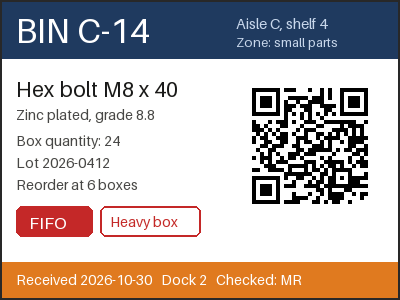
- Input
- bin-label-c14.tiff (42 KB)
- Output
- bin-label-c14.tga (469 KB)
- Source
- A two-page warehouse bin label and cycle-count sheet we drew for this page, saved as an LZW-compressed TIFF at 200 dpi. (CC0-1.0). How it was made
- Made by
- 2026-11-04, API build
9eeeb0640aba
Parameters
Send these as form fields next to the file. Names are case-insensitive. If you set one of the documented options below that we don't support yet, the request fails with a 400 that names it instead of returning a file made without it.
| Parameter | What it does |
|---|---|
TransparentColorstring | Pixels of exactly this color get alpha 0. #FCFBF7, the label's paper tone, made 51,575 of 120,000 pixels transparent.Values: Color name, #RRGGBB or R,G,B |
ImageWidthinteger | Target width; at 200 the Targa was 200 × 150 and 120,018 bytes.Values: 1–20000 |
ImageHeightinteger | Target height, or the box height when sent with ImageWidth.Values: 1–20000 |
ScaleProportionsboolean, default true | false lets the requested box change the page's aspect ratio. |
ScaleIfLargerboolean, default false | true refuses to upscale, leaving smaller pages as they are. |
ScaleImageboolean, default true | false crops a window from the top-left corner instead of scaling. |
ColorSpaceenum, default default | gray or monochrome before encoding; the Targa stays 32-bit and 480,018 bytes. cmyk is refused.Values: default, rgb, gray, monochrome |
FileNamestring | Name for the .tga; bin-label-c14.tga without it. |
StoreFileboolean, default false | true keeps the Targa for 3 hours and returns its URL. |
What carries over, and what doesn't
Kept
- Every RGB value of page 1: read back, the Targa matched the TIFF page exactly.
- A real alpha channel: the header declares 8 alpha bits and the sample's paper areas are fully transparent.
- The Orientation tag, applied to the pixels: a 300 × 200 TIFF tagged 6 became a 200 × 300 Targa, upright.
- Top-to-bottom row order, flagged in the header so readers don't flip the image.
- Strict readers: with no run-length packets, nothing crosses a row end, and the image library that had refused our earlier run-length Targas opened the sample.
Lost or not yet supported
- Soft edges around keyed colors. Only exact matches turn transparent, so anti-aliased text keeps a light paper-tinted rim on dark backgrounds.
- Compactness: the Targa is stored raw, 480,018 bytes for the 400 × 300 label, over 11 times the 42,928-byte TIFF.
- Page 2 of the TIFF, its 200 dpi value and its ICC profile.
- The TGA 2.0 footer and extension area; the file is a plain header plus pixel data.
Limits
- One TIFF per request, first page only.
- Requests up to 10 MB on the Free plan or 100 MB on paid plans, all files and fields together.
- Pages with more than 100,000,000 pixels return 413.
- Targa sides of at most 65,535 px: a 65,536 × 2 TIFF returned 413 'TGA images can be at most 65,535 pixels on a side, and this one is 65,536×2'.
- Palette TIFFs return 422.
- Requests are stopped after 120 seconds with 504.
Where teams use it
Textures and overlays for games and video
Game and video tools that import Targa textures can use its alpha channel directly. Turn a scanned or exported TIFF into a texture, or key out its background to use it as an overlay.
A cut-out from a flat background
When artwork sits on a single background color, TransparentColor removes it in the same request, without a separate masking step.
Questions
Is the TGA compressed?
No. It is an uncompressed true-color Targa (image type 2): an 18-byte header, then 4 bytes per pixel, so the label is 480,018 bytes whatever its content. There is no option for run-length compression. If the target takes PNG, the same keyed page as a PNG was 34,348 bytes.
Will a strict TGA reader open the file?
It should. Runs that continue from one row into the next are what made one image library reject our earlier Targas, and the uncompressed file has no runs at all. That library, a video tool and /v2/convert/tga/to/png all read the sample, with the same pixels.
How do I get transparency from a TIFF without alpha?
Name the background color in TransparentColor. Every pixel with exactly that value gets alpha 0; the sample removed 51,575 paper pixels. Edges that blend into the background stay opaque.
Which page of a multi-page TIFF is used?
The first. The sample's second page, a count sheet, was skipped and the response held one Targa.
Convert your first TIFF file in a minute.