WebP to BMP API
POST a .webp file to /v2/convert/webp/to/bmp and the response holds an uncompressed BMP with 8 bits each of blue, green, red and alpha, or a 24-bit one when no pixel is see-through. Transparency survives as it was decoded, including soft edges and shadows.
- Endpoint
- POST /v2/
convert/ webp/ to/ bmp - Accepts
- webp
- Sample timing
- 4 ms median of 5 runsHow we measure
- Request size
- Up to 10 MB on the Free plan or 100 MB on paid plans, all files together
Request and response
Every sample below ran against the API before this page was published. Set PDFCONVERSIONAPI_KEY to your key and run it as is.
curl -sS -X POST \
  https://api.pdfconversionapi.com/v2/convert/webp/to/bmp \
  -H "Authorization: Bearer $PDFCONVERSIONAPI_KEY" \
  -F File=@guest-badge.webp \
  -o response.json

# FileData is base64. Save the first file in converted/,
# or print the JSON error.
if jq -e '.Files' response.json > /dev/null; then
  mkdir -p converted
  name=$(jq -r '.Files[0].FileName' response.json)
  jq -r '.Files[0].FileData' response.json \
    | base64 --decode > "converted/$name"
else
  cat response.json
fi
import base64
import os
import requests
key = os.environ["PDFCONVERSIONAPI_KEY"]
response = requests.post(
"https://api.pdfconversionapi.com/v2/convert/webp/to/bmp",
headers={"Authorization": f"Bearer {key}"},
files=[("File", open("guest-badge.webp", "rb"))],
timeout=180,
)
result = response.json()
if not response.ok:
raise SystemExit(f"{result['Code']}: {result['Message']}")
os.makedirs("converted", exist_ok=True)
for file in result["Files"]:
path = os.path.join("converted", file["FileName"])
with open(path, "wb") as out:
out.write(base64.b64decode(file["FileData"]))
print(path, file["FileSize"], "bytes")
import { mkdir, readFile, writeFile } from "node:fs/promises";
import { join } from "node:path";

const form = new FormData();
const file = "guest-badge.webp";
form.append("File", new Blob([await readFile(file)]), file);

const url = "https://api.pdfconversionapi.com/v2/convert/webp/to/bmp";
const key = process.env.PDFCONVERSIONAPI_KEY;
const response = await fetch(url, {
  method: "POST",
  headers: { Authorization: `Bearer ${key}` },
  body: form,
});
const result = await response.json();
if (!response.ok) {
  throw new Error(`${result.Code}: ${result.Message}`);
}

await mkdir("converted", { recursive: true });
for (const file of result.Files) {
  const path = join("converted", file.FileName);
  await writeFile(path, Buffer.from(file.FileData, "base64"));
  console.log(path, file.FileSize, "bytes");
}
{
  "ConversionCost": 1,
  "ConversionTime": 0.004,
  "Files": [
    {
      "FileName": "guest-badge.bmp",
      "FileExt": "bmp",
      "FileSize": 416122,
      "FileData": "Qk16WQYAAAAAAHoAAABsAAAA…"
    }
  ]
}
Response from our test run on 2026-11-03. ConversionTime shows the median of 5 runs. FileData is shortened here; the real response carries the whole file as base64.
The sample, converted
The same file the code sends. Download the input and the output and compare them yourself.
- Input
- guest-badge.webp (9.4 KB)
- Output
- guest-badge.bmp (406 KB)
- Source
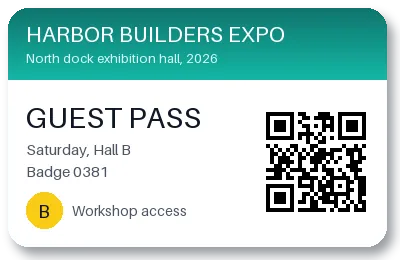
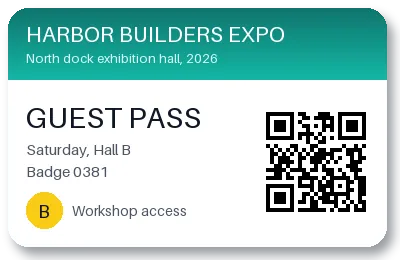
- A guest pass for a made-up trade show that we drew for this page, saved as a lossy WebP with a transparent background and a soft shadow. (CC0-1.0). How it was made
- Made by
- 2026-11-04, API build
9eeeb0640aba
Parameters
Send these as form fields next to the file. Names are case-insensitive. If you set one of the documented options below that we don't support yet, the request fails with a 400 that names it instead of returning a file made without it.
| Parameter | What it does |
|---|---|
ImageWidthinteger | Width of the bitmap. At 200 the 400 × 260 badge became 200 × 130 and 104,122 bytes.Values: 1–20000 |
ImageHeightinteger | Height of the bitmap; the width is derived, or both form a box when sent together.Values: 1–20000 |
ScaleProportionsboolean, default true | false makes the picture fill the exact width and height you send. |
ScaleIfLargerboolean, default false | true prevents enlargement past the WebP's own size. |
ScaleImageboolean, default true | false takes a top-left crop of the requested size instead of resizing. |
ColorSpaceenum, default default | gray keeps the alpha channel and grays the colors; monochrome makes them black or white. Both stay 32-bit because the badge has see-through pixels, and rgb returned the sample unchanged. cmyk returns 400.Values: default, rgb, gray, monochrome |
ImageResolutioninteger | Recorded in the BMP header; 150 was stored as 5,906 pixels per metre. WebP has no DPI to copy, so the default is 0.Values: 10–800 |
FileNamestring | Name for the bitmap; guest-badge.bmp for the sample. |
StoreFileboolean, default false | true keeps the BMP for 3 hours and returns Files[].Url. |
What carries over, and what doesn't
Kept
- The decoded image exactly: every BGRA value in the sample BMP equals the reference WebP decoder's output.
- All of the alpha: 2,599 fully transparent pixels and 11,188 partly transparent ones in the shadow and rounded corners.
- The size, 400 × 260, stored bottom-up.
- Lossless WebP input as well as lossy, and WebP with or without the extended header.
- EXIF orientation, applied to the pixels: a 300 × 200 WebP tagged 6 became an upright 200 × 300 BMP.
Lost or not yet supported
- Compression: 9,596 bytes of WebP became 416,122 bytes, 43 times larger, because BMP stores raw pixels.
- Frames after the first in an animated WebP.
- EXIF, XMP and ICC metadata chunks.
Limits
- One WebP per request.
- Requests up to 10 MB on the Free plan or 100 MB on paid plans, all files and fields together.
- 100,000,000 pixels per image; checked from the header before decoding.
- Damaged WebPs return 422 'the input file could not be read: the WebP image is damaged, or encoded in a way that can't be read yet'; other files sent here get 'the input file could not be read: it is not a WebP image'.
- Each conversion gets 120 seconds; then the API returns 504.
Where teams use it
Images from the web for desktop tools
Pictures saved from websites can arrive as WebP, which some older Windows programs, icon editors and embedded toolchains can't open. A BMP opens in those without a codec.
Sprites and UI graphics with transparency
Keep cut-out graphics transparent when a tool insists on BMP: the alpha channel is stored in the file with an explicit mask, not dropped or flattened.
Questions
Does the BMP keep transparency?
Yes. It is a 32-bit BMP with a 108-byte header whose masks name the fourth byte as alpha. In the sample, the transparent corners and the soft drop shadow have the same alpha values as in the WebP. The header's color-space field is 0, so macOS opens the file too, and all three readers we tried showed the alpha.
Why does my BMP look black around the edges?
Transparent pixels in the sample store near-black colors: only 162 of the 2,599 clear pixels are pure black, and none goes above 89 in any channel. A viewer that ignores BMP alpha shows those dark pixels. Flatten onto a color first with /v2/convert/webp/to/jpg and AlphaColor, or use PNG if transparency matters.
Can I get a 24-bit BMP?
Yes, from an opaque WebP: a 400 × 260 lossy WebP with no alpha came back as a 24-bit BMP of 312,054 bytes. A WebP with see-through pixels, like the badge, stays 32-bit, also with ColorSpace=gray or rgb: 416,122 bytes each time. Flatten it onto a color with /v2/convert/webp/to/jpg and AlphaColor first if you need 24 bits.
Are WebP quality settings used?
No. ConvertAPI documents no options for WebP to BMP, and our converter ignores ImageQuality, AlphaColor and TransparentColor here; the sample came back byte for byte the same with each of them.
Convert your first WebP file in a minute.