Guide5 min read
Table of contents not updating when converting Word to PDF
A Word table of contents is saved text, so the PDF shows it as it was last updated. Set UpdateTableOfContents=true to rebuild it. Before and after, tested.
Written and tested by Zeel Shekhaliya, Founder
Contents (8 sections)
A table of contents in a Word file is a field. Word works out its entries and page numbers when you update it, then saves the result in the file as ordinary text. Our DOCX to PDF prints that saved text unless you ask for the fields to be updated, so a contents list saved before the last round of edits comes out of the PDF with old headings and wrong page numbers. Send UpdateTableOfContents=true and the API rebuilds it from the headings before it writes the PDF.
curl -sS -X POST https://api.pdfconversionapi.com/v2/convert/docx/to/pdf \
  -H "Authorization: Bearer $PDFCONVERSIONAPI_KEY" \
  -F File=@field-service-handbook.docx \
  -F UpdateTableOfContents=true \
  -o response.json

jq -r '.Files[0].FileData' response.json | base64 --decode > field-service-handbook.pdf
The same handbook, without and with the option
Our test handbook has five sections, each starting on a new page, so the right page numbers are 2 to 6. We wrote its contents field the way Word leaves it when a document changes after the last update: the saved entries still call section 2 "Setup" (it is now "Installing the unit"), leave out 2.2, 3.1, 3.2 and sections 4 and 5, and give every page number one page too low.
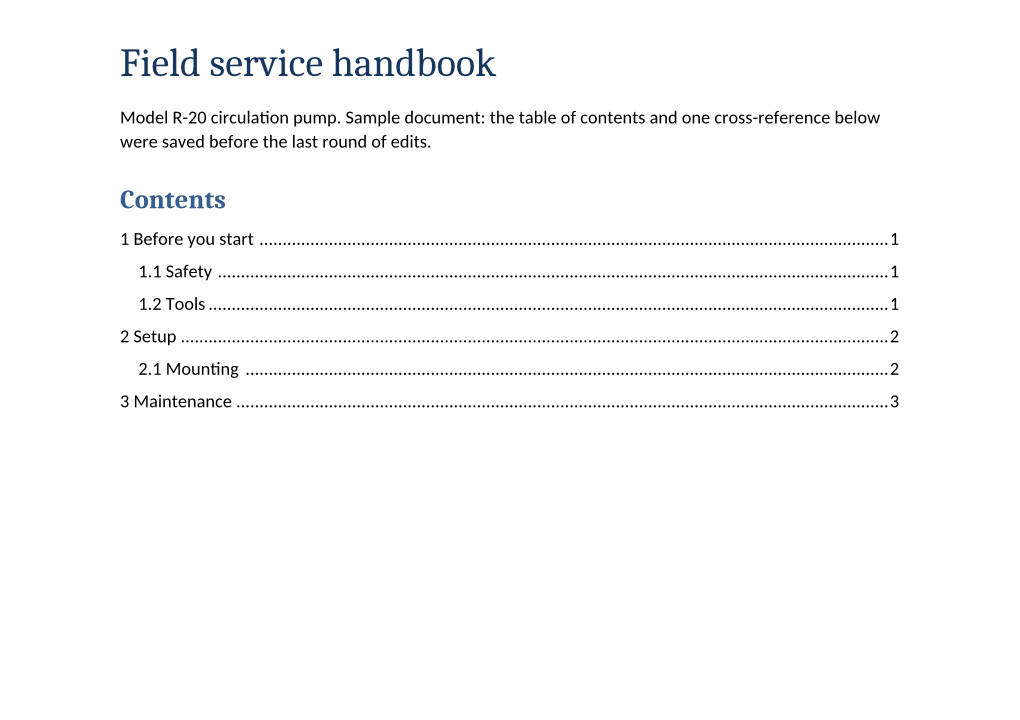
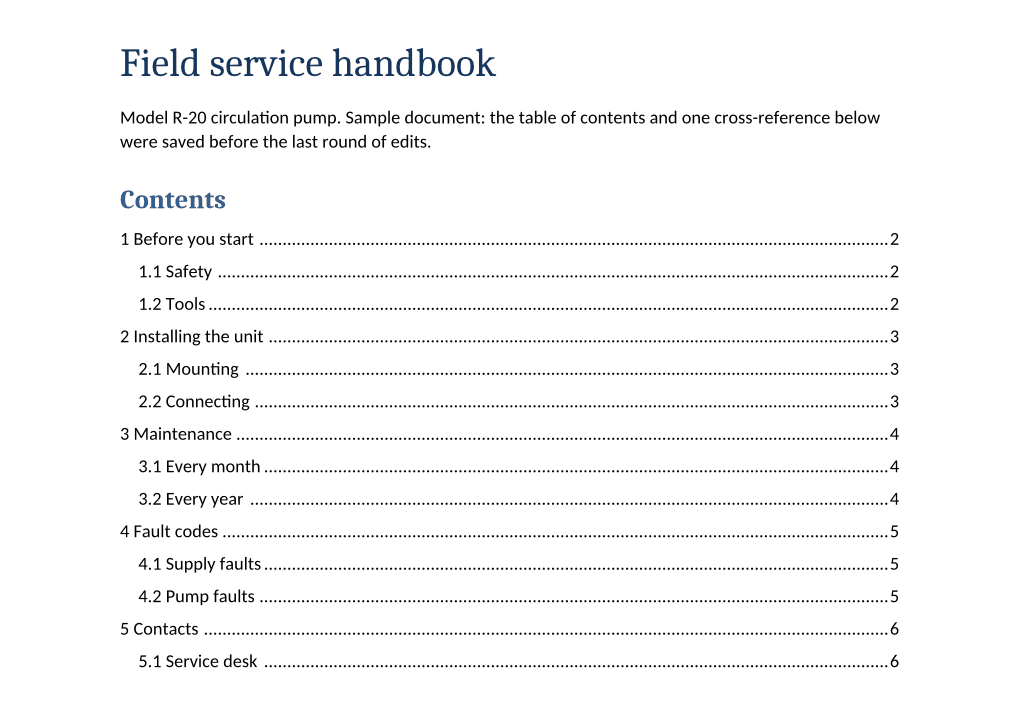
| In the PDF | No option | UpdateTableOfContents=true |
|---|---|---|
| Contents entries | 6 | 14 |
| Section 2's entry | "2 Setup", the old name | "2 Installing the unit" |
| Sections 4 and 5 | Missing | Listed, with their subsections |
| Page numbers in the contents | 1, 1, 1, 2, 2, 3: each one page too low | 2 to 6, matching the headings |
| Cross-reference in section 2.2 | "Error codes on page 4" | "4 Fault codes on page 5" |
| Clickable entries | 6 | 14 |
| Footer | "Page 1 of 6" to "Page 6 of 6" | The same |
| PDF bookmarks | 14, to the right pages | The same |
Three things were right even without the option. The footer's page numbers were saved as "Page 1 of 1" and printed correctly on every page. The bookmarks, which come from the headings, were right in both PDFs. And the six stale entries still linked to the right pages (2, 2, 2, 3, 3 and 4): in the Word file each entry links to a bookmark on its heading, and the converter points the link at wherever that heading is. Someone who clicks an entry lands in the right place; someone who reads the printed number and scrolls does not.
The cross-reference in section 2.2 is two fields, one for the heading's text and one for its page. They were saved as "Error codes on page 4"; with the option they show the heading as it is now, "4 Fault codes", on page 5.
UpdateFields, UpdateTableOfContents and UpdateReferences do the same thing
Any one of the three turns on a single pass that refreshes every field the converter can update. In our files that meant the contents and the cross-reference together. Footer page numbers were right with or without it, and the DOCX to PDF page notes the same for page counts and dates. We sent the handbook once with each, and all three returned the same 45,899-byte PDF, identical byte for byte. There is no way to refresh the contents and leave an old cross-reference as it was.
Documents generated by code
Code that writes DOCX files from a template can insert a contents field, but it can't work out page numbers without laying out the pages, so the field can be saved with only a placeholder. Our generated report saves the line "Right-click to update field." in its contents field.
- Without the option, the PDF prints "Right-click to update field." under "Contents".
- With
UpdateTableOfContents=true, the contents list its 7 headings with page numbers 2 to 4, and each entry links to its page. - The same report with Word's "update fields when the file opens" setting (
<w:updateFields w:val="true"/>insettings.xml) gave a PDF identical to the one without it. In Word, that setting asks the person opening the file whether to update. The converter doesn't read it, so send the option with the request.
Headings need a heading style or an outline level
The contents are built from paragraphs that have a heading style or an outline level. The headings file has four sections: A and B start with large bold text in the Normal style, and C and D start with the same bold text plus an outline level set on the paragraph (in Word: Paragraph, Outline level).
With UpdateTableOfContents=true, the contents listed C on page 4 and D on page 5, and left out A and B. The PDF's bookmarks follow the same rule, with or without the option: two bookmarks, C and D. If a template formats headings by hand, give them the Heading 1 to Heading 3 styles. Our contents field includes the \u switch, which tells Word to use outline levels as well as heading styles; we didn't test a field without it.
Fix the Word file as well
If you keep or send the Word file too, docx/to/docx takes the same three option names. With UpdateFields=true it returned the handbook as a .docx with the contents and the cross-reference refreshed. Converting that file to PDF afterwards, with no options, gave the same PDF byte for byte as converting the original with the option.
The request in Python and Node.js
Each version writes the 45,899-byte field-service-handbook.pdf from the test file and prints its name and size.
# Needs the requests package: pip install requests
import base64
import os

import requests

with open("field-service-handbook.docx", "rb") as f:
    response = requests.post(
        "https://api.pdfconversionapi.com/v2/convert/docx/to/pdf",
        headers={"Authorization": f"Bearer {os.environ['PDFCONVERSIONAPI_KEY']}"},
        files={"File": f},
        data={"UpdateTableOfContents": "true"},
        timeout=150,
    )
result = response.json()
if not response.ok:
    raise SystemExit(f"{result['Code']}: {result['Message']}")

pdf = result["Files"][0]
with open(pdf["FileName"], "wb") as out:
    out.write(base64.b64decode(pdf["FileData"]))
print(pdf["FileName"], pdf["FileSize"], "bytes")
// Needs Node.js 20 or later. Save it as toc.mjs and run: node toc.mjs
import { readFile, writeFile } from "node:fs/promises";
const form = new FormData();
form.append("File", new Blob([await readFile("field-service-handbook.docx")]), "field-service-handbook.docx");
form.append("UpdateTableOfContents", "true");
const response = await fetch("https://api.pdfconversionapi.com/v2/convert/docx/to/pdf", {
method: "POST",
headers: { Authorization: `Bearer ${process.env.PDFCONVERSIONAPI_KEY}` },
body: form,
});
const result = await response.json();
if (!response.ok) throw new Error(`${result.Code}: ${result.Message}`);
const pdf = result.Files[0];
await writeFile(pdf.FileName, Buffer.from(pdf.FileData, "base64"));
console.log(pdf.FileName, pdf.FileSize, "bytes");What the option doesn't change
- Page numbers come from our layout, not Word's. Fonts the server doesn't have are replaced, where one exists, with a font of the same character widths; the test files use Calibri and Cambria, which were replaced this way, so lines should break in the same places. Our test files start each section on a new page, so their page numbers don't depend on where a page happens to break. In a long document where headings fall mid-page, a heading can land on a different page than in Word if a page breaks differently; we haven't compared that with Word.
- A contents list typed by hand isn't a field, so the option has nothing to update in it.
- It's all or nothing. You can't keep one field's saved result while the others are updated.
How we tested
- Date
- 2026-11-05. Every request and result on this page ran that day.
- Server
- Our API running locally in a container, built from the same source as the hosted API. The commands show the hosted address; we ran them with only the base URL changed.
- Files
- Four Word files we wrote for this test (download them above). A handbook whose contents and one cross-reference were saved before the last edits; a generated report whose contents field holds only a placeholder; the same report with Word's setting to update fields when the file opens; and a file whose headings are bold text or outline levels instead of heading styles.
- Runs
- 10 conversions to PDF and 1 to DOCX. The handbook without options and with each of the three option names; the generated report and the headings file without and with UpdateTableOfContents; the report with Word's setting, without options; the handbook to DOCX with UpdateFields, and that DOCX back to PDF without options.
- Checked with
- Page text, links and bookmarks read with PyMuPDF 1.27.2; first pages rendered with our PDF to PNG at 120 DPI and compared by eye.
- Clients
- Curl 8.7.1, jq 1.8.1, Python 3.14 with requests 2.34.2, Node.js 24.15.0.
- Not checked
- Microsoft Word itself. We compared page numbers with the pages the headings land on in our own PDFs, not with Word's layout.