Guide6 min read
Convert Word to PDF without comments or tracked changes
DOCX to PDF prints tracked changes as accepted and leaves comments out unless you set IncludeMarkup=true. What else from the Word file reaches the PDF, tested.
Written and tested by Zeel Shekhaliya, Founder
Contents (6 sections)
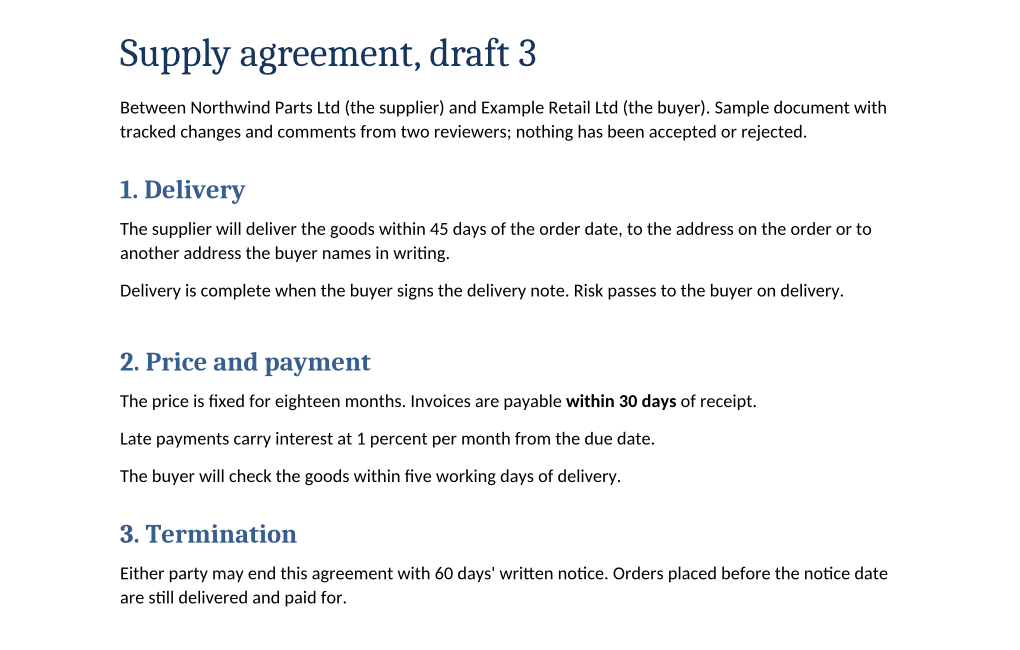
Our DOCX to PDF prints a reviewed Word file as if every tracked change had been accepted, and leaves the comments out, unless you set IncludeMarkup=true. We converted a contract draft with insertions, deletions, a moved paragraph, two comments and a hidden sentence, then searched the PDF for each of them. The insertions print as ordinary text; none of the deleted text, the comments, the reviewers' names on them or the hidden sentence was in the file. What did come through from the Word file is in the PDF's document properties: the author's name, the title and the creation date. A second request removes the name.
# 1. Word to PDF. Without IncludeMarkup, tracked changes print as accepted and comments are left out.
curl -sS -X POST https://api.pdfconversionapi.com/v2/convert/docx/to/pdf \
  -H "Authorization: Bearer $PDFCONVERSIONAPI_KEY" \
  -F File=@supply-agreement-draft.docx \
  -o step1.json
jq -r '.Files[0].FileData' step1.json | base64 --decode > draft.pdf

# 2. Clear the Author property the PDF took from the Word file.
curl -sS -X POST https://api.pdfconversionapi.com/v2/convert/pdf/to/pdf \
  -H "Authorization: Bearer $PDFCONVERSIONAPI_KEY" \
  -F File=@draft.pdf \
  -F "PdfAuthor=' '" \
  -F FileName=supply-agreement \
  -o step2.json
jq -r '.Files[0].FileData' step2.json | base64 --decode > supply-agreement.pdf
What the PDF contains without IncludeMarkup
| In the Word file | In the PDF |
|---|---|
| Tracked insertions: "45" days, "eighteen" months, a new paragraph on late payments | Printed as ordinary text |
| Tracked deletions: "30" days, "twelve" months, a paragraph on paying by check | Not printed, and not in the file |
| A paragraph moved from section 1 to section 2 | Printed once, in section 2 |
| A tracked change that made "within 30 days" bold | Printed bold |
| Two comments | Not printed, and not in the file |
| The reviewers' names on the changes and comments | Not in the file, apart from the Author property below |
| A sentence formatted as hidden text | Not printed, and not in the file |
| Author "Reviewer A" in the file's properties | In the PDF's Author property |
| Last modified by "Reviewer B" | Not in the file |
"Not in the file" means a phrase from that item was in none of these: the PDF's page text, its annotations, its document properties and XMP metadata, or the strings in its objects and decompressed streams. The PDF has no annotations at all, so the comments aren't hidden as PDF notes either.
The PDF's creation date also comes from the Word file: our draft was created on October 20, and the PDF's creation and modification dates both say October 20.
Remove the author's name
IncludeMetadata=false, the option for leaving the Word file's properties out, isn't supported on DOCX to PDF yet. The API refuses it rather than ignore it:
{"Code":400,"Message":"IncludeMetadata is not supported yet for DOCX → PDF"}Instead, send the PDF to pdf/to/pdf with PdfAuthor=' ' (a space in single quotes), as in step 2 above. The Author property is removed, and "Reviewer A" no longer appears anywhere in the file. The page text, bookmarks and fonts stayed the same, and the page rendered pixel for pixel the same at 72 DPI. The modification date in the document information becomes the time of the second request; the copy in the XMP metadata still says October 20. The title, "Supply agreement, draft 3", stays; PdfTitle changes or removes it the same way (see PDF to PDF).
To check a PDF before you send it, ask for its metadata:
curl -sS -X POST https://api.pdfconversionapi.com/v2/convert/pdf/to/meta \
  -H "Authorization: Bearer $PDFCONVERSIONAPI_KEY" \
  -F File=@supply-agreement.pdf \
  -o meta.json

jq -r '.Files[0].FileData' meta.json | base64 --decode \
| jq -c '{author, title, annotations: (.annotations | length), attachments: (.attachments | length)}'{"author":null,"title":"Supply agreement, draft 3","annotations":0,"attachments":0}Print the comments and changes: IncludeMarkup=true
curl -sS -X POST https://api.pdfconversionapi.com/v2/convert/docx/to/pdf \
  -H "Authorization: Bearer $PDFCONVERSIONAPI_KEY" \
  -F File=@supply-agreement-draft.docx \
  -F IncludeMarkup=true \
  -o response.json

jq -r '.Files[0].FileData' response.json | base64 --decode > supply-agreement-draft-markup.pdf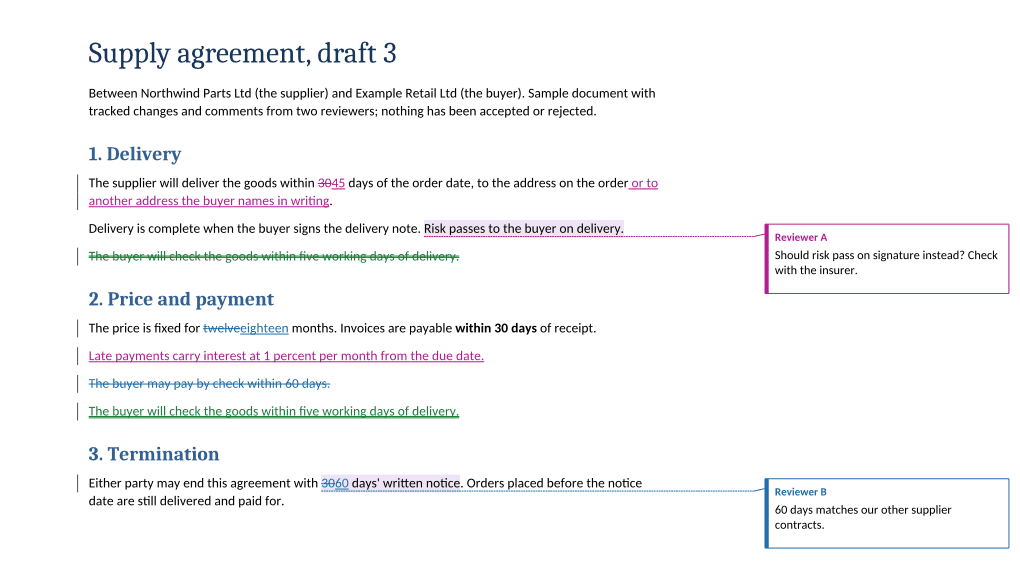
- Insertions are underlined and deletions struck through, in one color per reviewer, with a bar in the left margin beside each changed line.
- The moved paragraph shows twice, struck through where it was and underlined where it went, in a third color.
- Each comment sits in a column on the right with the reviewer's name, joined to the text it is about by a dotted line.
- To make room for that column, the page's content is scaled to 74% of its size on the same Letter page.
- The tracked bold change isn't shown as a change: "within 30 days" prints bold and black, with no note. Its line has a change bar, but that bar is for "twelve" becoming "eighteen" on the same line, so this file can't tell whether a formatting change gets a bar of its own.
- The hidden sentence is still left out.
Text extracted from this PDF runs the old and new values together: "within 3045 days", "twelveeighteen months". If you index markup PDFs for search, index the version without markup as well.
The same two steps in Python and Node.js
Each version writes supply-agreement.pdf without comments, tracked changes or the author's name, and prints its size: 31,577 bytes in our run, give or take a byte between runs, because the file records when it was saved.
# Needs the requests package: pip install requests
import base64
import os

import requests

API = "https://api.pdfconversionapi.com/v2/convert"
HEADERS = {"Authorization": f"Bearer {os.environ['PDFCONVERSIONAPI_KEY']}"}


def convert(route, name, data, options):
    response = requests.post(f"{API}/{route}", headers=HEADERS, files={"File": (name, data)}, data=options, timeout=150)
    result = response.json()
    if not response.ok:
        raise SystemExit(f"{route}: {result['Code']} {result['Message']}")
    return base64.b64decode(result["Files"][0]["FileData"])


def clean_pdf(path):
    """Word to PDF without comments or tracked changes, then without the Word file's author."""
    with open(path, "rb") as f:
        pdf = convert("docx/to/pdf", os.path.basename(path), f.read(), {})
    return convert("pdf/to/pdf", "draft.pdf", pdf, {"PdfAuthor": "' '"})


pdf = clean_pdf("supply-agreement-draft.docx")
with open("supply-agreement.pdf", "wb") as out:
    out.write(pdf)
print("supply-agreement.pdf", len(pdf), "bytes")
// Needs Node.js 20 or later. Save it as clean.mjs and run: node clean.mjs
import { readFile, writeFile } from "node:fs/promises";
import { basename } from "node:path";
const API = "https://api.pdfconversionapi.com/v2/convert";
async function convert(route, name, data, options = {}) {
const form = new FormData();
form.append("File", new Blob([data]), name);
for (const [key, value] of Object.entries(options)) form.append(key, value);
const response = await fetch(`${API}/${route}`, {
method: "POST",
headers: { Authorization: `Bearer ${process.env.PDFCONVERSIONAPI_KEY}` },
body: form,
});
const result = await response.json();
if (!response.ok) throw new Error(`${route}: ${result.Code} ${result.Message}`);
return Buffer.from(result.Files[0].FileData, "base64");
}
/** Word to PDF without comments or tracked changes, then without the Word file's author. */
async function cleanPdf(path) {
const pdf = await convert("docx/to/pdf", basename(path), await readFile(path));
return convert("pdf/to/pdf", "draft.pdf", pdf, { PdfAuthor: "' '" });
}
const pdf = await cleanPdf("supply-agreement-draft.docx");
await writeFile("supply-agreement.pdf", pdf);
console.log("supply-agreement.pdf", pdf.length, "bytes");What you can't do yet
- Print the original wording, as if every change had been rejected. There is no option for it.
- Print comments without tracked changes, or the reverse.
IncludeMarkupis one switch for both. - Keep comments as PDF notes that a reader can open and reply to. With
IncludeMarkup=truethey are drawn on the page; the PDF has no annotations. - Accept or reject the changes in the Word file.
docx/to/docxreturned the draft with every tracked change and both comments still in it. Converting to PDF never touches your original .docx: if you send the Word file along with the PDF, the comments, deleted text and hidden sentence go with it.
One layout difference we found: the paragraph removed by the tracked move, just before the heading "2. Price and payment", left 8 points (about 3 mm) of extra space above that heading, compared with a copy of the file without that paragraph. A copy with the same paragraph as a tracked deletion instead left the same 8 points. The deleted paragraph between two ordinary paragraphs in section 2 left no gap we could measure. The text is unaffected.
How we tested
- Date
- 2026-11-05. Every request and result on this page ran that day.
- Server
- Our API running locally in a container, built from the same source as the hosted API. The commands show the hosted address; we ran them with only the base URL changed.
- File
- A contract draft we wrote for this test (download it above), with tracked insertions, deletions, a moved paragraph and a tracked bold change from two reviewers, two comments, one sentence formatted as hidden text, and "Reviewer A" as Author and "Reviewer B" as Last modified by in its properties.
- Runs
- DOCX to PDF without options, with IncludeMarkup=true, and with IncludeMarkup=true plus UpdateFields=true (the same PDF as IncludeMarkup alone); DOCX to PDF with IncludeMetadata=false (refused); PDF to PDF with PdfAuthor=' '; PDF metadata on both PDFs; DOCX to DOCX; and two copies of the draft for the spacing check, one without the moved paragraph and one with it as a tracked deletion.
- Search
- 15 phrases from the comments, the reviewers' names and the deleted, hidden and inserted text, looked for in each PDF's page text, annotations, document properties and XMP metadata, and in the strings of every object and decompressed stream, with PyMuPDF 1.27.2.
- Checked with
- The PDF before and after PdfAuthor compared for page text, bookmarks, fonts and pixels at 72 DPI; line positions read with PyMuPDF; first pages rendered with our PDF to PNG at 120 DPI and compared by eye.
- Clients
- Curl 8.7.1, jq 1.8.1, Python 3.14 with requests 2.34.2, Node.js 24.15.0.
- Not checked
- Microsoft Word itself, comment replies and resolved comments, and other review marks such as ink.