EXR to SVG API
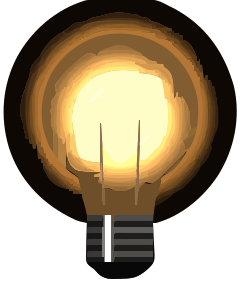
POST an .exr to /v2/convert/exr/to/svg and get a traced SVG made of filled paths. The render is first clipped to 0 to 1 and read as 8-bit RGBA, then split into color regions; with the defaults the sample gave 181 paths in 99,700 bytes.
- Endpoint
- POST /v2/
convert/ exr/ to/ svg - Accepts
- exr
- Sample timing
- 53 ms median of 5 runsHow we measure
- Request size
- Up to 10 MB on the Free plan or 100 MB on paid plans, all files together
Request and response
Every sample below ran against the API before this page was published. Set PDFCONVERSIONAPI_KEY to your key and run it as is.
curl -sS -X POST \
  https://api.pdfconversionapi.com/v2/convert/exr/to/svg \
  -H "Authorization: Bearer $PDFCONVERSIONAPI_KEY" \
  -F File=@glowing-bulb-render.exr \
  -o response.json

# FileData is base64. Save the first file in converted/,
# or print the JSON error.
if jq -e '.Files' response.json > /dev/null; then
  mkdir -p converted
  name=$(jq -r '.Files[0].FileName' response.json)
  jq -r '.Files[0].FileData' response.json \
    | base64 --decode > "converted/$name"
else
  cat response.json
fi
import base64
import os
import requests
key = os.environ["PDFCONVERSIONAPI_KEY"]
response = requests.post(
"https://api.pdfconversionapi.com/v2/convert/exr/to/svg",
headers={"Authorization": f"Bearer {key}"},
files=[("File", open("glowing-bulb-render.exr", "rb"))],
timeout=180,
)
result = response.json()
if not response.ok:
raise SystemExit(f"{result['Code']}: {result['Message']}")
os.makedirs("converted", exist_ok=True)
for file in result["Files"]:
path = os.path.join("converted", file["FileName"])
with open(path, "wb") as out:
out.write(base64.b64decode(file["FileData"]))
print(path, file["FileSize"], "bytes")
import { mkdir, readFile, writeFile } from "node:fs/promises";
import { join } from "node:path";

const form = new FormData();
const file = "glowing-bulb-render.exr";
form.append("File", new Blob([await readFile(file)]), file);

const url = "https://api.pdfconversionapi.com/v2/convert/exr/to/svg";
const key = process.env.PDFCONVERSIONAPI_KEY;
const response = await fetch(url, {
  method: "POST",
  headers: { Authorization: `Bearer ${key}` },
  body: form,
});
const result = await response.json();
if (!response.ok) {
  throw new Error(`${result.Code}: ${result.Message}`);
}

await mkdir("converted", { recursive: true });
for (const file of result.Files) {
  const path = join("converted", file.FileName);
  await writeFile(path, Buffer.from(file.FileData, "base64"));
  console.log(path, file.FileSize, "bytes");
}
{
  "ConversionCost": 1,
  "ConversionTime": 0.053,
  "Files": [
    {
      "FileName": "glowing-bulb-render.svg",
      "FileExt": "svg",
      "FileSize": 99700,
      "FileData": "PD94bWwgdmVyc2lvbj0iMS4w…"
    }
  ]
}
Response from our test run on 2026-11-03. ConversionTime shows the median of 5 runs. FileData is shortened here; the real response carries the whole file as base64.
The sample, converted
The same file the code sends. Download the input and the output and compare them yourself.
- Input
- glowing-bulb-render.exr (187 KB)
- Output
- glowing-bulb-render.svg (97 KB)
- Source
- A glowing light bulb we drew in code and saved as a 240 × 300 OpenEXR render: half-float RGBA, premultiplied alpha, ZIP compression, values up to 12.0. (CC0-1.0). How it was made
- Made by
- 2026-11-04, API build
9eeeb0640aba
Parameters
Send these as form fields next to the file. Names are case-insensitive. If you set one of the documented options below that we don't support yet, the request fails with a 400 that names it instead of returning a file made without it.
| Parameter | What it does |
|---|---|
Presetenum, default none | Bundled tracing settings. On the bulb, bw gave 2 paths, photo 27 and poster 264. Options you send as well override the preset's values.Values: none, bw, poster, photo |
FilterSpeckleinteger, default 4 | Regions smaller than this many pixels are dropped. 0 kept every fleck of the glow: 1,037 paths and 180,053 bytes.Values: 0–128 |
ColorPrecisioninteger, default 6 | Bits per channel used to group colors. 3 merged the bulb into 4 paths; 8 split it into 264.Values: 1–8 |
GradientStepinteger, default 16 | Smallest color difference between stacked layers. 64 cut the glass gradient to 31 paths; 0 gave 170.Values: 0–128 |
CurveModeenum, default spline | polygon writes straight segments (33,226 bytes); pixel follows pixel edges (122,652 bytes).Values: spline, polygon, pixel |
CornerThresholdinteger, default 60 | Angle in degrees above which a joint stays a corner; 90 gave 106,708 bytes.Values: 0–180 |
SegmentLengthnumber, default 4 | Target length of curve segments. 8 shortened the file to 80,631 bytes; 3 returns 400.Values: 3.5–10 |
SpliceThresholdinteger, default 45 | Angle at which a spline is split; 90 gave 87,257 bytes.Values: 0–180 |
ColorModeenum, default color | bw traces a two-tone version: 2 paths, 2,463 bytes.Values: color, bw |
Layeringenum, default stacked | cutout makes shapes with holes instead of shapes painted over each other: 136 paths.Values: stacked, cutout |
ImageWidthinteger | Scales the render before tracing. ImageWidth=120 gave a 120 × 150 SVG with 141 paths.Values: 1–20000 |
ImageHeightinteger | Height to scale to before tracing, fitted with the width when both are sent; ScaleProportions, ScaleIfLarger and ScaleImage work as on raster routes.Values: 1–20000 |
FileNamestring | Base name of the .svg file. |
StoreFileboolean, default false | true returns a 3-hour link. |
What carries over, and what doesn't
Kept
- The canvas size:
width="240"andheight="300"on the root element - Clear areas: the corners get no paths, and 25,911 pixels of the drawn SVG are transparent where the 8-bit render had 26,592
- The main color regions of the glass, base and filament wires
Lost or not yet supported
- Soft alpha. The halo's partly clear pixels are traced as solid shapes in their dark stored colors, so the sample shows a dark ring around the bulb.
- Smooth gradients, which become bands of flat color.
- Detail finer than 8 bits. The tracer only sees the 8-bit image, in which every channel above 1.0 is already 255.
- A
viewBox. Add one yourself if the SVG must scale with CSS. - Size: 99,700 bytes at the default settings, about half the 191,302-byte EXR.
Limits
- Tracing stops at 12,000,000 pixels with a 413;
ImageWidth=4000on this render asked for 20,000,000. Scale down withImageWidth. - One EXR per request, 10 MB on the Free plan or 100 MB on paid plans per request.
- Input renders up to 100,000,000 pixels.
- 120 seconds per conversion.
Where teams use it
Stylized artwork from 3D renders
An illustrator can render a model with flat or toon shading and trace it into vector shapes for posters, stickers or icons that must scale. Preset=poster keeps more color bands; photo merges them.
Cut paths from a rendered silhouette
With ColorMode=bw, a render's shape becomes a two-tone outline that vinyl cutters and laser software can import as paths.
Questions
Why does the traced bulb have a dark ring?
The tracer draws partly clear pixels as solid shapes. The render's soft glow holds premultiplied colors that are close to black, so they turn into dark shapes. Render without the halo, or crop it away, before tracing.
How do I get fewer paths?
Raise FilterSpeckle, lower ColorPrecision or raise GradientStep. On the bulb, ColorPrecision=3 gave 4 paths and GradientStep=64 gave 31, against 181 by default.
Can I get an SVG that keeps the photo-real shading?
Not as vector shapes: tracing turns shading into bands. If you need the exact pixels in an SVG wrapper, convert to PNG and reference it from an <image> element instead.
Convert your first EXR file in a minute.