PNG to SVG API
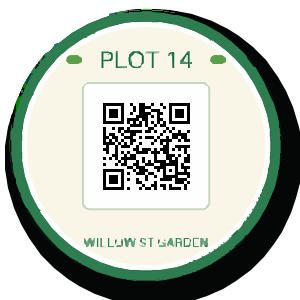
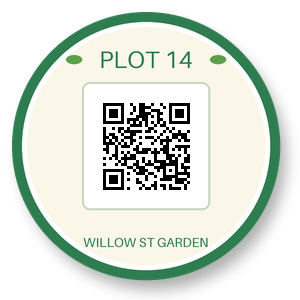
POST a PNG to /v2/convert/png/to/svg and get its shapes traced as filled SVG paths; the sticker's transparent surround is left empty. The sample turns off speckle filtering, which keeps the small type and the QR code scannable, and uses straight-edged curves: 3,446 paths, 241,082 bytes.
- Endpoint
- POST /v2/
convert/ png/ to/ svg - Accepts
- png
- Sample timing
- 25 ms median of 5 runsHow we measure
- Request size
- Up to 10 MB on the Free plan or 100 MB on paid plans, all files together
Request and response
Every sample below ran against the API before this page was published. Set PDFCONVERSIONAPI_KEY to your key and run it as is.
curl -sS -X POST \
  https://api.pdfconversionapi.com/v2/convert/png/to/svg \
  -H "Authorization: Bearer $PDFCONVERSIONAPI_KEY" \
  -F File=@garden-plot-badge.png \
  --form-string CurveMode=polygon \
  --form-string FilterSpeckle=0 \
  -o response.json

# FileData is base64. Save the first file in converted/,
# or print the JSON error.
if jq -e '.Files' response.json > /dev/null; then
  mkdir -p converted
  name=$(jq -r '.Files[0].FileName' response.json)
  jq -r '.Files[0].FileData' response.json \
    | base64 --decode > "converted/$name"
else
  cat response.json
fi
import base64
import os
import requests
key = os.environ["PDFCONVERSIONAPI_KEY"]
response = requests.post(
"https://api.pdfconversionapi.com/v2/convert/png/to/svg",
headers={"Authorization": f"Bearer {key}"},
files=[("File", open("garden-plot-badge.png", "rb"))],
data={
"CurveMode": "polygon",
"FilterSpeckle": "0",
},
timeout=180,
)
result = response.json()
if not response.ok:
raise SystemExit(f"{result['Code']}: {result['Message']}")
os.makedirs("converted", exist_ok=True)
for file in result["Files"]:
path = os.path.join("converted", file["FileName"])
with open(path, "wb") as out:
out.write(base64.b64decode(file["FileData"]))
print(path, file["FileSize"], "bytes")
import { mkdir, readFile, writeFile } from "node:fs/promises";
import { join } from "node:path";

const form = new FormData();
const file = "garden-plot-badge.png";
form.append("File", new Blob([await readFile(file)]), file);
form.append("CurveMode", "polygon");
form.append("FilterSpeckle", "0");

const url = "https://api.pdfconversionapi.com/v2/convert/png/to/svg";
const key = process.env.PDFCONVERSIONAPI_KEY;
const response = await fetch(url, {
  method: "POST",
  headers: { Authorization: `Bearer ${key}` },
  body: form,
});
const result = await response.json();
if (!response.ok) {
  throw new Error(`${result.Code}: ${result.Message}`);
}

await mkdir("converted", { recursive: true });
for (const file of result.Files) {
  const path = join("converted", file.FileName);
  await writeFile(path, Buffer.from(file.FileData, "base64"));
  console.log(path, file.FileSize, "bytes");
}
{
  "ConversionCost": 1,
  "ConversionTime": 0.025,
  "Files": [
    {
      "FileName": "garden-plot-badge.svg",
      "FileExt": "svg",
      "FileSize": 241082,
      "FileData": "PD94bWwgdmVyc2lvbj0iMS4w…"
    }
  ]
}
Response from our test run on 2026-11-03. ConversionTime shows the median of 5 runs. FileData is shortened here; the real response carries the whole file as base64.
The sample, converted
The same file the code sends. Download the input and the output and compare them yourself.
- Input
- garden-plot-badge.png (39 KB)
- Output
- garden-plot-badge.svg (235 KB)
- Source
- A round garden-plot sticker with a QR code, a transparent background and a soft drop shadow, drawn by us for these pages. (CC0-1.0). How it was made
- Made by
- 2026-11-04, API build
9eeeb0640aba
Parameters
Send these as form fields next to the file. Names are case-insensitive. If you set one of the documented options below that we don't support yet, the request fails with a 400 that names it instead of returning a file made without it.
| Parameter | What it does |
|---|---|
FilterSpeckleinteger, default 4 | Shapes smaller than this value squared, in pixels, are discarded: 16 px at the default 4. At the default the sticker lost the T of "PLOT" and letters of its bottom line (125 paths, 40,908 bytes); the sample's 0 keeps them.Values: 0–128 |
CurveModeenum, default spline | spline rounds corners, polygon keeps straight edges (16,444 bytes at default speckle) and pixel follows pixel boundaries. The QR code read back in all three once FilterSpeckle=0, and in none at the default speckle.Values: spline, polygon, pixel |
Presetenum, default none | Bundled settings. For the sticker: bw 49 paths, photo 62, poster 138. Explicit parameters override the preset.Values: none, bw, poster, photo |
ColorModeenum, default color | bw traces a two-tone version (15,300 bytes for the sticker).Values: color, bw |
ColorPrecisioninteger, default 6 | Color bits per channel used for clustering; 8 gives the poster result, 138 paths.Values: 1–8 |
Layeringenum, default stacked | cutout produces shapes with holes instead of shapes painted over each other: 75 paths.Values: stacked, cutout |
GradientStepinteger, default 16 | Minimum color step between layers. ConvertAPI documents 10; at 0 the sticker came out as 86 paths.Values: 0–128 |
CornerThresholdinteger, default 60 | Joint angle treated as a corner, in degrees (ConvertAPI documents 55).Values: 0–180 |
SegmentLengthnumber, default 4 | Curve segment length; values under 3.5 return 400.Values: 3.5–10 |
SpliceThresholdinteger, default 45 | Angle at which splines are split (ConvertAPI documents 35).Values: 0–180 |
ImageWidthinteger | Scale before tracing. At the default settings 600 px gave 372 paths and 233,185 bytes; 150 px gave 122 paths.Values: 1–20000 |
ImageHeightinteger | Height to scale to; with a width and ScaleProportions=false the art is distorted to fit.Values: 1–20000 |
FileNamestring | Output name, for example plot-14-outline gives plot-14-outline.svg. |
StoreFileboolean, default false | true returns a 3-hour link. |
What carries over, and what doesn't
Kept
- The sticker's transparent surround, which gets no paths: the rendered SVG had 20,768 clear pixels where the PNG had 21,347
- Solid colors and text, at the sample's settings
- A working QR code with
CurveMode=polygonandFilterSpeckle=0: the rendered sample scanned - The canvas size: width and height equal the PNG's 300 × 300, turned upright for a PNG tagged with an EXIF orientation (a 300 × 200 test PNG tagged 6 was traced at 200 × 300)
Lost or not yet supported
- Soft transparency. The 24/255-opaque shadow was traced as solid near-black, so the sticker gained a dark rim.
- Small features at default settings: shapes under 16 pixels in area vanish, such as thin letter parts and lone 3 × 3 QR modules.
- Compactness at the sample's settings: 241,082 bytes, six times the PNG.
- A viewBox; the root element only has width and height.
- Small transparent holes. Clear pixels are left empty only when enough of the image is clear; a 40 × 40 hole in an opaque 300 × 300 square was filled with black, the color stored under it.
Limits
- One PNG per request.
- Tracing stops at 12,000,000 pixels with a 413; resize first with
ImageWidth. - Uploads up to 10 MB on the Free plan or 100 MB on paid plans.
- 120 seconds per conversion.
Where teams use it
Logos that only exist as PNG
Trace a client's PNG logo into paths for print, signage or a web header that stays sharp at any size, then clean up in a vector editor if needed. Flat colors trace well: the sticker's green ring and text came through as solid shapes.
Cutting and engraving outlines
ColorMode=bw produces two-tone shapes a cutter or engraver can follow (49 paths for the sticker).
Questions
Why is some of my text missing?
FilterSpeckle (default 4) removes small shapes, and thin letter parts count. Set it to 0 to keep them; the sample does and keeps all of "PLOT 14" and "WILLOW ST GARDEN".
Can I vectorize a QR code and still scan it?
Yes, with no speckle filter. At the default FilterSpeckle=4 the code didn't read with spline or polygon curves; with FilterSpeckle=0 it rendered back to a code our reader decoded in spline, polygon and pixel mode.
What happens to the PNG's transparency?
Clear areas stay empty when the image has plenty of them, as the sticker does. A small clear hole is traced in its stored color: a 40 × 40 transparent square inside an opaque 300 × 300 PNG came back solid black. Partly transparent pixels (alpha 1 to 254) are traced as if opaque, so soft shadows become solid shapes.
Are the defaults the same as ConvertAPI's?
Not all of them: GradientStep, CornerThreshold and SpliceThreshold default to 16, 60 and 45 here, against ConvertAPI's documented 10, 55 and 35. Send them explicitly to match.
Convert your first PNG file in a minute.