JPG to SVG API
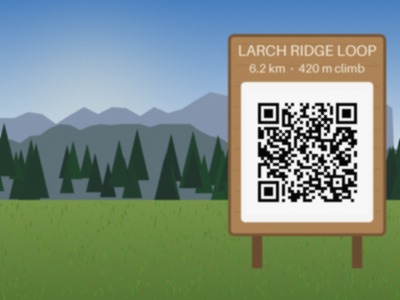
POST a JPEG to /v2/convert/jpg/to/svg and the photo is traced into filled vector paths, not wrapped as a bitmap. With default settings the sample sign became 293 paths in a 143,720-byte SVG that looks like a flat-color poster of the photo.
- Endpoint
- POST /v2/
convert/ jpg/ to/ svg - Accepts
- jpg
- Sample timing
- 46 ms median of 5 runsHow we measure
- Request size
- Up to 10 MB on the Free plan or 100 MB on paid plans, all files together
Request and response
Every sample below ran against the API before this page was published. Set PDFCONVERSIONAPI_KEY to your key and run it as is.
curl -sS -X POST \
  https://api.pdfconversionapi.com/v2/convert/jpg/to/svg \
  -H "Authorization: Bearer $PDFCONVERSIONAPI_KEY" \
  -F File=@trailhead-sign.jpg \
  -o response.json

# FileData is base64. Save the first file in converted/,
# or print the JSON error.
if jq -e '.Files' response.json > /dev/null; then
  mkdir -p converted
  name=$(jq -r '.Files[0].FileName' response.json)
  jq -r '.Files[0].FileData' response.json \
    | base64 --decode > "converted/$name"
else
  cat response.json
fi
import base64
import os
import requests
key = os.environ["PDFCONVERSIONAPI_KEY"]
response = requests.post(
"https://api.pdfconversionapi.com/v2/convert/jpg/to/svg",
headers={"Authorization": f"Bearer {key}"},
files=[("File", open("trailhead-sign.jpg", "rb"))],
timeout=180,
)
result = response.json()
if not response.ok:
raise SystemExit(f"{result['Code']}: {result['Message']}")
os.makedirs("converted", exist_ok=True)
for file in result["Files"]:
path = os.path.join("converted", file["FileName"])
with open(path, "wb") as out:
out.write(base64.b64decode(file["FileData"]))
print(path, file["FileSize"], "bytes")
import { mkdir, readFile, writeFile } from "node:fs/promises";
import { join } from "node:path";

const form = new FormData();
const file = "trailhead-sign.jpg";
form.append("File", new Blob([await readFile(file)]), file);

const url = "https://api.pdfconversionapi.com/v2/convert/jpg/to/svg";
const key = process.env.PDFCONVERSIONAPI_KEY;
const response = await fetch(url, {
  method: "POST",
  headers: { Authorization: `Bearer ${key}` },
  body: form,
});
const result = await response.json();
if (!response.ok) {
  throw new Error(`${result.Code}: ${result.Message}`);
}

await mkdir("converted", { recursive: true });
for (const file of result.Files) {
  const path = join("converted", file.FileName);
  await writeFile(path, Buffer.from(file.FileData, "base64"));
  console.log(path, file.FileSize, "bytes");
}
{
  "ConversionCost": 1,
  "ConversionTime": 0.046,
  "Files": [
    {
      "FileName": "trailhead-sign.svg",
      "FileExt": "svg",
      "FileSize": 143720,
      "FileData": "PD94bWwgdmVyc2lvbj0iMS4w…"
    }
  ]
}
Response from our test run on 2026-11-03. ConversionTime shows the median of 5 runs. FileData is shortened here; the real response carries the whole file as base64.
The sample, converted
The same file the code sends. Download the input and the output and compare them yourself.
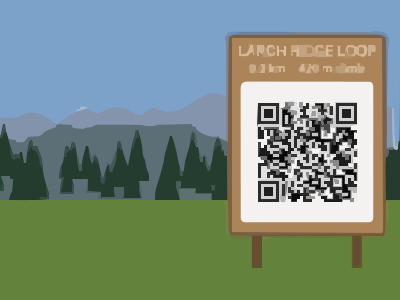
- Input
- trailhead-sign.jpg (25 KB)
- Output
- trailhead-sign.svg (140 KB)
- Source
- A drawn mountain trailhead with a wooden sign and a QR code, made by us for these pages and saved at JPEG quality 92 with an EXIF block, an sRGB color profile and 300 dpi. (CC0-1.0). How it was made
- Made by
- 2026-11-04, API build
9eeeb0640aba
Parameters
Send these as form fields next to the file. Names are case-insensitive. If you set one of the documented options below that we don't support yet, the request fails with a 400 that names it instead of returning a file made without it.
| Parameter | What it does |
|---|---|
Presetenum, default none | Starting settings. On the sample: bw 45 paths (22,454 bytes), photo 66 paths (129,914), poster 432 paths (266,601). Parameters you send after the preset override it.Values: none, bw, poster, photo |
ColorModeenum, default color | bw traces a black-and-white version, the same result as Preset=bw here.Values: color, bw |
ColorPrecisioninteger, default 6 | Bits per channel used when grouping colors. Lower merges more: 4 gave 89,721 bytes and 1 collapsed the photo into a single flat rectangle.Values: 1–8 |
FilterSpeckleinteger, default 4 | Patches smaller than this value squared, in pixels, are dropped: 16 px at the default 4. 16 cut the sample to 40 paths; 0 keeps everything (8,357 paths with CurveMode=pixel).Values: 0–128 |
GradientStepinteger, default 16 | Color difference between stacked layers. Our default is 16; ConvertAPI documents 10, which gave 301 paths instead of 293.Values: 0–128 |
CurveModeenum, default spline | Shape of path edges: polygon dropped the sample to 45,260 bytes; pixel follows pixel edges exactly.Values: spline, polygon, pixel |
Layeringenum, default stacked | cutout makes shapes that don't overlap: 121 paths, 86,899 bytes.Values: stacked, cutout |
CornerThresholdinteger, default 60 | A turn of at least this many degrees is kept as a sharp corner; smaller turns are smoothed. ConvertAPI documents 55.Values: 0–180 |
SegmentLengthnumber, default 4 | Length of curve segments; 8 gave smoother, smaller output (132,008 bytes). 2 returns 400.Values: 3.5–10 |
SpliceThresholdinteger, default 45 | Angle at which a spline is split. ConvertAPI documents 35.Values: 0–180 |
ImageWidthinteger | Scale the photo before tracing; 200 px gave 106 paths and 49,683 bytes. Also the way past the 12,000,000-pixel tracing limit.Values: 1–20000 |
ImageHeightinteger | Scale by height, or with the width as a box. ScaleProportions, ScaleIfLarger and ScaleImage work as on the raster routes.Values: 1–20000 |
FileNamestring | Output name; trailhead-sign.svg by default. |
StoreFileboolean, default false | true returns a 3-hour link. |
What carries over, and what doesn't
Kept
- The picture's size: the SVG's width and height are the photo's pixels (400 × 300), upright: a 300 × 200 test photo tagged EXIF Orientation 6 was traced at 200 × 300
- Large color areas, the ridges, trees and sign shape
- The QR code once small patches are kept:
FilterSpeckle=1withCurveMode=pixeltraced a readable code in 74,629 bytes, andFilterSpeckle=0did with every curve mode (605,493 to 763,018 bytes)
Lost or not yet supported
- Photographic detail: gradients turn into bands and small text into blobs.
- Scannable fine detail at the default settings: the traced QR code did not read.
- Compactness: 143,720 bytes, 5.7 times the JPEG.
- A viewBox: the root element has width and height only, so add a viewBox if you want it to scale with CSS.
- Every piece of metadata in the JPEG.
Limits
- One JPEG per request.
- Tracing is limited to 12,000,000 pixels; larger photos return 413 and a hint to set
ImageWidth. - Uploads up to 10 MB on the Free plan or 100 MB on paid plans.
- 120 seconds per conversion.
Where teams use it
Poster and illustration looks from photos
Tracing turns a photo into flat color areas that scale without blur, for print, laser cutting templates or a stylized web header.
Simple black-and-white logos photographed or scanned as JPEG
Preset=bw with a higher FilterSpeckle gives clean outlines from a dark-on-light mark; the sample's sign gave 45 paths in bw mode.
Questions
Does the SVG just embed my JPEG?
No. It contains only traced path elements with fill colors, no image element. That is why it scales cleanly and why fine photo detail is lost.
Why do my results differ from ConvertAPI's defaults?
Three defaults differ: we use GradientStep 16, CornerThreshold 60 and SpliceThreshold 45, against ConvertAPI's documented 10, 55 and 35. Send those three values explicitly to match their documentation; on the sample that gave 301 paths instead of 293.
How do I make the file smaller?
Raise FilterSpeckle (16 gave 68,469 bytes), lower ColorPrecision, use CurveMode=polygon (45,260 bytes) or scale down with ImageWidth.
What is the size limit?
12,000,000 pixels after any resize. A 4000 × 3001 JPEG returned 413; with ImageWidth=2000 it traced fine.
Convert your first JPG file in a minute.