SVG to JPG API
POST an SVG to /v2/convert/svg/to/jpg to get a JPEG rendered at the size you ask for. Transparent parts are filled with AlphaColor: the sample uses cream #F3EFE6 at 600 × 600 and quality 90, which gives 44,361 bytes.
- Endpoint
- POST /v2/
convert/ svg/ to/ jpg - Accepts
- svg
- Sample timing
- 43 ms median of 5 runsHow we measure
- Request size
- Up to 10 MB on the Free plan or 100 MB on paid plans, all files together
Request and response
Every sample below ran against the API before this page was published. Set PDFCONVERSIONAPI_KEY to your key and run it as is.
curl -sS -X POST \
  https://api.pdfconversionapi.com/v2/convert/svg/to/jpg \
  -H "Authorization: Bearer $PDFCONVERSIONAPI_KEY" \
  -F File=@water-day-icon.svg \
  --form-string ImageWidth=600 \
  --form-string 'AlphaColor=#F3EFE6' \
  --form-string ImageQuality=90 \
  -o response.json

# FileData is base64. Save the first file in converted/,
# or print the JSON error.
if jq -e '.Files' response.json > /dev/null; then
  mkdir -p converted
  name=$(jq -r '.Files[0].FileName' response.json)
  jq -r '.Files[0].FileData' response.json \
    | base64 --decode > "converted/$name"
else
  cat response.json
fi
import base64
import os
import requests
key = os.environ["PDFCONVERSIONAPI_KEY"]
response = requests.post(
"https://api.pdfconversionapi.com/v2/convert/svg/to/jpg",
headers={"Authorization": f"Bearer {key}"},
files=[("File", open("water-day-icon.svg", "rb"))],
data={
"ImageWidth": "600",
"AlphaColor": "#F3EFE6",
"ImageQuality": "90",
},
timeout=180,
)
result = response.json()
if not response.ok:
raise SystemExit(f"{result['Code']}: {result['Message']}")
os.makedirs("converted", exist_ok=True)
for file in result["Files"]:
path = os.path.join("converted", file["FileName"])
with open(path, "wb") as out:
out.write(base64.b64decode(file["FileData"]))
print(path, file["FileSize"], "bytes")
import { mkdir, readFile, writeFile } from "node:fs/promises";
import { join } from "node:path";

const form = new FormData();
const file = "water-day-icon.svg";
form.append("File", new Blob([await readFile(file)]), file);
form.append("ImageWidth", "600");
form.append("AlphaColor", "#F3EFE6");
form.append("ImageQuality", "90");

const url = "https://api.pdfconversionapi.com/v2/convert/svg/to/jpg";
const key = process.env.PDFCONVERSIONAPI_KEY;
const response = await fetch(url, {
  method: "POST",
  headers: { Authorization: `Bearer ${key}` },
  body: form,
});
const result = await response.json();
if (!response.ok) {
  throw new Error(`${result.Code}: ${result.Message}`);
}

await mkdir("converted", { recursive: true });
for (const file of result.Files) {
  const path = join("converted", file.FileName);
  await writeFile(path, Buffer.from(file.FileData, "base64"));
  console.log(path, file.FileSize, "bytes");
}
{
  "ConversionCost": 1,
  "ConversionTime": 0.043,
  "Files": [
    {
      "FileName": "water-day-icon.jpg",
      "FileExt": "jpg",
      "FileSize": 44361,
      "FileData": "/9j/4AAQSkZJRgABAgAAAQAB…"
    }
  ]
}
Response from our test run on 2026-11-03. ConversionTime shows the median of 5 runs. FileData is shortened here; the real response carries the whole file as base64.
The sample, converted
The same file the code sends. Download the input and the output and compare them yourself.
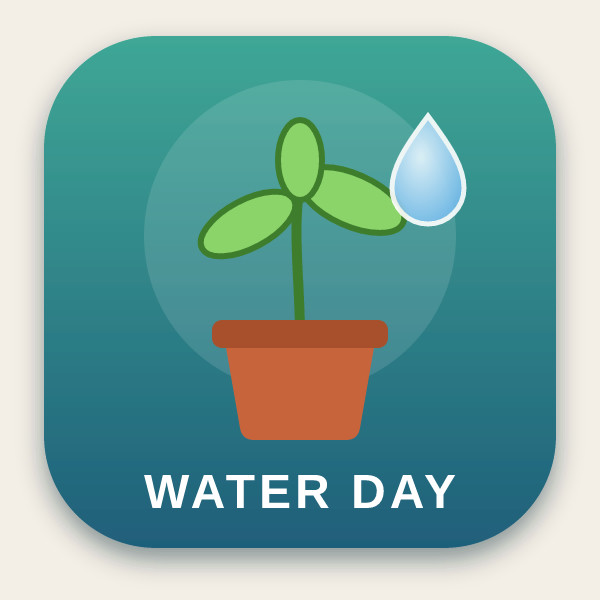
- Input
- water-day-icon.svg (2.1 KB)
- Output
- water-day-icon.jpg (43 KB)
- Source
- An app icon for a fictional plant-watering reminder, with two gradients, a soft drop shadow and a text label, which we drew by hand. (CC0-1.0). How it was made
- Made by
- 2026-11-04, API build
9eeeb0640aba
Parameters
Send these as form fields next to the file. Names are case-insensitive. If you set one of the documented options below that we don't support yet, the request fails with a 400 that names it instead of returning a file made without it.
| Parameter | What it does |
|---|---|
ImageWidthinteger | JPEG width in pixels; the vectors are drawn at that width. The sample asks for 600, twice the icon's own 300.Values: 1–20000 |
ImageHeightinteger | JPEG height in pixels, or with ImageWidth a box the drawing is fitted into (600 × 400 gave 400 × 400).Values: 1–20000 |
ScaleProportionsboolean, default true | false fills the exact box you send, so 600 × 400 really is 600 × 400 and the icon is stretched. |
ScaleIfLargerboolean, default false | With true, only reductions apply: ImageWidth=600 leaves the icon at 300 × 300. |
ScaleImageboolean, default true | false keeps a top-left crop of the SVG at its own size instead of resizing. |
AlphaColorstring, default white | Matte for everything that is transparent or partly transparent. #F3EFE6 makes the corners (243, 239, 230), and the shadow blends into the cream. When both are sent, this wins over BackgroundColor.Values: Color names (white, black, red, green, blue, gray), #RRGGBB or R,G,B |
BackgroundColorstring, default white | Used as the matte when AlphaColor is absent; black gave black corners.Values: Same as AlphaColor |
ImageQualityinteger, default 85 | JPEG quality. At 300 px the icon is 14,698 bytes at 85 and 9,470 at 60. ConvertAPI documents 75 as its default.Values: 1–100 |
ImageResolutioninteger | Written into the JPEG header as its DPI. It doesn't change the pixel size, which comes from the SVG or from ImageWidth.Values: 10–800 |
ColorSpaceenum, default default | gray writes a one-channel JPEG (8,439 bytes at 300 px). monochrome thresholds again after the matte is applied, so the shadow turns black or white too: at 300 px no pixel falls between 41 and 214, and JPEG ringing leaves 5,648 of the 90,000 within 24 levels of pure black or white. cmyk returns 400.Values: default, rgb, gray, monochrome |
FileNamestring | Name for the JPEG; water-day-icon.jpg by default. |
StoreFileboolean, default false | true hands back a 3-hour download URL in place of the data. |
What carries over, and what doesn't
Kept
- Soft shadows, blended into the matte: below the tile the sample reads (220, 219, 214) on cream instead of a hard edge
- Full color resolution: baseline JPEG with no chroma subsampling (4:4:4)
- Edges as sharp as the requested size allows, because the drawing is rendered at that size
- Gradients, opacity and text in installed fonts
Lost or not yet supported
- Transparency: everything clear is filled with the matte color.
- Exact colors. Compared with the render flattened on the same cream, the sample differs by 0.67 levels on average and up to 40 at sharp edges.
- A DPI, unless you send
ImageResolution; the header otherwise says 1:1 with no unit. - Text whose fonts aren't installed on our servers, and images that are linked rather than embedded.
Limits
- One SVG per request.
- Requests up to 10 MB on the Free plan or 100 MB on paid plans, all files and fields together.
- At most 100,000,000 pixels:
ImageWidth=10000on the square sample worked (3,311,649 bytes), 15,000 returned 413. - A JPEG side can't pass 65,500 px. A test SVG declaring a width of 65501 got 413 "JPEG images can be at most 65,500 pixels on a side, and this one is 65,501×2", while a width of 65500 converted.
ImageWidth,ImageHeight1 to 20,000;ImageQuality1 to 100;ImageResolution10 to 800.- 504 if a conversion runs past 120 seconds.
Where teams use it
Upload forms and cards that want JPEG
When a profile picture, listing or link-preview field accepts JPEG but not SVG, render the drawing at the size the form asks for, on the color it will sit on.
Icons on a colored page
Set AlphaColor to the page or card background so shadows and anti-aliased edges blend into that color instead of into a white box.
Questions
What color do transparent areas become?
White, unless you send AlphaColor (or BackgroundColor, which is used when AlphaColor is missing). Partly transparent pixels, such as a shadow or anti-aliased edges, are blended with that color rather than cut off.
Does ImageResolution make the JPEG larger?
No. An SVG's pixel size comes from its width and height attributes in CSS pixels, and ImageResolution only sets the DPI written in the header: with 300, the sample was still 300 × 300 and 14,698 bytes. Use ImageWidth or ImageHeight for more pixels.
Which ImageQuality should I use?
The default is 85. Lower values make smaller files: the icon at 300 px is 14,698 bytes at 85 and 9,470 at 60. Judge by the edges of text and thin lines at your target size, where JPEG noise shows first.
Why is some text missing from the JPEG?
The text names fonts we don't have, for example only Arial or a generic sans-serif. That text is skipped without an error. Add an installed family, such as Liberation Sans, to the font-family list, or convert the text to paths before uploading.
Convert your first SVG file in a minute.