HEIC to BMP API
POST a .heic file to /v2/convert/heic/to/bmp and get an uncompressed 24-bit Windows bitmap back as base64 in the JSON. The photo is decoded and turned upright, then written at three bytes a pixel, so the 22,517-byte sample becomes 360,054 bytes at full size.
- Endpoint
- POST /v2/
convert/ heic/ to/ bmp - Accepts
- heic
- Sample timing
- 30 ms median of 5 runsHow we measure
- Request size
- Up to 10 MB on the Free plan or 100 MB on paid plans, all files together
Request and response
Every sample below ran against the API before this page was published. Set PDFCONVERSIONAPI_KEY to your key and run it as is.
curl -sS -X POST \
  https://api.pdfconversionapi.com/v2/convert/heic/to/bmp \
  -H "Authorization: Bearer $PDFCONVERSIONAPI_KEY" \
  -F File=@harbor-dusk.heic \
  --form-string ImageWidth=200 \
  --form-string ImageResolution=96 \
  -o response.json

# FileData is base64. Save the first file in converted/,
# or print the JSON error.
if jq -e '.Files' response.json > /dev/null; then
  mkdir -p converted
  name=$(jq -r '.Files[0].FileName' response.json)
  jq -r '.Files[0].FileData' response.json \
    | base64 --decode > "converted/$name"
else
  cat response.json
fi
import base64
import os
import requests
key = os.environ["PDFCONVERSIONAPI_KEY"]
response = requests.post(
"https://api.pdfconversionapi.com/v2/convert/heic/to/bmp",
headers={"Authorization": f"Bearer {key}"},
files=[("File", open("harbor-dusk.heic", "rb"))],
data={
"ImageWidth": "200",
"ImageResolution": "96",
},
timeout=180,
)
result = response.json()
if not response.ok:
raise SystemExit(f"{result['Code']}: {result['Message']}")
os.makedirs("converted", exist_ok=True)
for file in result["Files"]:
path = os.path.join("converted", file["FileName"])
with open(path, "wb") as out:
out.write(base64.b64decode(file["FileData"]))
print(path, file["FileSize"], "bytes")
import { mkdir, readFile, writeFile } from "node:fs/promises";
import { join } from "node:path";

const form = new FormData();
const file = "harbor-dusk.heic";
form.append("File", new Blob([await readFile(file)]), file);
form.append("ImageWidth", "200");
form.append("ImageResolution", "96");

const url = "https://api.pdfconversionapi.com/v2/convert/heic/to/bmp";
const key = process.env.PDFCONVERSIONAPI_KEY;
const response = await fetch(url, {
  method: "POST",
  headers: { Authorization: `Bearer ${key}` },
  body: form,
});
const result = await response.json();
if (!response.ok) {
  throw new Error(`${result.Code}: ${result.Message}`);
}

await mkdir("converted", { recursive: true });
for (const file of result.Files) {
  const path = join("converted", file.FileName);
  await writeFile(path, Buffer.from(file.FileData, "base64"));
  console.log(path, file.FileSize, "bytes");
}
{
  "ConversionCost": 1,
  "ConversionTime": 0.03,
  "Files": [
    {
      "FileName": "harbor-dusk.bmp",
      "FileExt": "bmp",
      "FileSize": 90054,
      "FileData": "Qk3GXwEAAAAAADYAAAAoAAAA…"
    }
  ]
}
Response from our test run on 2026-11-03. ConversionTime shows the median of 5 runs. FileData is shortened here; the real response carries the whole file as base64.
The sample, converted
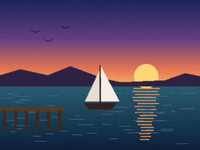
The same file the code sends. Download the input and the output and compare them yourself.
- Input
- harbor-dusk.heic (22 KB)
- Output
- harbor-dusk.bmp (88 KB)
- Source
- A harbor at dusk that we drew ourselves, saved as a 400 x 300 HEIC stored sideways with a rotation flag and made-up camera and GPS tags. (CC0-1.0). How it was made
- Made by
- 2026-11-04, API build
9eeeb0640aba

Parameters
Send these as form fields next to the file. Names are case-insensitive. If you set one of the documented options below that we don't support yet, the request fails with a 400 that names it instead of returning a file made without it.
| Parameter | What it does |
|---|---|
ImageWidthinteger | Width of the bitmap in pixels. The sample sends 200, so the 400 × 300 harbor comes back 200 × 150 in 90,054 bytes.Values: 1–20000 |
ImageHeightinteger | Height in pixels. Sent with ImageWidth, the two make a box the photo is fitted into: 200 × 200 still gave 200 × 150.Values: 1–20000 |
ScaleProportionsboolean, default true | false stretches the photo to the exact ImageWidth × ImageHeight; 200 × 200 came back square at 120,054 bytes. |
ScaleIfLargerboolean, default false | true turns the resize into shrink-only. With ImageWidth=800 the bitmap stayed 400 × 300 instead of growing to 1,440,054 bytes. |
ScaleImageboolean, default true | false cuts the top-left ImageWidth × ImageHeight pixels out of the photo instead of scaling it; 120 × 90 gave a corner of sky with two gulls. |
ImageResolutioninteger | Dots per inch for the header. The sample's 96 is stored as 3,780 pixels per meter in both directions; leave it out and the header says 0.Values: 10–800 |
ColorSpaceenum, default default | gray and monochrome change the pixel values only: the file stays a 24-bit bitmap of 360,054 bytes at full size, with blue, green and red equal in every pixel. monochrome leaves just black and white.Values: default, rgb, gray, monochrome |
FileNamestring | Name for the result without the extension. harbor-dusk.heic becomes harbor-dusk.bmp otherwise. |
StoreFileboolean, default false | true returns a download link in Files[].Url, valid for 3 hours, instead of base64 FileData. |
What carries over, and what doesn't
Kept
- The upright view: the harbor is stored 300 × 400 with a rotation flag and the bitmap is 400 × 300
- Every decoded pixel: at full size the BMP matched our PNG of the same HEIC on all 120,000 pixels
- The 4:3 shape when only a width is sent (200 gave 200 × 150)
- The colors of HEIC files without an embedded profile, like the sample: our decode was within 1 level on average of an independent decoder
- Acceptance by both readers we tried: each opened the full-size bitmap and showed the same pixels as our PNG
Lost or not yet supported
- Compression. The 22,517-byte HEIC needs 360,054 bytes as a full-size bitmap: 360,000 bytes of pixels and a 54-byte header.
- EXIF and XMP. The sample's camera name, capture time and made-up GPS position are not in the bitmap.
- Tones of HEIC files that carry an embedded Display P3 profile: in a gray-step test, 16 came out as 0 and 235 as 255.
- An alpha channel. An opaque photo is written without one, and
TransparentColoris not read here:13,32,62returned the same bytes as no option.
Limits
- One HEIC per request; a second file returns 400.
- At most 100,000,000 decoded pixels: a 10,240 × 10,240 HEIC was refused with 413.
- Requests up to 10 MB on the Free plan or 100 MB on paid plans, all files and fields together; 120 seconds per conversion.
- Only the primary picture of a HEIC that holds several: a two-image test file gave one bitmap of the first.
- A HEIC that a desktop encoder saved at its top quality setting returned 422 with a 'malformed data' message; the same harbor saved at quality 80 converts.
Where teams use it
Software that only opens bitmaps
Some kiosk players, label designers and lab programs take BMP and no other picture format, while phones save HEIC by default. Convert the photo on the way in instead of asking people to change their camera settings.
Reading pixels without an image library
A bitmap is a fixed header plus raw rows. In this one the pixels start at byte 54, three bytes each in blue, green, red order, bottom row first, with each row padded to a multiple of 4 bytes, so firmware or a test script can read them with plain file access.
Pre-sized images for small displays
Send ImageWidth and ImageHeight with ScaleProportions=false to get a bitmap that matches a panel's exact resolution, already decoded and upright.
Questions
Is the bitmap 24-bit or 32-bit?
24-bit for an opaque photo like the sample: a 40-byte info header, no compression and three bytes a pixel. Only an image with see-through pixels gets a 32-bit bitmap with a 108-byte V4 header and an alpha byte; our transparent sticker sent as .heic came back that way, at 409,722 bytes.
Will strict bitmap readers open the file?
The output is the plain uncompressed layout: a 14-byte file header, the 40-byte info header, then rows of blue, green and red bytes. Both readers we tried opened the sample and the full-size bitmap, and their pixels matched our HEIC to PNG output.
Does the bitmap keep the photo's location?
No. The sample HEIC carries a made-up GPS position and camera name in EXIF. The bitmap format has no place for them and the API writes none, so the converted file carries only pixels and the header.
How do I set the print size?
Send ImageResolution. The sample's 96 dpi is written as 3,780 pixels per meter for both axes. It changes only the header; the pixel count comes from ImageWidth and ImageHeight.
Convert your first HEIC file in a minute.