HEIC to PNG API
POST a HEIC to /v2/convert/heic/to/png and get the decoded photo as an 8-bit RGB PNG, upright and at full size unless you resize it. Nothing is lost after the HEIC's own compression, but the file grows: 22,517 bytes in, 195,656 out for the sample.
- Endpoint
- POST /v2/
convert/ heic/ to/ png - Accepts
- heic
- Sample timing
- 45 ms median of 5 runsHow we measure
- Request size
- Up to 10 MB on the Free plan or 100 MB on paid plans, all files together
Request and response
Every sample below ran against the API before this page was published. Set PDFCONVERSIONAPI_KEY to your key and run it as is.
curl -sS -X POST \
  https://api.pdfconversionapi.com/v2/convert/heic/to/png \
  -H "Authorization: Bearer $PDFCONVERSIONAPI_KEY" \
  -F File=@harbor-dusk.heic \
  -o response.json

# FileData is base64. Save the first file in converted/,
# or print the JSON error.
if jq -e '.Files' response.json > /dev/null; then
  mkdir -p converted
  name=$(jq -r '.Files[0].FileName' response.json)
  jq -r '.Files[0].FileData' response.json \
    | base64 --decode > "converted/$name"
else
  cat response.json
fi
import base64
import os
import requests
key = os.environ["PDFCONVERSIONAPI_KEY"]
response = requests.post(
"https://api.pdfconversionapi.com/v2/convert/heic/to/png",
headers={"Authorization": f"Bearer {key}"},
files=[("File", open("harbor-dusk.heic", "rb"))],
timeout=180,
)
result = response.json()
if not response.ok:
raise SystemExit(f"{result['Code']}: {result['Message']}")
os.makedirs("converted", exist_ok=True)
for file in result["Files"]:
path = os.path.join("converted", file["FileName"])
with open(path, "wb") as out:
out.write(base64.b64decode(file["FileData"]))
print(path, file["FileSize"], "bytes")
import { mkdir, readFile, writeFile } from "node:fs/promises";
import { join } from "node:path";

const form = new FormData();
const file = "harbor-dusk.heic";
form.append("File", new Blob([await readFile(file)]), file);

const url = "https://api.pdfconversionapi.com/v2/convert/heic/to/png";
const key = process.env.PDFCONVERSIONAPI_KEY;
const response = await fetch(url, {
  method: "POST",
  headers: { Authorization: `Bearer ${key}` },
  body: form,
});
const result = await response.json();
if (!response.ok) {
  throw new Error(`${result.Code}: ${result.Message}`);
}

await mkdir("converted", { recursive: true });
for (const file of result.Files) {
  const path = join("converted", file.FileName);
  await writeFile(path, Buffer.from(file.FileData, "base64"));
  console.log(path, file.FileSize, "bytes");
}
{
  "ConversionCost": 1,
  "ConversionTime": 0.045,
  "Files": [
    {
      "FileName": "harbor-dusk.png",
      "FileExt": "png",
      "FileSize": 195656,
      "FileData": "iVBORw0KGgoAAAANSUhEUgAA…"
    }
  ]
}
Response from our test run on 2026-11-03. ConversionTime shows the median of 5 runs. FileData is shortened here; the real response carries the whole file as base64.
The sample, converted
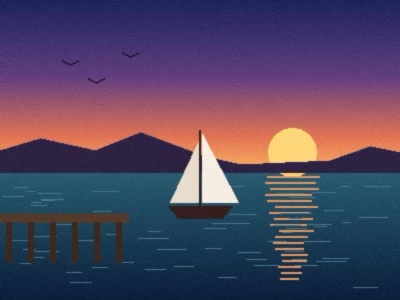
The same file the code sends. Download the input and the output and compare them yourself.
- Input
- harbor-dusk.heic (22 KB)
- Output
- harbor-dusk.png (191 KB)
- Source
- A harbor at dusk that we drew ourselves, saved as a 400 x 300 HEIC stored sideways with a rotation flag and made-up camera and GPS tags. (CC0-1.0). How it was made
- Made by
- 2026-11-04, API build
9eeeb0640aba

Parameters
Send these as form fields next to the file. Names are case-insensitive. If you set one of the documented options below that we don't support yet, the request fails with a 400 that names it instead of returning a file made without it.
| Parameter | What it does |
|---|---|
ImageWidthinteger | Output width in pixels; 200 gives 200 × 150 and 41,179 bytes for the sample.Values: 1–20000 |
ImageHeightinteger | Output height, or with ImageWidth the box the photo is fitted into.Values: 1–20000 |
ScaleProportionsboolean, default true | false stretches to both sizes: 200 × 200 came back square. |
ScaleIfLargerboolean, default false | true leaves photos smaller than the target at their own size. |
ScaleImageboolean, default true | false crops the top-left area instead of scaling. |
ImageResolutioninteger | Writes a pHYs chunk: 300 gives a PNG that reports 300 dpi. Without it the PNG has no resolution.Values: 10–800 |
ColorSpaceenum, default default | gray writes an 8-bit grayscale PNG (64,990 bytes for the sample); monochrome a two-level gray PNG of 2,730 bytes.Values: default, rgb, gray, monochrome |
TransparentColorstring | Makes pixels of exactly this color transparent and adds an alpha channel. 13,32,62 cleared 718 grainy sea pixels; nearby shades stayed.Values: #RRGGBB, R,G,B or a basic color name |
ImageInterpolationboolean, default false | Accepted as true or false; resizing always uses a Lanczos3 filter, so it changes nothing. |
FileNamestring | Name for the PNG without .png. |
StoreFileboolean, default false | true returns a 3-hour download URL instead of base64. |
What carries over, and what doesn't
Kept
- The upright view: stored sideways with a rotation flag, the sample comes out 400 × 300
- Decoded colors: on average within 1 level per channel of an independent HEIC decoder, at most 21 apart
- All 14,684 distinct colors of the decoded photo, with no further compression loss
- Transparency, when the HEIC has an alpha plane: HEIF to PNG shows a sticker that keeps its soft edges
Lost or not yet supported
- EXIF and XMP: camera, time and GPS position. The PNG contains only the IHDR, IDAT and IEND chunks.
- Any color tag. No ICC profile,
sRGBorgAMAchunk is written. - Correct tones for HEIC files that embed a Display P3 profile: grays of 16, 235 and 245 came out as 0, 255 and 255.
- Size: the PNG is 8.7 times the HEIC for the sample.
Limits
- One HEIC per request; only the primary picture of a multi-image file.
- Up to 100,000,000 pixels; a 10,240 × 10,240 HEIC returned 413.
- Requests up to 10 MB on the Free plan or 100 MB on paid plans and 120 seconds per conversion.
- A HEIC saved at a desktop encoder's top quality setting returned 422 'malformed data'; the same harbor at quality 80 converts.
Where teams use it
Editing or processing phone photos
In tools without HEIC support, converting to PNG first avoids a second lossy step before cropping, annotating or running recognition on the photo.
Displaying uploads in browsers that lack HEIC
Chrome, Edge and Firefox don't display HEIC; a PNG of the upload shows in all three. For large photos, heic/to/jpg or heic/to/webp give smaller files.
Screenshots and graphics saved as HEIC
Text and flat colors suffer from a second lossy encode; PNG keeps the decoded pixels exactly.
Questions
Is HEIC to PNG lossless?
The PNG holds the decoded pixels exactly, so nothing is lost in this step. The HEIC itself was lossy, so its compression artifacts are kept too. Compared with the drawing before it was saved as HEIC, the sample's pixels differ by about 2 levels on average.
Will a photo taken in portrait come out sideways?
Not if the HEIC records its rotation. The sample stores 300 × 400 pixels with a quarter-turn flag; the PNG is 400 × 300 and upright, and the flag isn't carried over, so viewers won't turn it twice.
Why do some converted photos look washed out or too bright?
HEIC files that describe their color with an embedded Display P3 profile are decoded with stretched tones: dark grays get darker and light grays turn white. Files without an embedded profile, like the sample, are not affected. The PNG carries no profile either way.
Why is the PNG so much larger than the HEIC?
HEIC uses HEVC compression, which is lossy and far more compact than PNG's lossless compression. For the sample, 22,517 bytes became 195,656. Use ImageWidth to scale down, or heic/to/jpg when lossless isn't needed.
Convert your first HEIC file in a minute.