HTML to XLS API
POST /v2/convert/html/to/xls writes the page into an Excel 97-2003 workbook (BIFF8 inside an OLE file). The sample's 3,041-byte page came back as an 8,704-byte .xls with its seed table at A9:E13, the counts stored as numbers and the page title in the file's summary properties.
- Endpoint
- POST /v2/
convert/ html/ to/ xls - Accepts
- html
- Sample timing
- 0.515 s median of 5 runsHow we measure
- Request size
- Up to 10 MB on the Free plan or 100 MB on paid plans, all files together
Request and response
Every sample below ran against the API before this page was published. Set PDFCONVERSIONAPI_KEY to your key and run it as is.
curl -sS -X POST \
  https://api.pdfconversionapi.com/v2/convert/html/to/xls \
  -H "Authorization: Bearer $PDFCONVERSIONAPI_KEY" \
  -F File=@seed-swap.html \
  -o response.json

# FileData is base64. Save the first file in converted/,
# or print the JSON error.
if jq -e '.Files' response.json > /dev/null; then
  mkdir -p converted
  name=$(jq -r '.Files[0].FileName' response.json)
  jq -r '.Files[0].FileData' response.json \
    | base64 --decode > "converted/$name"
else
  cat response.json
fi
import base64
import os
import requests
key = os.environ["PDFCONVERSIONAPI_KEY"]
response = requests.post(
"https://api.pdfconversionapi.com/v2/convert/html/to/xls",
headers={"Authorization": f"Bearer {key}"},
files=[("File", open("seed-swap.html", "rb"))],
timeout=180,
)
result = response.json()
if not response.ok:
raise SystemExit(f"{result['Code']}: {result['Message']}")
os.makedirs("converted", exist_ok=True)
for file in result["Files"]:
path = os.path.join("converted", file["FileName"])
with open(path, "wb") as out:
out.write(base64.b64decode(file["FileData"]))
print(path, file["FileSize"], "bytes")
import { mkdir, readFile, writeFile } from "node:fs/promises";
import { join } from "node:path";

const form = new FormData();
const file = "seed-swap.html";
form.append("File", new Blob([await readFile(file)]), file);

const url = "https://api.pdfconversionapi.com/v2/convert/html/to/xls";
const key = process.env.PDFCONVERSIONAPI_KEY;
const response = await fetch(url, {
  method: "POST",
  headers: { Authorization: `Bearer ${key}` },
  body: form,
});
const result = await response.json();
if (!response.ok) {
  throw new Error(`${result.Code}: ${result.Message}`);
}

await mkdir("converted", { recursive: true });
for (const file of result.Files) {
  const path = join("converted", file.FileName);
  await writeFile(path, Buffer.from(file.FileData, "base64"));
  console.log(path, file.FileSize, "bytes");
}
{
  "ConversionCost": 1,
  "ConversionTime": 0.515,
  "Files": [
    {
      "FileName": "seed-swap.xls",
      "FileExt": "xls",
      "FileSize": 8704,
      "FileData": "0M8R4KGxGuEAAAAAAAAAAAAA…"
    }
  ]
}
Response from our test run on 2026-11-03. ConversionTime shows the median of 5 runs. FileData is shortened here; the real response carries the whole file as base64.
The sample, converted
The same file the code sends. Download the input and the output and compare them yourself.
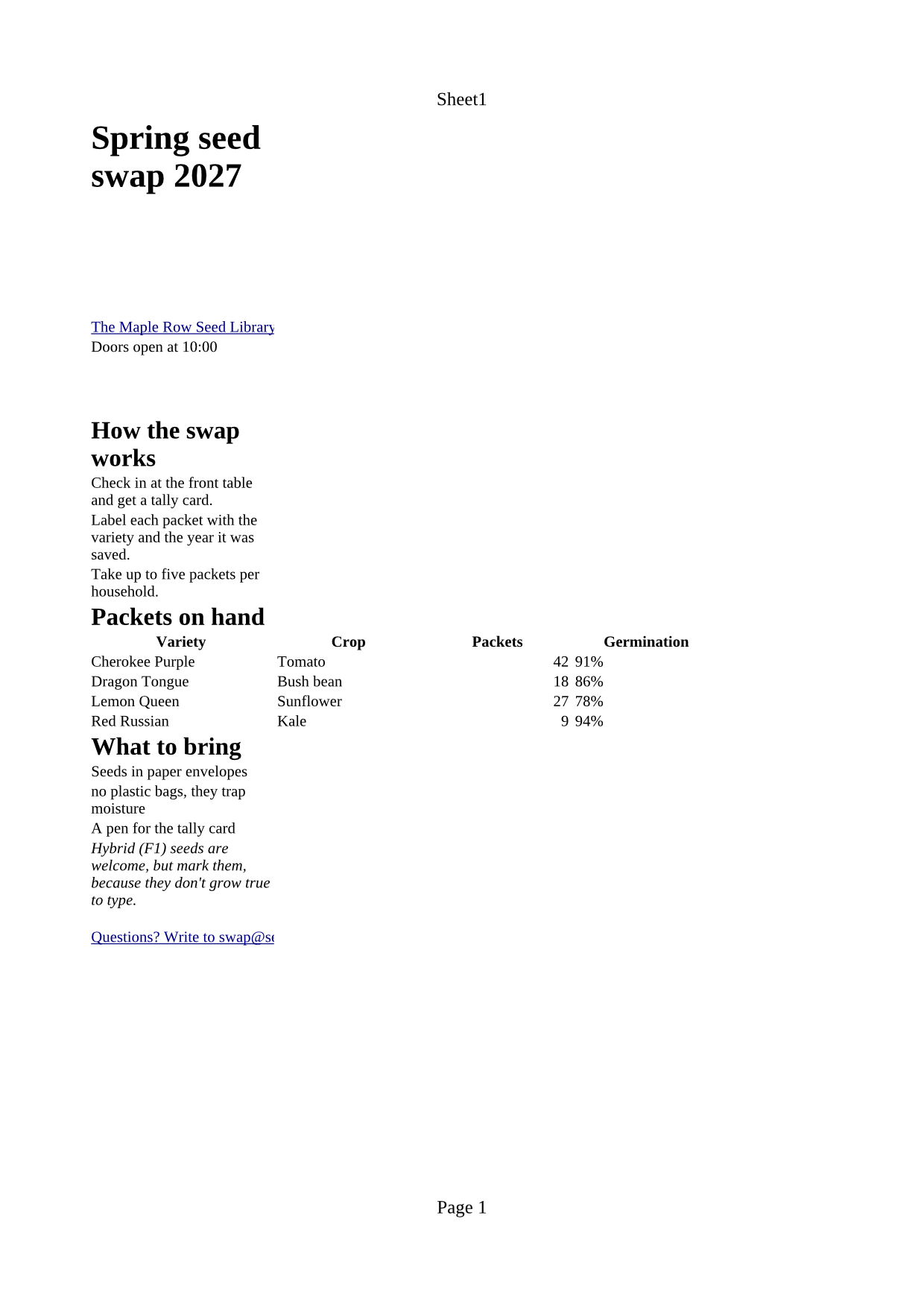
- Input
- seed-swap.html (3.0 KB)
- Output
- seed-swap.xls (8.5 KB)
- Source
- A one-page web page for a fictional community seed library, written for this site: headings, a table, two lists, links, a quote, a style sheet, a script and an inlined picture. (CC0-1.0). How it was made
- Made by
- 2026-11-04, API build
9eeeb0640aba
Parameters
Send these as form fields next to the file. Names are case-insensitive. If you set one of the documented options below that we don't support yet, the request fails with a 400 that names it instead of returning a file made without it.
| Parameter | What it does |
|---|---|
FileNamestring | Base name for the .xls. Without it, the sample is returned as seed-swap.xls. |
StoreFileboolean, default false | true sends back a download link (Files[].Url, 3 hours) instead of base64. |
What carries over, and what doesn't
Kept
- A real BIFF8 workbook: an OLE compound file whose workbook stream starts with a BIFF8 BOF record (version 0x0600)
- Title and description in the summary information, where the file's properties show them
- The table in reading order on one sheet: headings, paragraphs and list items in column A, the table at A9:E13
- Plain numbers as numbers (42, 18, 27 and 9 in the sample)
- Merged cells from colspan and rowspan, and bold header cells
- Cell hyperlinks for the web link and the
mailto:link
Lost or not yet supported
- Rows past 65,536 and columns past 256, with no error. A 70,000-row table stopped at row 65,536 and a 300-column table at column 256, while the .xlsx route kept both whole.
- Typed percentages and dates: 91% and 2027-01-14 are text cells.
- Pictures, list numbering, colors and borders.
- Formula safety: table text starting with
=is stored as a formula, as in the .xlsx route.
Limits
- One HTML file per request.
- Requests up to 10 MB on the Free plan or 100 MB on paid plans, all files and fields together.
- 120 seconds per conversion, then 504.
- 65,536 rows by 256 columns per sheet, the 97-2003 format's grid; extra cells are dropped.
- Sheet and page options (
PageSize,WorksheetName,ActiveWorksheetOnly,AutoFitColumns) return 400 for HTML input.
Where teams use it
Imports that only take .xls
When the software on the receiving end accepts only the 97-2003 format, turn the HTML table your system produces into the file it expects.
A real workbook instead of renamed HTML
Some apps serve an HTML table under an .xls name. Converting that HTML gives a binary 97-2003 workbook with typed number cells, so the file is what its extension says.
Questions
Should I ask for .xls or .xlsx?
Use /v2/convert/html/to/xlsx unless the receiving software needs the old format. The .xls grid holds 65,536 rows by 256 columns and larger tables are cut off silently; the sample is also bigger as .xls (8,704 bytes) than as .xlsx (7,159 bytes).
Is the result a real .xls or HTML with an .xls name?
A real workbook. The file starts with the OLE signature D0 CF 11 E0 and holds a BIFF8 workbook stream, and none of the page's HTML tags are left in it.
What happens to a value like 2027-01-14 or 91%?
It arrives as text, exactly as written, in a cell formatted as text. Only plain numbers such as 42, 3.14 or 1,234 are typed as numbers.
Convert your first HTML file in a minute.