XLS to XLSX API
Send an Excel 97-2003 file to POST /v2/convert/xls/to/xlsx and get the same workbook back in the current Excel format. The 10,752-byte sample returns as a 10,682-byte XLSX with its 22 formulas still formulas.
- Endpoint
- POST /v2/
convert/ xls/ to/ xlsx - Accepts
- xls
- Sample timing
- 0.553 s median of 5 runsHow we measure
- Request size
- Up to 10 MB on the Free plan or 100 MB on paid plans, all files together
Request and response
Every sample below ran against the API before this page was published. Set PDFCONVERSIONAPI_KEY to your key and run it as is.
curl -sS -X POST \
  https://api.pdfconversionapi.com/v2/convert/xls/to/xlsx \
  -H "Authorization: Bearer $PDFCONVERSIONAPI_KEY" \
  -F File=@van-fuel-log.xls \
  -o response.json

# FileData is base64. Save the first file in converted/,
# or print the JSON error.
if jq -e '.Files' response.json > /dev/null; then
  mkdir -p converted
  name=$(jq -r '.Files[0].FileName' response.json)
  jq -r '.Files[0].FileData' response.json \
    | base64 --decode > "converted/$name"
else
  cat response.json
fi
import base64
import os
import requests
key = os.environ["PDFCONVERSIONAPI_KEY"]
response = requests.post(
"https://api.pdfconversionapi.com/v2/convert/xls/to/xlsx",
headers={"Authorization": f"Bearer {key}"},
files=[("File", open("van-fuel-log.xls", "rb"))],
timeout=180,
)
result = response.json()
if not response.ok:
raise SystemExit(f"{result['Code']}: {result['Message']}")
os.makedirs("converted", exist_ok=True)
for file in result["Files"]:
path = os.path.join("converted", file["FileName"])
with open(path, "wb") as out:
out.write(base64.b64decode(file["FileData"]))
print(path, file["FileSize"], "bytes")
import { mkdir, readFile, writeFile } from "node:fs/promises";
import { join } from "node:path";

const form = new FormData();
const file = "van-fuel-log.xls";
form.append("File", new Blob([await readFile(file)]), file);

const url = "https://api.pdfconversionapi.com/v2/convert/xls/to/xlsx";
const key = process.env.PDFCONVERSIONAPI_KEY;
const response = await fetch(url, {
  method: "POST",
  headers: { Authorization: `Bearer ${key}` },
  body: form,
});
const result = await response.json();
if (!response.ok) {
  throw new Error(`${result.Code}: ${result.Message}`);
}

await mkdir("converted", { recursive: true });
for (const file of result.Files) {
  const path = join("converted", file.FileName);
  await writeFile(path, Buffer.from(file.FileData, "base64"));
  console.log(path, file.FileSize, "bytes");
}
{
  "ConversionCost": 1,
  "ConversionTime": 0.553,
  "Files": [
    {
      "FileName": "van-fuel-log.xlsx",
      "FileExt": "xlsx",
      "FileSize": 10682,
      "FileData": "UEsDBBQAAAgIAAR4ZF2yzuVs…"
    }
  ]
}
Response from our test run on 2026-11-03. ConversionTime shows the median of 5 runs. FileData is shortened here; the real response carries the whole file as base64.
The sample, converted
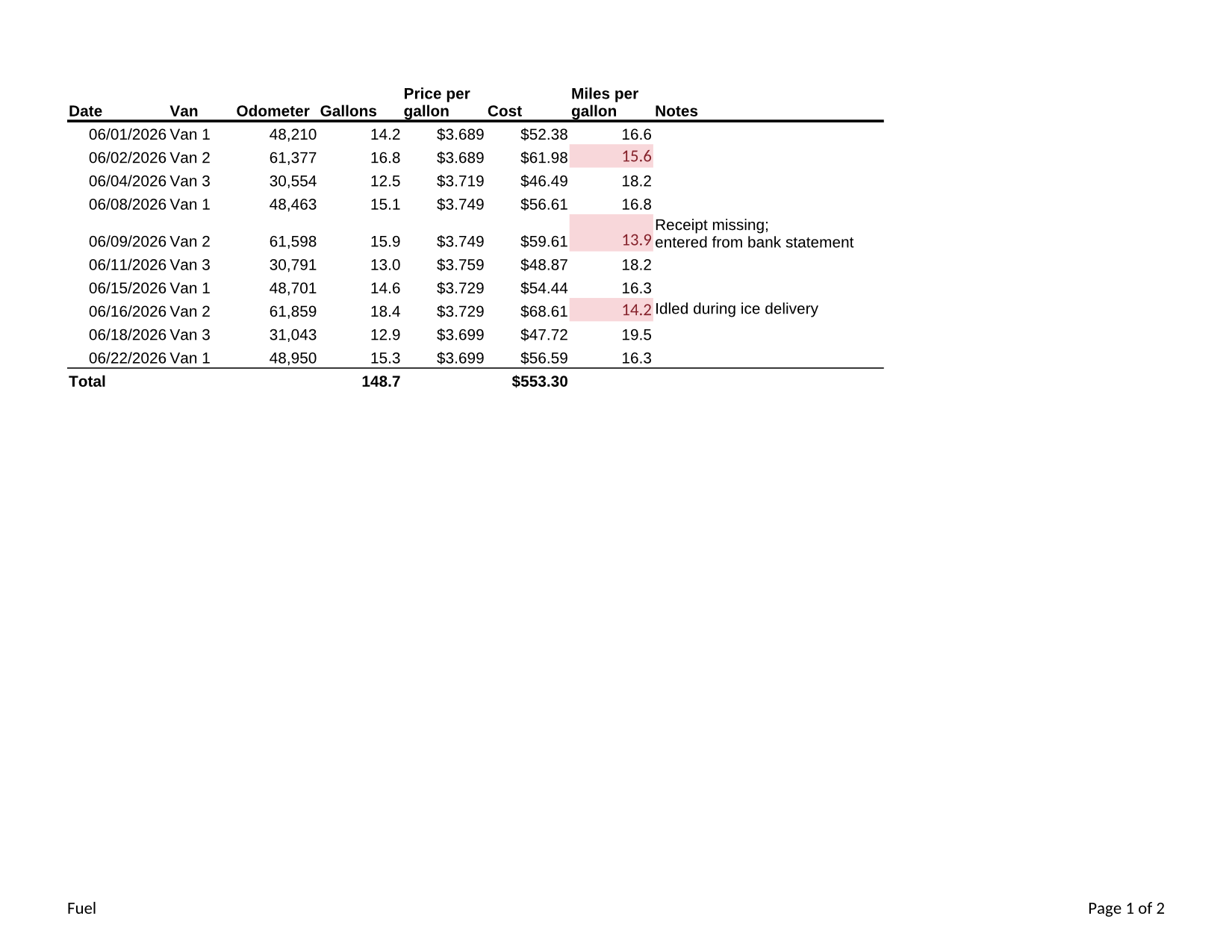
The same file the code sends. Download the input and the output and compare them yourself.
- Input
- van-fuel-log.xls (11 KB)
- Output
- van-fuel-log.xlsx (10 KB)
- Source
- A fictional bakery's van fuel log in Excel 97-2003 format (two sheets, formulas, a cell note and a merged title) that we wrote for this site (CC0-1.0). How it was made
- Made by
- 2026-11-04, API build
9eeeb0640aba
Parameters
Send these as form fields next to the file. Names are case-insensitive. If you set one of the documented options below that we don't support yet, the request fails with a 400 that names it instead of returning a file made without it.
| Parameter | What it does |
|---|---|
Passwordstring | Opens an .xls protected with a password to open. The XLSX that comes back has no password: our protected test file returned a 5,291-byte workbook that converts to JSON without one. A wrong or missing password returns 422. |
FileNamestring | Base name of the new file: FileName=fuel-2026 returns fuel-2026.xlsx. |
What carries over, and what doesn't
Kept
- Formulas as formulas, with their results: all 22 in the Fuel sheet, such as D2*E2 for the cost and the SUM totals
- Number formats: mm/dd/yyyy, #,##0, 0.0, $0.000 and $#,##0.00
- The merged title on Vans, still spanning columns A to D, and the line break inside the two-line note
- The note on A6 with its text, the Van 1 / Van 2 / Van 3 drop-down list and the rule that highlights mileage under 16
- Printing: Letter paper, landscape Fuel and portrait Vans, the repeated header row and the footers
- Title, author and creation date in the file properties
Lost or not yet supported
- The author of a note: "Office" in the sample became "Unknown Author".
- Which sheet was open: in a test file saved on its second sheet, the XLSX opens on the first.
- The file properties give PDF Conversion API as the application that saved the file.
Limits
- Only Excel's binary format is read: a web page or an XLSX sent to this route returns 422 "the input file could not be read: it could not be opened as XLS".
- Sheet and page options are not used on this route;
WorksheetName, for example, returns 400 "WorksheetName is not supported yet for XLS files". - Requests up to 10 MB on the Free plan or 100 MB on paid plans; 120 seconds per conversion, then 504.
Where teams use it
Moving an archive of old workbooks to the current format
Some current spreadsheet libraries read only XLSX. The one we tried refused the sample .xls as an old file format it doesn't support, and opened the converted XLSX with its formulas.
Preparing files for tools that only take XLSX
Upgrade an uploaded .xls once, then hand the XLSX to your own code, a spreadsheet library or other routes such as xlsx/to/protect.
Getting password-protected legacy files into a workflow
With the password in the request, the file comes back open, so later steps don't need to handle the old encryption.
Questions
Are formulas kept, or only their values?
Kept. Every formula in the sample is a formula in the XLSX, stored with the result it had, so the workbook opens with the same numbers and still recalculates when inputs change.
Do macros come across?
The workbook's own macros never run during the conversion. The conversion itself uses a fresh office-suite profile in which macro execution is switched off, and a password-protected file is first opened in a separate step with document macros set never to run. We have not tested whether a VBA project inside an .xls is carried into the XLSX, so don't rely on this route to keep macros.
Is there a route from XLSX back to XLS?
No. /v2/convert/xlsx/to/xls returns 404. To produce .xls from data, /v2/convert/html/to/xls builds one from an HTML table.
Can I upgrade an .xls that someone protected with a password?
Yes, if you have the password: send it as Password. The XLSX is saved without encryption; lock it again with /v2/convert/xlsx/to/protect if it needs one.
Convert your first XLS file in a minute.