XLSX to XLSX API
Send an XLSX file to POST /v2/convert/xlsx/to/xlsx and get the workbook back after a spreadsheet engine has opened it, calculated what was missing and saved it again. The 10,832-byte sample returns as 12,917 bytes with its sheets, chart and formulas in place.
- Endpoint
- POST /v2/
convert/ xlsx/ to/ xlsx - Accepts
- xlsx
- Sample timing
- 0.593 s median of 5 runsHow we measure
- Request size
- Up to 10 MB on the Free plan or 100 MB on paid plans, all files together
Request and response
Every sample below ran against the API before this page was published. Set PDFCONVERSIONAPI_KEY to your key and run it as is.
curl -sS -X POST \
  https://api.pdfconversionapi.com/v2/convert/xlsx/to/xlsx \
  -H "Authorization: Bearer $PDFCONVERSIONAPI_KEY" \
  -F File=@tool-library-loans.xlsx \
  -o response.json

# FileData is base64. Save the first file in converted/,
# or print the JSON error.
if jq -e '.Files' response.json > /dev/null; then
  mkdir -p converted
  name=$(jq -r '.Files[0].FileName' response.json)
  jq -r '.Files[0].FileData' response.json \
    | base64 --decode > "converted/$name"
else
  cat response.json
fi
import base64
import os
import requests
key = os.environ["PDFCONVERSIONAPI_KEY"]
response = requests.post(
"https://api.pdfconversionapi.com/v2/convert/xlsx/to/xlsx",
headers={"Authorization": f"Bearer {key}"},
files=[("File", open("tool-library-loans.xlsx", "rb"))],
timeout=180,
)
result = response.json()
if not response.ok:
raise SystemExit(f"{result['Code']}: {result['Message']}")
os.makedirs("converted", exist_ok=True)
for file in result["Files"]:
path = os.path.join("converted", file["FileName"])
with open(path, "wb") as out:
out.write(base64.b64decode(file["FileData"]))
print(path, file["FileSize"], "bytes")
import { mkdir, readFile, writeFile } from "node:fs/promises";
import { join } from "node:path";

const form = new FormData();
const file = "tool-library-loans.xlsx";
form.append("File", new Blob([await readFile(file)]), file);

const url = "https://api.pdfconversionapi.com/v2/convert/xlsx/to/xlsx";
const key = process.env.PDFCONVERSIONAPI_KEY;
const response = await fetch(url, {
  method: "POST",
  headers: { Authorization: `Bearer ${key}` },
  body: form,
});
const result = await response.json();
if (!response.ok) {
  throw new Error(`${result.Code}: ${result.Message}`);
}

await mkdir("converted", { recursive: true });
for (const file of result.Files) {
  const path = join("converted", file.FileName);
  await writeFile(path, Buffer.from(file.FileData, "base64"));
  console.log(path, file.FileSize, "bytes");
}
{
  "ConversionCost": 1,
  "ConversionTime": 0.593,
  "Files": [
    {
      "FileName": "tool-library-loans.xlsx",
      "FileExt": "xlsx",
      "FileSize": 12917,
      "FileData": "UEsDBBQAAAgIAAp4ZF0pwAlt…"
    }
  ]
}
Response from our test run on 2026-11-03. ConversionTime shows the median of 5 runs. FileData is shortened here; the real response carries the whole file as base64.
The sample, converted
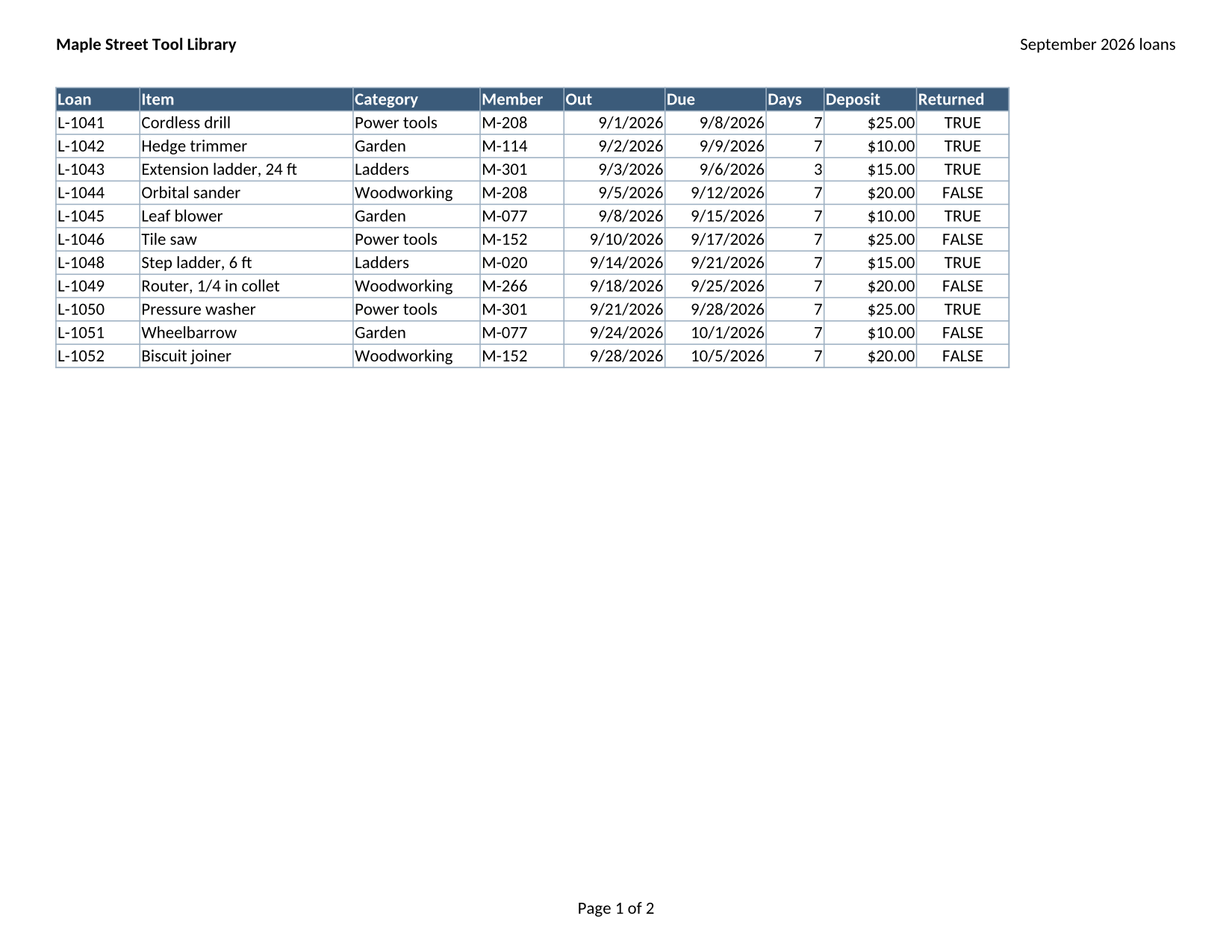
The same file the code sends. Download the input and the output and compare them yourself.
- Input
- tool-library-loans.xlsx (11 KB)
- Output
- tool-library-loans.xlsx (13 KB)
- Source
- A fictional tool library's September loans workbook (three sheets, one of them hidden, with formulas and a chart) that we wrote for this site (CC0-1.0). How it was made
- Made by
- 2026-11-04, API build
9eeeb0640aba
Parameters
Send these as form fields next to the file. Names are case-insensitive. If you set one of the documented options below that we don't support yet, the request fails with a 400 that names it instead of returning a file made without it.
| Parameter | What it does |
|---|---|
Passwordstring | The open password of an encrypted workbook. The workbook comes back without encryption: the sample, locked with xlsx/to/protect and re-saved with its password, could then be read with no password at all. |
FileNamestring | Base name of the returned file. Without it the name of the upload is kept (tool-library-loans.xlsx). |
What carries over, and what doesn't
Kept
- All 3 sheets in order, with Deposits still hidden and Summary still the tab that opens first
- The frozen header row, hidden row 8 and hidden column J on the Loans sheet
- Formulas as formulas: VLOOKUP, COUNTIF, SUMIFS and SUM, each with its stored result
- Page setup and printing: landscape Letter fitted to one page wide, the repeated header row, the page header and the page-number footer
- The column chart on Summary, cell styles and the m/d/yyyy and $#,##0.00 formats
- Title, author and creation date in the file properties
Lost or not yet supported
- The 12 TRUE/FALSE cells are written as the formulas =TRUE() and =FALSE(), with the same results. Excel shows TRUE and FALSE, but the formula bar shows the formula.
- The file properties name the application as PDF Conversion API, and the setting that asked Excel to recalculate everything on open is not kept.
- The hidden Deposits sheet, which had no page setup, gains one for A4 paper.
- Files are rewritten in full, so the XML inside differs from the original even where nothing changed: the sample grew from 10,832 to 12,917 bytes, and repeated requests gave 12,914 to 12,917 bytes because the chart's axis IDs change on every save.
Limits
- One XLSX per request, up to 10 MB on the Free plan or 100 MB on paid plans. A conversion has 120 seconds before the API returns 504.
- An XLS or another format sent to this route returns 422 "the input file could not be read: it could not be opened as XLSX". Use
/v2/convert/xls/to/xlsxfor Excel 97-2003 files. - Sheet and page options such as
FitToPageorWorksheetNameare refused with 400 ("FitToPage is not supported yet for XLSX files"); they apply to the PDF and image routes.
Where teams use it
Filling in formula results that a library didn't calculate
Some libraries that write XLSX, openpyxl among them, store formulas without results, so readers that don't calculate see empty cells. In our test the four totals of such a workbook were null in JSON before the re-save and 260, 150, 54 and 464 after it.
Removing the password from a workbook you are allowed to open
Send the file with Password; the copy that comes back opens without one, ready for the conversions and tools that can't handle encrypted files.
Normalizing files before further processing
Workbooks from many different writers come back in one consistent form, with every part written the same way, which makes later parsing and comparison simpler.
Questions
Does the re-save recalculate my formulas?
It fills in formulas that were saved without a result, which is what files from libraries such as openpyxl contain. Formulas that already have a stored result keep it. The saved file also no longer asks Excel to recalculate everything when it opens.
Will the file still open in Excel?
The result is a standard XLSX package. We checked its parts: sheets, defined names, the chart, styles and properties are all present, and our own converters read it back. We have not opened it in Excel itself for this page.
Why do my TRUE and FALSE cells show a formula now?
Logical values are saved as =TRUE() and =FALSE() with their results. The displayed values and any formulas that use them are unchanged, but someone editing the cell will see the formula.
Is the workbook protected again after I send a password?
No. A workbook opened with Password is saved without encryption. To lock the result again, send it to /v2/convert/xlsx/to/protect with EncryptPassword.
Convert your first XLSX file in a minute.