HTML to XLSX API
POST /v2/convert/html/to/xlsx reads a web page and writes it into one worksheet, tables as rows and columns. The sample page became a 7,159-byte workbook: its table at A9:E13 with the packet counts as numbers, and the headings, list items and paragraphs in column A above and below it.
- Endpoint
- POST /v2/
convert/ html/ to/ xlsx - Accepts
- html
- Sample timing
- 0.524 s median of 5 runsHow we measure
- Request size
- Up to 10 MB on the Free plan or 100 MB on paid plans, all files together
Request and response
Every sample below ran against the API before this page was published. Set PDFCONVERSIONAPI_KEY to your key and run it as is.
curl -sS -X POST \
  https://api.pdfconversionapi.com/v2/convert/html/to/xlsx \
  -H "Authorization: Bearer $PDFCONVERSIONAPI_KEY" \
  -F File=@seed-swap.html \
  -o response.json

# FileData is base64. Save the first file in converted/,
# or print the JSON error.
if jq -e '.Files' response.json > /dev/null; then
  mkdir -p converted
  name=$(jq -r '.Files[0].FileName' response.json)
  jq -r '.Files[0].FileData' response.json \
    | base64 --decode > "converted/$name"
else
  cat response.json
fi
import base64
import os
import requests
key = os.environ["PDFCONVERSIONAPI_KEY"]
response = requests.post(
"https://api.pdfconversionapi.com/v2/convert/html/to/xlsx",
headers={"Authorization": f"Bearer {key}"},
files=[("File", open("seed-swap.html", "rb"))],
timeout=180,
)
result = response.json()
if not response.ok:
raise SystemExit(f"{result['Code']}: {result['Message']}")
os.makedirs("converted", exist_ok=True)
for file in result["Files"]:
path = os.path.join("converted", file["FileName"])
with open(path, "wb") as out:
out.write(base64.b64decode(file["FileData"]))
print(path, file["FileSize"], "bytes")
import { mkdir, readFile, writeFile } from "node:fs/promises";
import { join } from "node:path";

const form = new FormData();
const file = "seed-swap.html";
form.append("File", new Blob([await readFile(file)]), file);

const url = "https://api.pdfconversionapi.com/v2/convert/html/to/xlsx";
const key = process.env.PDFCONVERSIONAPI_KEY;
const response = await fetch(url, {
  method: "POST",
  headers: { Authorization: `Bearer ${key}` },
  body: form,
});
const result = await response.json();
if (!response.ok) {
  throw new Error(`${result.Code}: ${result.Message}`);
}

await mkdir("converted", { recursive: true });
for (const file of result.Files) {
  const path = join("converted", file.FileName);
  await writeFile(path, Buffer.from(file.FileData, "base64"));
  console.log(path, file.FileSize, "bytes");
}
{
  "ConversionCost": 1,
  "ConversionTime": 0.524,
  "Files": [
    {
      "FileName": "seed-swap.xlsx",
      "FileExt": "xlsx",
      "FileSize": 7159,
      "FileData": "UEsDBBQAAAgIACN3ZF2+0DoZ…"
    }
  ]
}
Response from our test run on 2026-11-03. ConversionTime shows the median of 5 runs. FileData is shortened here; the real response carries the whole file as base64.
The sample, converted
The same file the code sends. Download the input and the output and compare them yourself.
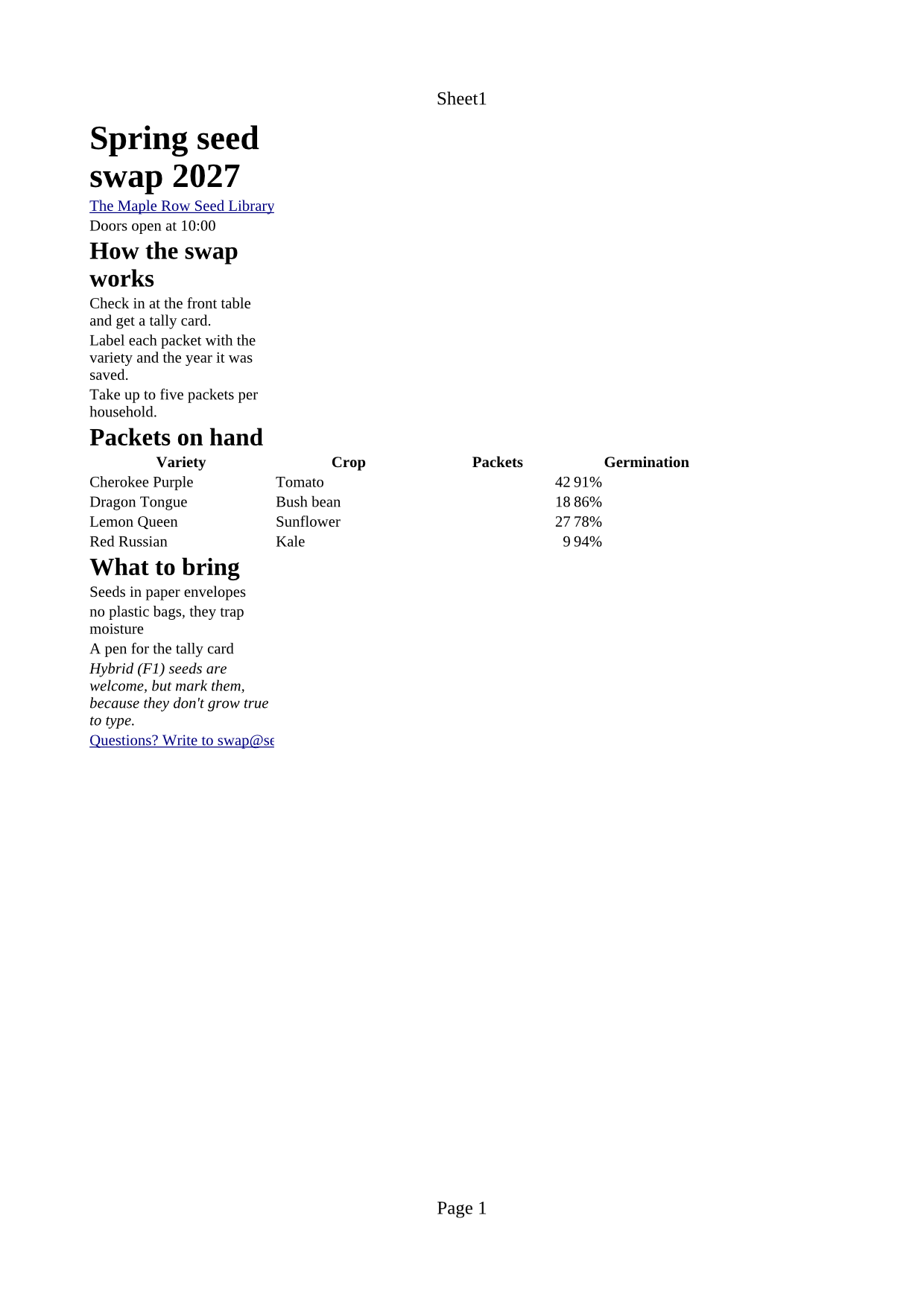
- Input
- seed-swap.html (3.0 KB)
- Output
- seed-swap.xlsx (7.0 KB)
- Source
- A one-page web page for a fictional community seed library, written for this site: headings, a table, two lists, links, a quote, a style sheet, a script and an inlined picture. (CC0-1.0). How it was made
- Made by
- 2026-11-04, API build
9eeeb0640aba
Parameters
Send these as form fields next to the file. Names are case-insensitive. If you set one of the documented options below that we don't support yet, the request fails with a 400 that names it instead of returning a file made without it.
| Parameter | What it does |
|---|---|
FileNamestring | Base name of the workbook; the sample would be seed-swap.xlsx without it. |
StoreFileboolean, default false | true returns a link in Files[].Url, kept 3 hours, instead of the workbook as base64. |
What carries over, and what doesn't
Kept
- Every table on the page, placed in order on one sheet named
Sheet1; the sample's table sits at A9:E13 - Whole numbers and decimals as numbers: the packet counts 42, 18, 27 and 9, and 3.14, -7 and 1e3 (1000) in a test table
1,234read as the number 1234- colspan and rowspan as merged cells (A1:B1 and C1:C2 in the test table)
- Bold header cells, centered; headings as larger bold cells (22 pt for the h1, 16 pt for h2)
- Links: the cell holding a link gets it as a cell hyperlink,
mailto:included - The page title and description as the workbook's title and description properties
Lost or not yet supported
- Percent and date values as values. 91% and 2027-01-14 arrived as text cells formatted
@, and so did$4.50and01/14/2027. - Leading zeros:
007became the number 7. - Pictures. The sample's inlined PNG is not in the workbook.
- List numbers and bullets: each list item is a plain text cell.
- Colors, fills and borders, whether from CSS or
styleattributes, and the page's fonts: cells use Times New Roman. - Links inside longer text: the whole cell becomes the link.
Limits
- One HTML file per request.
- Requests up to 10 MB on the Free plan or 100 MB on paid plans, all files and fields together.
- 120 seconds per conversion, then 504.
- Sheet and print options such as
PageSize,WorksheetNameorAutoFitColumnsreturn 400 "… is not supported yet for HTML files".
Where teams use it
Reports that only exist as HTML tables
Some admin panels and reporting tools show data only as an HTML table, with no export button. Save the page and convert it to get the figures into cells you can sort and sum.
Spreadsheet downloads from an HTML template
If your app already renders a table as HTML, the same markup can produce the .xlsx download, with bold header cells and colspan and rowspan kept as merged cells.
Questions
Can a table cell become a formula?
Yes, and it matters for HTML you didn't write. A cell whose text starts with = is stored as a formula: =1+1 came back as a formula with the cached value 2, and =HYPERLINK("https://evil.example","click") as a working link. A leading space doesn't stop it. Cells starting with +, - or @ stayed text, and '=1+1 stayed text with the apostrophe kept, so check user input before converting.
Why are my percentages and dates text instead of numbers?
The import types plain numbers only. Values such as 91%, $4.50, 2027-01-14 and 01/14/2027 are kept exactly as written, in text-formatted cells. Convert them in the sheet, or write them into the HTML as plain numbers, for example 0.91.
Does each table get its own worksheet?
No. The page goes onto one sheet in reading order: headings, paragraphs and list items in column A, each table starting on the next free row. A second test table landed on row 6, right under the first.
Are there sheet or page options?
Not for HTML input. Spreadsheet options like WorksheetName, ActiveWorksheetOnly, PageSize and AutoFitColumns return 400 when set to anything but their defaults.
Convert your first HTML file in a minute.