Join images API
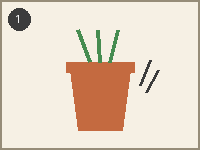
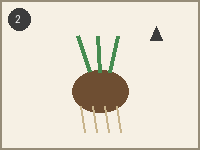
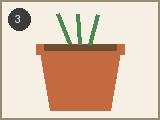
POST /v2/convert/images/to/join places the uploaded images one after another and returns a single picture. The sample sent three panels of a how-to strip (two 200 × 150 PNGs and a 160 × 120 JPEG) with JoinDirection=horizontal, ImageSpacing=10 and a dark SpacingColor, and got back a 580 × 150 PNG.
- Endpoint
- POST /v2/
convert/ images/ to/ join - Accepts
- images
- Sample timing
- 2 ms median of 5 runsHow we measure
- Request size
- Up to 10 MB on the Free plan or 100 MB on paid plans, all files together
Request and response
Every sample below ran against the API before this page was published. Set PDFCONVERSIONAPI_KEY to your key and run it as is.
curl -sS -X POST \
  https://api.pdfconversionapi.com/v2/convert/images/to/join \
  -H "Authorization: Bearer $PDFCONVERSIONAPI_KEY" \
  -F Files=@step-1-loosen.png \
  -F Files=@step-2-lift.png \
  -F Files=@step-3-pot.jpg \
  --form-string JoinDirection=horizontal \
  --form-string ImageSpacing=10 \
  --form-string 'SpacingColor=#2f3b45' \
  -o response.json

# FileData is base64. Save the first file in converted/,
# or print the JSON error.
if jq -e '.Files' response.json > /dev/null; then
  mkdir -p converted
  name=$(jq -r '.Files[0].FileName' response.json)
  jq -r '.Files[0].FileData' response.json \
    | base64 --decode > "converted/$name"
else
  cat response.json
fi
import base64
import os
import requests
key = os.environ["PDFCONVERSIONAPI_KEY"]
response = requests.post(
"https://api.pdfconversionapi.com/v2/convert/images/to/join",
headers={"Authorization": f"Bearer {key}"},
files=[
("Files", open("step-1-loosen.png", "rb")),
("Files", open("step-2-lift.png", "rb")),
("Files", open("step-3-pot.jpg", "rb")),
],
data={
"JoinDirection": "horizontal",
"ImageSpacing": "10",
"SpacingColor": "#2f3b45",
},
timeout=180,
)
result = response.json()
if not response.ok:
raise SystemExit(f"{result['Code']}: {result['Message']}")
os.makedirs("converted", exist_ok=True)
for file in result["Files"]:
path = os.path.join("converted", file["FileName"])
with open(path, "wb") as out:
out.write(base64.b64decode(file["FileData"]))
print(path, file["FileSize"], "bytes")
import { mkdir, readFile, writeFile } from "node:fs/promises";
import { join } from "node:path";

const form = new FormData();
for (const file of [
  "step-1-loosen.png",
  "step-2-lift.png",
  "step-3-pot.jpg",
]) {
  form.append("Files", new Blob([await readFile(file)]), file);
}
form.append("JoinDirection", "horizontal");
form.append("ImageSpacing", "10");
form.append("SpacingColor", "#2f3b45");

const url = "https://api.pdfconversionapi.com/v2/convert/images/to/join";
const key = process.env.PDFCONVERSIONAPI_KEY;
const response = await fetch(url, {
  method: "POST",
  headers: { Authorization: `Bearer ${key}` },
  body: form,
});
const result = await response.json();
if (!response.ok) {
  throw new Error(`${result.Code}: ${result.Message}`);
}

await mkdir("converted", { recursive: true });
for (const file of result.Files) {
  const path = join("converted", file.FileName);
  await writeFile(path, Buffer.from(file.FileData, "base64"));
  console.log(path, file.FileSize, "bytes");
}
{
  "ConversionCost": 1,
  "ConversionTime": 0.002,
  "Files": [
    {
      "FileName": "step-1-loosen.png",
      "FileExt": "png",
      "FileSize": 17257,
      "FileData": "iVBORw0KGgoAAAANSUhEUgAA…"
    }
  ]
}
Response from our test run on 2026-11-03. ConversionTime shows the median of 5 runs. FileData is shortened here; the real response carries the whole file as base64.
The sample, converted
The same file the code sends. Download the input and the output and compare them yourself.
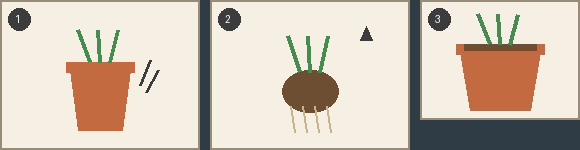
- Input
- step-1-loosen.png (842 bytes)step-2-lift.png (1.0 KB)step-3-pot.jpg (4.7 KB)
- Output
- step-1-loosen.png (17 KB)
- Source
- Three drawn panels of a how-to strip about repotting a plant, made for this site: two PNGs and a smaller JPEG for the last step. (CC0-1.0). How it was made
- Made by
- 2026-11-04, API build
9eeeb0640aba
Parameters
Send these as form fields next to the file. Names are case-insensitive. If you set one of the documented options below that we don't support yet, the request fails with a 400 that names it instead of returning a file made without it.
| Parameter | What it does |
|---|---|
JoinDirectionenum, default vertical | vertical stacks the images top to bottom (the sample's panels give 200 × 420); horizontal puts them in a row (580 × 150 with the 10 px gaps).Values: vertical, horizontal |
ImageSpacinginteger, default 0 | Pixels between neighboring images. Two gaps of 10 px widened the sample from 560 to 580 px.Values: 0–1000 |
SpacingColorstring, default white | Fills the gaps and any space a smaller image leaves. The sample's #2f3b45 shows as the bars between panels and the band under the 120 px tall third panel.Values: white, black, red, green, blue, gray, #RRGGBB or R,G,B |
ImageOutputFormatenum, default auto | auto gives a PNG when the first image is a PNG, a TIFF when it is a TIFF, and a JPEG otherwise. The sample starts with a PNG, so it is a PNG; with jpg it came back as a 15,848-byte JPEG.Values: auto, png, jpg, tiff |
ImageQualityinteger, default 85 | JPEG quality, used only when the result is a JPEG: 50 made the sample's JPEG 10,030 bytes.Values: 1–100 |
ImageResolutioninteger | DPI written into the file's header; the pixels don't change. With 150 the PNG carries 150 DPI.Values: 10–800 |
ColorSpaceenum, default default | gray returns a one-channel image (6,229 bytes for the sample); monochrome reduces it to black and white (2,204 bytes). cmyk returns 400.Values: default, rgb, gray, monochrome |
FileNamestring | Base name of the result. Without it the result takes the first file's name: step-1-loosen.png. |
StoreFileboolean, default false | true returns a 3-hour download link in Files[].Url instead of the image inline. |
What carries over, and what doesn't
Kept
- Every pixel of every panel, at its own size: nothing is scaled
- Upload order: the first file is on the left (or on top)
- Mixed formats in one request: two PNGs and a JPEG in the sample; GIF and WebP joined in a test
- Exact gap and filler color: the sample's gaps and the band under the short panel are (47, 59, 69)
- EXIF orientation: a 60 × 30 JPEG tagged to rotate 90° was turned upright and joined as 30 × 60
Lost or not yet supported
- Alignment choices: images are aligned to the top (or the left) and the rest is filled with
SpacingColor. - Transparency in the inputs. Images are combined without alpha, so transparent pixels show the color stored under them: a test PNG's clear corners stored as black came out black.
TransparentColor, read for PNG and TIFF results, can only clear one exact color afterwards:#2f3b45cleared the sample's 7,800 gap and filler pixels. - Size on photos. The sample's 6,717 bytes of input became a 17,257-byte PNG, because the JPEG panel's grain compresses poorly as PNG; use
ImageOutputFormat=jpgfor photos. - Animation: a two-frame GIF was joined as its first (red) frame only.
- EXIF data: the joined picture has none, even when an input JPEG carried an EXIF block.
Limits
- 2 to 50 images per request: one returns 400 "Join Images needs at least two files", a 51st returns 400 "at most 50 files per request".
- PNG, JPEG, GIF, BMP, WebP, TIFF, TGA, ICO, PNM and QOI inputs; a HEIC returned 422 "unrecognized image format".
- The joined picture may have up to 100,000,000 pixels: two 7100 × 7100 PNGs stacked (7100 × 14200) returned 413.
- A JPEG result can be at most 65,500 px on a side. Two 32,750 × 8 strips joined in a row as
jpgcame out 65,500 px wide; two 40,000 × 8 strips returned 413 "JPEG images can be at most 65,500 pixels on a side, and this one is 80,000×8", though they joined as a PNG. - Requests up to 10 MB on the Free plan or 100 MB on paid plans, all files and fields together.
- 120 seconds per request, then 504.
Where teams use it
Step-by-step strips and before-and-after pairs
Put the photos of a repair, a recipe or a product change next to each other in one image for a help article or a marketplace listing, in the order you upload them.
Long receipts and screenshots in one file
Stack the photos of a long receipt, or several screenshots of a scrolling page, top to bottom so one image goes to an expense tool or a support ticket.
Contact sheets of labels or codes
Join generated labels, barcodes or thumbnails into one sheet for print or review, with a white or colored gap between them.
Questions
What happens when the images have different sizes?
Nothing is resized. In a row, the result is as tall as the tallest image; in a stack, as wide as the widest. Smaller images sit at the top or left edge and the remaining space is filled with SpacingColor, as under the sample's third panel.
Can I join images in a grid?
Not in one request: JoinDirection takes only vertical or horizontal. Join each row horizontally first, then send the rows back to join them vertically.
Why is the joined PNG bigger than my files together?
A JPEG's compression doesn't carry over to PNG. The sample's 4,824-byte JPEG panel is stored losslessly in the PNG, so the 580 × 150 result is 17,257 bytes. With ImageOutputFormat=jpg the same join is 15,848 bytes, and 10,030 with ImageQuality=50.
Does it keep transparent backgrounds?
No. The images are combined in RGB, and each transparent pixel shows the RGB value stored under it, which was black in our test. Flatten transparent images onto a background first, for example with /v2/convert/png/to/jpg.
Convert your first IMAGES file in a minute.