MOBI to PDF API
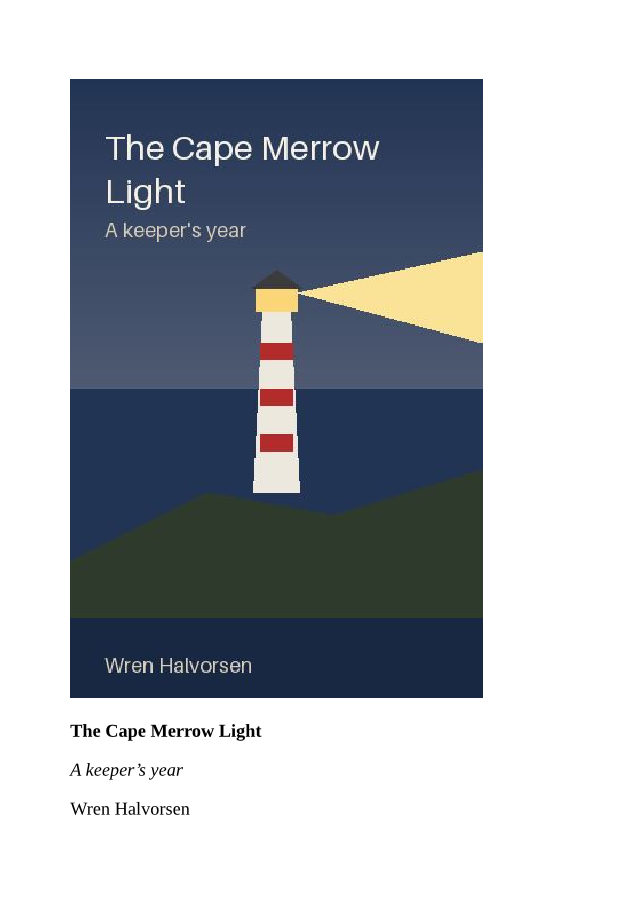
POST a .mobi file to /v2/convert/mobi/to/pdf and get the book back as a PDF with selectable text. Our sample, a short lighthouse book with a cover, a map and a chart, came back on PageSize=a5 as nine A5 pages in 80,436 bytes.
- Endpoint
- POST /v2/
convert/ mobi/ to/ pdf - Accepts
- mobi
- Sample timing
- 12 ms median of 5 runsHow we measure
- Request size
- Up to 10 MB on the Free plan or 100 MB on paid plans, all files together
Request and response
Every sample below ran against the API before this page was published. Set PDFCONVERSIONAPI_KEY to your key and run it as is.
curl -sS -X POST \
  https://api.pdfconversionapi.com/v2/convert/mobi/to/pdf \
  -H "Authorization: Bearer $PDFCONVERSIONAPI_KEY" \
  -F File=@cape-merrow-light.mobi \
  --form-string PageSize=a5 \
  -o response.json

# FileData is base64. Save the first file in converted/,
# or print the JSON error.
if jq -e '.Files' response.json > /dev/null; then
  mkdir -p converted
  name=$(jq -r '.Files[0].FileName' response.json)
  jq -r '.Files[0].FileData' response.json \
    | base64 --decode > "converted/$name"
else
  cat response.json
fi
import base64
import os
import requests
key = os.environ["PDFCONVERSIONAPI_KEY"]
response = requests.post(
"https://api.pdfconversionapi.com/v2/convert/mobi/to/pdf",
headers={"Authorization": f"Bearer {key}"},
files=[("File", open("cape-merrow-light.mobi", "rb"))],
data={
"PageSize": "a5",
},
timeout=180,
)
result = response.json()
if not response.ok:
raise SystemExit(f"{result['Code']}: {result['Message']}")
os.makedirs("converted", exist_ok=True)
for file in result["Files"]:
path = os.path.join("converted", file["FileName"])
with open(path, "wb") as out:
out.write(base64.b64decode(file["FileData"]))
print(path, file["FileSize"], "bytes")
import { mkdir, readFile, writeFile } from "node:fs/promises";
import { join } from "node:path";

const form = new FormData();
const file = "cape-merrow-light.mobi";
form.append("File", new Blob([await readFile(file)]), file);
form.append("PageSize", "a5");

const url = "https://api.pdfconversionapi.com/v2/convert/mobi/to/pdf";
const key = process.env.PDFCONVERSIONAPI_KEY;
const response = await fetch(url, {
  method: "POST",
  headers: { Authorization: `Bearer ${key}` },
  body: form,
});
const result = await response.json();
if (!response.ok) {
  throw new Error(`${result.Code}: ${result.Message}`);
}

await mkdir("converted", { recursive: true });
for (const file of result.Files) {
  const path = join("converted", file.FileName);
  await writeFile(path, Buffer.from(file.FileData, "base64"));
  console.log(path, file.FileSize, "bytes");
}
{
  "ConversionCost": 1,
  "ConversionTime": 0.012,
  "Files": [
    {
      "FileName": "cape-merrow-light.pdf",
      "FileExt": "pdf",
      "FileSize": 80436,
      "FileData": "JVBERi0xLjcKJYCAgIAKMSAw…"
    }
  ]
}
Response from our test run on 2026-11-03. ConversionTime shows the median of 5 runs. FileData is shortened here; the real response carries the whole file as base64.
The sample, converted
The same file the code sends. Download the input and the output and compare them yourself.
- Input
- cape-merrow-light.mobi (29 KB)
- Output
- cape-merrow-light.pdf (79 KB)
- Source
- A short fictional e-book about a lighthouse keeper's year, with a cover, a map and a chart, written and drawn by us and packed as a MOBI file by our own script. (CC0-1.0). How it was made
- Made by
- 2026-11-04, API build
9eeeb0640aba
Parameters
Send these as form fields next to the file. Names are case-insensitive. If you set one of the documented options below that we don't support yet, the request fails with a 400 that names it instead of returning a file made without it.
| Parameter | What it does |
|---|---|
PageSizeenum, default letter | Paper for every page, always portrait. The sample on a5 (148 × 210 mm) runs to nine pages; on the default Letter it is six, one per section.Values: a0–a9, b0–b5, letter, legal, ledger |
BaseFontSizenumber, default 12 | Size of the book's body text. MOBI files carry no style sheet, so this sets nearly everything: at 9 the body is 9 pt and the h2 chapter titles 13.5 pt; at 16 they are 16 and 24 pt.Values: 1–50 (points) |
MarginTopnumber, default 40 | Top margin in points; the first line sits a little lower because of the text's own leading.Values: 0–200 (points) |
MarginRightnumber, default 40 | Right margin in points.Values: 0–200 (points) |
MarginBottomnumber, default 40 | Bottom margin in points.Values: 0–200 (points) |
MarginLeftnumber, default 40 | Left margin in points. Text starts 6 pt further in, at 46 pt, because the book's body keeps the default body margin.Values: 0–200 (points) |
FileNamestring | Name of the PDF without .pdf; cape-merrow gives cape-merrow.pdf. |
StoreFileboolean, default false | Get a download link in Files[].Url, valid for 3 hours, instead of the PDF as base64. |
What carries over, and what doesn't
Kept
- The book's text and reading order, with curly quotes and apostrophes from the UTF-8 text intact; books stored in Windows-1252 decode correctly too
- Each
<mbp:pagebreak/>as a new page: the sample's title page, contents, three chapters and colophon start on fresh pages - The pictures stored inside the book: the JPEG cover, the PNG map and the GIF chart, each at its own pixel size (the 360 × 540 cover is 270 × 405 pt on the page)
- Bold, italic, h2 headings, block quotes and bulleted lists
- Selectable, searchable text with the fonts embedded as subsets (Liberation Serif in the sample)
Lost or not yet supported
- MOBI's layout attributes. The sample's align="center" on the title and pictures, font size="6" on the title, the width attributes that indent paragraphs and the table's border and right-aligned cells were all ignored; everything starts at the left margin, and the table has no rules.
- Links. The contents page's filepos links are plain text in the PDF, and there are no bookmarks.
- The book's metadata: the title, author and publisher in the MOBI header are not copied into the PDF's document properties.
- Images that do not fit the page are not shrunk. On A5 the 405 pt cover pushed the publisher's name onto page 2.
- The KF8 (AZW3) half of a combined file. Only the older MOBI 6 part is read, which such files carry for older Kindles.
- Pictures in formats other than JPEG, PNG, GIF and BMP, which are left out.
Limits
- One book per request; two files return 400 "this conversion takes exactly one file".
- Requests up to 10 MB on the Free plan or 100 MB on paid plans, all files and fields together.
- DRM-protected books return 422 "the input file could not be read: the book is DRM-protected".
- Books compressed with HUFF/CDIC return 404 "MOBI books with HUFF/CDIC compression are not supported yet". PalmDOC-compressed and uncompressed books are read.
- A file that is not a MOBI book returns 422 with "this is not a MOBI book" in the message; a book whose text is larger than 64 MB returns 413.
- Up to 2,000 pages per PDF, and 120 seconds per conversion.
Where teams use it
Opening old Kindle-format files without a Kindle
Collections made for early Kindles may exist only as MOBI files, which browsers and PDF tools do not open. Converting the unprotected ones to PDF lets anyone read them in a browser or print them.
Review and print copies
An editor or a print shop can work from a PDF on A5 or Letter. Set the paper with PageSize and the text size with BaseFontSize, which a MOBI file has no way to fix on its own.
A step toward an archive format
Convert the book here, then send the PDF to /v2/convert/pdf/to/pdfa for a PDF/A copy, or to /v2/convert/pdf/to/merge to bind several short books into one file. The sample's PDF passed both steps, and the PDF/A copy validated as PDF/A-2b.
Questions
Why is my book's title not centered in the PDF?
MOBI 6 books store their layout as old HTML attributes, such as align="center" and font size="6", rather than CSS. Our layout applies CSS but not those attributes, so the sample's title is 12 pt bold at the left margin instead of large and centered. The text, bold and italics are all there.
Can it convert AZW or AZW3 files?
Only when they are unprotected MOBI files under another name. A DRM-protected file returns 422. A combined MOBI/KF8 file is read from its MOBI 6 part, the one older Kindles use.
Does the PDF get a table of contents?
No bookmarks are made, and the book's own contents page prints as plain text: its filepos links point into the MOBI file's text and do not become PDF links. The sample's PDF has no outline and no link annotations.
Which MOBI files did you test?
MOBI 6 books we built ourselves from the published format description: UTF-8 and Windows-1252 text, PalmDOC-compressed and uncompressed records, and JPEG, PNG and GIF pictures. We have no Kindle software in our test setup, so files from Kindle tools may contain things we did not cover.
Can I choose pages or landscape paper?
Not here. This route reads the e-book options only: PageSize, BaseFontSize and the four margins. PageRange and PageOrientation are ignored. To keep some pages, send the PDF to /v2/convert/pdf/to/extract with PageRange.
Convert your first MOBI file in a minute.