MOBI to PNG API
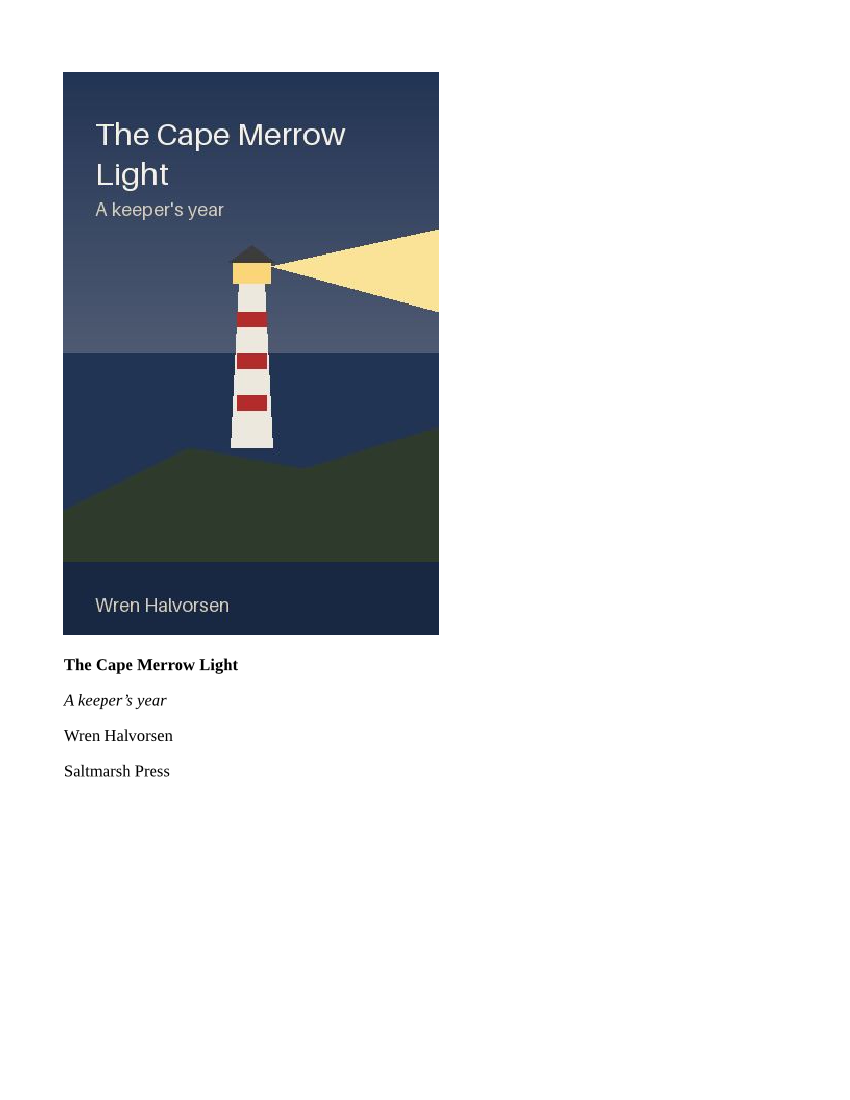
POST a .mobi book to /v2/convert/mobi/to/png and receive one PNG per laid-out page. The sample requests PageRange=1 at ImageResolution=100 and gets the lighthouse book's opening page, cover picture and title lines, as an 850 × 1100 PNG of 94,665 bytes.
- Endpoint
- POST /v2/
convert/ mobi/ to/ png - Accepts
- mobi
- Sample timing
- 22 ms median of 5 runsHow we measure
- Request size
- Up to 10 MB on the Free plan or 100 MB on paid plans, all files together
Request and response
Every sample below ran against the API before this page was published. Set PDFCONVERSIONAPI_KEY to your key and run it as is.
curl -sS -X POST \
  https://api.pdfconversionapi.com/v2/convert/mobi/to/png \
  -H "Authorization: Bearer $PDFCONVERSIONAPI_KEY" \
  -F File=@cape-merrow-light.mobi \
  --form-string PageRange=1 \
  --form-string ImageResolution=100 \
  -o response.json

# FileData is base64. Save the first file in converted/,
# or print the JSON error.
if jq -e '.Files' response.json > /dev/null; then
  mkdir -p converted
  name=$(jq -r '.Files[0].FileName' response.json)
  jq -r '.Files[0].FileData' response.json \
    | base64 --decode > "converted/$name"
else
  cat response.json
fi
import base64
import os
import requests
key = os.environ["PDFCONVERSIONAPI_KEY"]
response = requests.post(
"https://api.pdfconversionapi.com/v2/convert/mobi/to/png",
headers={"Authorization": f"Bearer {key}"},
files=[("File", open("cape-merrow-light.mobi", "rb"))],
data={
"PageRange": "1",
"ImageResolution": "100",
},
timeout=180,
)
result = response.json()
if not response.ok:
raise SystemExit(f"{result['Code']}: {result['Message']}")
os.makedirs("converted", exist_ok=True)
for file in result["Files"]:
path = os.path.join("converted", file["FileName"])
with open(path, "wb") as out:
out.write(base64.b64decode(file["FileData"]))
print(path, file["FileSize"], "bytes")
import { mkdir, readFile, writeFile } from "node:fs/promises";
import { join } from "node:path";

const form = new FormData();
const file = "cape-merrow-light.mobi";
form.append("File", new Blob([await readFile(file)]), file);
form.append("PageRange", "1");
form.append("ImageResolution", "100");

const url = "https://api.pdfconversionapi.com/v2/convert/mobi/to/png";
const key = process.env.PDFCONVERSIONAPI_KEY;
const response = await fetch(url, {
  method: "POST",
  headers: { Authorization: `Bearer ${key}` },
  body: form,
});
const result = await response.json();
if (!response.ok) {
  throw new Error(`${result.Code}: ${result.Message}`);
}

await mkdir("converted", { recursive: true });
for (const file of result.Files) {
  const path = join("converted", file.FileName);
  await writeFile(path, Buffer.from(file.FileData, "base64"));
  console.log(path, file.FileSize, "bytes");
}
{
  "ConversionCost": 1,
  "ConversionTime": 0.022,
  "Files": [
    {
      "FileName": "cape-merrow-light-1.png",
      "FileExt": "png",
      "FileSize": 94665,
      "FileData": "iVBORw0KGgoAAAANSUhEUgAA…"
    }
  ]
}
Response from our test run on 2026-11-03. ConversionTime shows the median of 5 runs. FileData is shortened here; the real response carries the whole file as base64.
The sample, converted
The same file the code sends. Download the input and the output and compare them yourself.
- Input
- cape-merrow-light.mobi (29 KB)
- Output
- cape-merrow-light-1.png (92 KB)
- Source
- A short fictional e-book about a lighthouse keeper's year, with a cover, a map and a chart, written and drawn by us and packed as a MOBI file by our own script. (CC0-1.0). How it was made
- Made by
- 2026-11-04, API build
9eeeb0640aba
Parameters
Send these as form fields next to the file. Names are case-insensitive. If you set one of the documented options below that we don't support yet, the request fails with a 400 that names it instead of returning a file made without it.
| Parameter | What it does |
|---|---|
PageRangestring | Pages to render. The sample's six Letter pages follow the book's page breaks: title, contents, three chapters, colophon. 7 returns 400 "PageRange asks for page 7, but the document has 6 pages".Values: 1, 2-4, 3-, 3-last |
ImageResolutioninteger, default 150 | Pixels per inch of paper, recorded in the PNG when sent: 100 gives 850 × 1100 Letter pages; the default 150 gives 1275 × 1650.Values: 36–600 |
ImageWidthinteger | Pixel width of each PNG, for a fixed thumbnail size.Values: 1–20,000 |
ImageHeightinteger | Pixel height of each PNG.Values: 1–20,000 |
PageSizeenum, default letter | Paper the book flows onto. Small paper means more pages: a6 split the sample into 13.Values: a0–a9, b0–b5, letter, legal, ledger |
BaseFontSizenumber, default 12 | Body text size in points. A MOBI book has no style sheet, so headings scale with it too (h2 at 1.5 times).Values: 1–50 (points) |
MarginTopnumber, default 40 | Top margin, points.Values: 0–200 (points) |
MarginRightnumber, default 40 | Right margin, points.Values: 0–200 (points) |
MarginBottomnumber, default 40 | Bottom margin, points.Values: 0–200 (points) |
MarginLeftnumber, default 40 | Left margin, points; the text starts 6 pt inside it.Values: 0–200 (points) |
ColorSpaceenum, default default | One-channel gray or black-and-white PNGs.Values: default, rgb, gray, monochrome |
TransparentColorstring | Turns one exact color transparent, such as the white around the cover.Values: Color names, #RRGGBB or R,G,B |
BackgroundColorstring, default white | Paper color behind the text.Values: Color names, #RRGGBB or R,G,B |
FileNamestring | Stem for the PNG names in place of cape-merrow-light. |
StoreFileboolean, default false | Links for 3 hours instead of inline PNG data. |
What carries over, and what doesn't
Kept
- The cover picture referenced from the book's text with recindex, drawn on the first page at its own size: 360 × 540 CSS pixels, which is 270 × 405 pt and about 375 × 563 pixels in the 100 dpi sample
- The title page's text with its bold and italic, under the cover
- Page breaks from
<mbp:pagebreak/>, so each section is its own PNG - JPEG, PNG and GIF pictures stored in the book's records
- Lossless 8-bit RGB pixels;
TransparentColoradds an alpha channel
Lost or not yet supported
- A cover stored only in the MOBI header. When we removed the cover's img tag from the sample's text and kept the header's cover record, page 1 showed the title lines alone.
- Centering and sizes written as HTML attributes: the cover and title sit at the left margin, and the title's font size="6" draws as ordinary 12 pt bold.
- Paragraph indents from MOBI's width attribute, and table borders.
- The contents page's links, and any text you could copy.
- Landscape pages;
PageOrientationis not read for e-books.
Limits
- One book per request.
- Requests up to 10 MB on the Free plan or 100 MB on paid plans, all files and fields together.
- DRM-protected books return 422 "the book is DRM-protected"; HUFF/CDIC-compressed books return 404.
- Book text over 64 MB returns 413, and so do more than 2,000 pages.
- Pages larger than 16,000 px a side or 100,000,000 pixels return 413.
- 120 seconds per conversion.
Where teams use it
Covers for an old e-book collection
When a library or publisher still holds titles as MOBI, page 1 of each book makes a thumbnail for the catalog, provided the cover picture is placed in the book's text, as in the sample.
Checking what a MOBI file contains
Before migrating a back catalog, render each book's pages to PNG and look through them. Missing pictures, odd characters and lost layout show up at a glance, without a Kindle device or app.
Questions
How do I get the book's cover as an image?
Ask for PageRange=1. When a book opens with the cover picture in its text, as the sample does, page 1 shows it. A cover kept only in the file's header (the EXTH cover record) is not drawn, so for those books page 1 starts with the title text.
Why are my PNGs so different in size?
PNG size follows the content. At the default 150 dpi the sample's contents page was 49,137 bytes and the first chapter, full of text, 405,846 bytes. The cover page was 129,825 bytes.
Does it read Windows-1252 books as well as UTF-8?
Yes. The MOBI header says which encoding the text uses, and both are decoded. Our Windows-1252 build of the sample gave the same curly quotes and apostrophes as the UTF-8 one.
Convert your first MOBI file in a minute.