EPUB to PNG API
POST an .epub to /v2/convert/epub/to/png and get one PNG per laid-out page. The sample sends PageRange=1 with ImageWidth=480, and the ferry handbook returned its title page, cover drawing included, as a 480 × 621 PNG of 34,411 bytes.
- Endpoint
- POST /v2/
convert/ epub/ to/ png - Accepts
- epub
- Sample timing
- 33 ms median of 5 runsHow we measure
- Request size
- Up to 10 MB on the Free plan or 100 MB on paid plans, all files together
Request and response
Every sample below ran against the API before this page was published. Set PDFCONVERSIONAPI_KEY to your key and run it as is.
curl -sS -X POST \
  https://api.pdfconversionapi.com/v2/convert/epub/to/png \
  -H "Authorization: Bearer $PDFCONVERSIONAPI_KEY" \
  -F File=@gull-point-ferry.epub \
  --form-string PageRange=1 \
  --form-string ImageWidth=480 \
  -o response.json

# FileData is base64. Save the first file in converted/,
# or print the JSON error.
if jq -e '.Files' response.json > /dev/null; then
  mkdir -p converted
  name=$(jq -r '.Files[0].FileName' response.json)
  jq -r '.Files[0].FileData' response.json \
    | base64 --decode > "converted/$name"
else
  cat response.json
fi
import base64
import os
import requests
key = os.environ["PDFCONVERSIONAPI_KEY"]
response = requests.post(
"https://api.pdfconversionapi.com/v2/convert/epub/to/png",
headers={"Authorization": f"Bearer {key}"},
files=[("File", open("gull-point-ferry.epub", "rb"))],
data={
"PageRange": "1",
"ImageWidth": "480",
},
timeout=180,
)
result = response.json()
if not response.ok:
raise SystemExit(f"{result['Code']}: {result['Message']}")
os.makedirs("converted", exist_ok=True)
for file in result["Files"]:
path = os.path.join("converted", file["FileName"])
with open(path, "wb") as out:
out.write(base64.b64decode(file["FileData"]))
print(path, file["FileSize"], "bytes")
import { mkdir, readFile, writeFile } from "node:fs/promises";
import { join } from "node:path";

const form = new FormData();
const file = "gull-point-ferry.epub";
form.append("File", new Blob([await readFile(file)]), file);
form.append("PageRange", "1");
form.append("ImageWidth", "480");

const url = "https://api.pdfconversionapi.com/v2/convert/epub/to/png";
const key = process.env.PDFCONVERSIONAPI_KEY;
const response = await fetch(url, {
  method: "POST",
  headers: { Authorization: `Bearer ${key}` },
  body: form,
});
const result = await response.json();
if (!response.ok) {
  throw new Error(`${result.Code}: ${result.Message}`);
}

await mkdir("converted", { recursive: true });
for (const file of result.Files) {
  const path = join("converted", file.FileName);
  await writeFile(path, Buffer.from(file.FileData, "base64"));
  console.log(path, file.FileSize, "bytes");
}
{
  "ConversionCost": 1,
  "ConversionTime": 0.033,
  "Files": [
    {
      "FileName": "gull-point-ferry-1.png",
      "FileExt": "png",
      "FileSize": 34411,
      "FileData": "iVBORw0KGgoAAAANSUhEUgAA…"
    }
  ]
}
Response from our test run on 2026-11-03. ConversionTime shows the median of 5 runs. FileData is shortened here; the real response carries the whole file as base64.
The sample, converted
The same file the code sends. Download the input and the output and compare them yourself.
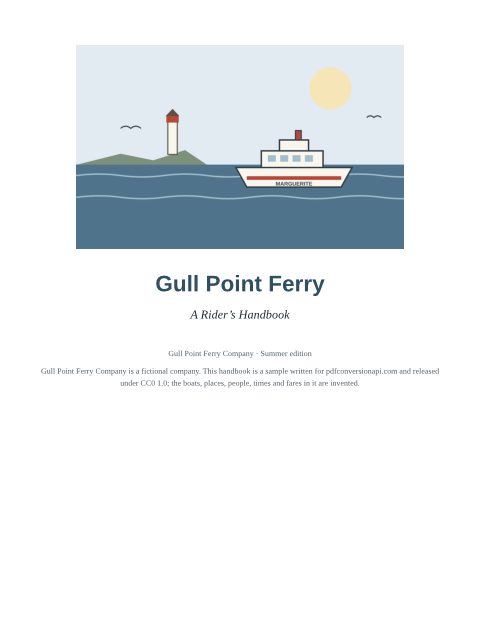
- Input
- gull-point-ferry.epub (53 KB)
- Output
- gull-point-ferry-1.png (34 KB)
- Source
- A short fictional ferry guide written for this site: a cover, a contents page and three chapters with a route map and a fare table. (CC0-1.0). How it was made
- Made by
- 2026-11-04, API build
9eeeb0640aba
Parameters
Send these as form fields next to the file. Names are case-insensitive. If you set one of the documented options below that we don't support yet, the request fails with a 400 that names it instead of returning a file made without it.
| Parameter | What it does |
|---|---|
PageRangestring | Pages to render. 1 is the first page of the book's reading order, which for the sample is its title page; leave it out to get all five pages.Values: 1, 3-5, 2-, 2-last |
ImageWidthinteger | Pixel width of each PNG; height follows the page. At 480 a Letter page is 480 × 621.Values: 1–20,000 |
ImageHeightinteger | Pixel height, or a fit-inside box together with ImageWidth.Values: 1–20,000 |
ImageResolutioninteger, default 150 | Drawing resolution when no pixel size is sent, stored in the PNG when you send it. Letter at 150 dpi is 1275 × 1650; at 200, ConvertAPI's documented default, 1700 × 2200.Values: 36–600 |
PageSizeenum, default letter | Paper the book is paginated on, always upright. a5 gives 874 × 1240 pages at 150 dpi.Values: a0–a9, b0–b5, letter, legal, ledger |
BaseFontSizenumber, default 12 | Body text size. Text the book sizes in em or percent follows it: at 20 the sample grew from five pages to eight, at 9 it stayed at five.Values: 1–50 (points) |
MarginTopnumber, default 40 | Space above the text on each page, in points (not millimeters as on the email routes).Values: 0–200 (points) |
MarginRightnumber, default 40 | Right margin in points.Values: 0–200 (points) |
MarginBottomnumber, default 40 | Bottom margin in points.Values: 0–200 (points) |
MarginLeftnumber, default 40 | Left margin in points; decimals such as 12.5 are accepted, 201 is refused.Values: 0–200 (points) |
ColorSpaceenum, default default | Grayscale or black-and-white PNGs, one channel each; CMYK is refused.Values: default, rgb, gray, monochrome |
TransparentColorstring | Pixels of exactly that color become transparent, such as the white page around a cover.Values: Color names, #RRGGBB or R,G,B |
BackgroundColorstring, default white | Color behind the page where the book's CSS paints no background.Values: Color names, #RRGGBB or R,G,B |
FileNamestring | Stem for the PNG names in place of gull-point-ferry. |
StoreFileboolean, default false | Return 3-hour links instead of base64 PNGs. |
What carries over, and what doesn't
Kept
- The book's reading order (its spine): the sample's title page is page 1, the contents page 2 and the three chapters pages 3 to 5
- The JPEG cover drawing placed on the title page by the book's HTML, at the size its CSS gives it
- The book's style sheet: the centered title, the blue-gray headings, small chapter labels, the red bar on the logbook quote, shaded table headings and the yellow note box
- PNG images inside the book, such as the route map in chapter 3 with its caption
- Each chapter starting on a fresh page
- Lossless 8-bit RGB pixels; an alpha channel appears only when you ask for transparency
Lost or not yet supported
- A cover listed only in the package. With the title page taken out of the sample's spine, page 1 became the contents page, though cover.jpg was still marked as the cover image.
- Clickable links, the table of contents as navigation, and selectable text; the PNG is a picture of the page.
- Fonts embedded in the book with @font-face; text falls back to the server's fonts.
- Images the book links from the web, which are not fetched.
- Page orientation. Pages are always upright, and
PageOrientation=landscapeis ignored here without an error. - Running headers, footers and page numbers; the PNG shows only what the book's HTML contains.
Limits
- One EPUB per request; two files return 400 "this conversion takes exactly one file".
- Requests up to 10 MB on the Free plan or 100 MB on paid plans, all files and fields together.
- A book can unpack to at most 1 GB and 10,000 files and lay out to at most 2,000 pages; larger books return 413.
- DRM-protected books return 422 "the input file could not be read: the book is DRM-protected"; font obfuscation alone is accepted.
- A file that is not a ZIP, or has no META-INF/container.xml, returns 422 with "this is not an EPUB" in the message.
- Pages over 16,000 px a side or 100,000,000 pixels return 413, and a conversion can run for 120 seconds.
Where teams use it
Cover thumbnails for a catalog
A store, library or course platform can make the grid image for each title from the book itself: PageRange=1 and a fixed ImageWidth. Check that the book's first spine page is its cover; some books keep the cover only in the package metadata, and that image is not drawn.
Look inside previews
Render the first chapters as PNG and show them on the product page, so readers can see the typesetting and tables before they buy, without shipping the EPUB to the browser.
Checking a book's layout in CI
Publishers who build EPUBs from source can render pages to PNG after each build and compare them with the last release. PNG is lossless, so a changed pixel is a real change in the output.
Questions
How do I get just the cover?
Send PageRange=1, plus ImageWidth for a fixed thumbnail width. That returns the first page of the reading order, which is the cover when the book opens with a cover or title page, as the sample does. A cover image that is only named in the package file and never shown by a page is not drawn.
Why does my book give more PNGs than I expected?
Every chapter starts on a new page, a contents page in the spine is drawn even when it is marked linear="no", and BaseFontSize changes how much fits. The sample is five Letter pages at 12 pt, seven at 14 pt and eight at 20 pt.
What size are the images by default?
The book is laid out on Letter paper with 40 pt margins and drawn at 150 dpi, so each PNG is 1275 × 1650. The sample's title page at that size is 148,807 bytes. Use ImageWidth, ImageResolution or PageSize to change it.
Which EPUB versions are read?
EPUB 3 books like the sample, and EPUB 2 books with an OPF package version 2.0. What matters is a container.xml that names the package file, a spine that lists the chapters, and no DRM.
Convert your first EPUB file in a minute.